
1. Inleiding
Thank you for choosing the RAZEAK RM-X18 Wired Gaming Mouse. This manual provides detailed instructions for setting up, operating, and maintaining your new gaming mouse. Please read this manual thoroughly before use to ensure optimal performance and longevity of your device.
2. Produkkenmerke
- Programmable 8 Buttons: Customize button functions, DPI settings, RGB lighting, and record macros using the dedicated software.
- Dual Usage Modes: Switch between gaming and office modes by simultaneously pressing the middle and right buttons.
- 9 RGB Backlight Modes: Enhance your gaming environment with 9 distinct backlight modes and 16 million customizable colors.
- 6 Adjustable DPI Levels: Default DPI settings include 500, 1000, 1500, 2000, 3000, and 4000. These values and their indicator colors can be customized via software.
- Ergonomiese ontwerp: Engineered for comfortable grip during extended use.
- Hoë-presisie optiese sensor: Equipped with an Avago 3050 sensor for accurate tracking.
3. Pakketinhoud
- RAZEAK RM-X18 Wired Gaming Mouse
- Gebruikershandleiding
4. Opstelgids
- Koppel die muis: Plug the USB connector of the RAZEAK RM-X18 mouse into an available USB port on your computer.
- Bestuurder installasie: The mouse is plug-and-play for basic functionality. For advanced features such as button programming, DPI customization, and RGB lighting effects, please download and install the official RAZEAK software from the manufacturer's webwebwerf.

Image: The RAZEAK RM-X18 mouse connected to a computer, showcasing its RGB lighting and ergonomic design alongside a keyboard.
5. Bedryfsinstruksies
5.1 Knoppie-uitleg en -funksies
The RAZEAK RM-X18 mouse features 8 buttons, all of which can be customized using the dedicated software.
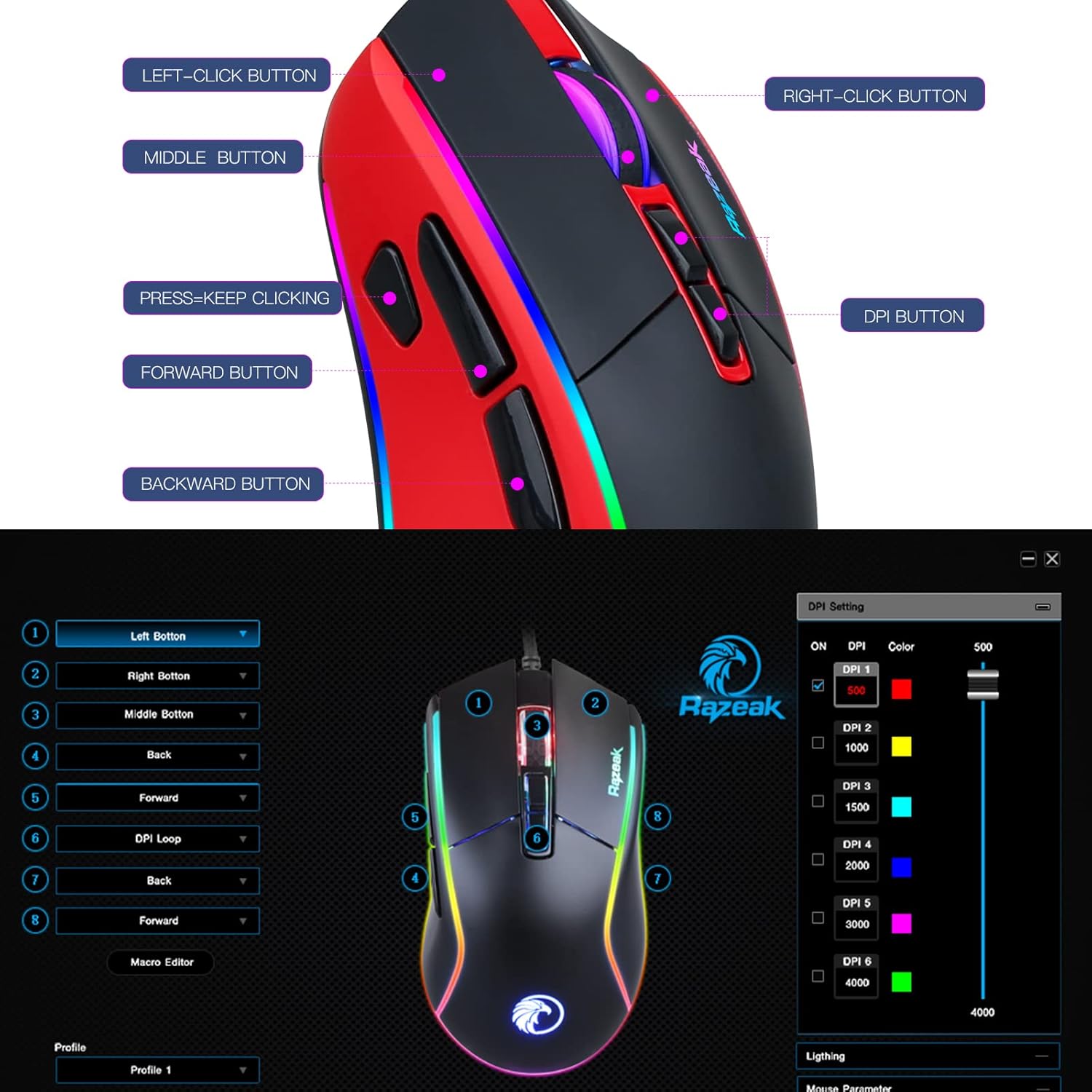
Image: A diagram illustrating the location and labels of the Left-Click, Right-Click, Middle Button, DPI Button, Press=Keep Clicking, Forward, and Backward buttons on the RAZEAK RM-X18 mouse.
- Links-klik-knoppie: Standaard primêre klikfunksie.
- Regskliek-knoppie: Standaard sekondêre klikfunksie.
- Middelste knoppie (rolwiel klik): Standard middle click function.
- DPI-knoppie: Blaai deur DPI-instellings.
- Aanstuur-knoppie: Navigeer vorentoe in web blaaiers of file ontdekkingsreisigers.
- Terug-knoppie: Navigeer agteruit in web blaaiers of file ontdekkingsreisigers.
- "Press=Keep Clicking" Button: A dedicated button for rapid, continuous clicks, often referred to as a "fire button" in gaming. This button can be programmed to perform multiple left clicks with a single press.
5.2 DPI-aanpassing
The mouse offers 6 adjustable DPI levels to suit various tasks and gaming preferences. Press the DPI-knoppie (located behind the scroll wheel) to cycle through the preset DPI levels: 500, 1000, 1500, 2000, 3000, and 4000.
For advanced customization, including setting specific numerical values for each DPI level and assigning indicator colors, use the RAZEAK software.

Image: A close-up of the RAZEAK RM-X18 mouse highlighting the DPI button and a graphic representation of the six adjustable DPI levels.
5.3 Button Programming and Macros
All 8 buttons on the RM-X18 mouse are programmable. To customize button functions, record macros, or assign specific actions, you must use the RAZEAK software. The software allows you to create profiles vir verskillende toepassings of speletjies.

Image: Screenshot of the RAZEAK software interface, showing options to program each of the 8 mouse buttons and manage profiles.
5.4 RGB-beligtingsbeheer
The RM-X18 mouse features dynamic RGB lighting with 9 backlight modes and 16 million colors. You can adjust the lighting effects directly on the mouse or through the RAZEAK software.
- On-Mouse Adjustment: Druk die Left-Click Button en die DPI-knoppie simultaneously to cycle through different lighting effects.
- Sagteware aanpassing: Use the RAZEAK software for full control over lighting modes, colors, brightness, and speed.

Image: A close-up of the RAZEAK RM-X18 mouse, indicating the combination of the Left Key and DPI button to adjust lighting effects.

Image: The RAZEAK RM-X18 mouse displaying vibrant RGB lighting effects.
5.5 Switching Between Gaming and Office Modes
The mouse supports two distinct usage modes: Gaming and Office. To switch between these modes, simultaneously press the Middelste knoppie (scroll wheel click) and the Regs-kliek knoppie.
6. Sagteware-installasie en -gebruik
To unlock the full potential of your RAZEAK RM-X18 mouse, including advanced button programming, macro recording, and detailed RGB lighting customization, download the official software from the RAZEAK webwebwerf. Volg die instruksies op die skerm vir installasie.
The software interface allows you to:
- Assign custom functions to all 8 buttons.
- Skep en bestuur veelvuldige gebruikersprofielefiles.
- Adjust DPI levels and their corresponding indicator colors.
- Configure RGB lighting effects, colors, and speed.
- Record and edit macros for complex command sequences.
Video: An official RAZEAK video demonstrating the features and customization options of the RM-X18 Wired Gaming Mouse, including RGB lighting, DPI settings, and programmable buttons.
7. Onderhoud
To ensure the longevity and optimal performance of your RAZEAK RM-X18 mouse, follow these maintenance guidelines:
- Skoonmaak: Gebruik 'n sagte, droë lap om die oppervlak van die muis af te vee. Vir hardnekkige vuiligheid, vee dit effens af.ampMaak die lap met water skoon. Vermy die gebruik van harde chemikalieë of skuurmiddels.
- Sensor sorg: Hou die optiese sensor aan die onderkant van die muis skoon en vry van stof of puin om akkurate dophou te verseker.
- Kabelbestuur: Vermy skerp buigings of oormatige trek aan die USB-kabel om skade te voorkom.
- Berging: Bêre die muis in 'n skoon, droë omgewing wanneer dit nie gebruik word nie.
8. Probleemoplossing
| Probleem | Moontlike oorsaak | Oplossing |
|---|---|---|
| Muis reageer nie | Los USB-verbinding, foutiewe USB-poort, drywerprobleem. |
|
| Onakkurate dophou of wyservertraging | Vuil optiese sensor, ongeskikte muismatoppervlak, verkeerde DPI-instelling. |
|
| RGB-beligting werk nie of is verkeerd | Software settings, mode conflict. |
|
| Knoppies nie programmeerbaar nie | Software not installed or not running, incorrect profile gekies. |
|
9. Spesifikasies
| Kenmerk | Detail |
|---|---|
| Handelsmerk | RAZEAK |
| Model Naam | RM-X18 |
| Verbindingstegnologie | USB bedraad |
| Bewegingsopsporingstegnologie | Optical (Avago 3050 Sensor) |
| DPI-vlakke | 500/1000/1500/2000/3000/4000 (Adjustable) |
| Aantal knoppies | 8 (Programmeerbaar) |
| RGB-agterlig | 9 Modes, 16.8 Million Colors |
| Hand Oriëntasie | Reg |
| Versoenbare toestelle | Persoonlike rekenaar |
| Hardeware Platform | PC |
| Item gewig | 137 gram |
10. Waarborg en Ondersteuning
RAZEAK offers a een jaar vervaardigerswaarborg for the RM-X18 Wired Gaming Mouse. For any product inquiries, technical support, or warranty claims, please contact RAZEAK customer service. We aim to respond to messages within 24 hours.
Bewaar asseblief u aankoopbewys vir waarborgvalidering.