
Brinsea USHD4121C
Brinsea TLC-50 Zoologica II User Manual
Automatic Humidity & Digital Temperature Control 100 L
Inleiding
The Brinsea TLC-50 Zoologica II is a state-of-the-art, large-capacity brooder and recovery incubator designed to provide a controlled environment for a variety of small animals, including newly hatched birds, newborn puppies, kittens, and sick or injured pets. This unit ensures optimal temperature and humidity levels, crucial for the health and development of vulnerable animals.
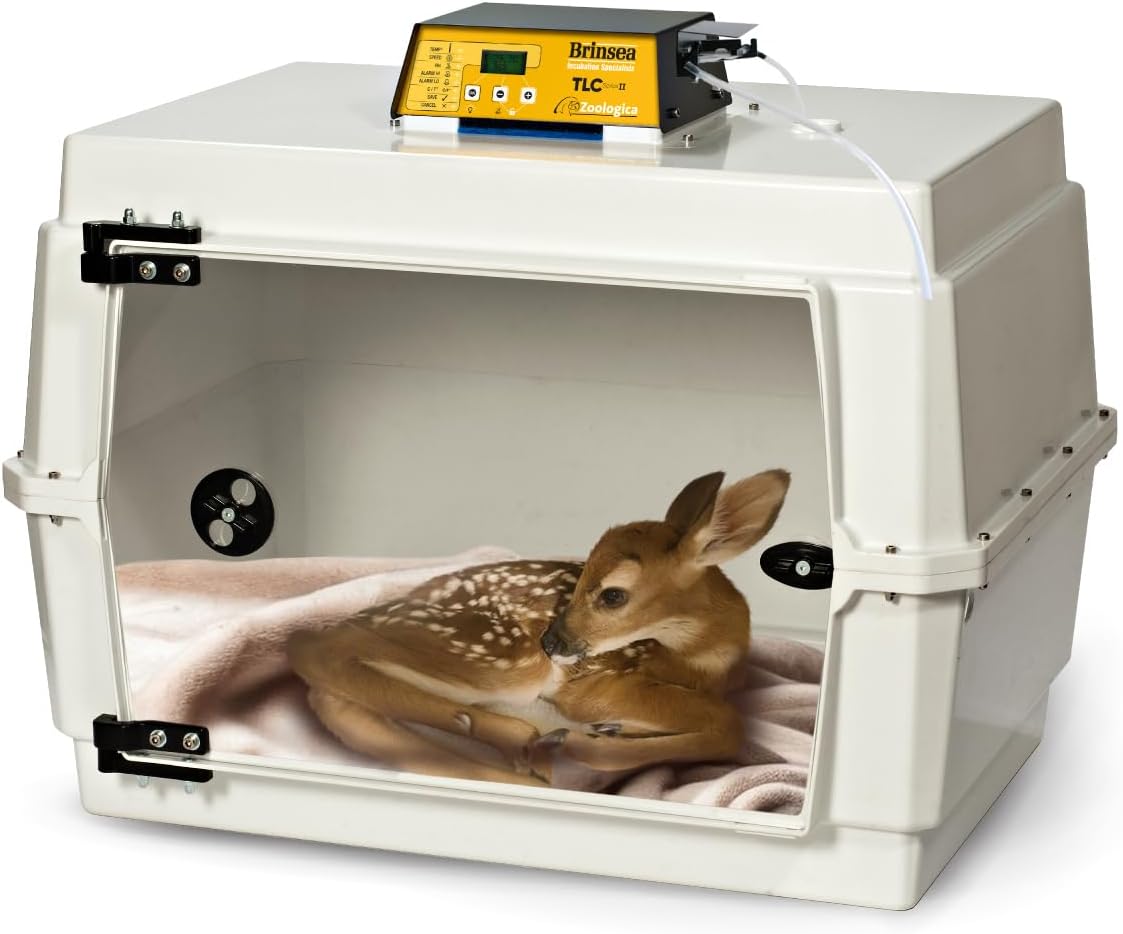
Image: The Brinsea TLC-50 Zoologica II incubator, showcasing its spacious interior and clear viewing door, with a small fawn resting comfortably inside.
Sleutel kenmerke
- 100-liter kapasiteit: Spacious interior suitable for large birds, multiple puppies, kittens, or other small animals.
- Precision Digital Controls: Accurate digital read-out and control of temperature (in °F or °C) and humidity (% RH).
- Outomatiese humiditeitsbeheer: Features an integral water pump and evaporating block for convenient, fully automatic humidity management.
- Geoptimaliseerde lugvloei: Fan-assisted airflow ensures uniform temperature distribution throughout the chamber, with gentle airspeeds to prevent disturbance.
- Gevorderde lugfiltrering: Equipped with a specialized air filtration system to remove airborne particles, promoting a healthy environment.
- Durable and Hygienic Construction: Made from tough, double-walled ABS plastic for heat and sound insulation. Features a smooth, easily cleanable interior protected by Polygiene Biomaster.
- Gebruikersvriendelike ontwerp: Includes a removable clear door and base for easy cleaning, a switchable internal LED light for observation, and an adjustable fresh air vent.
- Safety Alarms: High and low temperature alarms, including a patented room temperature alarm, provide peace of mind.

Image: An illustration highlighting the main features of the Brinsea TLC-50 Zoologica II, including digital display, automatic humidity, quiet fan, clear door, air filtration, and adjustable vent.
Opstel instruksies
- Uitpak en inspeksie: Carefully unpack all components. Verify that all parts listed in the "Parts Included" section are present and undamaged.
- Plasing: Position the incubator on a stable, level surface away from direct sunlight, drafts, or extreme temperature fluctuations. Ensure adequate space around the unit for ventilation.
- Assemble Humidity System:
- Insert the evaporating block into the water reservoir.
- Connect the humidifier tubing from the external water pump to the incubator's humidity port.
- Fill the external water reservoir with distilled water.
- Kragverbinding: Connect the mains power cable to the incubator and then to a suitable electrical outlet.
- Aanvanklike krag aan: The unit will power on and display current temperature and humidity readings. Allow the unit to stabilize for at least 30 minutes before placing animals inside.
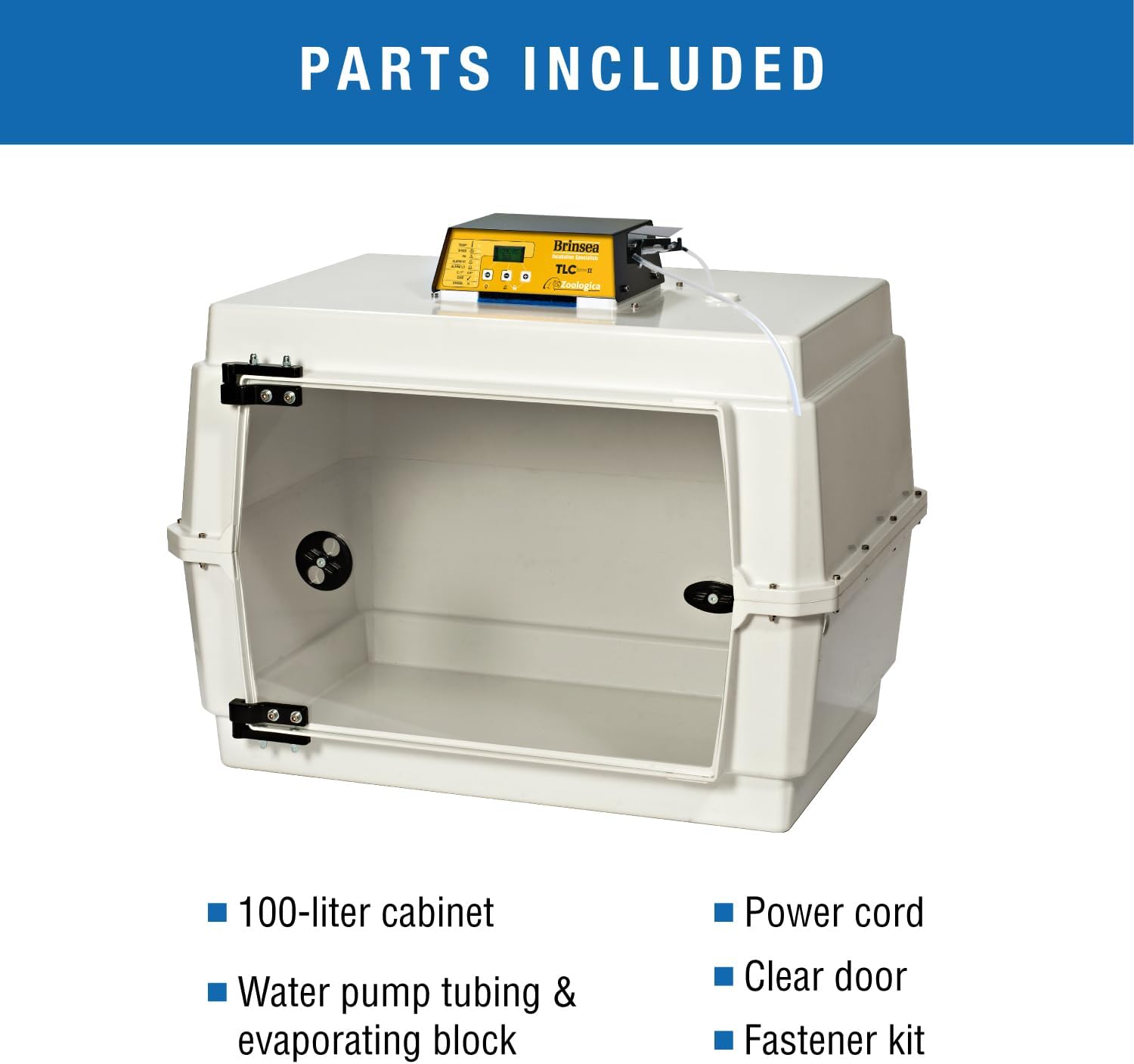
Image: A visual representation of the components included with the Brinsea TLC-50 Zoologica II, such as the 100-liter cabinet, power cord, water pump tubing, evaporating block, clear door, and fastener kit.
Bedryfsinstruksies
- Stel temperatuur:
- Press the "TEMP" button to enter temperature setting mode.
- Use the "+" and "-" buttons to adjust the desired temperature.
- Press "OK" to confirm the setting. The unit will begin adjusting to the new temperature.
- Instelling van humiditeit:
- Press the "RH%" button to enter humidity setting mode.
- Use the "+" and "-" buttons to adjust the desired relative humidity.
- Press "OK" to confirm the setting. The automatic humidity system will activate to reach the target level.
- Aanpassing van waaierspoed:
- Press the "SPEED" button to cycle through fan speed options.
- Select a speed appropriate for the animals' sensitivity.
- Interne LED-lig: Press the "OK" button briefly to toggle the internal LED light on or off for observation.
- Monitering: Regularly check the digital display for current temperature and humidity. Respond to any high/low alarms promptly.
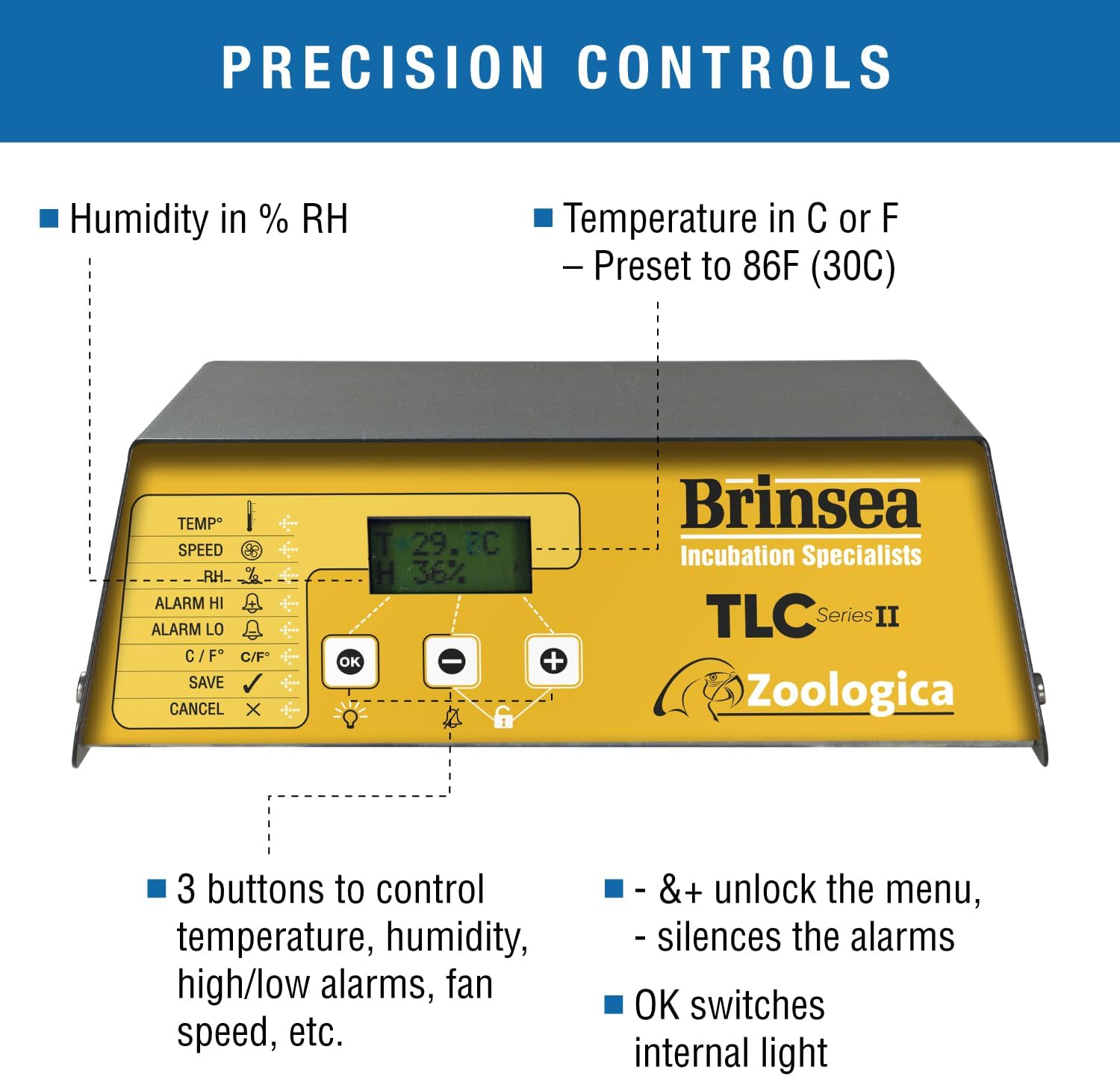
Beeld: 'n Nabyskoot view of the Brinsea TLC-50 Zoologica II control panel, showing the digital display for temperature and humidity, and the intuitive buttons for setting parameters and managing alarms.

Image: Diagram illustrating the fan-assisted airflow within the Brinsea TLC-50 Zoologica II, demonstrating uniform temperature distribution and the double-walled cabinet for insulation.

Image: A diagram detailing the fully automatic humidity system of the Brinsea TLC-50 Zoologica II, showing the integral water pump and water reservoir with evaporating block.
Onderhoud en Skoonmaak
Regular cleaning is essential to maintain a hygienic environment for the animals and ensure the longevity of the incubator. The design allows for easy disassembly for thorough cleaning.
- Daaglikse kontroles:
- Check water level in the external reservoir and refill with distilled water as needed.
- Vee die binneoppervlaktes af met adamp cloth to remove any spills or debris.
- Weeklikse skoonmaak (of soos nodig):
- Ontkoppel die eenheid van krag.
- Remove the clear door and the lower half of the cabinet. These parts are designed to be fully removable for immersion and scrubbing.
- Clean all removable parts and the interior of the main unit with a mild disinfectant solution suitable for animal environments. Ensure all surfaces are thoroughly rinsed and dried before reassembly.
- Clean or replace the air filter as per manufacturer recommendations.
- Langtermyn berging: If storing the unit for an extended period, ensure it is thoroughly cleaned and dried. Store in a clean, dry place.

Image: The Brinsea TLC-50 Zoologica II with its top section removed, demonstrating the ease of access for cleaning the lower cabinet and removable clear door.
Probleemoplossing
| Probleem | Moontlike oorsaak | Oplossing |
|---|---|---|
| Temperature not stable or incorrect. | Unit not warmed up; sensor obstruction; external drafts; incorrect setting. | Allow 30 minutes for stabilization; ensure nothing blocks the sensor; relocate unit away from drafts; verify temperature setting. |
| Humiditeit te laag. | Water reservoir empty; humidifier tubing kinked; evaporating block dirty; door not sealed. | Refill reservoir with distilled water; check tubing for kinks; clean or replace evaporating block; ensure door is properly closed and sealed. |
| Eenheid skakel nie aan nie. | Power cable loose; power outlet issue; internal fuse. | Check power cable connection; test outlet with another device; contact Brinsea support if fuse is suspected. |
| Alarms sounding frequently. | Environmental fluctuations; settings too close to ambient; sensor issue. | Ensure stable room conditions; adjust alarm limits if necessary; clean sensor area; contact support if persistent. |
Spesifikasies
- Model Naam: Brinsea TLC-50 Zoologica II Large Bird Brooder Pet Incubator with humidity control
- Modelnommer: USHD4121C
- Kapasiteit: 100 liter
- Afmetings (LxBxH): 27 x 20 x 21 inches (Unit); 32.5 x 24 x 18.75 inches (Package)
- Item gewig: 24 pond
- Materiaal: Tough ABS Plastic
- Kleur: Naaswit
- Beheer tipe: Automatic Humidity & Digital Temperature Control
- Ingesluit komponente: Pet incubator, Fastener Kit, Mains power cable (US plug), Humidifier tubing, Evaporating block.
- Teikengehoor: Birds, Cats, Dogs, Rabbits, small animals.
- Spesifieke gebruike: Indoor, Transport.

Image: A diagram showing the external dimensions of the Brinsea TLC-50 Zoologica II incubator, indicating its length, width, and height.
Waarborg en Ondersteuning
The Brinsea TLC-50 Zoologica II comes with a 3 jaar vervaardiger se waarborg. This warranty is subject to registration within 30 days of purchase. For warranty claims, technical support, or replacement parts, please contact Brinsea Products directly.
For further assistance, visit the official Brinsea webwebwerf of kontak hul kliëntediensafdeling. Bewaar u bewys van aankoop vir waarborgvalidering.
Brinsea Products Inc.
Visit the Brinsea Store on Amazon
Ask a question about this manual
Ask about setup, troubleshooting, compatibility, parts, safety, or missing instructions. Manuals+ will review the question and use this page’s manual context to help answer it.