
1. Produk verbyview
The Source Audio Atlas Compressor Pedal is a compact, studio-grade compressor designed for guitar and bass. It offers a wide range of compression tones, from optical to RMS and VCA, providing extensive control over your instrument's dynamics. The pedal integrates with the Source Audio Neuro app for deep editing capabilities, custom preset creation, and firmware updates. Key features include MIDI functionality, external expression control, and stereo I/O.
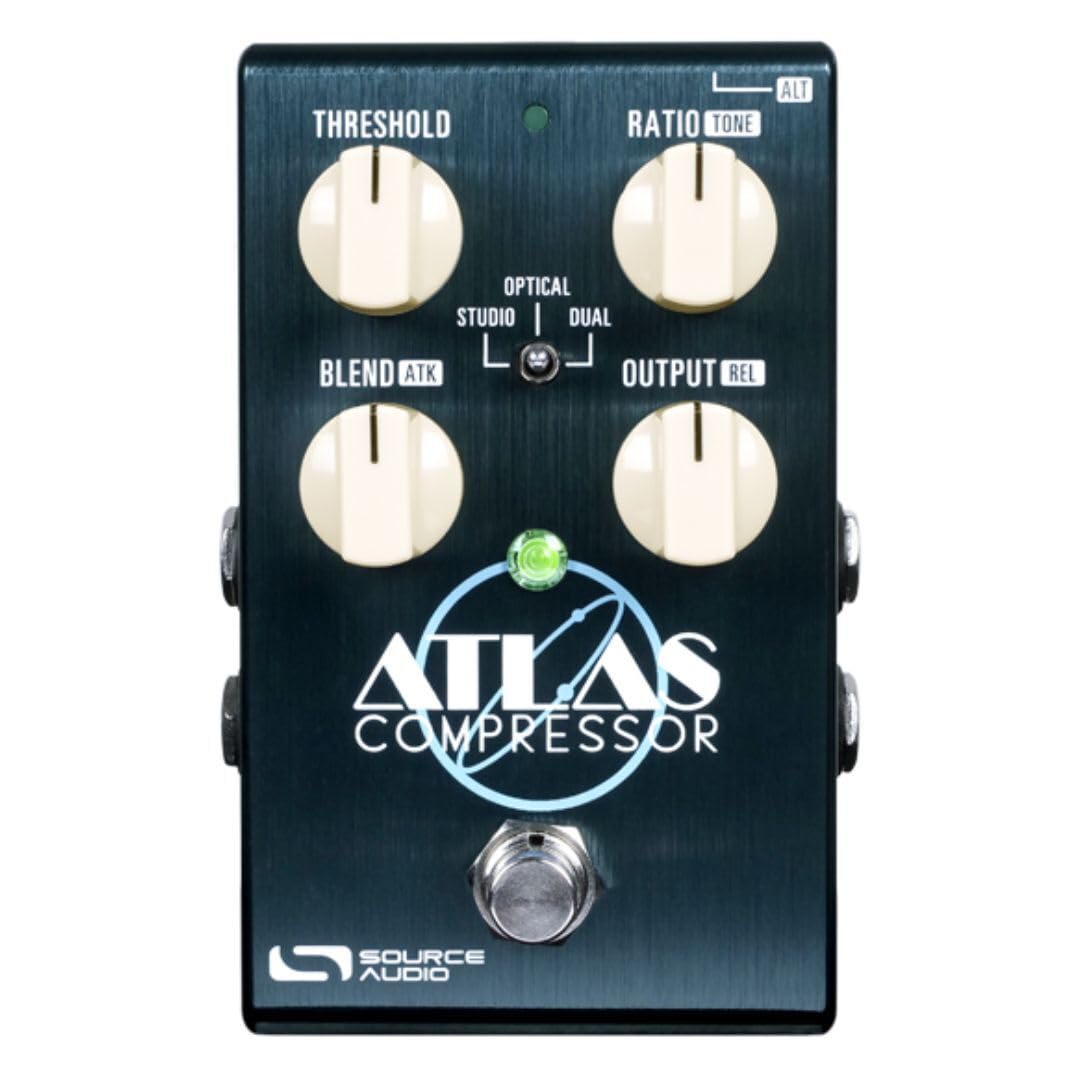
Beeld: Voorkant view of the Source Audio Atlas Compressor Pedal, showcasing sy kompakte ontwerp en beheerknoppies.

Beeld: Bo-onder view of the Atlas Compressor Pedal, highlighting the Threshold, Ratio, Blend, and Output knobs, along with the mode switches.
2. Opstelling
2.1 Uitpak
Before connecting your Atlas Compressor Pedal, ensure all components are present:
- Source Audio Atlas Compressor Pedal
- Power supply (if included, otherwise a compatible 9V DC power supply is required)
- USB cable (for Neuro app connection)
2.2 Verbindings
Follow these steps to connect your pedal:
- Kragverbinding: Connect a 9V DC (center negative) power supply to the DC 9V input jack. The pedal requires 5mA of current.
- Oudio-invoer: Connect your instrument (guitar or bass) to INPUT 1. For stereo input, connect a second instrument or stereo signal to INPUT 2.
- Oudio-uitvoer: Connect OUTPUT 1 to your amplifier or next pedal in the signal chain. For stereo output, connect OUTPUT 2 to a second amplifier or stereo input.
- Beheerinvoer: The CONTROL INPUT jack can be used for an external expression pedal or for MIDI control via a compatible adapter.
- USB-verbinding: Connect the mini-USB port to your computer for use with the Neuro Desktop Editor or for firmware updates.
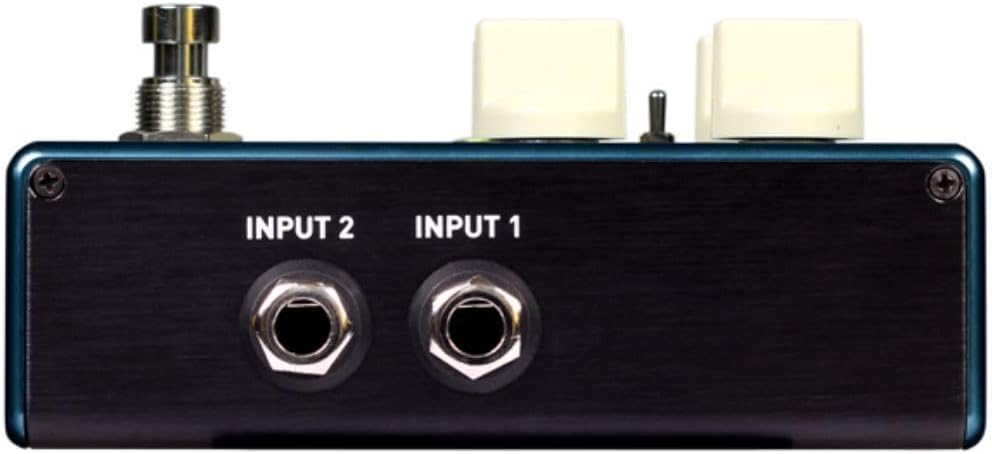
Beeld: Agter view of the Atlas Compressor Pedal showing INPUT 1 and INPUT 2 jacks.

Beeld: Agter view of the Atlas Compressor Pedal showing OUTPUT 1 and OUTPUT 2 jacks.

Beeld: Sykant view of the Atlas Compressor Pedal showing the DC 9V power input, Control Input, and USB port.
3. Operasie
3.1 Basiese kontroles
The Atlas pedal features four primary control knobs and a toggle switch for selecting compression modes:
- DREMPEL: Sets the level at which compression begins. Signals above this threshold will be compressed.
- -verhouding: Determines the amount of compression applied once the signal exceeds the threshold. Higher ratios result in more aggressive compression.
- MENGSEL: Mixes the compressed signal with the dry (uncompressed) signal. This allows for parallel compression techniques.
- afvoer: Controls the overall output volume of the pedal. Use this to match levels or boost your signal.
- MODUS-skakelaar: Selects between different compression styles (e.g., Optical, Studio, Dual, Rel). Each mode offers a unique compression character. Refer to the full manual on the Source Audio website for detailed descriptions of each mode.
3.2 Using the Neuro App
The Source Audio Neuro app (available for desktop and mobile) unlocks the full potential of the Atlas pedal:
- Deep Editing: Access advanced parameters not available on the pedal's physical controls, such as attack, release, tone controls, and noise gate settings.
- Vooraf ingestelde bestuur: Create, save, and recall custom presets. Explore and download presets from the Source Audio community.
- Firmware -opdaterings: Keep your pedal's firmware up-to-date for new features and performance improvements.
Connect the pedal to your device via USB (for desktop) or the 1/8" TRRS cable (for mobile) to use the Neuro app.
3.3 MIDI and Expression Control
The Atlas pedal supports MIDI control for advanced integration into your rig. With a compatible MIDI interface, you can recall presets, control parameters, and synchronize with other MIDI devices. An external expression pedal can be connected to the Control Input for real-time manipulation of various parameters, offering dynamic performance possibilities.
4. Onderhoud
Proper maintenance ensures the longevity and optimal performance of your Atlas Compressor Pedal:
- Skoonmaak: Gebruik 'n sagte, droë lap om die buitekant van die pedaal skoon te maak. Vermy skuurmiddels of oplosmiddels.
- Berging: Store the pedal in a cool, dry place away from direct sunlight and extreme temperatures. Disconnect power when not in use for extended periods.
- Firmware -opdaterings: Regularly check the Source Audio website or Neuro app for available firmware updates to ensure your pedal has the latest features and bug fixes.
5. Probleemoplossing
If you encounter issues with your Atlas Compressor Pedal, try the following:
- Geen klank:
- Ensure the pedal is powered correctly (9V DC, center negative).
- Kontroleer alle klankkabelverbindings (inset en uitvoer).
- Verify that the OUTPUT knob is not set to minimum.
- Bypass the pedal to check if the issue is with the pedal or another part of your signal chain.
- Unexpected Behavior/Sound:
- Reset the pedal to factory settings (refer to the full manual for instructions).
- Check for firmware updates via the Neuro app.
- Ensure your power supply meets the specified voltage en huidige vereistes.
- Neuro App Connection Issues:
- Ensure the USB cable is securely connected to both the pedal and your computer.
- Probeer 'n ander USB-poort of -kabel.
- Restart the Neuro app and your computer.
- Verify that the pedal's firmware is compatible with the Neuro app version.
For persistent issues, consult the comprehensive manual on the Source Audio webwebwerf of kontak hul kliëntediens.
6. Spesifikasies
| Handelsmerk | Bron oudio |
| Model Naam | Atlas |
| Modelnommer | SA252 |
| Afmetings | 33 x 18.3 x 6.6 sentimeter |
| Item gewig | 318 gram |
| Voltage | 9 Volt |
| Huidige trekking | 5 mA |
| Oudio-uitvoereffekte | Kompressie |
| Tipe beheer | Knop |
| Kragbron | Elektries met koord |
| Hardeware-koppelvlak | 1/4 inch Audio, USB |
| Seinformaat | Analoog |
| UPC / GTIN | 890729001651 |
7. Waarborginligting
The Source Audio Atlas Compressor Pedal is covered by a manufacturer's warranty. For detailed information regarding warranty terms, duration, and claim procedures, please refer to the official Source Audio webwebwerf of kontak hul kliëntediens direk. Bewaar jou bewys van aankoop vir waarborgeise.
8. Ondersteuning
For further assistance, additional resources, or to download the full user manual, please visit the official Source Audio webwebwerf:
You can find FAQs, product registration, and contact information for technical support on their webwebwerf.