
Inleiding
Thank you for choosing the TESSAN TS-TPM06-C Surge Protector Power Strip. This device is designed to provide convenient power distribution and surge protection for your electronic devices. It features 6 AC outlets, 2 USB-A ports, and 1 USB-C port, all connected via a 15-foot flat plug extension cord. This manual provides essential information for safe and effective use.
Produk Kenmerke
- 15-Foot Flat Extension Cord: Provides extended reach and a low-profile plug for tight spaces.
- 6 Widely Spaced AC Outlets: Accommodates larger power adapters without blocking adjacent outlets.
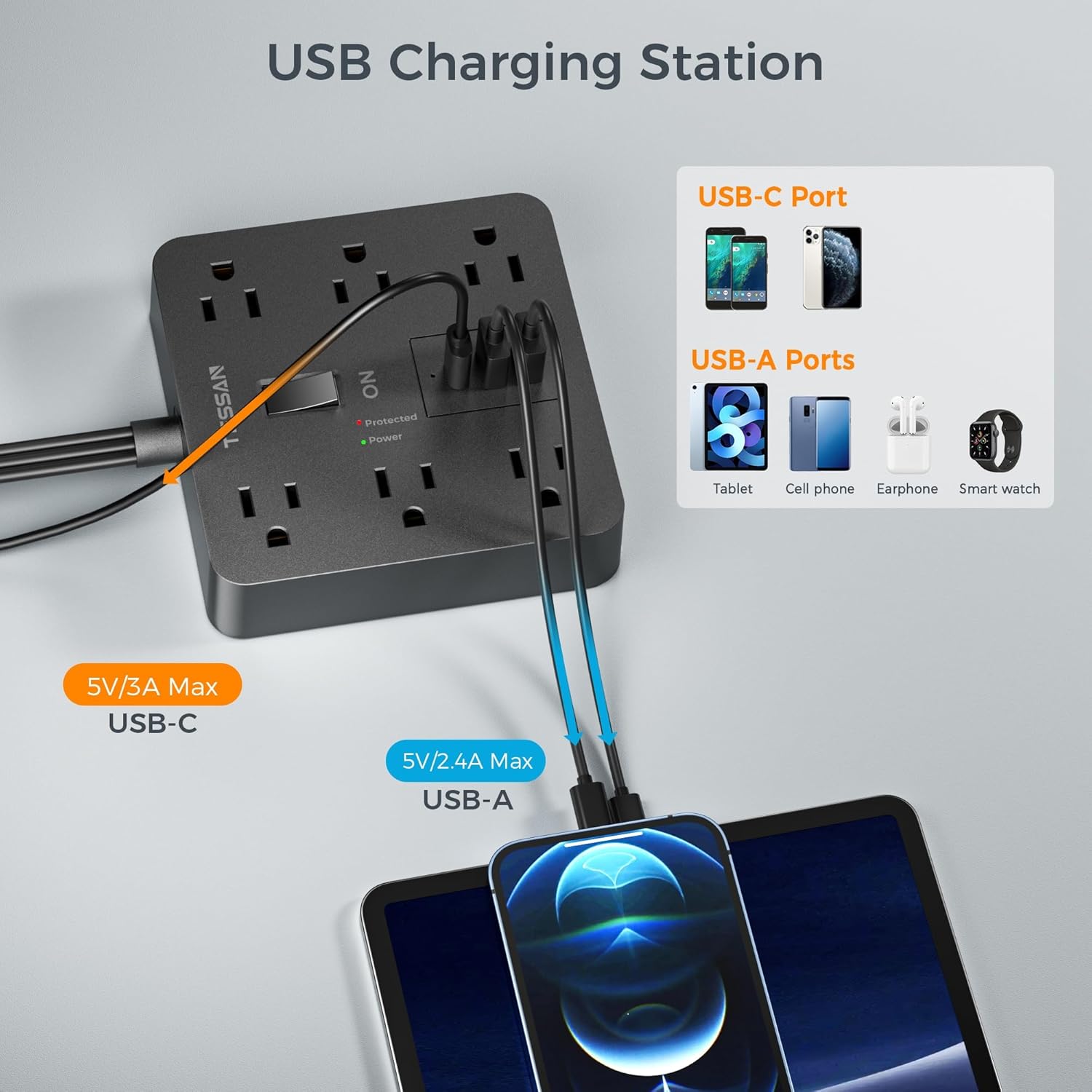
- 3 USB-laaipoorte: Includes 2 USB-A (2.4A Max) and 1 USB-C (3A Max) for versatile device charging.
- 1700J Surge Protection: Safeguards your electronics from voltage spykers en oplewings.
- Geïntegreerde stroombreker: Automatically trips to prevent overload when power exceeds 1625W.
- Aan/af skakelaar: Conveniently controls power to all connected devices.
- Nie-gly rubbervoete: Verseker stabiliteit op verskeie oppervlaktes.
Opstelling
Follow these steps to set up your TESSAN Surge Protector Power Strip:
- Pak die toestel uit: Verwyder die kragstrook versigtig uit sy verpakking.
- Position the Power Strip: Place the power strip on a stable, dry surface. The non-slip rubber feet on the bottom will help keep it in place.
- Connect to a Wall Outlet: Plug the 15-foot flat plug extension cord into a standard 3-prong 125V AC wall outlet. The flat, right-angle design allows furniture to be placed closer to the wall.
- Krag aan: Press the ON/OFF switch to the 'ON' position. The 'Power' indicator light should illuminate, confirming the unit is receiving power. The 'Protected' indicator light should also be on, indicating active surge protection.


Bedryfsinstruksies
Utilize the various ports to power and charge your devices:
- AC afsetpunte: Plug your electronic devices into the 6 widely spaced AC outlets. The wide spacing is designed to accommodate bulky power adapters without obstructing other outlets.
- USB-A-poorte: Connect your USB-A compatible devices (e.g., smartphones, tablets, earphones) to the two USB-A ports for charging. Each port provides up to 2.4A.
- USB-C-poort: Use the USB-C port for faster charging of compatible devices. This port provides up to 3A.
- Kragbeheer: Use the master ON/OFF switch to easily turn all connected devices on or off simultaneously.


Onderhoud
To ensure the longevity and safe operation of your power strip:
- Skoonmaak: Disconnect the power strip from the wall outlet before cleaning. Use a dry, soft cloth to wipe the surface. Do not use liquid cleaners or immerse the unit in water.
- Berging: When not in use, store the power strip in a cool, dry place away from direct sunlight and moisture.
- Inspeksie: Periodically inspect the cord and plug for any signs of damage. If damaged, discontinue use and replace the unit.
- Vermy oorlading: Do not exceed the maximum power rating of 1625W. Overloading can cause the circuit breaker to trip and may damage the unit or connected devices.
Probleemoplossing
If you encounter issues with your TESSAN Surge Protector Power Strip, refer to the following:
- Geen krag na toestelle nie:
- Ensure the power strip's ON/OFF switch is in the 'ON' position.
- Check if the power strip is securely plugged into a functioning wall outlet.
- Verify that the 'Power' indicator light is illuminated. If not, try a different wall outlet.
- 'Protected' Light is Off:
- If the 'Protected' indicator light is off, the surge protection feature may have been compromised due to a significant power surge. The power strip will continue to function as a power distributor, but without surge protection. It is recommended to replace the unit for continued protection.
- Stroombreker afgeskakel:
- If the power strip suddenly loses power, the integrated circuit breaker may have tripped due to an overload. Disconnect some devices, then press the reset button (usually located near the ON/OFF switch) to restore power.
- USB-poorte laai nie:
- Ensure the power strip is powered on.
- Check the USB cable for damage and ensure it is properly connected to both the device and the power strip.
- Probeer 'n ander USB-poort of -kabel.
Spesifikasies
| Kenmerk | Spesifikasie |
|---|---|
| Handelsmerk | TESSAN |
| Modelnommer | TS-TPM06-C |
| Totale kragpunte | 6 WS-afsetpunte |
| Totale USB-poorte | 3 (2 USB-A, 1 USB-C) |
| USB-A-uitgang | 2.4A Max per port |
| USB-C-uitset | 3A Maks |
| Voltage | 125 Volt |
| Maksimum stroom | 15 Amps |
| Spanningsbeskermingsgradering | 1700 Joule |
| Koordlengte | 15 Voet |
| Tipe prop | Type B - 3 pin (North American), Flat Plug |
| Materiaal | Polikarbonaat |
| Afmetings (L x B) | 4.65"L x 4.65"B |
Waarborg en Ondersteuning
TESSAN products are designed for reliability and performance. For warranty information or technical support, please refer to the product packaging or contact TESSAN customer service directly. Keep your purchase receipt for warranty claims.