
1. Inleiding
Dankie vir die aankoopasing the Blaupunkt PB10DB Bluetooth Karaoke Speaker. This manual provides essential information for the safe and efficient operation of your device. Please read it thoroughly before use and keep it for future reference. The PB10DB is a portable party speaker designed for high-quality audio playback and karaoke, featuring Bluetooth connectivity, USB, and AUX inputs.
2. Veiligheidsinligting
Om veilige werking te verseker en skade te voorkom, neem asseblief die volgende voorsorgmaatreëls in ag:
- Moenie die toestel blootstel aan uiterste temperature, direkte sonlig of hoë humiditeit nie.
- Keep the speaker away from water and other liquids. The product is indicated as waterproof, but avoid submerging it.
- Do not attempt to disassemble or modify the speaker. Repairs should only be performed by qualified personnel.
- Gebruik slegs die gespesifiseerde laaitoebehore.
- Ensure proper ventilation around the speaker during use.
- Vermy luister teen uitermatig hoë volumes vir lang tye om gehoorskade te voorkom.
3. Pakketinhoud
Kontroleer asseblief dat alle items in die pakket teenwoordig is:
- Blaupunkt PB10DB Bluetooth Karaoke Speaker
- Kragadapter/Laaikabel
- Gebruikershandleiding (hierdie dokument)
- Microphone (if included in your specific package)
4. Produk verbyview
Familiarize yourself with the various parts of your Blaupunkt PB10DB speaker.
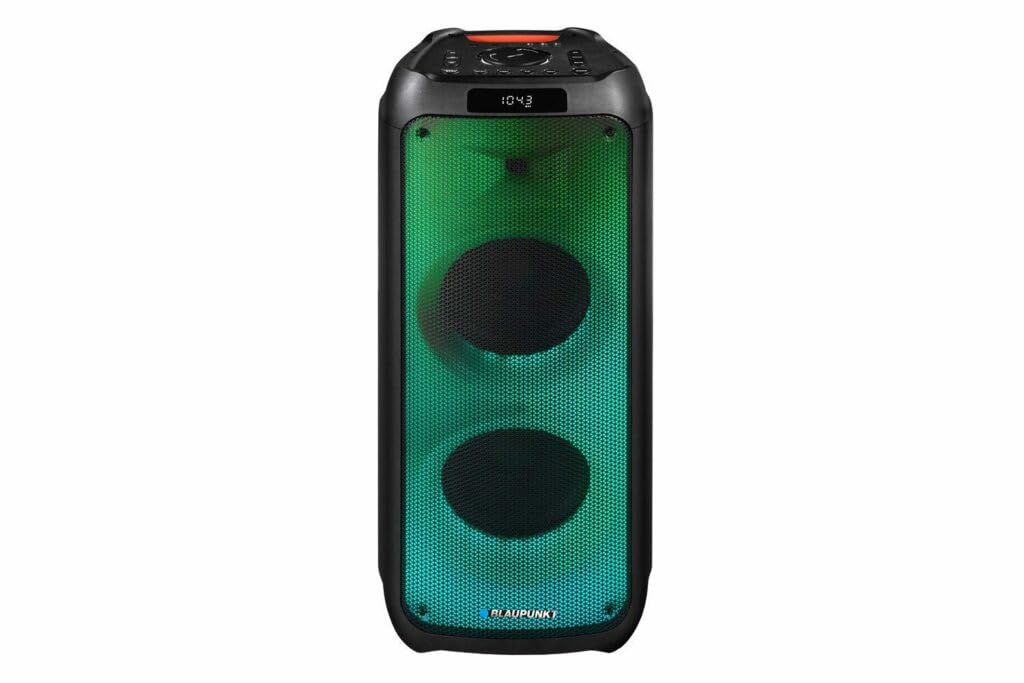
Figuur 1: Voorkant view of the Blaupunkt PB10DB speaker, showcasing the dual speaker grilles and dynamic LED lighting. The top panel features a display and control buttons.

Figuur 2: Hoekig view of the Blaupunkt PB10DB speaker, highlighting its portable design and the side profile.
Controls and Ports (Typical Layout)
- Kragknoppie: Skakel die luidspreker aan/af.
- Modusknoppie: Switches between Bluetooth, USB, AUX, and FM radio modes.
- Volumebeheer: Pas die hoofvolume aan.
- Speel/Pause-knoppie: Beheer die afspeel van media.
- Vorige/Volgende Snit-knoppies: Navigates through tracks.
- Mikrofoon-invoer (MIC IN): For connecting a wired microphone for karaoke.
- USB-poort: Vir die speel van musiek vanaf 'n USB-skyf of die laai van eksterne toestelle.
- AUX-invoer (3.5 mm): For connecting external audio devices via an audio cable.
- Laaipoort: Vir die koppeling van die kragadapter om die luidspreker te laai.
5. Opstelling
5.1 Laai die luidspreker
- Connect the provided power adapter to the charging port on the speaker.
- Steek die adapter in 'n geskikte kragaansluiting.
- Die laai-aanwyserliggie sal brand (kleur kan verskil) om aan te dui dat die luidspreker laai.
- Once fully charged, the indicator light may change color or turn off. Disconnect the charger.
A full charge typically takes several hours and provides approximately 8 hours of playback time.
5.2 Aan-/afskakel
- Om aan te skakel: Press and hold the Power button for a few seconds until the display lights up and you hear an audible prompt.
- Om af te skakel: Press and hold the Power button again for a few seconds until the display turns off and you hear an audible prompt.
6. Bedryfsinstruksies
6.1 Bluetooth -koppeling
- Ensure the speaker is powered on and in Bluetooth mode. If not, press the Mode button until "Bluetooth" or a similar indicator appears on the display. The speaker will enter pairing mode, indicated by a flashing Bluetooth icon or LED.
- Aktiveer Bluetooth op jou mobiele toestel (slimfoon, tablet, ens.) en soek vir beskikbare toestelle.
- Select "Blaupunkt PB10DB" from the list of found devices.
- Once paired, the speaker will emit an audible confirmation, and the Bluetooth indicator will stop flashing.
- Jy kan nou klank vanaf jou toestel deur die luidspreker speel.
Die luidspreker sal outomaties probeer om weer aan die laaste gekoppelde toestel te koppel wanneer dit aangeskakel word.
6.2 Karaoke-funksie
- Connect a wired microphone (not always included) to the MIC IN port on the speaker.
- Ensure the microphone is switched on (if it has a power switch).
- Play your desired karaoke track via Bluetooth, USB, or AUX.
- Adjust the microphone volume and echo effects (if available on the speaker) using the dedicated controls.
6.3 USB-terugspeel
- Plaas 'n USB-geheuestokkie wat MP3-klank bevat files in die USB-poort.
- Press the Mode button to switch to USB mode. The speaker will automatically begin playing music from the USB drive.
- Gebruik die Speel/Pause- en Vorige/Volgende Snit-knoppies om terugspeel te beheer.
6.4 AUX-invoer
- Koppel die een kant van 'n 3.5 mm-klankkabel (nie ingesluit nie) aan die AUX IN-poort op die luidspreker.
- Koppel die ander kant van die kabel aan die koptelefoonaansluiting of klankuitset van jou eksterne klanktoestel.
- Press the Mode button to switch to AUX mode.
- Beheer terugspeel en volume vanaf jou eksterne klanktoestel.
7. Onderhoud
7.1 Skoonmaak
- Skakel altyd die luidspreker af en ontkoppel dit van die kragbron voordat u dit skoonmaak.
- Gebruik 'n sagte, droë lap om die buitekant van die luidspreker af te vee.
- Moenie skuurmiddels, wasse of oplosmiddels gebruik nie, aangesien dit die afwerking kan beskadig.
7.2 Berging
- Bêre die luidspreker op 'n koel, droë plek weg van direkte sonlig en uiterste temperature.
- Indien dit vir 'n lang tydperk gestoor word, laai die battery gereeld (bv. elke 3 maande) om die battery se gesondheid te handhaaf.
8. Probleemoplossing
| Probleem | Moontlike oorsaak | Oplossing |
|---|---|---|
| Luidspreker skakel nie aan nie. | Battery is leeg. | Charge the speaker using the provided power adapter. |
| Geen geluid van die luidspreker nie. | Volume is too low or muted. Incorrect input mode. | Increase volume. Press the Mode button to select the correct input (Bluetooth, USB, AUX). |
| Bluetooth-saambinding misluk. | Luidspreker nie in paringsmodus nie. Toestel te ver. Steuring. | Ensure speaker is in Bluetooth pairing mode. Move device closer to speaker. Turn off other Bluetooth devices. |
| Mikrofoon werk nie. | Microphone not connected properly or switched off. Microphone volume too low. | Check microphone connection. Ensure microphone is powered on. Adjust microphone volume. |
| USB-terugspeel werk nie. | USB-skyf nie korrek geformateer of word nie ondersteun nie file tipes. | Maak seker dat die USB-skyf geformateer is na FAT32 en MP3 bevat files. Probeer 'n ander USB-skyf. |
9. Spesifikasies
| Model Naam: | PB10DB |
| Handelsmerk: | BLAUPUNKT |
| Verbindingstegnologie: | Hulp, Bluetooth, USB |
| Maksimum luidspreker uitsetkrag: | 1000 Watt |
| Klankuitsetmodus: | Stereo |
| Montage tipe: | Tafelberg |
| Materiaal: | Metaal en plastiek |
| Tipe luidspreker: | Tweeter |
| Spesiale kenmerk: | Musiek |
| Aanbevole gebruike: | For music player |
| Kleur: | Blou |
| Waterdig: | Waar |
| Beheer metode: | Raak |
| Tweeter deursnee: | 4 sentimeter |
| Gemiddelde batterylewe: | 8 uur |
| Versoenbare toestelle: | Skootrekenaar, slimfoon |
| Kragbron: | Battery aangedrewe |
| Item gewig: | 105 gram |
| Produkafmetings (L x B x H): | 24 x 69 x 2.5 cm |
10. Waarborg en Ondersteuning
Blaupunkt products are designed and manufactured to the highest quality standards. For detailed warranty information, please refer to the warranty card included with your product or visit the official Blaupunkt webwebwerf.
For technical support, troubleshooting assistance, or service inquiries, please contact Blaupunkt customer support through their official channels.
- Amptelik Webwebwerf: www.blaupunkt.com
- Kliëntediens: Refer to your regional Blaupunkt webwebwerf vir kontakbesonderhede.