
1. Inleiding
This manual provides essential information for the safe and efficient use of your Konka 32 Inch HD Standard TV, model KE32MS314. Please read these instructions thoroughly before operating the television and retain them for future reference.
2. Veiligheidsinligting
- Kragtoevoer: Maak seker dat die TV aan 'n AC 100-240V, 50/60Hz-kragtoevoer gekoppel is.
- Ventilasie: Moenie ventilasie-openinge blokkeer nie. Laat voldoende spasie rondom die TV toe vir behoorlike lugvloei.
- Water en vog: Moenie die TV aan reën of vog blootstel nie. Moenie voorwerpe gevul met vloeistowwe, soos vase, op die TV plaas nie.
- Hittebronne: Hou die TV weg van hittebronne soos verkoelers, hitteregisters, stowe of ander apparaat (insluitend ampversterkers) wat hitte produseer.
- Skoonmaak: Ontkoppel die TV van die muurprop voordat u dit skoonmaak. Gebruik 'n sagte, droë lap. Moenie vloeibare skoonmaakmiddels of aërosolskoonmakers gebruik nie.
- Weerlig: Ontkoppel die TV tydens weerligstorms of wanneer dit vir lang tye nie gebruik word nie.
- Diens: Moenie probeer om hierdie produk self te onderhou nie. Verwys alle diens na gekwalifiseerde dienspersoneel.
3. Pakketinhoud
Verifieer dat alle items in die pakket teenwoordig is:
- Konka KE32MS314 32-Inch HD LED TV
- Afstandbeheer
- Kragkoord
- Gebruikershandleiding (hierdie dokument)
- Desktop Stand (if included)
4. Opstelling
4.1 Uitpak
Carefully remove the TV and all accessories from the packaging. Keep the packaging materials for future transport or storage.
4.2 Staaninstallasie (Opsioneel)
If you are using the desktop stand, attach it securely to the bottom of the TV using the provided screws. Ensure the stand is stable before placing the TV on a flat surface.
4.3 Muurbevestiging (Opsioneel)
If you plan to wall-mount the TV, refer to the instructions provided with your wall-mount bracket. Ensure the bracket is compatible with the TV's VESA mounting pattern and is installed by qualified personnel.
4.4 Koppel toestelle
The TV offers various connection ports for external devices. Refer to the image below for port identification and connect your devices accordingly.
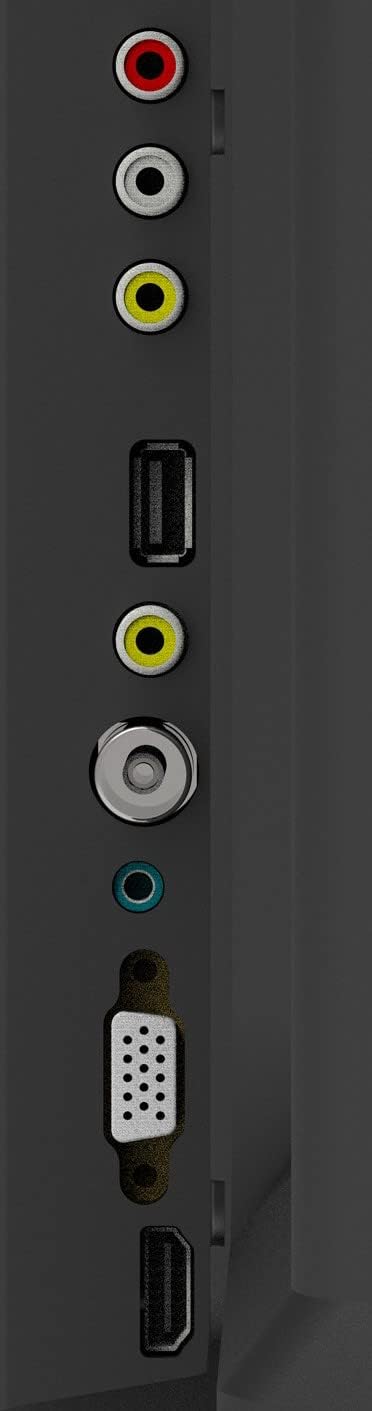
Figure 1: TV Connection Ports
- Antenna-invoer: Connect your aerial or cable TV signal to this port.
- HDMI-insette (2): Connect devices such as Blu-ray players, game consoles, or set-top boxes. One HDMI input supports Audio Return Channel (ARC).
- VGA-invoer: Koppel 'n rekenaar aan vir gebruik as 'n monitor.
- Mini Component / AV Input: Connect older devices using component (YPbPr) or composite (AV) cables.
- USB Inputs (2): Koppel USB-bergingstoestelle vir mediaweergawe.
- Koptelefoonaansluiting: Koppel koptelefoon vir privaat luister.
5. Bedryf
5.1 afstandbeheer
The included remote control allows you to operate all functions of your TV. Insert two AAA batteries (not included) into the battery compartment, ensuring correct polarity.

Figuur 2: Uitleg van afstandbeheer
- KRAG: Skakel die TV aan of af.
- INSET: Selects the input source (HDMI, AV, VGA, etc.).
- Getalknoppies (0-9): Kies kanale direk.
- VOL +/-: Pas die volumevlak aan.
- PROG +/-: Verander kanale.
- SPYSKAART: Verkry toegang tot die hoofkieslys.
- Navigasieknoppies (Op/Af/Links/Regs): Navigeer deur menu-opsies.
- INSKRYWING: Bevestig keuses.
- UITGANG: Verlaat die huidige kieslys of funksie.
- INLIGTING: Wys kanaalinligting.
- DEMPEL: Demp of ontdemp die klank.
5.2 Aanvanklike opstelling
Upon first power-on, the TV will guide you through an initial setup process. This typically includes selecting your language, country, and performing an automatic channel scan for available broadcasts.
5.3 Basiese Funksies
- Krag aan/af: Druk die AAN/UIT-knoppie op die afstandbeheerder of die TV se beheerpaneel.
- Invoerbronkeuse: Press the INPUT button repeatedly to cycle through available input sources, or use the menu to select.
- Volume aanpassing: Gebruik die VOL +/- knoppies.
- Kanaalkeuse: Use the PROG +/- buttons or the number buttons.
5.4 Spyskaartnavigasie
Press the MENU button to access the main menu. Use the navigation buttons to move between options and ENTER to select. Adjust settings such as picture mode, sound mode, and channel settings. Press EXIT to close the menu.
5.5 Oudiomodusse
The TV features 5 audio modes to optimize sound for different content types:
- Standaard
- Musiek
- Fliek
- Sport
- User (customizable settings)
6. Onderhoud
6.1 Skoonmaak van die skerm
Vee die skerm liggies af met 'n sagte, pluisvrye lap. Vir hardnekkige merke, vee dit effens af.ampen the cloth with water or a specialized screen cleaner (ensure it's safe for LED screens) and wipe gently. Do not apply pressure or use abrasive materials.
6.2 Die skoonmaak van die kabinet
Wipe the TV cabinet with a soft, dry cloth. Avoid using strong detergents or solvents, as they may damage the finish.
7. Probleemoplossing
As jy probleme met jou TV ondervind, raadpleeg die volgende algemene probleme en oplossings:
| Probleem | Moontlike Oplossing |
|---|---|
| Geen krag nie | Kontroleer of die kragkabel stewig in die TV en die muursok ingeprop is. Maak seker dat die sok funksioneel is. |
| Geen beeld nie, maar klank is teenwoordig | Verifieer dat die korrekte invoerbron gekies is. Kontroleer kabelverbindings na eksterne toestelle. |
| Geen klank nie, maar beeld is teenwoordig | Check the volume level and ensure the TV is not muted. Verify audio settings in the menu. |
| Afstandbeheer werk nie | Vervang batterye. Maak seker daar is geen obstruksies tussen die afstandbeheerder en die TV se IR-sensor nie. |
| Swak beeldkwaliteit | Check antenna connection or source device cables. Adjust picture settings in the TV menu. |
8. Spesifikasies
Detailed specifications for the Konka KE32MS314 TV:
| Kenmerk | Detail |
|---|---|
| Modelnommer | KE32MS314 |
| Skerm grootte | 32 duim |
| Vertoon tegnologie | LED |
| Resolusie | 720p (HD) |
| Herlaaitempo | 60 Hz |
| Viewing Hoek | 178 grade |
| Oudiostelsel | 2 x 8W Stereophonic |
| Oudiomodusse | Standard, Music, Movie, Sport, User |
| Konnektiwiteit | 2 HDMI (including ARC), 2 USB, VGA, Mini Component/AV, Antenna Input, Headphone Jack, Ethernet |
| Spesiale kenmerke | Flat Display, D3 Image Noise Reduction, Automatic Volume Level Maintenance |
| Ondersteunde internetdienste | YouTube |
| Produk Afmetings (met staander) | 73.2W x 20.7D x 47.9H cm (approx.) |
| Produk Gewig | 4.5 kg |
9. Waarborg en Ondersteuning
For warranty information and technical support, please refer to the warranty card included with your product or contact Konka customer service. Keep your purchase receipt as proof of purchase for warranty claims.