
1. Inleiding
Thank you for choosing the Pantum BP5100DN Monochrome Laser Printer. This manual provides essential information for the safe and efficient use of your printer. Please read it thoroughly before operating the device and keep it for future reference.
The Pantum BP5100DN is designed for high-speed, high-quality monochrome printing, featuring automatic two-sided printing and versatile connectivity options including USB and Ethernet.
2. Veiligheidsinligting
- Plaas die drukker altyd op 'n stabiele, gelyk oppervlak.
- Ensure proper ventilation around the printer to prevent overheating.
- Moenie die drukker aan water of oormatige humiditeit blootstel nie.
- Use only the specified power supply and connect to a grounded outlet.
- Hou hande en los klere weg van bewegende dele tydens werking.
- Vermy om die fuser-eenheid aan te raak, aangesien dit baie warm kan wees.
- Moenie probeer om die drukker self te diens nie. Raadpleeg gekwalifiseerde dienspersoneel.
3. Wat is in die boks
Verifieer dat al die items wat hieronder gelys word, in jou pakket ingesluit is:
- Pantum BP5100DN Monochrome Laser Printer
- Krag koord
- USB-koppelvlakkabel
- Vinnige opstelgids
- Starter cartridge (3000 pages)
- Starter drum (30000 pages)

Figure 3.1: Package Contents. This image displays the Pantum BP5100DN printer along with its accessories: power cord, USB interface cable, quick setup guide, starter toner cartridge, and starter drum unit.
4. Produk verbyview
4.1. Drukkerkomponente
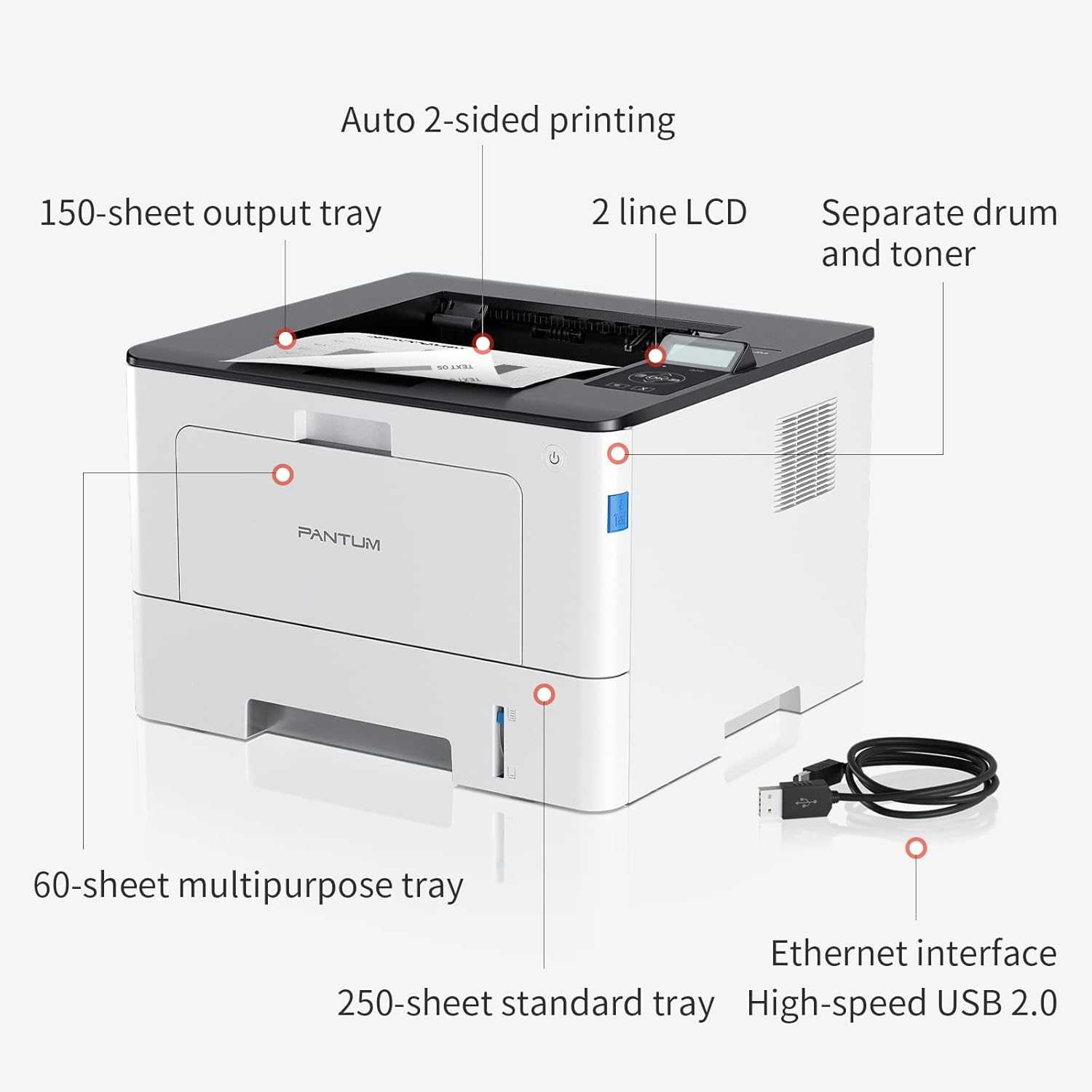
Figure 4.1: Printer Components. Key features include a 150-sheet output tray, a 2-line LCD display, separate drum and toner units, a 60-sheet multipurpose tray, a 250-sheet standard tray, an Ethernet interface, and a High-speed USB 2.0 port.
4.2. Afmetings

Figure 4.2: Printer Dimensions. The printer measures approximately 14.33 inches (W) x 10.12 inches (H) x 13.54 inches (D).
4.3. Beheerpaneel

Figure 4.3: Control Panel. The control panel includes a 2-line LCD display for status messages and menu navigation, along with buttons for OK, arrow controls, and cancel functions.
5. Opstelling
5.1. Uitpak en Plasing
- Verwyder die drukker versigtig uit sy verpakking.
- Verwyder alle beskermende kleefband en verpakkingsmateriaal van die drukker.
- Place the printer on a firm, level surface with adequate space for ventilation.
5.2. Toner and Drum Installation
- Maak die voorblad van die drukker oop.
- Pak die dromeenheid en tonerpatroon uit.
- Plaas die tonerpatroon in die drom-eenheid totdat dit in plek klik.
- Insert the combined drum and toner unit into the printer.
- Maak die voorblad toe.
5.3. Papier laai
- Pull out the standard paper tray or open the multipurpose tray.
- Pas die papiergidse aan volgens die grootte van jou papier.
- Load paper into the tray, ensuring it is flat and not exceeding the maximum capacity (250 sheets for standard tray, 60 sheets for multipurpose tray).
- Maak die papierbak toe.
5.4. Krag en Konnektiwiteit
- Koppel die kragkabel aan die drukker en dan aan 'n geaarde elektriese aansluiting.
- For USB connection: Connect the provided USB 2.0 cable from the printer to your computer.
- For Ethernet connection: Connect an Ethernet cable from the printer to your network router or switch.
- Druk die kragknoppie om die drukker aan te skakel.
6. Bedryfsinstruksies
6.1. Bestuurder Installasie
For optimal performance, install the printer drivers from the official Pantum website or the provided installation media. The printer supports easy one-step installation for quick setup.
6.2. Printing a Document
- Maak die dokument oop wat jy op jou rekenaar of mobiele toestel wil druk.
- Kies die drukopsie vanaf jou toepassing.
- Choose the Pantum BP5100DN from the list of available printers.
- Pas drukinstellings aan soos nodig (bv. aantal kopieë, papiergrootte, dupleksdrukwerk).
- Klik 'Druk'.
The printer offers fast printing speeds of up to 40 pages per minute (A4) / 42 pages per minute (Letter) in black and white. It also supports automatic two-sided printing to save paper.
6.3. Mobile Printing
The Pantum BP5100DN supports direct printing of office documents from mobile devices. Ensure your mobile device and printer are connected to the same network or via USB OTG (if supported by your device and printer).
7. Onderhoud
7.1. Replacing Toner Cartridge and Drum Unit
When the toner is low or the drum unit reaches its end of life, the printer's display will show a message. Refer to the instructions provided with the replacement consumables for proper installation. The starter toner cartridge yields approximately 3000 pages, and the starter drum unit yields approximately 30000 pages.
7.2. Maak die drukker skoon
- Skakel die drukker af en trek die kragkabel uit voordat u dit skoonmaak.
- Vee die buitekant van die drukker af met 'n sagte, pluisvrye lap.
- Use a dry cloth to clean the paper path and rollers if paper jams occur frequently.
- Moenie skuur skoonmaakmiddels of oplosmiddels gebruik nie.
8. Probleemoplossing
If you encounter issues with your printer, refer to the following common solutions:
- Drukker reageer nie: Check power connections, USB/Ethernet cable connections, and ensure the printer is turned on. Restart both the printer and your computer.
- Papierstoppe: Open all covers and carefully remove any jammed paper. Ensure paper is loaded correctly and not creased or damaged.
- Swak drukgehalte: Check toner levels. If print quality is faded, especially with cut and paste text, ensure you are using the correct print settings and consider replacing the toner cartridge or drum unit if they are near end-of-life.
- Verbindingskwessies: For Ethernet, verify network cable connection and IP address settings. For USB, try a different USB port or cable.
- Foutboodskappe: Consult the printer's display for specific error codes and refer to the quick setup guide or online support for detailed solutions.
For persistent issues, please contact customer service for support.
9. Spesifikasies
| Kenmerk | Spesifikasie |
|---|---|
| Model Naam | BP5100DN |
| Druk tegnologie | Laser |
| Drukker Uitset | Monochroom |
| Maksimum drukspoed (monochroom) | 40 ppm (A4) / 42 ppm (Letter) |
| Maksimum drukresolusie | 1200 x 1200 dpi |
| Dubbelsydige drukwerk | Ja (Outomaties) |
| Verbindingstegnologie | Ethernet, USB 2.0 |
| Maksimum invoerbladkapasiteit | 250 sheets (Standard Tray), 60 sheets (Multipurpose Tray) |
| Druk Media | Papier (gewoon) |
| Bladgrootte | A4, Letter, etc. |
| Versoenbare toestelle | Slimfone, rekenaars |
| Wattage | 650 Watt |
| Item gewig | 9.07 kg (ongeveer 9 kg 70 g) |
| Vervaardiger | Pantum |
10. Waarborg en Ondersteuning
The Pantum BP5100DN Monochrome Laser Printer comes with a 1-year warranty from the date of purchase. For warranty claims, technical support, or any inquiries, please refer to the contact information provided in your quick setup guide or visit the official Pantum webwebwerf.
For a better experience, please kindly refer to the user manual or contact customer service for support.