
Ysametp M10
Ysametp Mini Projector M10 User Manual
1080P Full HD Supported Portable Video Projector
Inleiding
Dankie vir die aankoopasing the Ysametp Mini Projector M10. This portable video projector is designed to provide a high-quality home theater experience with its 1080P Full HD support and 10000 Lux LED light source. It features dual built-in stereo speakers with an SRS sound system for immersive audio. Its compact size and multi-connection capabilities make it ideal for various entertainment and presentation needs. Please read this manual thoroughly before operating the projector to ensure proper use and maintenance.
Veiligheidsinligting
Om veilige werking te verseker en die lewensduur van u projektor te verleng, neem asseblief die volgende veiligheidsmaatreëls in ag:
- Moenie die ventilasie-openinge blokkeer nie. Verseker voldoende lugvloei rondom die projektor om oorverhitting te voorkom.
- Moenie die projektor aan reën of vog blootstel om elektriese skok of brand te vermy nie.
- Moenie die projektor oopmaak nie.asing. Verwys alle diens na gekwalifiseerde dienspersoneel.
- Gebruik slegs die kragadapter wat saam met die projektor voorsien word.
- Place the projector on a stable, flat surface to prevent it from falling.
- Vermy direkte oogblootstelling aan die projektorlens wanneer die lamp is aan.
- Ontkoppel die projektor van die kragtoevoer tydens weerligstorms of wanneer dit vir lang tye nie gebruik word nie.
Pakketinhoud
Kontroleer asseblief die inhoud van die pakket na uitpak:
- 1 x Ysametp Mini Projector M10
- 1 x HDMI-kabel
- 1 x 3-in-1 AV Line
- 1 x netsnoer
- 1 x Driepoot
- 1 x Drawstring Backpack
- 1 x afstandbeheer (batterye nie ingesluit nie)
- 1 x Gebruikershandleiding

Produk verbyview
Familiarize yourself with the projector's components and connection ports.

Invoer- / uitvoerpoorte:
- HDMI-poort: Connect to devices like TV sticks, laptops, gaming consoles.
- USB-poort: Koppel USB-skywe vir mediaweergawe.
- TF-kaartgleuf: Insert TF cards for media playback.
- VGA-poort: Connect to computers or laptops.
- AV-poort: Connect to older devices like DVD players using the 3-in-1 AV cable.
- 3.5 mm oudio-aansluiting: Koppel eksterne oorfone of luidsprekers.
Opstelling
1. Plasing en Skermgrootte
Position the projector on a flat, stable surface. The projection size can range from 32 inches to 200 inches, with an optimal projection distance between 3.6 feet and 16.4 feet.

2. Kragverbinding
Connect the supplied power cord to the projector's power input and then plug it into a power outlet.
3. Fokus- en Keystone-aanpassing
After powering on, adjust the focus and keystone knobs located on top of the projector to achieve a clear and rectangular image. The focus ring adjusts image sharpness, while the keystone correction corrects trapezoidal distortion if the projector is not perfectly perpendicular to the screen.
Bedryfsinstruksies
1. Skakel aan/af
- Om aan te sit: Druk die kragknoppie op die projektor of die afstandbeheer.
- Om af te sit: Press the power button again. The projector will go through a shutdown sequence.
2. Invoerbronkeuse
Use the "Source" button on the remote control or the projector's control panel to select the desired input source (HDMI, USB, TF, VGA, AV).
3. Verbind toestelle
- HDMI: Connect an HDMI cable from your device (e.g., TV Stick, laptop, game console) to the projector's HDMI port.
- USB/TF-kaart: Insert a USB drive or TF card into the respective port. The projector will automatically detect the media or prompt you to select it.
- VGA: Connect a VGA cable from your PC/laptop to the projector's VGA port.
- VAN: Use the provided 3-in-1 AV cable to connect to devices with AV output.
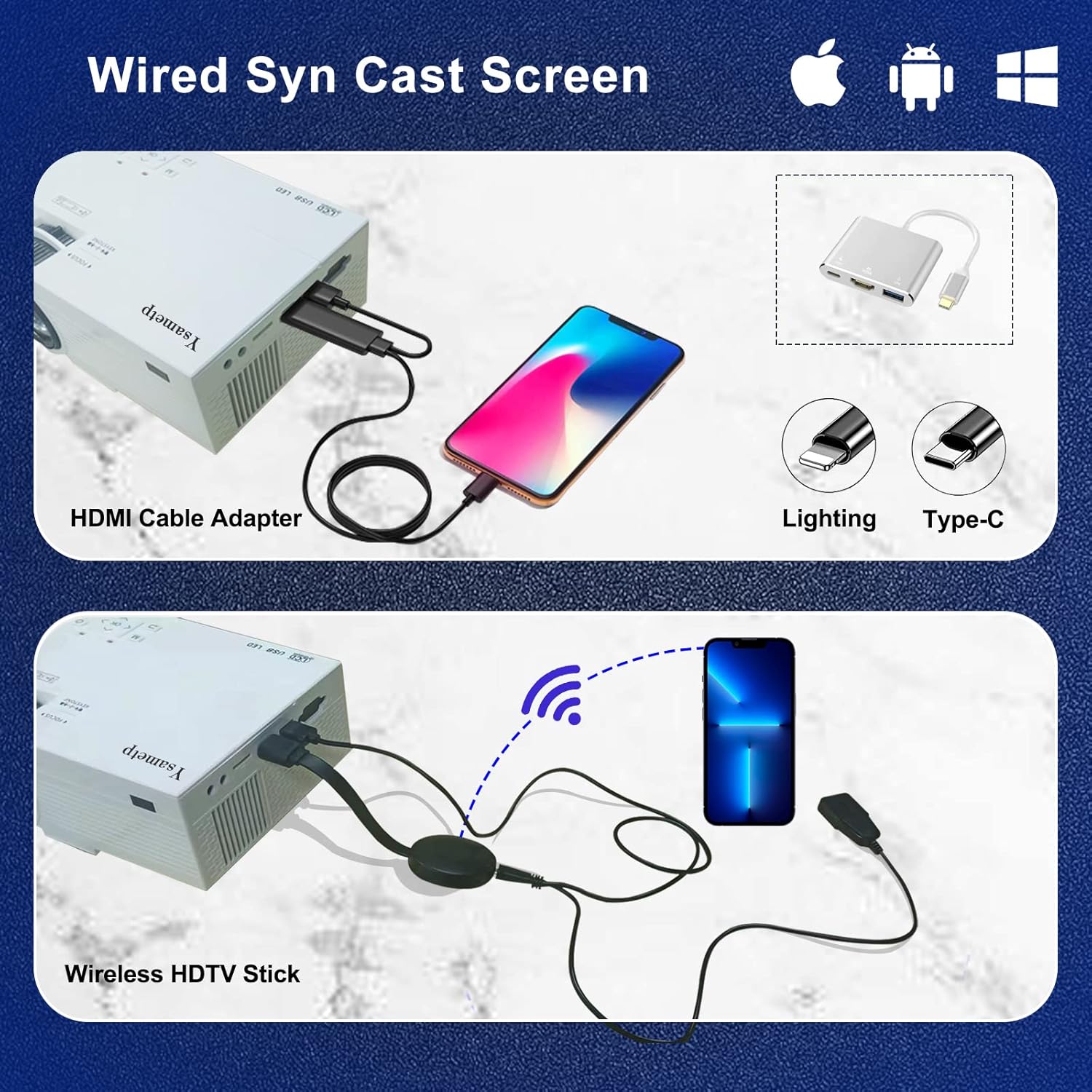
4. Wired Screen Mirroring (for Smartphones)
To mirror your smartphone screen, you will need an HDMI adapter (e.g., Lightning to HDMI for iPhone, USB-C to HDMI for Android) or a Miracast dongle/TV stick (like Roku, Fire TV Stick).

5. Klankuitset
The projector has dual built-in stereo speakers. For external audio, connect headphones or external speakers to the 3.5mm audio jack.

Onderhoud
1. Skoonmaak
- Lens: Gebruik 'n sagte, pluisvrye lap wat spesifiek vir optiese lense ontwerp is. Moenie skuurmiddels gebruik nie.
- Casing: Wipe the projector's exterior with a soft, dry cloth. Do not use liquid or aerosol cleaners.
- Ventilasie: Regularly check and clean the ventilation openings to prevent dust buildup, which can affect cooling performance.
2. Berging
When not in use, store the projector in a cool, dry place, away from direct sunlight and extreme temperatures. Use the provided drawstring backpack for protection during storage or transport.
3. LED Lifespan
The built-in LED light source is designed to support up to 55,000 hours of use, providing long-lasting performance.
Probleemoplossing
| Probleem | Moontlike oorsaak/oplossing |
|---|---|
| Geen beeld op die skerm nie. |
|
| Beeld is vaag. |
|
| Die beeld is trapesiumvormig. |
|
| Geen klank nie. |
|
| Afstandbeheer werk nie. |
|
Spesifikasies
| Kenmerk | Detail |
|---|---|
| Handelsmerk | Ysametp |
| Model | M10 |
| Vertoon tegnologie | LCD |
| Inheemse resolusie | 1920 x 1080 Pixels (Full HD Supported) |
| Beeldhelderheid | 11000 Lux |
| Beeldkontrasverhouding | 10000:1 |
| Aspekverhouding | 4:3 |
| Projeksie grootte | 32 - 200 duim |
| Projeksie afstand | 3.6 voet - 16.4 voet |
| LED lewensduur | 55,000 uur |
| Geraasvlak | 31 dB |
| Wattage | 60 watt |
| Hardeware-koppelvlak | VGA, USB, HDMI, 3.5mm Audio, TF Card |
| Afmetings (L x B x H) | 23.88 x 15.49 x 8.13 cm |
| Gewig | 975.22 g (ongeveer 2.15 lb) |
Waarborg en Ondersteuning
Ysametp provides a 3 jaar produkwaarborg for the Mini Projector M10.
If you encounter any problems or have questions regarding your projector, please do not hesitate to contact our customer support. Refer to the contact information provided on the product packaging or the official Ysametp webwebwerf vir hulp.
Ask a question about this manual
Ask about setup, troubleshooting, compatibility, parts, safety, or missing instructions. Manuals+ will review the question and use this page’s manual context to help answer it.