
1. Inleiding
The ACT AC7049 Dual Monitor Docking Station transforms your laptop into a complete workstation. This versatile 11-in-1 docking station allows you to connect up to two Full HD displays (max. 2048 x 1152 resolution) to your laptop via HDMI, using a single USB-C/A cable. It expands your laptop's connectivity with a Gigabit LAN port, microphone and headphone jacks, and six additional USB ports. Featuring DisplayLink® technology, it ensures advanced screen display on both MacOS and Windows computers.
2. Sleutel kenmerke
- Dubbele monitor ondersteuning: Connect up to two external displays with HDMI ports, supporting resolutions up to 2048x1152@60Hz.
- Universele verenigbaarheid: Works with laptops featuring a USB-C or USB-A 3.2 Gen1 (USB 3.0) port, compatible with MacOS and Windows thanks to DisplayLink technology.
- Uitgebreide konnektiwiteit: Includes 2x HDMI, 1x Gigabit Ethernet, 3x USB-A 3.2 Gen 1 (one with fast charging), 4x USB-A 2.0, and 3.5mm audio jacks for microphone and headphones.
- Buigsame plasing: Designed for both vertical and horizontal placement to optimize desk space and port accessibility.
- USB-laaipoort: Dedicated USB port for charging smartphones and tablets.
3. Pakketinhoud
Kontroleer asseblief die pakket vir die volgende items:
- ACT AC7049 Docking Station
- USB-C/A 3.2 Gen1 Connection Cable (USB-A to USB-C)
- Kragadapter
- Vertikale staander
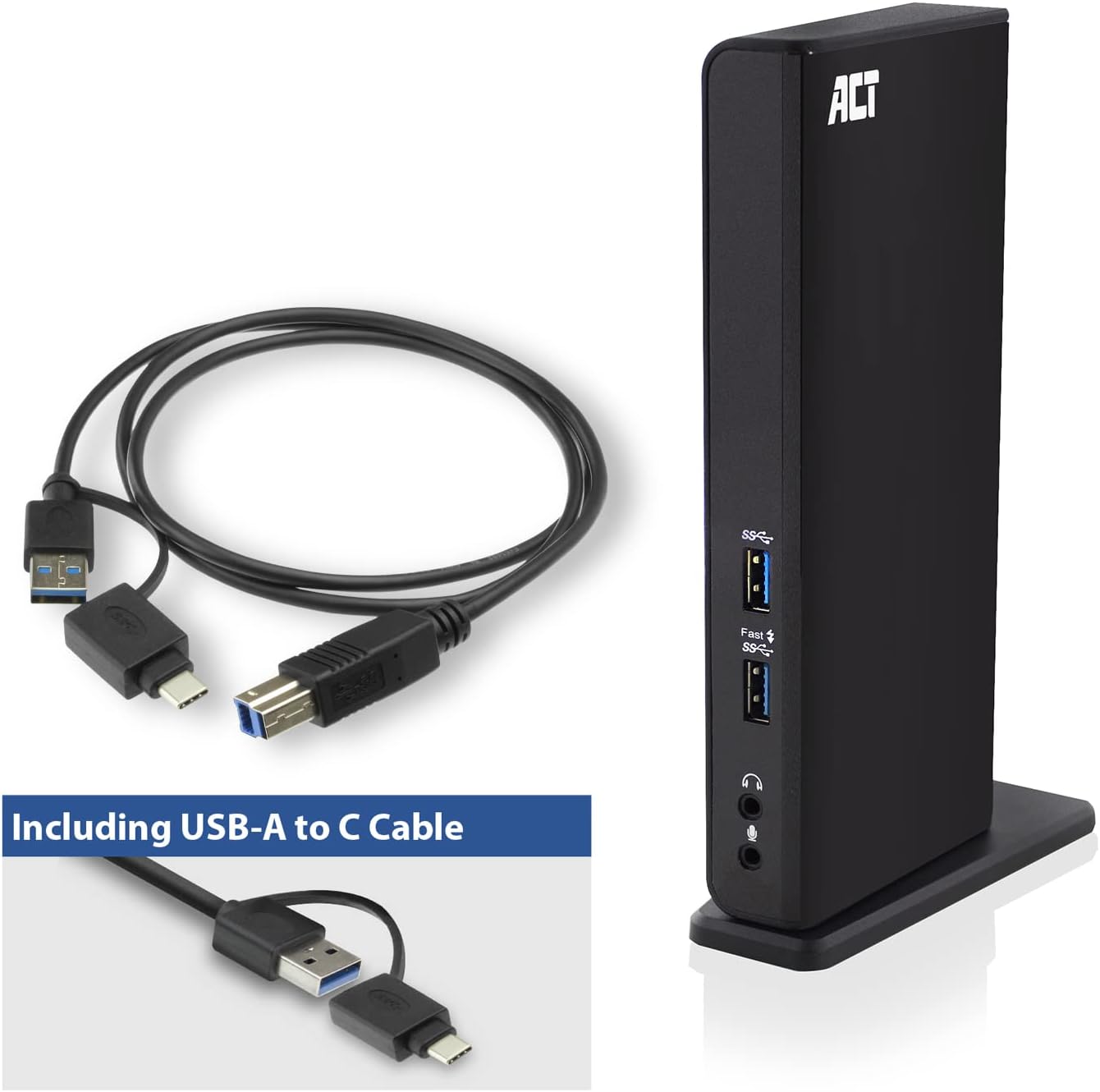
Image: The ACT AC7049 Docking Station shown with its included USB-A to USB-C connection cable and power adapter, highlighting the components provided in the package.
4. Opstelgids
4.1. Die kragadapter koppel
- Connect the power adapter to the DC 5V input port on the back of the AC7049 docking station.
- Plug the power adapter into a wall outlet. The docking station will power on.
4.2. Connecting to Your Laptop
- Use the provided USB-C/A 3.2 Gen1 connection cable. Connect the USB-B end to the corresponding port on the docking station.
- Connect the other end (USB-A or USB-C, depending on your laptop's port) to an available USB 3.2 Gen1 (USB 3.0) or USB-C port on your laptop.
4.3. Driver Installation (DisplayLink)
The AC7049 utilizes DisplayLink technology for extended monitor functionality. Drivers are typically installed automatically on most operating systems. If not, please follow these steps:
- Besoek die amptelike DisplayLink webwerf (www.displaylink.com/downloads) to download the latest drivers for your operating system (Windows or MacOS).
- Install the downloaded driver package and follow the on-screen instructions.
- Herbegin jou rekenaar as jy gevra word.

Image: The official DisplayLink 'Plug and Display' logo, indicating the technology used for multi-monitor support.
5. Bedryfsinstruksies
5.1. Koppeling van eksterne skerms
- Connect your HDMI monitors to the two HDMI ports on the back of the docking station.
- Once connected, your operating system should detect the new displays. You can configure display settings (extend, mirror, primary display) through your computer's display settings.

Image: A visual representation of the docking station enabling both 'Mirror your content' and 'Extend your content' display modes across a laptop and two external monitors.
5.2. Koppel USB-randapparatuur
- Voorste USB-poorte: Two USB-A 3.2 Gen1 ports (one with fast charging capability) are located on the front for easy access to frequently used devices like USB drives, smartphones, or tablets.
- Rear USB Ports: Four USB-A 2.0 ports are located on the back for connecting peripherals such as keyboards, mice, printers, or other less frequently connected devices.
5.3. Netwerkverbinding
Connect an Ethernet cable from your router or network switch to the Gigabit Ethernet port on the docking station. Your laptop will automatically gain wired network access.
5.4. Klankverbindings
Connect your headphones and/or microphone to the dedicated 3.5mm audio jacks on the front of the docking station.

Image: An isometric diagram showcasing the comprehensive connectivity of the ACT AC7049, demonstrating how a laptop, two monitors, a keyboard, mouse, network cable, headphones, and a smartphone can all be connected simultaneously.
6. Plasingsopsies
The ACT AC7049 docking station offers flexible placement options to suit your workspace:
- Vertical Placement: Use the included stand to position the docking station vertically. This saves desk space and provides easy access to all ports.
- Horisontale plasing: The docking station can also be placed horizontally if preferred.

Image: The ACT AC7049 Docking Station positioned vertically on its stand, highlighting its compact design and accessible ports.
7. Onderhoud
To ensure optimal performance and longevity of your ACT AC7049 Docking Station, follow these maintenance guidelines:
- Skoonmaak: Gebruik 'n sagte, droë lap om die buitekant van die dokstasie skoon te maak. Vermy die gebruik van vloeibare skoonmaakmiddels of aërosols, aangesien dit die toestel kan beskadig.
- Ventilasie: Maak seker dat die dokstasie in 'n goed geventileerde area geplaas is om oorverhitting te voorkom. Moenie enige ventilasie-openinge blokkeer nie.
- Berging: Wanneer dit nie vir lang tye gebruik word nie, bêre die dokstasie op 'n koel, droë plek weg van direkte sonlig en uiterste temperature.
- Kabelbestuur: Keep cables organized and free from kinks or excessive bending to prevent damage to the cables and ports.
8. Probleemoplossing
If you encounter issues with your ACT AC7049 Docking Station, please refer to the following common troubleshooting steps:
- Geen skermuitvoer:
- Ensure the docking station is powered on and correctly connected to your laptop.
- Verify that the HDMI cables are securely connected to both the docking station and the monitors.
- Check your laptop's display settings to ensure the external monitors are detected and configured correctly (e.g., extended or mirrored).
- Reinstall or update the DisplayLink drivers from www.displaylink.com/downloads.
- Try connecting one monitor at a time to isolate the issue.
- USB-toestelle werk nie:
- Ensure the docking station is properly connected to your laptop and powered.
- Try connecting the USB device directly to your laptop to confirm it is functional.
- Connect the USB device to a different USB port on the docking station.
- Herbegin jou skootrekenaar.
- Geen netwerkverbinding:
- Verifieer dat die Ethernet-kabel stewig aan beide die dokstasie en jou router/skakelaar gekoppel is.
- Gaan jou skootrekenaar se netwerkinstellings na om seker te maak dat die bedrade verbinding geaktiveer is.
- Test the Ethernet cable with another device if possible.
- Audio Not Working:
- Ensure headphones/microphone are fully plugged into the correct 3.5mm jacks.
- Check your laptop's sound settings to ensure the docking station's audio output/input is selected as the default device.
9. Spesifikasies
| Kenmerk | Spesifikasie |
|---|---|
| Modelnommer | AC7049 |
| Handelsmerk | WET OP |
| Kleur | Swart |
| Verbindingstegnologie | USB-A, USB-C |
| Video-uitset | 2 x HDMI (Max. 2048 x 1152 @ 60Hz) |
| USB-poorte | 3 x USB-A 3.2 Gen 1 (5Gbps, 1x Fast Charging), 4 x USB-A 2.0 (480Mbps) |
| Netwerkpoort | 1 x Gigabit Ethernet (RJ45) |
| Oudiopoorte | 1 x 3.5mm Headphone Jack, 1 x 3.5mm Microphone Jack |
| Versoenbare toestelle | Laptop, Computer (with USB 3.2 Gen1 / USB 3.0 or USB-C port) |
| Ondersteuning van bedryfstelsels | Windows, MacOS (via DisplayLink) |
| Afmetings (L x B x H) | 10.9 x 6 x 18.1 cm (ongeveer) |
| Item gewig | 317 gram |
10. Waarborg en Ondersteuning
ACT products are designed for reliability and adhere to international standards and EU legislation. The ACT AC7049 Docking Station comes with a manufacturer's warranty, typically ranging from 2 to 5 years. For specific warranty details and support, please refer to the official ACT webwebwerf of kontak jou handelaar.
For technical support or further inquiries, please visit the official ACT connectivity webwebwerf: www.act-connectivity.com