
1. Inleiding
This manual provides essential information for the safe and efficient use of your OPPO F21 Pro (5G) smartphone. Please read this manual thoroughly before using your device to ensure optimal performance and longevity.
The OPPO F21 Pro (5G) is a high-performance smartphone featuring a 2.2 GHz Octa-core processor, 8GB of RAM, and 128GB of internal storage, expandable via microSDXC. It operates on Android 12 and is powered by a non-removable 4500 mAh Li-Po battery. Key features include a 6.43-inch AMOLED display, a 64 MP AI Triple Camera system, and 5G connectivity.
2. Toestelopstelling
2.1 Pakketinhoud
- OPPO F21 Pro (5G) Smartphone
- USB kabel
- Vinnige Begingids (kan per streek verskil)
- Veiligheidsinligting (kan per streek verskil)
2.2 SIM-kaarte en MicroSD-kaart insit
Your OPPO F21 Pro (5G) supports Dual-SIM functionality and a microSDXC card for expanded storage. The device uses Nano-SIM cards.
- Vind die SIM-kaartlaai aan die kant van jou foon.
- Plaas die SIM-uitwerpgereedskap (indien voorsien) in die klein gaatjie langs die laai en druk liggies totdat die laai uitspring.
- Place your Nano-SIM card(s) and/or microSDXC card into the designated slots on the tray. Ensure the gold contacts face downwards.
- Druk die laai versigtig terug in die foon totdat dit gelyk met die kant is.
Important Network Compatibility Note for USA Buyers:
This smartphone is not compatible with CDMA networks, including VERIZON, SPRINT, and US CELLULAR. Please verify 3G or 4G/LTE compatibility with your network provider before purchase.
2.3 Aan-/afskakel
- Om aan te skakel: Druk en hou die aan/af-knoppie (aan die regterkant) in totdat die OPPO-logo verskyn.
- Om af te skakel: Druk en hou die aan/af-knoppie in, en kies dan 'Skakel af' uit die opsies op die skerm.
- Om weer te begin: Druk en hou die aan/af-knoppie in, en kies dan 'Herbegin' uit die opsies.
2.4 Aanvanklike opstelling
Upon first power-on, follow the on-screen instructions to complete the initial setup process. This includes selecting your language, connecting to Wi-Fi, setting up your Google account, and configuring security features like Face Recognition.
3. Bedien jou toestel
3.1 Basiese navigasie
Your OPPO F21 Pro (5G) runs on Android 12, offering an intuitive user interface. Use gestures or navigation buttons (configurable in settings) to move between apps, return to the home screen, and access recent applications.
3.2 Vertoonkenmerke

The front of the OPPO F21 Pro (5G) features a vibrant AMOLED display with a punch-hole cutout for the front camera.

'n Gedetailleerde view of the punch-hole front camera, integrated seamlessly into the display.
The device features a 6.43-inch AMOLED display with a resolution of 1080 x 2400 pixels, protected by Schott Xensation glass. This display provides vivid colors and deep blacks for an enhanced viewondervinding.
3.3 Kameragebruik
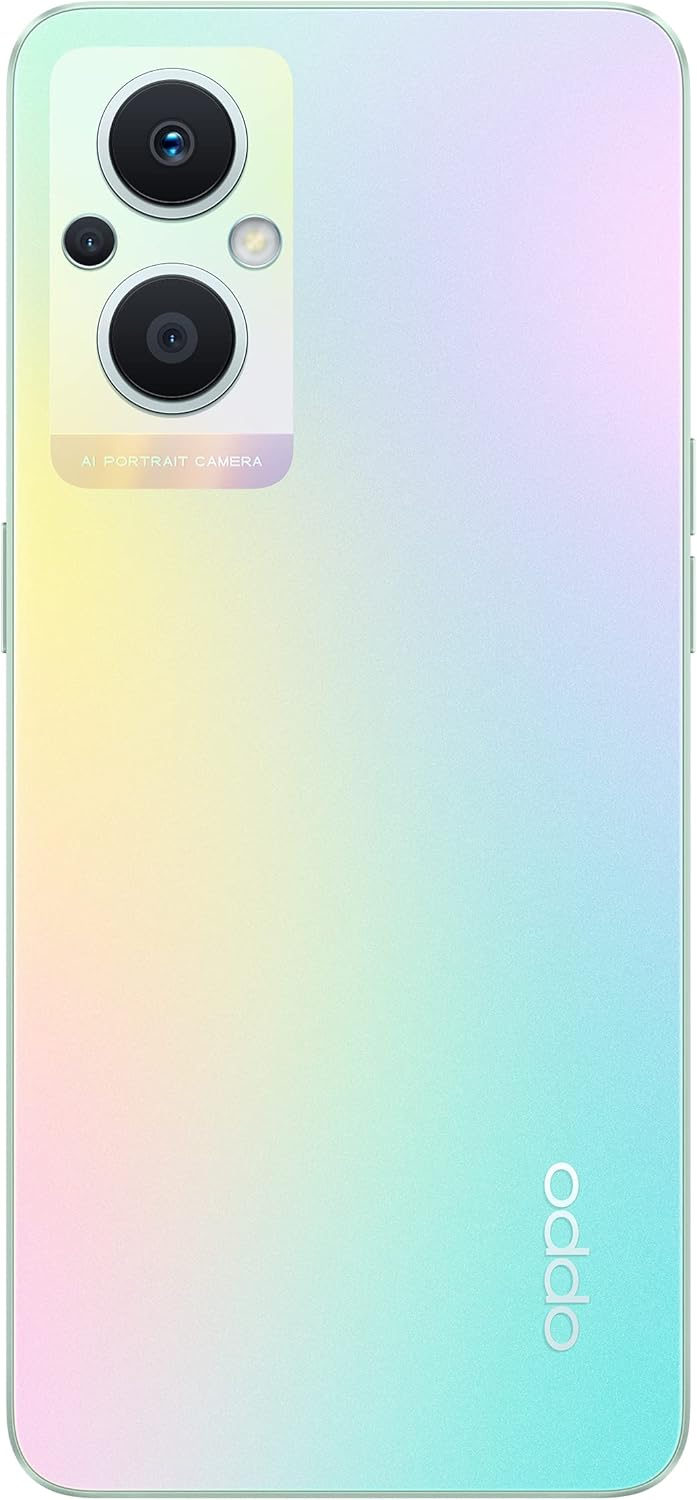
The back of the OPPO F21 Pro (5G) showcases its triple camera system and sleek design.

'n Gedetailleerde view of the AI Portrait Camera module on the rear, highlighting the lenses and flash.
The OPPO F21 Pro (5G) is equipped with a versatile camera system:
- Agterste kamera: 64 MP (wide, f/1.7, PDAF), 2 MP (macro, f/2.4), 2 MP (depth, f/2.4).
- Voorste kamera: 16 MP (wide, f/2.4).
Access the Camera app from your home screen or app drawer. Select various shooting modes such as Photo, Video, Portrait, Macro, and more. Tap the screen to focus and press the shutter button to capture images or start/stop video recording.
3.4 Konnektiwiteit
- 5G-netwerk: Supports N1/ N8/ N28/ N41/ N77/ N78 SA/NSA bands.
- Wi-Fi: Koppel aan draadlose netwerke vir internettoegang.
- Bluetooth: Koppel met draadlose bykomstighede soos oorfone en luidsprekers.
- USB Tipe C: Vir laai en data-oordrag.
3.5 Veiligheidsfunksies
The device includes Face Recognition for convenient and secure unlocking. You can set this up in the Security settings menu.
4. Onderhoud
4.1 Batterysorg
Your OPPO F21 Pro (5G) is equipped with a 4500 mAh Lithium-Polymer battery. To maximize battery life:
- Vermy uiterste temperature.
- Gebruik die oorspronklike laaier en USB-kabel wat voorsien word.
- Vermy om die battery gereeld heeltemal te ontlaai.
- Optimize battery settings in the device's settings menu.
4.2 Skoonmaak van jou toestel
The device is rated as Water Resistant. To clean your phone:
- Skakel die toestel af voordat dit skoongemaak word.
- Gebruik 'n sagte, pluisvrye lap.
- Vermy die gebruik van harde chemikalieë, skuurmiddels of saamgeperste lug.
- Moenie die toestel in water dompel nie.
4.3 Sagteware-opdaterings
Regularly check for and install software updates to ensure your device has the latest features, security patches, and performance improvements. You can check for updates in the device's Settings menu under 'About phone' or 'Software update'.
5. Probleemoplossing
If you encounter issues with your OPPO F21 Pro (5G), try the following basic troubleshooting steps:
- Toestel reageer nie: Druk en hou die aan/af-knoppie vir ongeveer 10-15 sekondes in om 'n herbegin te forseer.
- Netwerkkwessies: Ensure your SIM card is correctly inserted. Check your network settings and ensure mobile data or Wi-Fi is enabled. Restart your device.
- Program-ineenstorting: Close and reopen the app. Clear the app's cache and data in Settings > Apps. If the issue persists, uninstall and reinstall the app.
- Battery dreineer vinnig: Review battery usage in Settings to identify power-hungry apps. Reduce screen brightness, disable unnecessary features (GPS, Bluetooth, Wi-Fi) when not in use.
- Stoorplek vol: Skrap onnodig files, photos, and videos. Move media to a microSD card if installed. Clear app caches.
For more complex issues, refer to the official OPPO support webwebwerf of kontak kliëntediens.
6. Spesifikasies

'n verbyview of the OPPO F21 Pro (5G) showcasing its main features including the 64MP AI Triple Camera, AMOLED screen, and Qualcomm Snapdragon 5G SoC.

The OPPO F21 Pro (5G) in Rainbow Spectrum, displaying both its front and rear aesthetics.
| Kenmerk | Spesifikasie |
|---|---|
| Handelsmerk | OPPO |
| Model Naam | OPPO F21 Pro (5G) |
| Bedryfstelsel | Android 12.0 |
| Verwerker | Qualcomm SM6375 Snapdragon 695 5G (6 nm), agtkern (2x2.2 GHz Kryo 660 Gold & 6x1.7 GHz Kryo 660 Silver) |
| RAM | 8 GB |
| Interne berging | 128 GB |
| Uitbreidbare berging | microSDXC |
| Skerm grootte | 6.43 duim (16.33 sentimeter) |
| Tipe vertoon | AMOLED |
| Resolusie | 1080 x 2400 piksels |
| Agterste kamera | 64 MP (wyd), 2 MP (makro), 2 MP (diepte) |
| Voorste kamera | 16 MP (wyd) |
| Battery kapasiteit | 4500 mAh (Lithium-Polymer, non-removable) |
| Sellulêre Tegnologie | 5G (Dubbele SIM) |
| Draadlose Tegnologie | Wi-Fi, Bluetooth |
| Connector Tipe | USB Tipe C |
| Biometriese sekuriteit | Gesigherkenning |
| Waterweerstandvlak | Waterbestand |
| Afmetings | 6.3 x 2.87 x 0.31 duim |
| Item gewig | 173 gram |
7. Waarborginligting
Your OPPO F21 Pro (5G) smartphone comes with a 1 jaar vervaardiger se waarborgHierdie waarborg dek defekte in materiaal en vakmanskap onder normale gebruik. Bewaar asseblief u bewys van aankoop vir waarborgeise.
The warranty does not cover damage caused by misuse, accidents, unauthorized modifications, or normal wear and tear. For full terms and conditions, please refer to the warranty card included in your product packaging or visit the official OPPO webwebwerf.
8. Ondersteuning
For further assistance, technical support, or to find service centers, please visit the official OPPO support webwebwerf:
You may also find helpful FAQs and community forums on the support webwebwerf.