
1. Inleiding
This user manual provides essential information for the safe and efficient use of your Gigaset COMFORT 500A Trio cordless phone system. This system includes a base station and three cordless handsets, designed for reliable communication in your home or office. Please read these instructions carefully before initial use to ensure proper setup and operation.
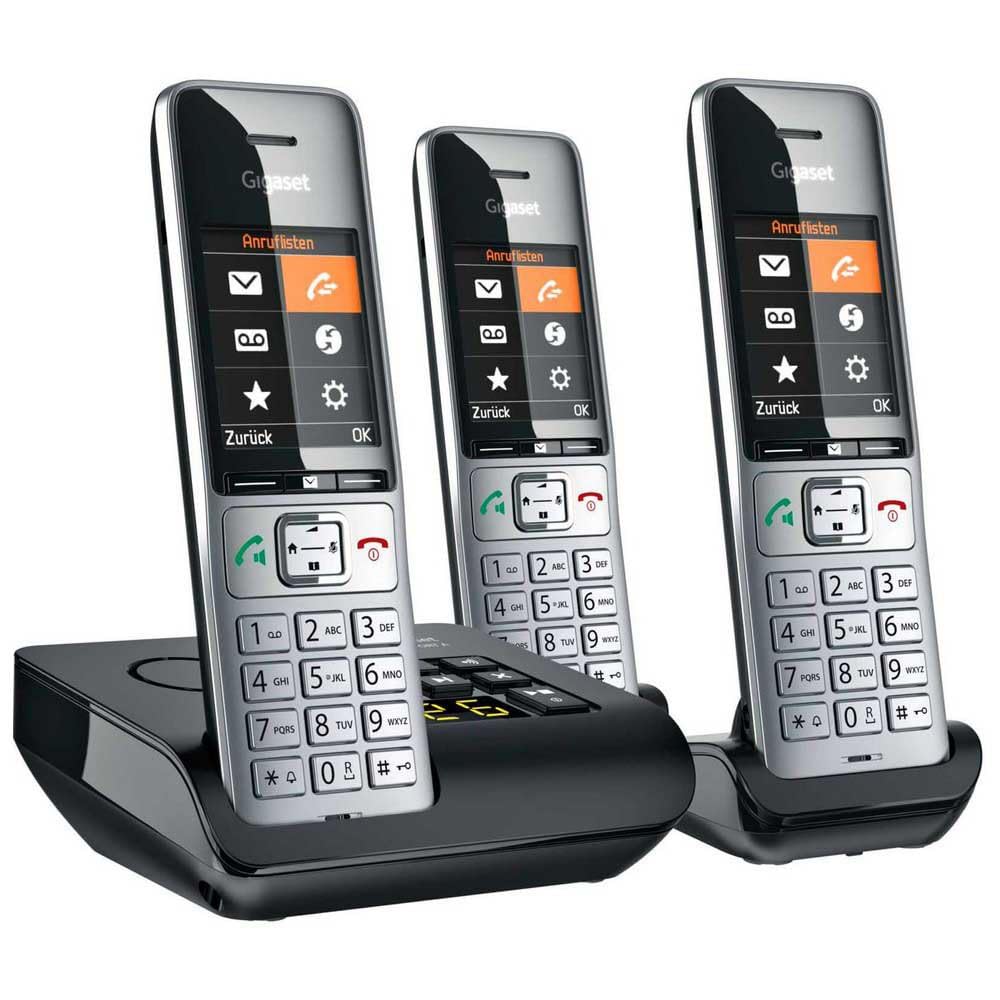
Image 1.1: The Gigaset COMFORT 500A Trio system, featuring a black base station with an integrated answering machine and three silver and black cordless handsets.
2. Pakketinhoud
Verify that all items are present in your package. If any items are missing or damaged, contact your retailer immediately.
- 1x Gigaset COMFORT 500A Base Station
- 3x Gigaset COMFORT 500A Handsets
- 3x Handset Battery Covers
- 6x AAA Rechargeable Batteries (2 per handset)
- 1x Power Adapter for Base Station
- 1x Phone Line Cable
- 2x Handset Charging Cradles (for the two additional handsets)
- 2x Power Adapters for Charging Cradles
- 1x Gebruikershandleiding (hierdie dokument)
3. Veiligheidsinstruksies
Observe the following safety precautions to prevent injury or damage to your device:
- Use only the provided power adapters and phone line cable.
- Use only the specified rechargeable batteries. Do not use non-rechargeable batteries.
- Moenie die toestel aan water, vog of uiterste temperature blootstel nie.
- Avoid placing the base station or charging cradles near heat sources or direct sunlight.
- Moenie die toestel oopmaak nie casing. Repairs should only be performed by authorized service personnel.
- Hou die toestel buite bereik van kinders.
4. Opstelling
4.1. Verbind die basisstasie
- Plaas die basisstasie op 'n plat, stabiele oppervlak, weg van ander elektroniese toestelle wat steuring kan veroorsaak.
- Connect the supplied phone line cable to the TEL socket on the base station and to your telephone wall socket.
- Koppel die meegeleverde kragadapter aan die KRAG socket on the base station and plug it into a mains power outlet.
- For the additional charging cradles, connect their respective power adapters and plug them into mains power outlets.
4.2. Installering van Handsetbatterye
- Maak die batteryklep aan die agterkant van elke handset oop.
- Plaas die twee meegeleverde AAA herlaaibare batterye in en let op die korrekte polariteit (+/-).
- Maak die batteryklepdeksel toe totdat dit in plek klik.
- Place each handset into its respective base station or charging cradle to charge. The display will indicate charging. Allow at least 8 hours for the initial charge.

Beeld 4.2.1: 'n Nabyskoot view of a Gigaset COMFORT 500A handset, highlighting its clear display, navigation keys, and numeric keypad. The handset is designed for comfortable handling.
4.3. Registrasie van die handset
Your handsets are typically pre-registered to the base station at the factory. If a handset displays "Register Handset" or similar, follow these steps for manual registration:
- On the base station, press and hold the registration/paging button (usually marked with a signal icon) for approximately 3 seconds. The base station will enter registration mode.
- On the handset, navigate to the menu, select Instellings, toe Registrasie, en Registreer Handset.
- Enter the system PIN (default is usually 0000). Confirm with OK.
- The handset will search for the base station and register. A confirmation message will appear on the handset display once successful.
5. Bediening van jou foon
5.1. Maak en Ontvang Oproepe
- Maak 'n oproep: Pick up a handset, dial the number, and press the green call key. Alternatively, dial first, then press the call key.
- Ontvang 'n oproep: When the phone rings, press the green call key.
- Beëindig 'n oproep: Press the red end call key or place the handset back in its cradle.
- Beller-ID: Incoming call numbers will be displayed if the service is active and supported by your network provider.
5.2. Using the Digital Answering Machine
The Gigaset COMFORT 500A Trio includes an integrated digital answering machine in the base station.
- Aktivering/Deaktivering: Access the answering machine menu via the handset or use the dedicated button on the base station (if available).
- Luister na boodskappe: New messages are indicated on the handset display and/or by a flashing LED on the base station. Press the play button on the base station or navigate through the handset menu to listen.
- Recording an Announcement: You can record a personalized outgoing message through the handset menu.
5.3. Telefoonboek
Stoor gereeld gebruikte nommers in die telefoonboek vir vinnige skakeling.
- Saving a Contact: Navigate to the Phonebook menu, select "New Entry," enter the name and number, then save.
- Skakel vanaf telefoonboek: Open the Phonebook, scroll to the desired contact, and press the green call key.
5.4. Instellings
Customize your phone system through the handset's settings menu.
- Volume: Adjust handset speaker, ringer, and earpiece volume.
- luitone: Select different melodies for internal and external calls.
- Vertoontaal: Change the language of the handset display.
- Datum en Tyd: Set the correct date and time for accurate call logging and answering machine timestamps.
6. Onderhoud
6.1. Skoonmaak
Clean the device surfaces with a soft, damp lap. Moenie skuur skoonmaakmiddels of oplosmiddels gebruik nie.
6.2. Batteryversorging
- Gebruik altyd die gespesifiseerde herlaaibare batterye.
- Indien die handset vir 'n lang tydperk nie gebruik gaan word nie, verwyder die batterye om lekkasie te voorkom.
- Gooi ou batterye weg volgens plaaslike regulasies.
7. Probleemoplossing
| Probleem | Moontlike oorsaak | Oplossing |
|---|---|---|
| Geen kiestoon nie | Phone line cable not connected or faulty. | Check phone line connection. Try a different phone line socket or cable. |
| Handset display is blank or "Register Handset" appears | Batteries are flat or handset is not registered. | Place handset in base/charger to charge. If still blank, check battery installation. If "Register Handset" appears, follow Section 4.3. |
| Kan nie oproepe maak/ontvang nie | Base station not powered or phone line issue. | Ensure base station power adapter is connected. Check phone line connection. Contact your service provider if the issue persists. |
| Swak klankgehalte | Handset te ver van basisstasie of steuring. | Move closer to the base station. Avoid placing the base near other electronic devices (Wi-Fi routers, microwaves). |
8. Spesifikasies
- Model: L36852-H3023-B111
- Produk Tipe: DECT Cordless Phone System with Digital Answering Machine
- Kleur: Swart, silwer
- Dimensions (Base Station): Ongeveer 24 x 69 x 2.5 cm (L x B x H)
- Gewig (item): 1 Kilogram (total package weight)
- Praat Tyd: Tot 4 uur
- Power Source (Handsets): Battery-Powered (Rechargeable AAA batteries)
- Materiaal: Akrielnitril Butadieen Styreen (ABS)
- Kenmerke: Caller ID, Basic Conference Call Capability, Multiple Line Support
- Tipe antwoordstelsel: Digitaal
- Versoenbare toestelle: PSTN, basic communication devices
9. Waarborg en Ondersteuning
Your Gigaset COMFORT 500A Trio system comes with a 2 jaar vervaardiger se waarborg vanaf die aankoopdatum. Bewaar asseblief u bewys van aankoop vir waarborgeise.
For technical support, service, or further information, please refer to the official Gigaset website or contact your local Gigaset service center. Contact details can typically be found on the Gigaset webwebwerf of in die waarborgkaart wat by u produk ingesluit is.