
Inleiding
Thank you for choosing the Oversteel Bulat 1080P Full HD Webkamera. Hierdie handleiding verskaf gedetailleerde instruksies vir die opstel, bedryf en instandhouding van jou webcam to ensure optimal performance. The Bulat webcam is designed for high-quality video communication, recording, and streaming, featuring a 1080p resolution at 60 frames per second, an integrated microphone, and an adjustable ring light.
Produk verbyview
Sleutel kenmerke
- 1080P Volle HD-video: Equipped with a 2MP CMOS HD sensor, delivering sharp and clear video at resolutions up to 1920 x 1080 at 60fps. The 6G 2M glass lens ensures a crisp image.
- Geïntegreerde mikrofoon: Features a built-in microphone for clear audio capture, effective up to 10 meters, suitable for video conferences, meetings, and live broadcasts.
- Adjustable Ring Light: An integrated ring light provides uniform and flattering illumination. It offers adjustable brightness and color temperature (warm/cold light) to suit various lighting conditions.
- Plug & Play-konnektiwiteit: Simple USB connection (compatible with USB 2.0/3.0) with a 150 cm cable. No additional drivers or software are required for operation.
- Kompakte en duursame ontwerp: Measuring 10 x 35 x 25 cm and weighing 135 grams, the webcam is portable and made from ABS material for durability.
Wat is in die boks
- Oversteel Bulat Webnok
Produkkomponente
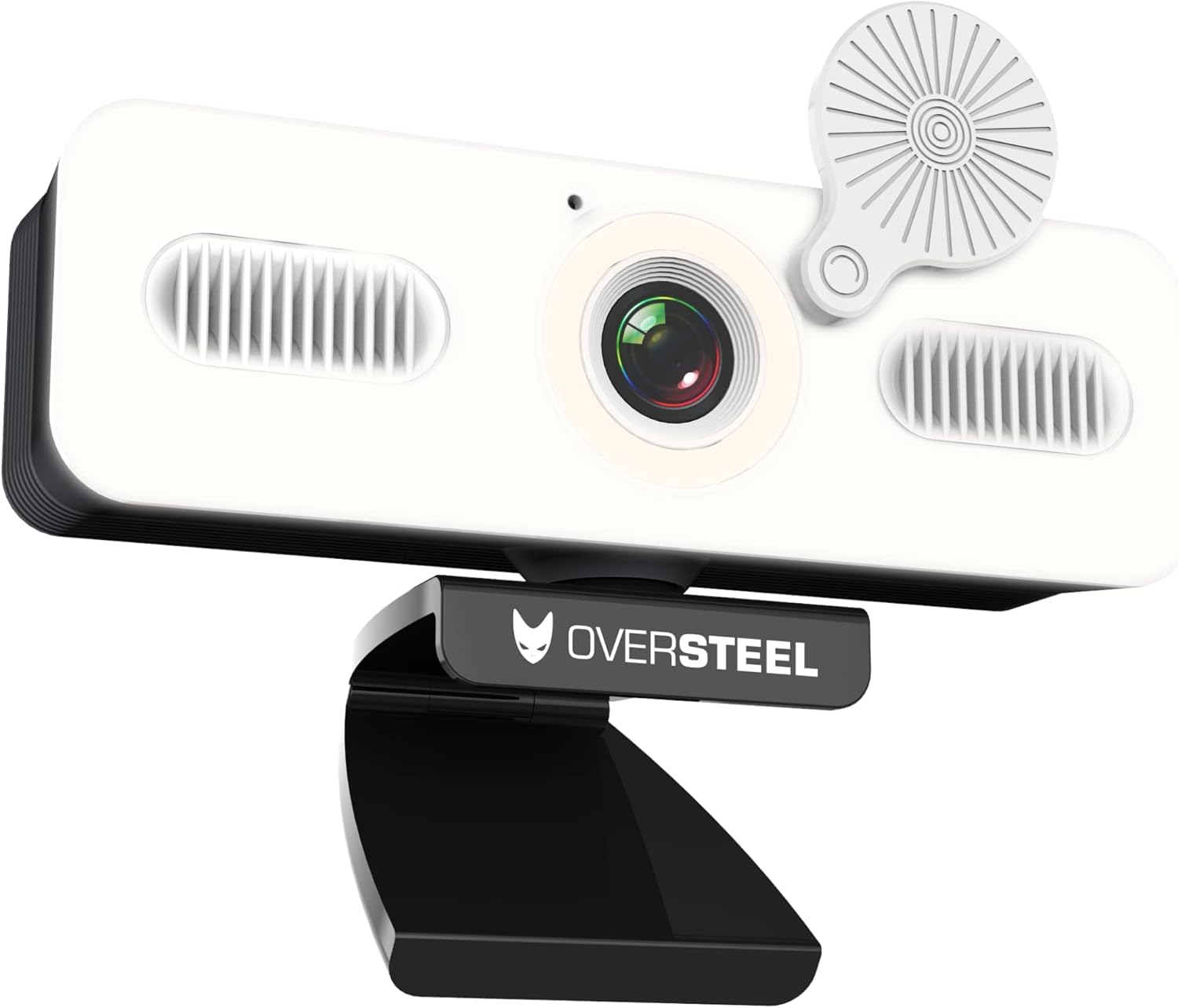
Prent 1: Voorkant view of the Oversteel Bulat Webcam, showing the camera lens, integrated ring light, and microphone grilles. The webcam is mounted on its adjustable stand.

Prent 2: Oversteel Bulat Webcam with its privacy cover closed, highlighting the design and the integrated light.
Opstel instruksies
- Pak die Webkamera: Carefully remove the Oversteel Bulat Webkamera uit sy verpakking.
- Plaas die Webkamera:
- Plaas die webcam on top of your monitor or laptop screen using its integrated clip. Ensure it is stable and securely positioned.
- Alternatiewelik, die webcam can be mounted on a tripod using the standard tripod thread located at the bottom of the stand (tripod not included).
- Connect to your Device: Koppel die USB-kabel van die webcam into an available USB 2.0 or USB 3.0 port on your computer (PC, Mac, Laptop, Tablet, Chromebook).
- Outomatiese installasie: Die webcam is Plug & Play. Your operating system will automatically detect and install the necessary drivers. This process may take a few moments. No manual driver installation is typically required.
- Verifieer installasie:
- Windows: Go to Device Manager and check under "Cameras" or "Imaging devices" for "Oversteel Bulat Webkamera".
- MacOS: Open System Preferences > Sound > Input and check for the webcam's microphone. For video, open an application like Photo Booth or FaceTime.

Prent 3: The Oversteel Bulat Webcam securely mounted on top of a computer monitor, demonstrating its adjustable clip.
Bedryfsinstruksies
Die gebruik van die Webcam for Video Calls and Recording
- Open Your Application: Launch your preferred video conferencing or recording software (e.g., Zoom, Microsoft Teams, Skype, Google Meet, OBS Studio, Photo Booth).
- Kies die Webkamera: In the application's settings, navigate to the video and audio input options.
- For video input, select "Oversteel Bulat Webcam" or a similar name.
- For audio input, select "Oversteel Bulat Microphone" or a similar name.
- Pas instellings aan (opsioneel): Some applications allow you to adjust video resolution, frame rate, brightness, contrast, and other settings. Refer to your application's documentation for specific adjustments. The webcam supports 1080p resolution at 60fps.
- Start Your Session: Begin your video call, recording, or live stream.
Ringlig werking
The Oversteel Bulat Webcam features an integrated ring light to enhance your illumination.
- Krag aan/af: The ring light is controlled by a touch-sensitive button located on the webcam body, typically near the lens. Tap the button to turn the light on or off.
- Pas Helderheid aan: Press and hold the touch button to cycle through different brightness levels. Release the button when the desired brightness is achieved.
- Verander kleurtemperatuur: The light offers warm and cold light options. Tap the button repeatedly to switch between warm light, cold light, and mixed light modes.

Prent 4: Comparison of the Oversteel Bulat Webcam's integrated ring light in warm and standard (cold) light modes, illustrating the adjustable color temperature feature.
Onderhoud
- Maak die lens skoon: Use a soft, lint-free cloth specifically designed for camera lenses to gently wipe the webnoklens. Vermy die gebruik van harde chemikalieë of skuurmiddels.
- Maak die liggaam skoon: Vee die webcam body with a dry or slightly damp soft cloth. Do not immerse the webkam in water of gebruik oormatige vog.
- Berging: Stoor die as dit nie gebruik word nie webcam in a clean, dry place away from direct sunlight and extreme temperatures. Use the privacy cover to protect the lens from dust and scratches.
- Kabelversorging: Vermy die USB-kabel te veel te buig of te draai om skade te voorkom.
Probleemoplossing
| Probleem | Moontlike oorsaak | Oplossing |
|---|---|---|
| No image or video |
|
|
| Geen klank of swak klankgehalte nie |
|
|
| Ring light not working |
|
|
| Video appears choppy or laggy |
|
|
Spesifikasies
| Kenmerk | Detail |
|---|---|
| Modelnommer | NAT-OV-BULAT-60 |
| Afmetings (D x B x H) | 10 x 35 x 25 cm |
| Gewig | 190 g |
| sensor Tegnologie | CMOS |
| Video-opname-resolusie | 1080p Full HD (1920 x 1080 pixels) |
| Video Capture Speed | 60 fps |
| Effective Still Image Resolution | 2.07 MP |
| Verbindingstegnologie | USB 2.0/3.0 |
| Spesiale kenmerk | Built-in Ring Light (Warm/Cold) |
| Mikrofoon | Geïntegreerde |
| Versoenbare toestelle | PC, Laptop, Tablet, Chromebook |
| Bedryfstelsel | Proprietary (firmware or embedded OS) |
| Video-formaat | MP4 |
| Oudio-formaat | MP3 |
| Fokus Tipe | Vaste fokus |
| Witbalans | Outomatiese |
| Beeld-aspekverhouding | 16:9 |
| Waterweerstandvlak | Nie waterbestand nie |
Waarborg en Ondersteuning
Waarborg inligting
The Oversteel Bulat Webkamera kom met 'n two-year manufacturer's warranty from the date of purchase. This warranty covers defects in materials and workmanship under normal use. It does not cover damage caused by misuse, accident, unauthorized modification, or external causes. Please retain your proof of purchase for warranty claims.
Kliënte ondersteuning
For technical assistance, troubleshooting, or warranty inquiries, please contact Oversteel customer support. Refer to the official Oversteel webwebwerf vir die mees onlangse kontakinligting.
Aanlyn hulpbronne: Besoek die Oversteel Brand Store on Amazon vir bykomende produkinligting en ondersteuning.