
Belangrike veiligheidsinligting
Please read this manual carefully before assembly and use to ensure safe operation and to prevent damage to the product or injury to yourself.
- Moenie die maksimum laaikapasiteit oorskry nie 100 kgOorbelasting kan onstabiliteit en skade veroorsaak.
- Ensure all cables are properly managed and secured to prevent tripping hazards or damage during height adjustments.
- Hou kinders en troeteldiere weg van die lessenaar tydens werking.
- Do not place hands or other body parts near moving parts of the desk frame during height adjustment.
- Gebruik die lessenaar slegs vir die beoogde doel as 'n werkstasie.
- Regularly check all screws and bolts to ensure they are tightened.
Produk verbyview
The FLEXISPOT E1B Electric Standing Desk is designed to provide a versatile and ergonomic workspace. It features a robust dual-motor system for smooth height adjustments and a durable tabletop.
Sleutel kenmerke:
- Dubbelmotorstelsel: Ensures stable and efficient height adjustment at 25 mm/s.
- Hoogtereeks: Adjustable from 70 cm to 119 cm to suit various user heights and work preferences.
- Laai kapasiteit: Supports up to 100 kg, accommodating multiple monitors and office equipment.
- Geheuevoorinstellings: Control panel with memory functions for saving preferred height settings.
- High-Quality Tabletop: 160x80cm black tabletop, made in the EU from FSC-certified MDF with scratch-resistant high-pressure laminate.
Pakketinhoud
Before starting assembly, verify that all components listed below are present and undamaged. If any parts are missing or damaged, please contact customer support.
- Desk Frame (E1B) components (legs, feet, crossbar, motor, control box)
- Tabletop (DT1608-BLACK-EU18)
- Beheerpaneel met geheuefunksies
- Kragadapter en kabel
- Assembly Hardware (screws, bolts, Allen keys)
- Kabelbestuur-bykomstighede
- Gebruikershandleiding
Opstel- en monteringsinstruksies
Assembly is designed to be straightforward. It is recommended to assemble the desk on a soft, clean surface to prevent scratches. Two people are recommended for easier assembly.
Stap 1: Pak komponente uit
Verwyder alle dele versigtig uit die verpakking en lê dit uit. Kontroleer dit teen die lys van die verpakkingsinhoud.
Step 2: Assemble the Desk Frame
- Attach the lifting columns to the crossbar using the provided screws.
- Bevestig die lessenaarvoete aan die onderkant van die hefkolomme.
- Mount the control box to the designated area on the frame.
- Connect the motor cables from the lifting columns to the control box.
- Connect the control panel cable to the control box.

Image: The FLEXISPOT E1B desk frame in black and white, illustrating the height adjustment range from 70cm to 119cm, highlighting the dual motor system, 25mm/s adjustment speed, and low noise operation (less than 50dB).
Stap 3: Heg die tafelblad aan
Carefully place the tabletop upside down on a soft surface. Position the assembled desk frame onto the tabletop, aligning the pre-drilled holes. Secure the tabletop to the frame using the provided screws.

Image: A FLEXISPOT desk with a black tabletop, featuring a laptop, books, and a pen holder, demonstrating a functional and organized workspace.
Step 4: Connect Power and Cable Management
Connect the power adapter to the control box and then to a power outlet. Use the included cable management accessories to organize and secure all cables, preventing them from interfering with the desk's movement.
Bedryfsinstruksies
Beheerpaneel oorview:
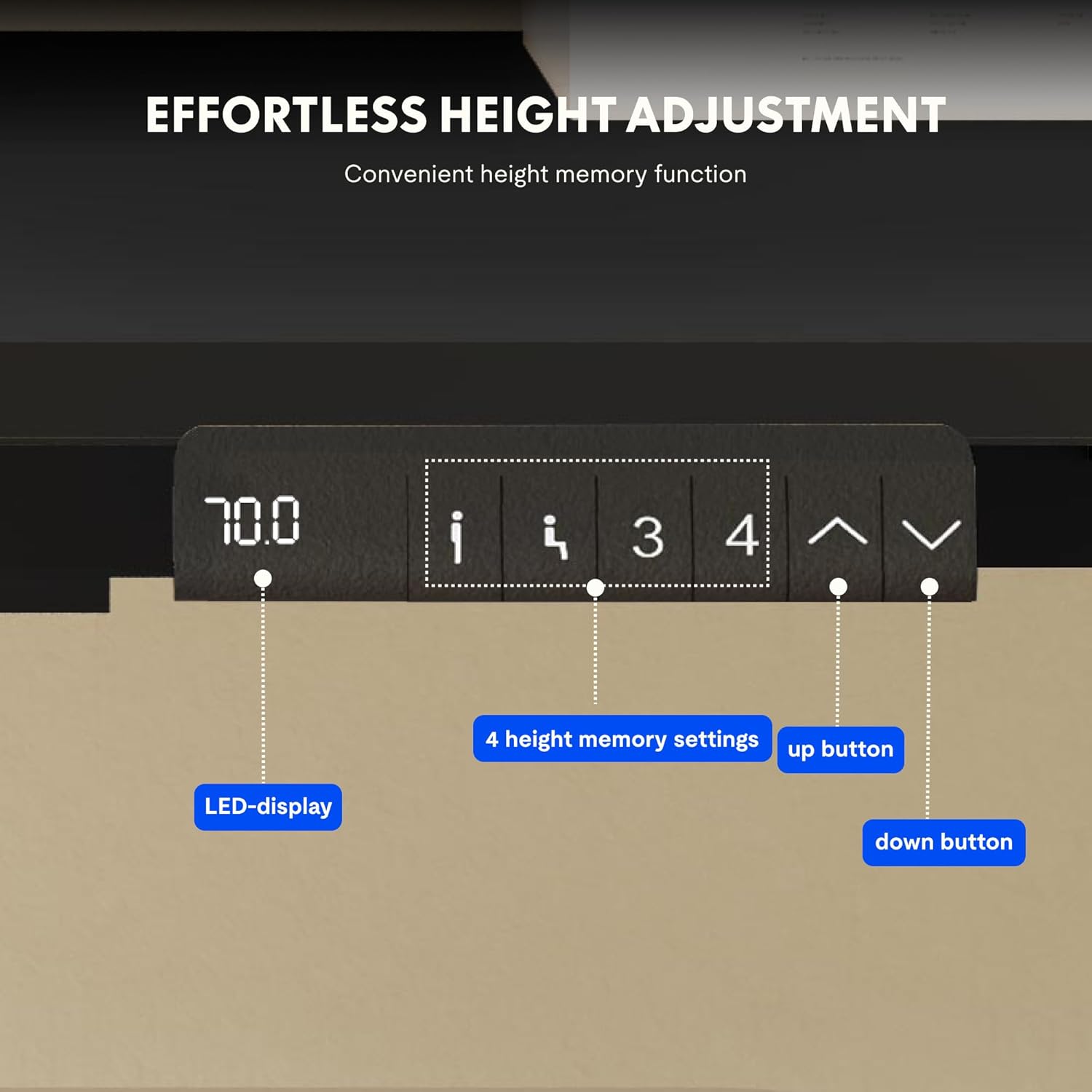
Image: Close-up of the FLEXISPOT desk control panel, showing the LED display for current height, up and down arrow buttons for manual adjustment, and four numbered buttons for saving and recalling height memory presets.
Manual Height Adjustment:
- Druk en hou die Up arrow (^) knoppie om die lessenaar op te lig.
- Druk en hou die Down arrow (v) knoppie om die lessenaar te laat sak.
- Release the button at your desired height. The LED display will show the current height.
Geheuevoorinstellings instel:
- Verstel die lessenaar tot die verlangde hoogte met die pyltjies op/af.
- Druk die "M" or "STEL" knoppie (indien beskikbaar, andersins gaan voort na stap 3).
- Druk een van die genommerde geheueknoppies (1, 2, 3 of 4) within 3 seconds. The display will show "S-" followed by the number, indicating the height is saved.
Recalling Memory Presets:
Simply press the desired numbered memory button (1, 2, 3 of 4Die lessenaar sal outomaties na die gestoorde hoogte beweeg.
Herstel funksie:
If the desk encounters an error or does not move smoothly, a reset may be required. Press and hold the "Af" button until the desk reaches its lowest position, then release and press it again for 5-10 seconds until the display shows "RST" or "E-1" and then returns to the lowest height. The desk will then reset to its factory lowest position.
Onderhoud
- Skoonmaak: Vee die lessenaaroppervlak en raam af met 'n sagte, damp lap. Vermy skuurmiddels of harde chemikalieë.
- Inspeksie: Kontroleer gereeld alle skroewe en verbindings om te verseker dat hulle styf vas is. Draai weer vas indien nodig.
- Kabelbestuur: Ensure cables remain tidy and do not obstruct the desk's movement.
- Gewig verspreiding: Distribute weight evenly on the tabletop to prevent strain on the motors and frame.
Probleemoplossing
| Probleem | Moontlike oorsaak | Oplossing |
|---|---|---|
| Die lessenaar beweeg nie. | Power cable disconnected; control box error; overloaded desk. | Check power connections. Perform a reset (see Operating Instructions). Reduce weight on the desk. |
| Die lessenaar beweeg oneweredig of maak ongewone geluide. | Los verbindings; obstruksie; ongelyke gewigsverspreiding. | Check all screws and connections. Remove any obstructions. Redistribute weight evenly. Perform a reset. |
| Die skerm wys 'n foutkode (bv. E01, E02). | Interne stelselfout. | Perform a reset. If the error persists, contact customer support. |
| Geheue-voorinstellings werk nie. | Voorinstellings nie korrek gestoor nie. | Re-save the memory presets following the instructions. |
Spesifikasies
| Kenmerk | Detail |
|---|---|
| Handelsmerk | FLEXISPOT |
| Modelnommer | E1B+DT1608-BLACK-EU18 |
| Tafelbladafmetings (L x B) | 160 cm x 80 cm |
| Hoogteaanpassingsreeks | 70 cm - 119 cm |
| Laai kapasiteit | 100 kg |
| Aanpassing spoed | 25 mm/s |
| Motor tipe | Dubbele motors |
| Tafelblad materiaal | FSC-certified MDF with high-pressure laminate |
| Raammateriaal | Allooi staal |
| Kleur | Black Tabletop + Black Frame |
Waarborg en Ondersteuning
FLEXISPOT products are manufactured to high-quality standards. For warranty information and customer support, please refer to the official FLEXISPOT webwebwerf of kontak jou handelaar.
- Waarborg: Specific warranty terms may vary by region and product. Please check your purchase documentation or the manufacturer's webwebwerf vir besonderhede.
- Kliëntediens: For technical assistance, missing parts, or operational questions, please visit the FLEXISPOT Brand Store of kontak hul amptelike ondersteuningskanale.