

1. Inleiding
This manual provides comprehensive instructions for the CALYPSO K5818/4 X-trem digital watch. This sporty and functional timepiece is designed for daily wear and various activities, featuring a durable plastic case, a comfortable black plastic strap, and 10 ATM water resistance. Please read this manual carefully to ensure proper use and maintenance of your watch.
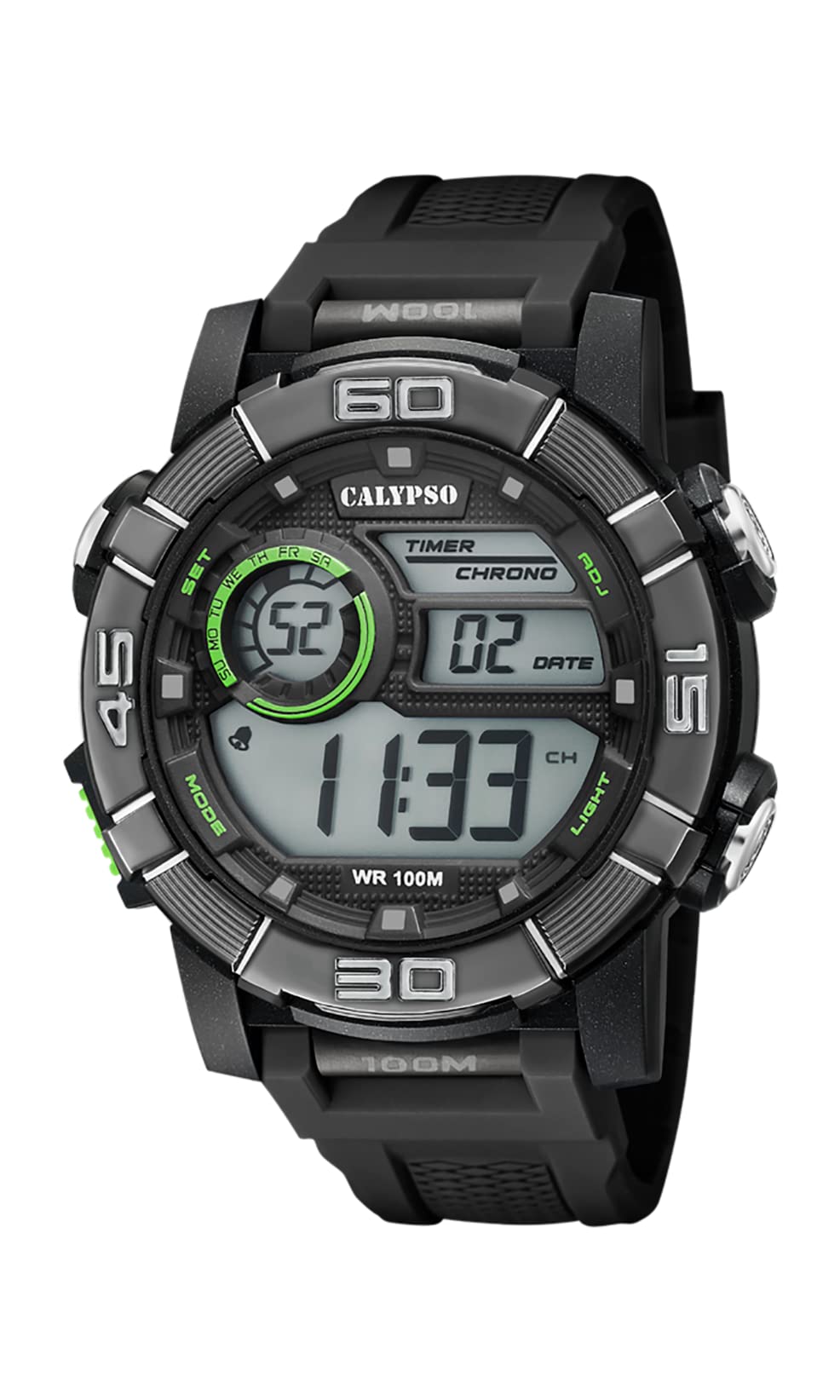
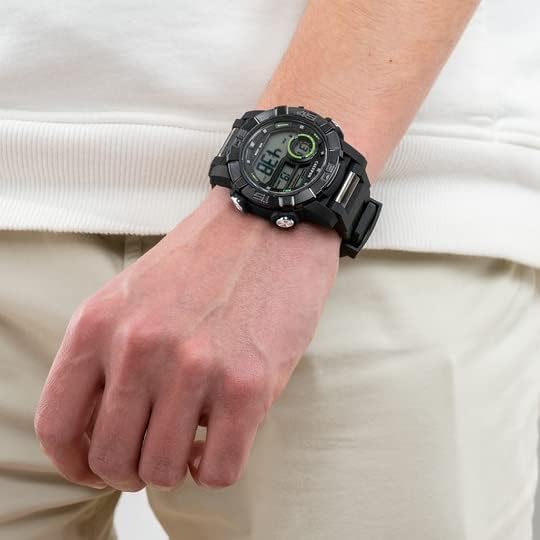
Image 1.1: CALYPSO K5818/4 X-trem Digital Watch on a wrist, showcasing sy ontwerp.
Pakketinhoud:
- CALYPSO K5818/4 X-trem Digital Watch
- Gebruikershandleiding (hierdie dokument)

Image 1.2: The watch is typically supplied in a clear cylindrical packaging.
2. Waak oorview en Knoppiefunksies
Familiarize yourself with the buttons and their functions before operating your watch.
Beeld 2.1: Voorkant view of the watch, highlighting button locations.
- MODE-knoppie (links onder): Cycles through different modes (Time, Chronograph, Alarm).
- SET Button (Left-Top): Used to enter and confirm settings in various modes.
- ADJ Button (Right-Top): Adjusts values during setting, starts/stops chronograph.
- LIGHT Button (Right-Bottom): Aktiveer die agtergrondlig vir beligting.
3. Opstelling en basiese werking
3.1. Stel tyd en datum in
- In Time Mode (normal time display), press and hold the STEL knoppie totdat die sekondes begin flikker. Dit dui aan dat jy in die instellingsmodus is.
- Druk die LIG knoppie om deur die instellings te blaai: Sekondes → Uur → Minuut → Jaar → Maand → Dag → 12/24-uur formaat.
- Gebruik die ADJ knoppie om die flikkerende waarde te verhoog.
- Sodra alle instellings aangepas is, druk die STEL knoppie om die instellingsmodus te verlaat.
3.2. Gebruik van die chronograaf (stophorlosie)
- Vanuit Tydmodus, druk die MODUS button once to enter Chronograph Mode. The display will show '00:00:00'.
- Druk die ADJ knoppie om die stophorlosie te begin.
- Druk die ADJ knoppie weer om die stophorlosie te stop.
- Terwyl die stophorlosie gestop is, druk die STEL button to reset it to '00:00:00'.
- Druk die MODUS knoppie om terug te keer na Tydmodus.
3.3. Stel die alarm in
- Vanuit Tydmodus, druk die MODUS button twice to enter Alarm Mode. The display will show the alarm time.
- Druk en hou die STEL knoppie totdat die uursyfers begin flikker.
- Gebruik die ADJ knoppie om die verlangde alarmuur in te stel.
- Druk die LIG button to move to the minute digits, then use the ADJ om die gewenste alarmminuut in te stel.
- Druk die STEL button to confirm the alarm time and exit setting mode.
- In Alarmmodus, druk die ADJ button to toggle the alarm ON or OFF. An alarm icon will appear/disappear on the display.
3.4. Gebruik van die agterlig
Druk die LIG knoppie te eniger tyd om die skerm vir 'n paar sekondes te verlig, sodat dit sigbaar is in lae ligtoestande.
4. Waterweerstand
Your CALYPSO K5818/4 X-trem watch has a water resistance rating of 10 ATM (100 meters).
- This means the watch is suitable for swimming, snorkeling, and water sports.
- Dit is nie suitable for high-impact water sports or diving.
- Belangrik: Do not operate any buttons while the watch is submerged in water or wet, as this can compromise the water seal and cause damage.
- Na blootstelling aan soutwater, spoel die horlosie met vars water af en droog dit deeglik af.
5. Onderhoud
5.1. Skoonmaak
Om jou horlosie in goeie toestand te hou:
- Vee die horlosiekas en -bandjie gereeld af met 'n sagte, damp lap.
- Avoid using harsh chemicals, solvents, or abrasive cleaners, as these can damage the watch materials.
5.2. Battery vervanging
The watch is powered by a quartz movement with a battery. When the display becomes dim or stops functioning, the battery may need replacement. It is recommended to have the battery replaced by a qualified watch technician to ensure the water resistance seal is properly maintained.
5.3. Berging
When not in use, store your watch in a cool, dry place away from direct sunlight and extreme temperatures.
6. Probleemoplossing
- Display is blank or faint: Die battery is dalk laag of uitgeput. Vervang die battery.
- Tyd is verkeerd: Reset the time and date according to the instructions in Section 3.1.
- Knoppies reageer nie: Ensure the watch is dry. If the issue persists, there may be internal damage, and professional inspection is recommended.
- Kondensasie binne die horlosie: This indicates a breach in the water resistance. Stop using the watch immediately and seek professional service to prevent further damage.
7. Spesifikasies
| Kenmerk | Spesifikasie |
|---|---|
| Modelnommer | K5818/4 |
| Tipe vertoon | Digitaal |
| Beweging Tipe | Kwarts |
| Waterweerstand | 10 OTM (100 meter) |
| Materiaal van die saak | Polycarbonate (Plastic) |
| Bandmateriaal | Polycarbonate (Plastic) |
| Dial Venster Materiaal | Plastiek |
| Kas deursnee | 35 millimeter |
| Bandbreedte | 23 millimeter |
| Kasdikte | 16.3 millimeter |
| Gewig | 40 gram |
| Spesiale kenmerke | 24-hour Display, Chronograph |
8. Waarborg en Ondersteuning
8.1. Vervaardiger se waarborg
Your CALYPSO K5818/4 X-trem watch is covered by a manufacturer's warranty. Please refer to the warranty card included with your purchase or visit the official CALYPSO webwebwerf vir gedetailleerde bepalings en voorwaardes.
8.2. Beskikbaarheid van onderdele
Onderdele vir hierdie model is beskikbaar vir tot 5 jaar vanaf die aankoopdatum.
8.3. Kliëntediens
For any questions, service requests, or technical support, please contact CALYPSO customer service through their official webwebwerf of gemagtigde dienssentrums. Bewaar u aankoopbewys as bewys van aankoop vir waarborgeise.