
1. Inleiding
Thank you for choosing the ARGO Polyfemo Slim Evaporative Cooler. This manual provides important information regarding the safe operation, installation, maintenance, and troubleshooting of your appliance. Please read this manual thoroughly before use and keep it for future reference.
1.1. Veiligheidsinligting
- Maak altyd seker dat die toestel op 'n stabiele, gelyk oppervlak geplaas word.
- Moenie die toestel, koord of prop in water of ander vloeistowwe dompel nie.
- Ontkoppel die toestel van die kragtoevoer voordat u dit skoonmaak, vul of enige onderhoud uitvoer.
- Hou buite bereik van kinders en troeteldiere.
- Moenie die luginlate of -uitlate blokkeer nie.
- Use only clean tap water in the water tank.
- Moenie die toestel gebruik as die koord of prop beskadig is nie, of as die toestel wanfunksioneer of op enige manier beskadig is nie.
2. Produk verbyview
The ARGO Polyfemo Slim is a high-performance evaporative cooler designed for efficient air cooling and circulation. Its patented Vortex System ensures a circular airflow, wide cooling area, and low noise levels.
2.1. Sleutel kenmerke
- Patented VORTEX System: Circular airflow for wide cooling and low noise.
- Hoë lugvloeikapasiteit: Up to 750 m³/h with an effective range of up to 10 meters.
- Slim ontwerp: Only 17 cm deep for minimal space occupation.
- Multiple Ventilation Options: Natural, Normal, and Sleep modes.
- Drie waaiersnelhede: High, Medium, Low.
- Maklike instandhouding: Removable dust filter and honeycomb design for cleaning.
- Gerieflike watertenk: 4-liter capacity with patented opening system for easy removal and filling.
- Intuïtiewe beheer: Large Soft-Touch control panel and remote control.
2.2. Komponente

Figuur 2.1: Voor-links view of the ARGO Polyfemo Slim Evaporative Cooler, showcasing its sleek design and main air outlet.

Figuur 2.2: Kant view of the evaporative cooler, highlighting its slim profile.

Figuur 2.3: Direkte front view of the evaporative cooler, showing the large fan grille and water level indicator.

Figuur 2.4: Ontplof view illustrating the internal fan and removable front grille for maintenance.

Figuur 2.5: Close-up of the Soft-Touch control panel with digital display and various function icons.

Figuur 2.6: Agter view showing the access panel for the dust filter and the removable water tank.
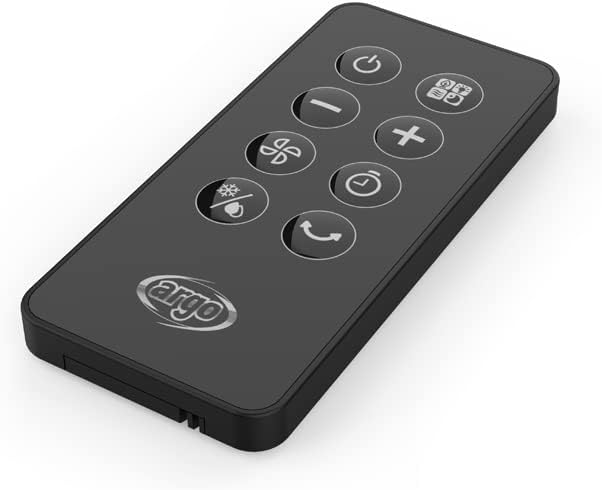
Figuur 2.7: The compact remote control for convenient operation of the evaporative cooler.

Figuur 2.8: Technical drawing indicating the dimensions of the ARGO Polyfemo Slim: 675mm height, 258mm width, 170mm depth.
3. Opstelling
3.1. Uitpak
- Carefully remove the evaporative cooler from its packaging.
- Kontroleer vir enige tekens van skade tydens vervoer. Indien beskadig, moenie dit gebruik nie en kontak kliëntediens.
- Verwyder alle verpakkingsmateriaal, insluitend enige beskermende films of kleefband.
- Ensure all included components are present: the product unit, user manual, warranty card, and synthetic ice board (ice pack).
3.2. plasing
- Place the evaporative cooler on a firm, level surface.
- Maak seker dat daar voldoende spasie rondom die eenheid is vir behoorlike lugvloei (ten minste 20 cm vanaf mure of meubels).
- Moenie die eenheid naby hittebronne of in direkte sonlig plaas nie.
3.3. Vul die watertenk
- Pull out the water tank from the rear of the unit using its patented opening system.
- Fill the tank with clean tap water. Do not exceed the maximum fill line indicated on the tank. The tank capacity is 4 liters.
- For enhanced cooling, place the provided synthetic ice board (ice pack) in the freezer until frozen, then add it to the water tank.
- Skuif die watertenk versigtig terug in die eenheid totdat dit vasklik.
4. Bedryfsinstruksies
The ARGO Polyfemo Slim can be operated using the Soft-Touch control panel on top of the unit or the included remote control.
4.1. Beheerpaneelfunksies
- Kragknoppie: Skakel die eenheid aan/af.
- Modusknoppie: Cycles through operating modes: Normal, Natural, and Sleep.
- Spoedknoppie: Adjusts fan speed: Low, Medium, High.
- Timer-knoppie: Sets the operating timer (e.g., 1-8 hours).
- Cooling/Humidification Button: Aktiveer of deaktiveer die verdampingsverkoelingsfunksie.
- Swaai knoppie: Aktiveer of deaktiveer die ossillasiefunksie vir wyer lugverspreiding.
4.2. Afstandbeheer
The remote control duplicates all functions available on the main control panel, allowing for convenient operation from a distance. Ensure the remote control has working batteries and is pointed towards the unit's receiver.
4.3. Bedryfswyses
- Normale modus: Verskaf 'n konstante lugvloei teen die gekose spoed.
- Natuurlike modus: Simulates natural breeze by varying fan speed intermittently.
- Slaap stelling: Gradually reduces fan speed and dims display lights for quiet operation during sleep.
5. Onderhoud
Gereelde onderhoud verseker optimale werkverrigting en lang lewensduur van jou verdampingskoeler.
5.1. Maak die stoffilter skoon
- Koppel die toestel uit die kragaansluiting.
- Open the rear panel to access the dust filter.
- Verwyder die stoffilter.
- Clean the filter with a soft brush or vacuum cleaner to remove accumulated dust. For thorough cleaning, rinse with water and mild detergent, then allow to air dry completely before reinserting.
- Reinstall the dust filter and close the rear panel.
5.2. Cleaning the Honeycomb Design
The honeycomb design (evaporative pad) should be cleaned periodically to prevent mineral buildup and maintain cooling efficiency.
- Ontkoppel die toestel.
- Remove the water tank and dust filter as described above.
- Carefully remove the honeycomb pad.
- Rinse the honeycomb pad under running water to remove dust and mineral deposits. For stubborn buildup, soak in a solution of water and white vinegar (1:1 ratio) for 30 minutes, then rinse thoroughly.
- Allow the honeycomb pad to dry completely before reassembling.
5.3. Skoonmaak van die watertenk
To prevent mold and mildew growth, clean the water tank regularly.
- Unplug the appliance and remove the water tank.
- Gooi enige oorblywende water leeg.
- Clean the inside of the tank with a soft cloth and mild detergent. You can also use a solution of water and white vinegar to remove mineral deposits.
- Rinse the tank thoroughly with clean water and allow it to air dry before refilling and reinserting.
6. Probleemoplossing
If you encounter issues with your ARGO Polyfemo Slim, please refer to the following common problems and solutions before contacting customer support.
| Probleem | Moontlike oorsaak | Oplossing |
|---|---|---|
| Eenheid skakel nie aan nie. | Geen kragtoevoer. | Kontroleer of die kragkabel stewig in 'n werkende stopcontact ingeprop is. |
| Geen verkoelingseffek nie. | Die watertenk is leeg of die verkoelingsfunksie is af. | Fill the water tank. Ensure the cooling/humidification function is activated. |
| Swak lugvloei. | Dust filter or honeycomb pad is dirty. | Clean the dust filter and honeycomb pad as per maintenance instructions. |
| Ongewone geraas. | Unit not on a level surface; foreign object in fan; water pump issue. | Ensure the unit is on a flat surface. Unplug and check for obstructions. If noise persists, contact support. |
| Afstandbeheer werk nie. | Batterye is pap of verkeerd geplaas. | Replace batteries, ensuring correct polarity. Point remote directly at the unit. |
7. Spesifikasies
| Kenmerk | Spesifikasie |
|---|---|
| Handelsmerk | ARGO |
| Model Naam | POLIFEMO SLIM |
| Modelnommer | ARGO POLIFEMO SLIM |
| Kleur | Wit |
| Produkafmetings (L x B x H) | 17 x 25 x 67 cm |
| Item gewig | 4.44 kilogram |
| Voltage | 230 Volt |
| Montage tipe | Vloerberging |
| Spesiale kenmerk | Draagbaar |
| Lugvloeikapasiteit | 750 CMPH (Kubieke Meter Per Uur) |
| Tipe beheer | Raak Beheer |
| Tenk kapasiteit | 4 liter |
| Ingesluit komponente | Product unit, User Manual, Warranty, Synthetic Ice Board |
8. Waarborg en Ondersteuning
Your ARGO Polyfemo Slim Evaporative Cooler comes with a manufacturer's warranty. Please refer to the included warranty card for specific terms and conditions, including the warranty period and coverage details.
For technical assistance, troubleshooting beyond this manual, or warranty claims, please contact ARGO customer support. Contact information can typically be found on the manufacturer's webwebwerf of op die waarborgkaart.