
ARGO ARGO POLIFEMO BEAR
Argo Polyphemo Bear Evaporative Cooler User Manual
Model: ARGO POLIFEMO BEAR
Inleiding
This manual provides important information for the safe and efficient operation of your Argo Polyphemo Bear Evaporative Cooler. Please read this manual thoroughly before using the appliance and keep it for future reference.
The Argo Polyphemo Bear is designed to provide effective cooling and air purification through its evaporative cooling system. It features an intuitive LED control panel and a convenient remote control for ease of use.
Produk verbyview
The Argo Polyphemo Bear Evaporative Cooler is a compact and efficient appliance designed for cooling rooms or personal areas. It features a pure white, glossy finish and is equipped with multi-directional wheels for easy portability.

Figuur 1: Voorkant view of the Argo Polyphemo Bear Evaporative Cooler, showing the air outlet grille and water level indicator.

Figuur 2: Top view of the control panel, featuring LED indicators and various function buttons.
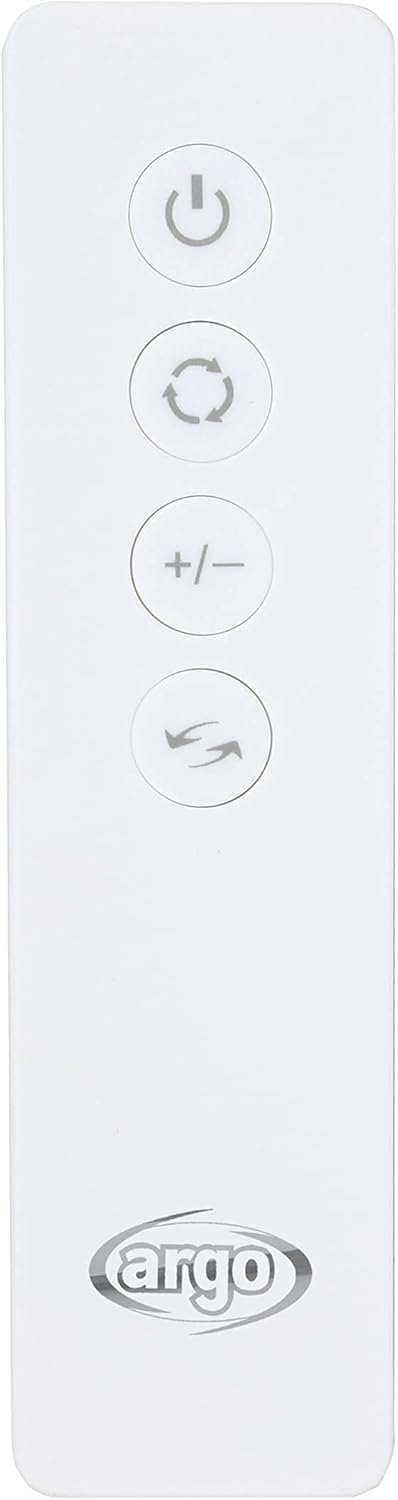
Figuur 3: The infrared remote control, allowing convenient operation from a distance.

Figuur 4: Product dimensions: 70cm height, 29cm depth, 30cm width.
Veiligheidsinstruksies
Volg altyd basiese veiligheidsmaatreëls wanneer elektriese toestelle gebruik word om die risiko van brand, elektriese skok en beserings aan persone te verminder.
- Verseker die kragtoevoer voltage stem ooreen met die toestel se gradering.
- Moenie die toestel, koord of prop in water of ander vloeistowwe dompel nie.
- Trek die prop uit die stopcontact wanneer dit nie gebruik word nie, voordat jy onderdele aan- of afhaal, en voor skoonmaak.
- Moenie enige toestel gebruik met 'n beskadigde koord of prop, of nadat die toestel wanfunksioneer of op enige manier beskadig is nie.
- Hou die toestel buite bereik van kinders.
- Moenie luginlate of -uitlate blokkeer nie.
- Gebruik slegs op 'n plat, stabiele oppervlak.
- Moenie buite gebruik nie.
Opstelling
- Uitpak: Carefully remove the evaporative cooler from its packaging. Retain packaging for future storage or transport.
- Posisionering: Place the unit on a flat, stable surface. Ensure there is adequate space around the unit for proper airflow. The multi-directional wheels allow for easy movement.
- Vul die watertenk:
- Locate the removable 5-liter water tank at the bottom of the unit.
- Pull out the tank gently.
- Fill the tank with clean tap water. Do not exceed the "MAX" fill line.
- For enhanced cooling, you may add the included synthetic ice board (after freezing) into the water tank.
- Carefully slide the water tank back into its position until it clicks securely.

Figuur 5: View of the water tank compartment, showing the removable tank and pump mechanism.
- Kragverbinding: Steek die kragsnoer in 'n geskikte elektriese aansluiting.
Bedryfsinstruksies
The unit can be operated using the control panel on top of the unit or the infrared remote control.
Beheerpaneel funksies:
Figuur 6: Control panel layout with function icons.
- Kragknoppie (⏻): Druk om die eenheid AAN of AF te skakel.
- Modusknoppie (↻): Cycle through ventilation modes: Normal, Natural, Sleep.
- Spoedknoppie (☰): Adjust fan speed: Low, Medium, High.
- Timer-knoppie (⏱): Set the operating timer (1-7 hours). The unit will automatically turn off after the set time.
- Ossillasieknoppie (⇆): Activate or deactivate automatic vertical oscillation of the air flaps. Horizontal flaps can be adjusted manually.
- Verkoeling/Bevogtigingsknoppie (❄): Activates the evaporative cooling function. Ensure water tank is filled.
Afstandbeheer:
The remote control duplicates most functions of the control panel for convenient operation. Ensure the remote control is pointed towards the unit's receiver.
Figuur 7: Remote control buttons.
- Kragknoppie: Skakel die eenheid AAN/UIT.
- Modusknoppie: Cycles through Normal, Natural, Sleep modes.
- Spoedknoppies (+/-): Adjusts fan speed up or down.
- Ossilasie -knoppie: Controls vertical oscillation.
- Verkoelingsknoppie: Activates cooling function.
Onderhoud
Regular maintenance ensures optimal performance and extends the lifespan of your evaporative cooler. Always unplug the unit before performing any maintenance.
- Watertenk skoonmaak:
- The 5-liter water tank is easily removable for cleaning.
- Empty any remaining water and rinse the tank with clean water.
- For thorough cleaning, use a mild detergent and a soft brush. Rinse thoroughly to remove all detergent residue.
- Laat die tenk heeltemal lugdroog word voordat dit weer teruggeplaas word.
- Filter skoonmaak:
The unit features a double filter system: a dust filter and a honeycomb evaporation panel. Both are easily removable for cleaning.

Figuur 8: Agter view with the filter panel visible.
- Locate the filter panel at the rear of the unit.
- Gently remove the dust filter and the honeycomb evaporation panel.
- Rinse both filters under running water to remove dust and debris. For stubborn dirt, use a soft brush.
- Laat die filters heeltemal lugdroog voordat dit weer in die eenheid geplaas word.
- Clean filters regularly, especially in dusty environments, to maintain air quality and cooling efficiency.
- Buitenste skoonmaak: Vee die buitekant van die eenheid af met 'n sagte, damp lap. Moenie skuur skoonmaakmiddels of oplosmiddels gebruik nie.
Probleemoplossing
| Probleem | Moontlike oorsaak | Oplossing |
|---|---|---|
| Eenheid skakel nie aan nie. | Geen kragtoevoer nie; Aan/uit-knoppie nie gedruk nie. | Check power cord connection; Ensure outlet is functional; Press the power button. |
| Geen verkoelingseffek nie. | Water tank empty; Cooling function not activated; Filters are dirty. | Fill water tank; Press the cooling button; Clean the dust filter and honeycomb panel. |
| Swak lugvloei. | Air inlets/outlets blocked; Filters are dirty; Fan speed set too low. | Clear any obstructions; Clean filters; Increase fan speed. |
| Ongewone geraas. | Unit not on a flat surface; Water pump issue; Foreign object inside. | Place on a stable surface; Check water level; Inspect for foreign objects (unplug first). If problem persists, contact support. |
| Afstandbeheer werk nie. | Batterye pap of verkeerd geplaas; Obstruksie tussen afstandbeheerder en eenheid. | Replace batteries; Ensure correct polarity; Remove obstructions; Point remote directly at unit. |
Indien die probleem voortduur nadat u hierdie oplossings probeer het, kontak asseblief kliëntediens.
Spesifikasies
| Handelsmerk | ARGO |
| Modelnommer | ARGO POLIFEMO BEAR |
| Model Naam | Polifemo Bear |
| Kleur | Wit |
| Produkafmetings (L x B x H) | 29 x 30 x 70 cm |
| Item gewig | 6.1 kilogram |
| Voltage | 230 Volt (2.3E+2 Volt) |
| Aantal spoedvlakke | 3 |
| Tipe beheer | Remote Control, Control Panel |
| Tenk kapasiteit | 5 liter |
| Montage tipe | Vloerberging |
| Aanbevole gebruik | Cooling rooms or personal areas |
| Ingesluit komponente | Product, User Manual, Warranty Card, Synthetic Ice Board |
Waarborg en Ondersteuning
Your Argo Polyphemo Bear Evaporative Cooler comes with a manufacturer's warranty. Please refer to the included warranty card for specific terms and conditions, including warranty period and coverage details.
For technical support, service, or questions regarding your product, please contact Argo customer service. Contact information can typically be found on the warranty card or the official Argo webwebwerf.
Behou asseblief jou aankoopbewys vir waarborgeise.
Ask a question about this manual
Ask about setup, troubleshooting, compatibility, parts, safety, or missing instructions. Manuals+ will review the question and use this page’s manual context to help answer it.