The Laser DVD CD Player HD012 is a versatile multi-region player designed to provide a comprehensive home entertainment experience. It supports a wide array of disc and digital media formats, ensuring compatibility with your existing media library. Equipped with HDMI and AV outputs, it offers flexible connectivity options for various television setups. Its compact design and user-friendly interface make it an ideal addition to any home cinema system.
Image: The Laser DVD CD Player HD012, a sleek black unit, is shown with its remote control resting on top. The player features a disc tray, USB port, and a digital display.
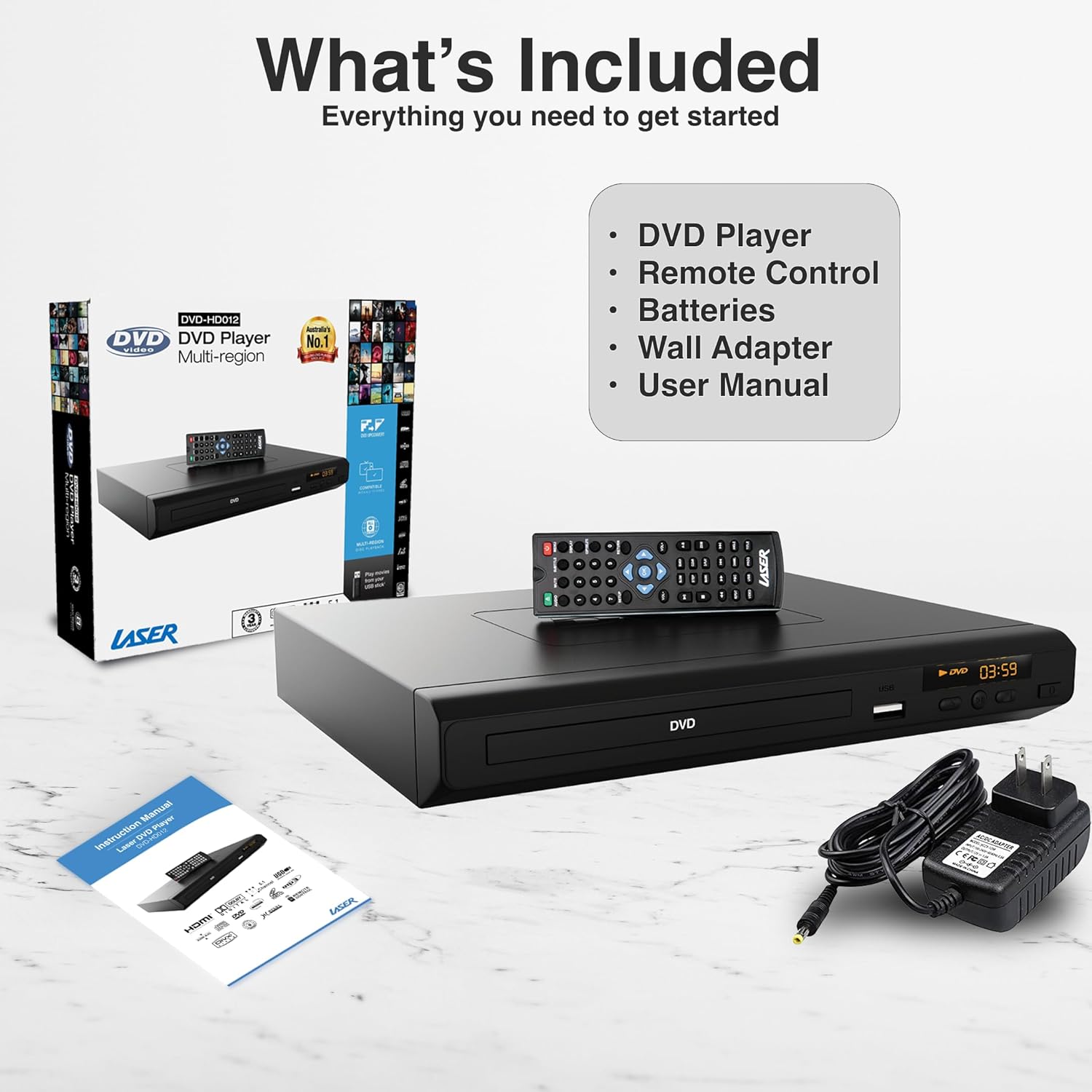
Wat is ingesluit
Upon unboxing your Laser DVD CD Player HD012, please verify that all the following components are present:
DVD Player (Model: DVD-HD012)
Afstandbeheer
Wall Adapter (Power Supply)
Gebruikershandleiding (hierdie dokument)
Note: Batteries for the remote control are not included and must be purchased separately.
Image: A visual representation of the items included in the product package: the DVD player, its remote control, a wall power adapter, and the user manual, alongside the product packaging box.
Opstelgids
1. Connecting the Player to Your Television
The Laser DVD CD Player HD012 offers multiple connectivity options to suit your television setup:
HDMI Connection (Recommended for High Definition): For the best audio and video quality, connect an HDMI cable (not included) from the HDMI OUT port on the DVD player to an available HDMI IN port on your television. This single cable transmits both digital video and audio signals.
RCA Composite Connection (Standard Definition): If your television does not have an HDMI port, or if you prefer an analog connection, use an RCA composite cable (not included). Connect the yellow video cable to the VIDEO OUT port on the DVD player and the yellow VIDEO IN port on your TV. Connect the red and white audio cables to the AUDIO OUT (R/L) ports on the DVD player and the corresponding red and white AUDIO IN (R/L) ports on your TV.
Image: An illustration demonstrating the HDMI output capability of the DVD player, showing a television screen displaying content and the DVD player connected via an HDMI cable, emphasizing high-definition video from a single cable.
2. Powering On the Player
Connect the provided wall adapter to the DC IN port on the back of the DVD player.
Plug the wall adapter into a standard electrical outlet.
Druk die KRAG button on the front of the DVD player or on the remote control to turn the unit on. The display will illuminate.
Select the correct input source (HDMI or AV) on your television using your TV's remote control.
Bedryfsinstruksies
1. Skyfweergawe
Ensure the player is powered on and connected to your TV.
Druk die OOP/TOUS knoppie op die voorpaneel of afstandbeheerder om die skyflaai oop te maak.
Carefully place a DVD or CD disc onto the tray with the label side facing up.
Druk die OOP/TOUS druk weer op die knoppie om die laai toe te maak. Die speler sal outomaties die skyf begin lees.
Use the remote control's SPEEL/POUSEER, STOP, SPOEL TERUG, en SPOORT VORENTOE knoppies om afspeel te beheer.
Image: The DVD player and remote are shown with text indicating support for various video and additional media formats, including DVD-RW, VCD, CD-R, DivX, MP3, JPEG, AVI, MPEG, MPEG4, VOB, and FLV.
2. USB-mediaterugspeel
The player supports playback of digital media files from USB memory devices.
Steek jou USB-geheuestokkie in die USB-poort aan die voorkant van die DVD-speler.
The player should automatically detect the USB device and display a menu for selecting media types (e.g., Photo, Music, Movie).
Navigeer deur die dopgehou en files using the arrow keys on the remote control and press ENTER te kies.
Druk SPEEL om die terugspeel van die gekose te begin file.
3. Afstandbeheer funksies
The included IR remote control provides full functionality for operating your DVD player. Key buttons include:
KRAG: Skakel die speler aan of af.
OOP/SLUIT: Maak die skyfbak oop en toe.
SPEEL/POUSIE: Begin of laat wag die afspeel.
STOP: Stop afspeel.
VORIGE/VOLGENDE: Skips to the previous or next chapter/track.
REW/FF: Rewinds or fast forwards through content.
VOL +/-: Adjusts the volume (if connected directly to an audio system or TV via analog output).
STEL OP: Kry toegang tot die stelselinstellingskieslys.
TITEL/SPYSKAART: Accesses the disc title or main menu.
USB: Switches input to USB mode.
4. Region-Free Playback
This DVD player is designed to be multi-region (region-free), allowing you to play DVDs from any region worldwide (Region 0-6). This feature ensures broad compatibility with your international DVD collection.
Image: The DVD player and remote are depicted against a global map background, highlighting its "Region-Free Playback" capability, allowing users to enjoy DVDs from any part of the world, supporting both PAL and NTSC formats.
5. Supported Media Formats
The Laser DVD CD Player HD012 supports a wide range of disc and digital media formats:
The player also features built-in Anti-Shock and Error-Correction technologies to ensure uninterrupted viewluister- en luistergenot.
Image: A living room setup showing the DVD player connected to a large television displaying a movie in Full HD 1080p, indicating an immersive audiovisual experience with Dolby 7.1 Surround Sound support.
Onderhoud
To ensure the longevity and optimal performance of your Laser DVD CD Player HD012, follow these maintenance guidelines:
Maak die eenheid skoon: Use a soft, dry cloth to wipe the exterior of the player. Do not use liquid cleaners, abrasive cleaners, or chemical sprays, as these can damage the finish.
Skyfversorging: Handle discs by their edges. Keep discs clean and free of dust, fingerprints, and scratches. Use a soft, lint-free cloth to wipe discs from the center outwards if cleaning is necessary.
Ventilasie: Ensure the player is placed in a well-ventilated area. Do not block any ventilation openings on the unit. Avoid placing it on soft surfaces like carpets or blankets that could obstruct airflow.
Berging: When not in use for extended periods, disconnect the power adapter and store the player in a cool, dry place away from direct sunlight and extreme temperatures.
Probleemoplossing
If you encounter issues with your DVD player, please refer to the following common problems and their solutions:
Probleem
Moontlike oorsaak/oplossing
Geen krag nie
Ensure the power adapter is securely connected to the player and the electrical outlet.
Kontroleer of die kragaansluiting funksioneel is deur 'n ander toestel in te prop.
Druk die AAN/UIT-knoppie op die speler of afstandbeheerder.
Geen beeld op TV nie
Verify that the HDMI or RCA cables are securely connected to both the player and the TV.
Ensure your TV is set to the correct input source (e.g., HDMI 1, AV).
Check if the disc is inserted correctly and is not damaged.
Geen klank nie
Check audio cable connections (HDMI or RCA).
Increase the volume on your TV or audio receiver.
Ensure the player's volume is not muted or set too low.
Verify the audio settings in the player's setup menu.
Skyf speel nie / "Geen skyf" fout
Maak seker dat die skyf skoon en vry van skrape of vlekke is.
Verifieer dat die skyf korrek geplaas is met die etiketkant na bo.
Check if the disc format is supported by the player (refer to Supported Media Formats section).
Afstandbeheer werk nie
Ensure fresh batteries are installed correctly (polarity).
Point the remote directly at the player's IR sensor.
Verwyder enige hindernisse tussen die afstandbeheerder en die speler.
Indien die probleem voortduur nadat u hierdie oplossings probeer het, kontak asseblief kliëntediens.
Tegniese spesifikasies
Kenmerk
Detail
Handelsmerk
Laser
Model
DVD-HD012
Versoenbare toestelle
Televisie
Ondersteunde mediasoorte
CD, DVD, VCD (and various digital formats via USB as listed above)
Up to 3840x2160 (4K) via HDMI (for compatible media and display)
Kragbron
Elektries met koord
Produkafmetings (L x B x H)
22 x 18 x 4.5 cm
Item gewig
742 gram
Waarborg en Ondersteuning
Your Laser DVD CD Player HD012 comes with a 3 jaar waarborg from the date of purchase, providing peace of mind regarding its quality and performance. This warranty covers manufacturing defects and ensures reliable operation under normal use conditions.
For warranty claims, technical assistance, or any inquiries regarding your product, please contact Laser customer support. Keep your proof of purchase (receipt or invoice) readily available as it will be required for any warranty service.
For the most up-to-date support information, including contact details and FAQs, please visit the official Laser webwebwerf of verwys na die kontakinligting wat saam met u aankoopdokumentasie verskaf is.
Ask a question about this manual
Ask about setup, troubleshooting, compatibility, parts, safety, or missing instructions. Manuals+ will review the question and use this page’s manual context to help answer it.