
1. Opstelling
1.1 Uitpak en Pakketinhoud
Carefully remove the television and all components from the packaging. Verify that all items listed below are present:
- LG 70-Inch Class UQ9000 Series 4K Smart TV
- Magiese afstandbeheer
- Afstandbeheerbatterye (AA x 2)
- TV-staanplek
- Kragkabel
- Vinnige Begingids
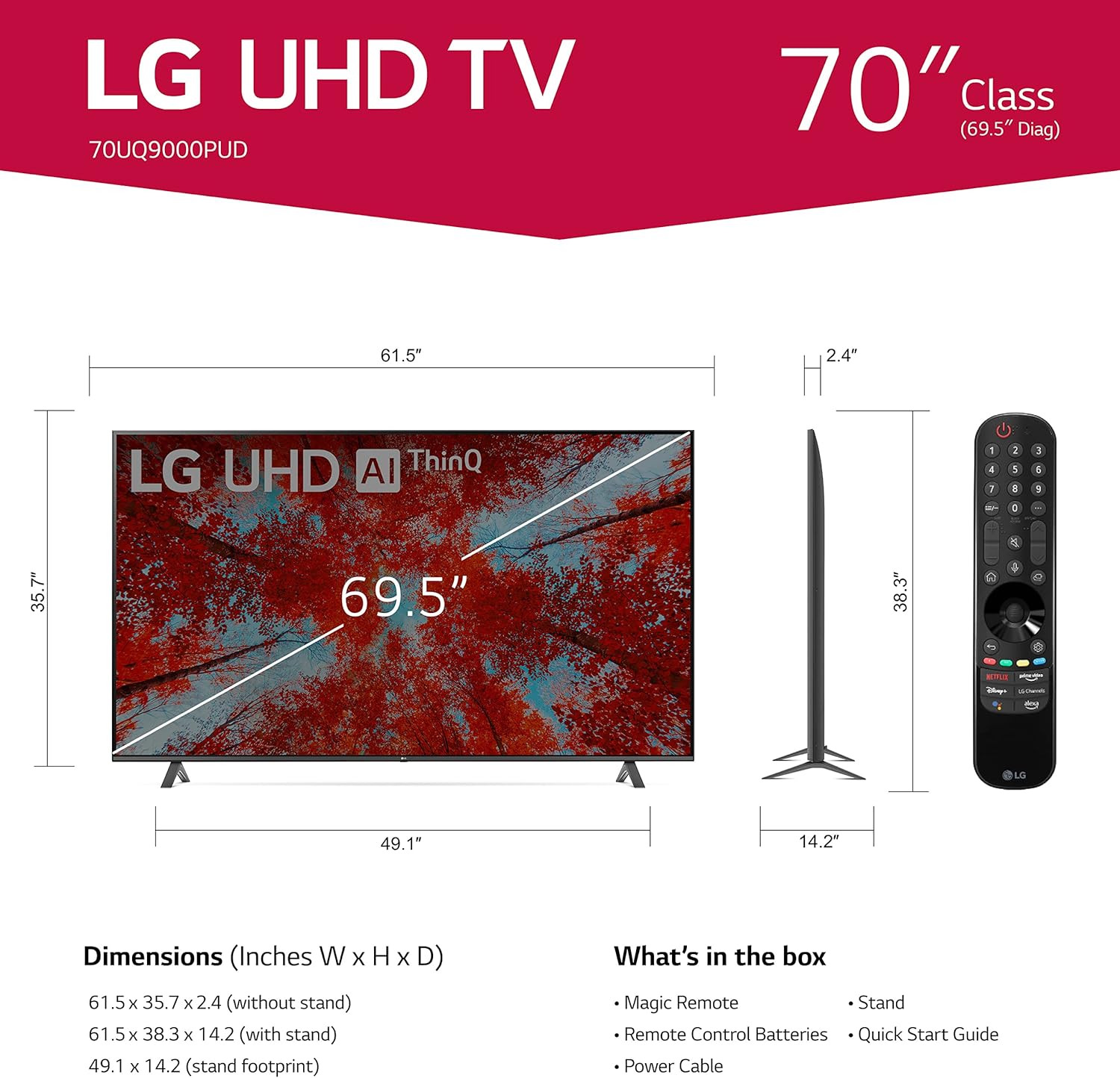
Image 1.1: LG 70UQ9000PUD TV with dimensions, Magic Remote, and a list of included accessories.
1.2 Fisiese installasie
The television can be installed using the included stand or mounted on a wall.
Staan installasie:
- Attach the stand components to the bottom of the TV using the provided screws.
- Ensure the stand is securely fastened before placing the TV on a stable, flat surface.
Muurmontering:
For wall mounting, use a VESA compatible mount with a 400 x 400 mm standard. Consult a professional for wall mounting to ensure proper and safe installation.
1.3 Eksterne Toestelle Koppel
Connect your external devices to the TV's ports. The LG 70UQ9000PUD features multiple connectivity options:
- HDMI-poorte (x3): For connecting devices such as gaming consoles, Blu-ray players, and set-top boxes.
- USB-poorte (x2): Vir die koppeling van USB-bergingstoestelle of ander versoenbare randapparatuur.
- LAN-poort: Vir 'n bedrade internetverbinding.
- Optiese Digitale Oudio Uit: Vir die koppeling aan eksterne klankstelsels.
- Antenne/Kabel In: Vir die koppeling van 'n antenna- of kabeltelevisiesein.
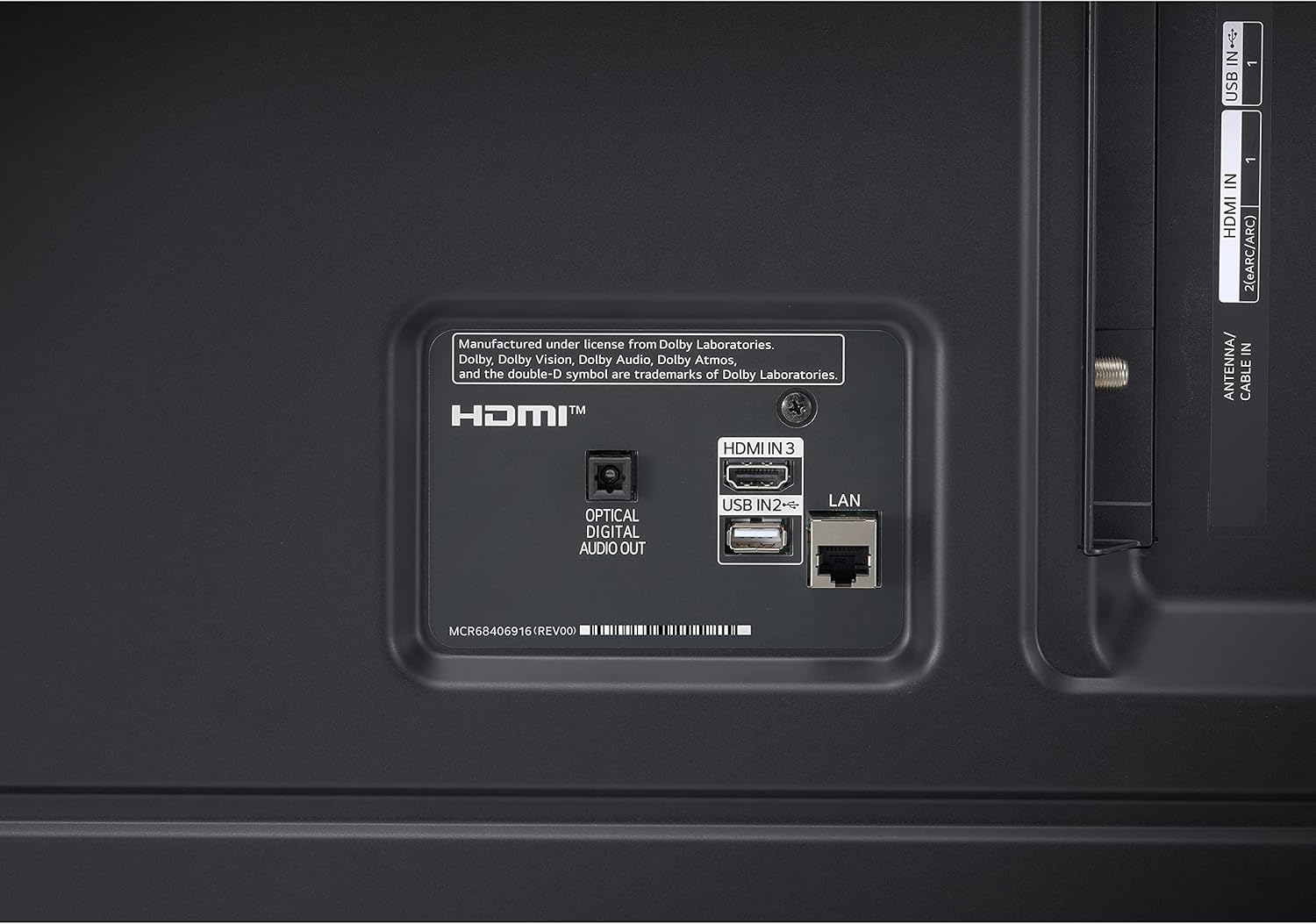
Image 1.2: Rear panel connections showing HDMI, USB, LAN, and Optical Digital Audio Out ports.
1.4 Aanvanklike aanskakeling en basiese instellings
- Koppel die kragkabel aan die TV en 'n kragaansluiting.
- Druk die aan/uit-knoppie op die afstandbeheerder of die TV.
- Follow the on-screen instructions to complete the initial setup, including language selection, network connection (Wi-Fi or LAN), and channel scanning.
2. Bedryfsinstruksies
2.1 Gebruik van die Magic-afstandbeheerder
The LG Magic Remote allows for intuitive control of your TV. It supports point, click, scroll, and voice commands.

Image 2.1: The LG Magic Remote, designed for easy navigation and voice control.
Sleutel kenmerke:
- Wys: Point the remote at the screen to move the on-screen cursor.
- Klik: Druk die skuifwiel (OK-knoppie) om items te kies.
- Rollees: Use the scroll wheel to move through menus and web bladsye.
- Stembeheer: Press and hold the microphone button to activate voice commands for searching content or controlling TV functions.

Image 2.2: Using the Magic Remote for intuitive control, including voice commands.
2.2 Slim-TV-funksies (webOS with ThinQ AI)
The LG UQ9000 Series TV runs on webOS, providing a user-friendly interface for accessing various smart features and applications. ThinQ AI integrates artificial intelligence for enhanced control and personalized experiences.
Video 2.1: This video demonstrates the LG webOS-koppelvlak, wysasing gebruiker profiles and personalized recommendations for a customized viewondervinding.
Key Smart Features:
- Gepersonaliseerde Aanbevelings: webOS leer jou viewing habits to suggest content.
- Ingeboude stroomtoepassings: Access popular services like Netflix, Prime Video, Apple TV app, Disney+, HBO Max, and over 300+ free LG Channels.
- Alexa ingeboude: Use voice commands to control your TV and smart home devices.
Video 2.2: This video highlights various LG UHD TV features, including the α5 Gen5 AI Processor 4K, AI Brightness, and AI Sound, enhancing picture and audio quality.
2.3 Beeld- en klankverbetering
The TV incorporates advanced technologies to optimize your viewluister- en luisterervaring.
- α5 Gen5 KI-verwerker 4K: Verbeter beeld- en klankgehalte deur kunsmatige intelligensie.
- 4K Opskaling: Verander inhoud met laer resolusie na amper 4K-gehalte vir skerper detail.
- KI-helderheidsbeheer: Automatically adjusts screen brightness based on ambient room lighting.
- HDR Format Support: Compatible with HDR10 and HLG for improved contrast and color.
- Filmmaker-modus: Bewaar die regisseur se oorspronklike kleure, instellings en raamtempo's vir 'n outentieke filmervaring.
- AI Sound Pro: Automatically up-mixes 2-channel audio into virtual 5.1.2 channel sound for an immersive audio experience.

Image 2.3: AI Brightness Control automatically adjusts screen brightness to match room conditions.
2.4 Speletjie-kenmerke
The TV offers features designed to enhance the gaming experience.
- Wolkspeletjies: Access games directly from the cloud (GeForce Now compatible, subscription and compatible controller may be required).
- Speloptimaliseerder en dashboard: Centralized settings for quick adjustments to game-specific parameters.
- HGiG: Delivers realistic HDR gaming with optimized tone mapping.

Image 2.4: Game Optimizer and Dashboard for quick adjustment of gaming settings.
2.5 Sportwaarskuwing
Receive real-time updates for your favorite teams and matches, ensuring you never miss important sports moments.

Image 2.5: Sports Alert feature providing real-time updates for ongoing matches.
3. Onderhoud
3.1 Skoonmaak van die TV
- Skerm: Vee die skerm liggies af met 'n sagte, droë mikrofiberdoek. Vir hardnekkige merke, vee liggies afampMaak die lap skoon met water of 'n gespesialiseerde skermreiniger. Vermy harde chemikalieë.
- Raam en Staan: Gebruik 'n sagte, droë lap om stof van die TV-raam en -staander af te vee.
- Ventilasie: Maak seker dat die ventilasie-openinge aan die agterkant van die TV nie geblokkeer is om oorverhitting te voorkom nie.
3.2 Sagteware-opdaterings
The TV may receive regular software updates to improve performance, add new features, and enhance security. It is recommended to allow these updates to install when prompted to ensure optimal functionality.
3.3 Vervanging van afstandbeheerbattery
The Magic Remote requires two AA batteries. Replace them when the remote's performance diminishes.
- Maak die deksel van die batterykamer aan die agterkant van die afstandbeheerder oop.
- Verwyder die ou batterye.
- Plaas twee nuwe AA-batterye in en maak seker dat die polariteit (+/-) korrek is.
- Maak die batterykompartement se deksel toe.
4. Probleemoplossing
If you encounter issues with your LG 70UQ9000PUD TV, refer to the following common troubleshooting steps:
- Geen krag: Maak seker dat die kragkabel stewig aan beide die TV en die kragaansluiting gekoppel is. Kontroleer of die aansluiting werk deur 'n ander toestel in te prop.
- Geen Beeld/Klank: Verifieer dat die korrekte invoerbron gekies is. Kontroleer alle kabelverbindings (HDMI, antenna, ens.) vir losheid of skade.
- Afstandbeheer werk nie: Vervang die batterye in die Magic Remote. Maak seker daar is geen obstruksies tussen die afstandbeheerder en die TV nie.
- Netwerkverbindingsprobleme: For Wi-Fi, restart your router and modem. For wired connections, ensure the LAN cable is properly connected. You can also try resetting network settings on the TV.
- Probleme met beeldkwaliteit: Pas beeldinstellings (helderheid, kontras, kleur) in die TV-kieslys aan. Maak seker dat die inhoudbron van hoë gehalte is.
For more detailed troubleshooting or persistent issues, consult the full electronic manual available through the TV's settings or contact LG customer support.
5. Spesifikasies
| Kenmerk | Spesifikasie |
|---|---|
| Modelnommer | 70UQ9000PUD |
| Handelsmerk | LG |
| Skerm grootte | 69.5 duim (70-duim klas) |
| Vertoon tegnologie | LED |
| Resolusie | 4K (3840 x 2160) |
| Herlaaitempo | 60 Hz |
| Verwerker | α5 Gen5 KI-verwerker 4K |
| Bedryfstelsel | webOS |
| Stemassistent | Alexa ingeboude |
| Verbindingstegnologie | Bluetooth 5.0, Wi-Fi |
| HDMI-poorte | 3 |
| USB-poorte | 2 |
| Produk Afmetings (D x B x H) | 14.2" D x 61.5" B x 38.3" H |
| VESA-monteringsstandaard | 400 x 400 mm |
| Kragverbruik | 22 Watt |
| Afstandbeheerbatterye | 2 AA batterye |
| UPC | 195174030073 |
6. Waarborginligting
This LG TV is covered by a Manufacturer’s Warranty. For specific details regarding warranty coverage, duration, and terms, please refer to the warranty card included with your product or visit the official LG webwebwerf. Bewaar u bewys van aankoop vir waarborgeise.
7. Kliëntediens
For further assistance, technical support, or service inquiries, please contact LG Customer Support. You can find contact information on the official LG webwebwerf of in die dokumentasie wat saam met jou televisie voorsien word.
Aanlyn hulpbronne: Besoek die LG-ondersteuning website for FAQs, software downloads, and detailed product manuals.
Telefoniese ondersteuning: Refer to your product documentation for regional customer service numbers.