
1. Inleiding
The Waveshare ESP32-S2 MCU WiFi Development Board is a compact and versatile module designed for Internet of Things (IoT) applications. It features an ESP32-S2FH4 Xtensa single-core 32-bit LX7 microcontroller, operating at up to 240 MHz, and includes an integrated 0.96-inch IPS LCD. This board supports the Raspberry Pi Pico expansion board ecosystem, offering extensive peripheral interfaces and low-power Wi-Fi capabilities for various development projects.
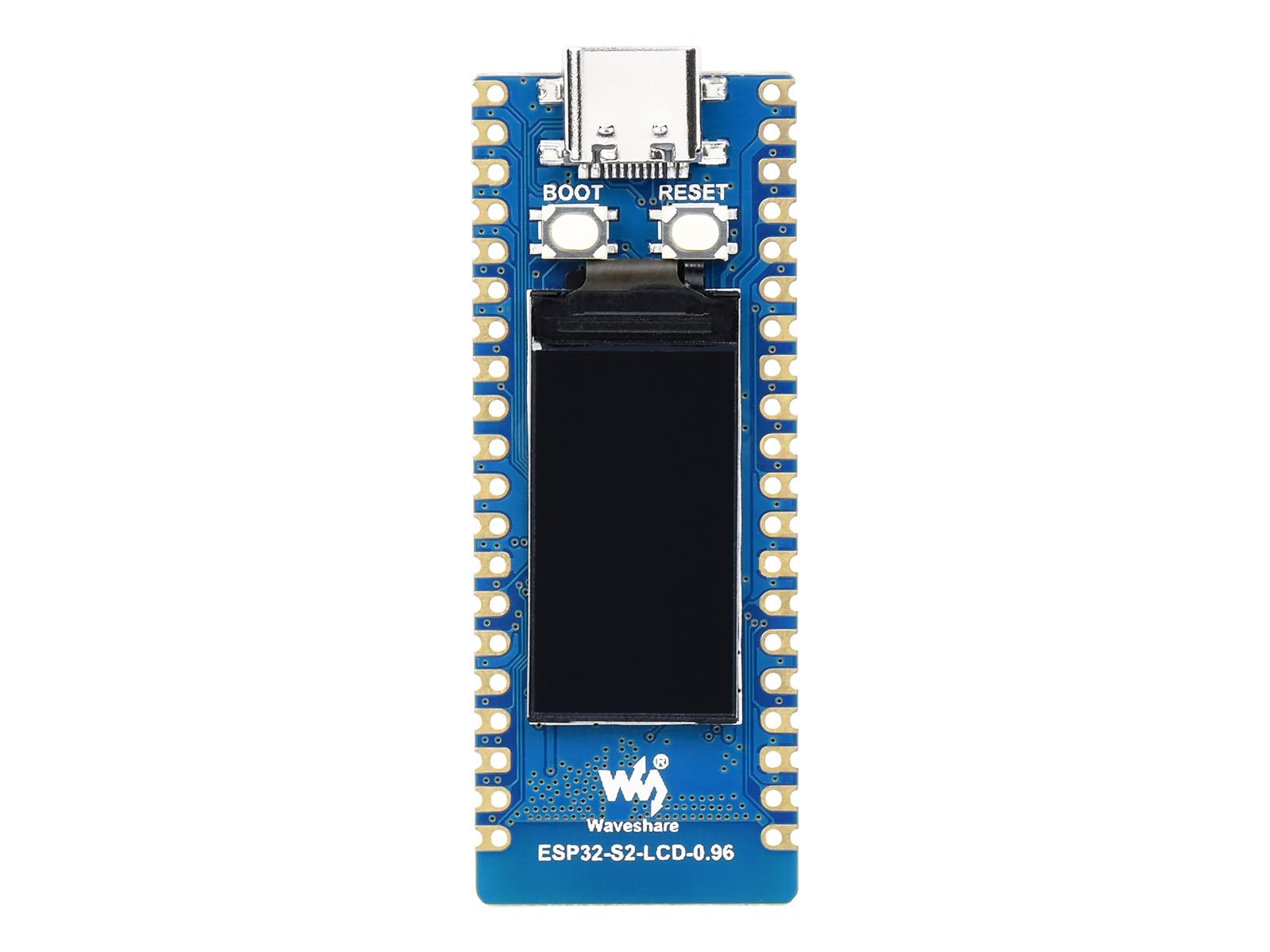
Figuur 1: Bo view of the ESP32-S2 MCU WiFi Development Board with 0.96-inch IPS LCD.
2. Sleutel kenmerke
- mikrobeheerders: Xtensa single-core 32-bit LX7 microprocessor (ESP32-S2FH4), up to 240 MHz.
- Geheue: Integrated 320KB SRAM, 128KB ROM, 8MB PSRAM, 4MB Flash memory.
- Draadlose konneksie: 2.4 GHz WiFi (IEEE802.11 b/g/n) with on-board ceramic antenna, up to 150 Mbps data transfer rate.
- Vertoon: On-board 0.96-inch 160×80 pixels 65K color IPS LCD.
- USB-koppelvlak: USB-C connector for power and data, with on-chip integrated full-speed USB OTG interface.
- Kragbestuur: On-board 1.8A high-efficiency boost/buck DC-DC TPS63000 power supply IC.
- Batteryondersteuning: On-board 3.7V lithium battery charge/discharge header for mobile applications.
- Uitbreiding: Supports Raspberry Pi Pico expansion board ecosystem.
- Sekuriteit: Equipped with hardware crypto accelerator, RNG, HMAC, and Digital Signature module.
- Randapparatuur: LCD interface (8-bit serial RGB/8080/6800), TWAI controller (ISO11898-1 compatible), capacitive sensor GPIO, temperature sensor, and RMT (TX/RX).

Figure 2: Detailed top view of the development board, highlighting the ESP32-S2 chip, USB-C port, and buttons.

Figure 3: Detailed bottom view of the development board, showing additional components and pin labels.
3. Pakketinhoud
Die pakket sluit die volgende item in:
- ESP32-S2-LCD-0.96 x 1
4. Opstelling
- Kragtoevoer: Connect the ESP32-S2 board to a computer or a 5V power adapter using a USB-C cable. The board can also be powered via the 3.7V lithium battery header.
- Bestuurder installasie: Depending on your operating system, you may need to install a USB-to-serial driver. Most modern operating systems will automatically recognize the device.
- Ontwikkelingsomgewing: Install your preferred development environment, such as Arduino IDE, ESP-IDF, MicroPython, or CircuitPython. Ensure the necessary board support packages and toolchains are installed.
- Koppel aan rekenaar: Plug the USB-C cable into the board and your computer. The board should be recognized as a serial port.
5. Bedryfsinstruksies
- Programmering: Write your code using the chosen development environment. The ESP32-S2 supports various programming languages and frameworks.
- Uploading Code: Select the correct serial port for your board in the IDE. Compile and upload your code to the ESP32-S2. The board may require entering bootloader mode by holding the BOOT button while pressing and releasing the RESET button, then releasing BOOT.
- Using the LCD: The integrated 0.96-inch IPS LCD can be programmed to display information. Refer to the specific display library documentation for your chosen development environment (e.g., Adafruit GFX library for Arduino).
- WiFi-verbinding: Utilize the ESP32-S2's built-in 2.4 GHz WiFi for network communication. Libraries are available to connect to access points, host soft APs, and implement various network protocols.
- GPIO Usage: The board provides numerous General Purpose Input/Output (GPIO) pins. Refer to the pinout diagram for their functions and connect external components as needed.
- Raspberry Pi Pico Expansion: Leverage the compatibility with the Raspberry Pi Pico expansion board ecosystem for additional modules and functionalities.
6. Pinout Diagram
Understanding the pinout is crucial for connecting peripherals and utilizing the full capabilities of the ESP32-S2 development board. The diagram below illustrates the various pins and their functions.

Figure 4: Pinout diagram for the ESP32-S2 development board, detailing GPIO, power, and communication pins, including specific LCD used pins.
The diagram categorizes pins by function (Power, Ground, UART, GPIO, ADC, SPI, I2C, System Control) to aid in development. Pay close attention to the LCD-specific pins for display integration.
7. Afmetings
The physical dimensions of the ESP32-S2 development board are important for enclosure design and integration into projects.

Figure 5: Dimensional drawing of the ESP32-S2 LCD version, showing measurements in millimeters.
- Produkafmetings (LxBxH): 2.01 x 0.83 x 0.08 inches (approximately 51 x 21 x 2 mm)
8. Onderhoud
- Berging: Bêre die bord in 'n droë, antistatiese omgewing wanneer dit nie gebruik word nie.
- Skoonmaak: Indien nodig, maak die bord liggies skoon met 'n sagte, droë borsel of saamgeperste lug. Vermy die gebruik van vloeistowwe of skuurmiddels.
- Hantering: Handle the board by its edges to avoid touching components, especially the pins, to prevent electrostatic discharge (ESD) damage.
- Krag: Always disconnect power before making or changing connections to the board.
9. Probleemoplossing
- Bord nie opgespoor nie:
- Ensure the USB-C cable is securely connected to both the board and your computer.
- Probeer 'n ander USB-C-kabel of USB-poort op jou rekenaar.
- Verify that the necessary USB-to-serial drivers are installed for your operating system.
- Code Upload Failure:
- Bevestig dat die korrekte seriële poort in jou ontwikkelomgewing gekies is.
- Ensure the board is in bootloader mode during upload (hold BOOT, press/release RESET, then release BOOT).
- Check for compilation errors in your code.
- WiFi-verbindingskwessies:
- Verify your WiFi credentials (SSID and password) are correct in your code.
- Ensure the WiFi network is within range and operating on the 2.4 GHz band.
- Check for any firewall or router settings that might be blocking the connection.
- LCD Not Displaying:
- Confirm that the LCD initialization code is correct and that the display library is properly configured.
- Check power supply to the board.
10. Spesifikasies
| Kenmerk | Spesifikasie |
|---|---|
| Verwerker | Xtensa Single-Core 32-bit LX7 (ESP32-S2FH4) |
| SVE-spoed | Tot 240 MHz |
| RAM | 320KB SRAM, 8MB PSRAM |
| ROM | 128KB |
| Flash Memory | 4 MB |
| Draadlose tipe | 2.4 GHz WiFi (IEEE802.11 b/g/n) |
| Vertoon | 0.96-inch 160×80 IPS LCD, 65K colors |
| Verbindingstegnologie | Wi-Fi, USB-C |
| Ondersteuning van bedryfstelsels | Linux (for development), various RTOS/frameworks |
| Kragtoevoer IC | TPS63000 (1.8A boost/buck DC-DC) |
| Battery Ondersteuning | 3.7V Lithium battery charge/discharge header |
| Item gewig | 1.13 onse (ongeveer 32 g) |
| Produkafmetings (LxBxH) | 2.01 x 0.83 x 0.08 duim (51 x 21 x 2 mm) |
| Modelnommer | ESP32-S2+0.96 LCD for Pico-N |
| Vervaardiger | Golfaandeel |
11. Waarborg en Ondersteuning
Vir waarborginligting en tegniese ondersteuning, verwys asseblief na die amptelike Waveshare website or contact their customer service. Product documentation, examples, and community forums may also be available to assist with your development projects.
You can visit the official Waveshare store for more information and resources: Waveshare Winkel