
1. Belangrike veiligheidsinstruksies
Please read all instructions carefully before operating the appliance. Retain this manual for future reference. Failure to follow these instructions may result in electric shock, fire, or serious injury.
- Elektriese veiligheid: Maak seker dat die toestel aan 'n geaarde kragaansluiting met die korrekte volum gekoppel istage (800 watts). Do not immerse the machine, cord, or plug in water or other liquids. Do not operate with a damaged cord or plug.
- Hot Surfaces and Liquids: The coffee machine produces hot water and steam. Exercise extreme caution to avoid burns. Do not touch hot surfaces during or immediately after operation.
- Kinders en Kwesbare Persone: Hierdie toestel is nie bedoel vir gebruik deur persone met verminderde fisiese, sensoriese of geestelike vermoëns, of 'n gebrek aan ervaring en kennis nie, tensy hulle toesig of instruksies rakende die gebruik van die toestel ontvang het van 'n persoon wat verantwoordelik is vir hul veiligheid. Hou kinders weg van die toestel.
- Skoonmaak en instandhouding: Always unplug the appliance before cleaning. Allow it to cool completely before handling any internal components.
- Beoogde gebruik: This appliance is designed for preparing coffee beverages. Do not use it for any other purpose.
2. Produk verbyview
The Mcilpoog WS-101+3 is a super automatic coffee machine designed for ease of use and high performance. It integrates a coffee machine, a mini refrigerator, and a cup heating equipment for a complete beverage solution.
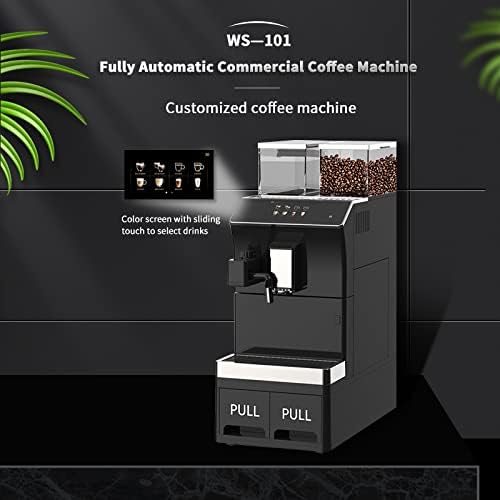
Figuur 2.1: Voorkant view of the Mcilpoog WS-101+3 coffee machine, highlighting the color touch screen for drink selection and the integrated design with pull-out waste drawers.
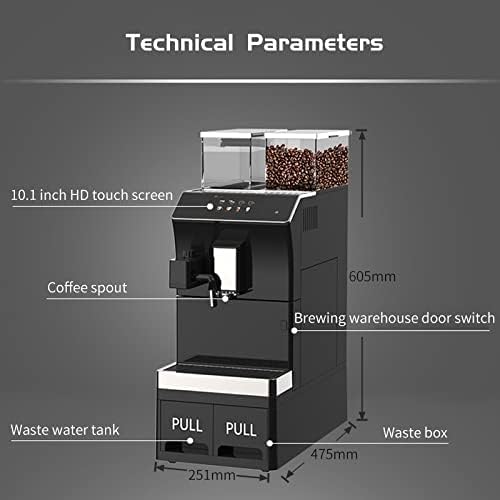
Figuur 2.2: Technical diagram showing key components and dimensions of the coffee machine, including the 10.1-inch HD touch screen, coffee spout, brewing warehouse door switch, waste water tank, and waste box.
Sleutelkomponente:
- 10.1-duim HD-aanraakskerm: For intuitive selection and customization of beverages.
- Coffee Bean Hoppers: Two transparent hoppers for fresh coffee beans.
- Koffie-tuit: Verstelbaar vir verskeie koppiegroottes.
- Brewing Warehouse Door Switch: Access point for the brewing unit.
- Waste Water Tank: Collects used water.
- Waste Box: Collects spent coffee grounds.
- Self-contained Fresh Milk Foaming Device: Vir die voorbereiding van melkgebaseerde drankies.
3. Opstelling en eerste gebruik
3.1 Uitpak en plasing
- Verwyder alle verpakkingsmateriaal versigtig.
- Place the machine on a stable, level, and heat-resistant surface. Ensure adequate ventilation around the unit.
- The product dimensions are approximately 47.5 cm (D) x 24.6 cm (W) x 48.3 cm (H). Allow extra space for access and connections.
3.2 Watertoevoeraansluiting
The machine offers flexible water supply options:
- Internal Water Tank: The machine has an internal water tank with a capacity of 3.5 liters. Fill this tank with fresh, cold drinking water.
- Eksterne waterbron: For continuous operation, the machine can be connected to an external water source, such as a water purifier or a barrel water supply. Refer to Figure 3.1 for connection points.

Figuur 3.1: Diagram illustrating the external connections for the Mcilpoog WS-101+3, including options for a water purifier, direct-discharge waste water tank, and barrel water supply.
3.3 Filling Coffee Beans
Open the lids of the coffee bean hoppers and fill them with fresh, whole coffee beans. The total soybean storage capacity is 1000g.

Figuur 3.2: verbyview of the machine's capacities, showing the 1000g soybean storage, 3.5L water tank (with external connection option), and large waste residue bin (25-50 pcs capacity).
3.4 Power Connection and Initial Rinse
- Steek die kragkabel in 'n geaarde elektriese aansluiting. Die masjien sal aanskakel.
- Follow the on-screen prompts for the initial setup and rinse cycle. This primes the system and cleans internal components.
3.5 Mini Refrigerator and Cup Heating Equipment
The integrated mini refrigerator uses semiconductor refrigeration technology, allowing temperature adjustment between 2-14°C. The cup warmer provides space for cup storage and helps maintain hygiene by drying cups.
4. Bedryfsinstruksies
4.1 Using the Touch Screen Interface
The 10.1-inch HD touch screen provides an intuitive interface for selecting and customizing your coffee. Simply slide or tap to navigate through the options.

Figuur 4.1: Image demonstrating interaction with the touch screen to adjust coffee parameters and the dial for 12 levels of coffee powder thickness adjustment.
4.2 Selecting and Customizing Beverages
- From the main menu, select your desired coffee beverage (e.g., Espresso, Americano, Latte).
- Adjusting Coffee Parameters: On-screen options allow you to adjust parameters such as coffee strength, volume, and temperature. These settings can be adjusted at any time.
- Maalverstelling: The machine features 12 levels of coffee powder thickness adjustment. Use the dedicated dial (refer to Figure 4.1) to set your preferred grind fineness. A finer grind typically results in stronger coffee.
4.3 Gebruik van die melkskuimer
The self-contained fresh milk foaming device allows for easy preparation of milk-based drinks.
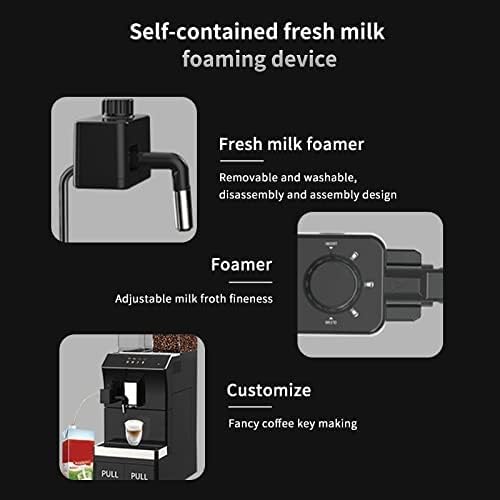
Figuur 4.2: Gedetailleerd view of the fresh milk foamer, showing its removable and washable design, and the control for adjustable milk froth fineness.
- Connect the milk frother to a container of cold milk.
- Select a milk-based beverage from the touch screen.
- Adjusting Froth Fineness: Use the dedicated control on the frother (refer to Figure 4.2) to adjust the desired fineness of the milk froth.
- After use, ensure the frother is cleaned promptly to prevent milk residue buildup.
5. Onderhoud en Skoonmaak
Regular cleaning and maintenance ensure optimal performance and longevity of your coffee machine. Always unplug the machine and allow it to cool before cleaning.
5.1 Emptying Waste Containers
- Waste Water Tank: Regularly pull out and empty the waste water tank. Rinse it with clean water.
- Waste Box (Coffee Grounds): The waste box has a capacity for 25-50 spent coffee pucks. Empty and clean it regularly to prevent mold growth.
5.2 Skoonmaak van die brou-eenheid
- Open the brewing warehouse door switch to access the brewing unit.
- Remove the brewing unit and rinse it thoroughly under lukewarm running water. Do not use detergents.
- Allow the brewing unit to air dry completely before reinserting it.
5.3 Maak die melkskuimer skoon
The fresh milk foamer is designed for easy disassembly and assembly, making it removable and washable.
- After each use, detach the milk frother components.
- Rinse all parts under running water to remove milk residue. Use a mild detergent if necessary, then rinse thoroughly.
- Maak seker dat alle dele droog is voordat dit weer aanmekaargesit word.
5.4 Ontkalking
Depending on water hardness, the machine will require descaling periodically. Follow the on-screen prompts or refer to the descaling instructions provided with a suitable descaling solution. Use only descaling solutions recommended for coffee machines.
5.5 Buite Skoonmaak
Vee die buitekant van die masjien af met 'n sagte, damp lap. Moenie skuur skoonmaakmiddels of oplosmiddels gebruik nie.
6. Probleemoplossing
If you encounter issues with your Mcilpoog WS-101+3, please refer to the common problems and solutions below. If the problem persists, contact customer service.
| Probleem | Moontlike oorsaak | Oplossing |
|---|---|---|
| Masjien skakel nie aan nie | Geen kragtoevoer nie; kragkabel nie behoorlik gekoppel nie | Kontroleer die kragaansluiting en maak seker dat die kragkabel stewig ingeprop is. |
| Geen koffie word uitgegee nie | Water tank empty; Coffee beans empty; Brewing unit blocked | Fill water tank. Fill coffee beans. Clean the brewing unit. |
| Koffie is te swak/sterk | Incorrect grind setting; Incorrect coffee strength setting | Adjust the grind fineness (12 levels). Adjust coffee strength via the touch screen. |
| Milk frother not working | Milk frother blocked; Insufficient milk | Clean the milk frother thoroughly. Ensure sufficient cold milk is available. |
| Foutboodskap op skerm | Spesifieke interne probleem | Note the error code and consult the customer service or a more detailed troubleshooting guide if available. |
7. Tegniese spesifikasies
| Kenmerk | Spesifikasie |
|---|---|
| Handelsmerk | Mcilpoog |
| Model | WS-101+3 |
| Kleur | Swart |
| Produkafmetings (L x B x H) | 47.5 x 24.64 x 48.26 cm |
| Item gewig | 13.6 kg |
| Krag/Wattage | 800 watt |
| Watertenk kapasiteit | 3.5 Liters (internal, with external connection option) |
| Kapasiteit van koffieboonhouer | 1000g |
| Waste Residue Capacity | 25-50 stuks |
| Vertoon | 10.1 duim HD-aanraakskerm |
| Spesiale kenmerke | Programmable, Self-contained Milk Frother, Mini Refrigerator, Cup Heating Equipment |
| Koffiemaker Tipe | Espressomasjien |
8. Waarborg en Ondersteuning
Mcilpoog is committed to providing excellent customer service and support for your WS-101+3 coffee machine.
- Kliëntediens: 24-hour online customer service is available to assist with any inquiries or issues.
- Return and Exchange: The product is eligible for return and exchange within 30 days of purchase.
- Na-verkope waarborg: An 18-month after-sales guarantee covers manufacturing defects and malfunctions under normal use.
For support, please refer to the contact information provided with your purchase or visit the official Mcilpoog webwebwerf.