
1. Produk verbyview
The iTOMA CKS209 is a versatile alarm clock radio designed to enhance your bedside experience. It features dual wireless charging capabilities for your smartphone and earbuds, along with two additional USB ports for other devices. Enjoy your favorite music via Bluetooth 5.1 technology or tune into digital FM radio. The clock includes dual alarms with customizable wake-up modes, a large 1.4-inch orange LED display with auto and manual dimmer control, and a 2-level orange night light.
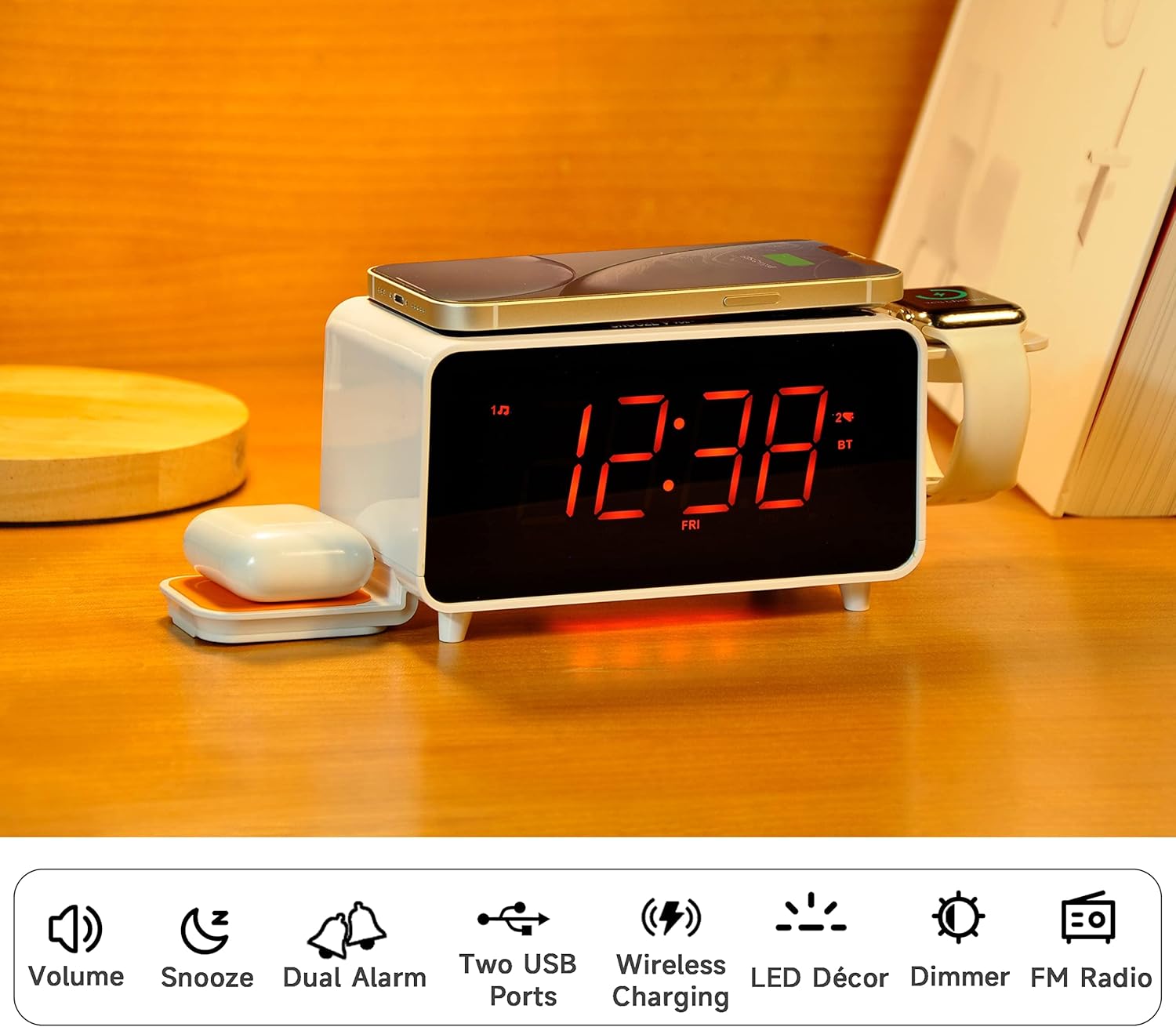
Image: The iTOMA CKS209 alarm clock radio displaying the time, with a smartphone wirelessly charging on top, earbuds on a side wireless charging pad, and a smartwatch on its holder.
Sleutel kenmerke:
- Draadlose laai: 15W ultra-fast wireless charger for smartphones and 3W foldable earphone wireless charger. Includes a watch wireless charging support holder (charging cable not included).
- Bluetooth 5.1: Seamless audio streaming from your Bluetooth-enabled devices.
- Dubbele USB-poorte: One USB-A and one USB-C port (5V 2.1A) for additional device charging.
- Smart Dual Alarm: Set two independent alarms with options to wake to radio or buzzer. Features snooze, crescendo wake-up, 15-level volume control, and 4 alarm week modes (Every day, single day, weekdays, weekends).
- 1.4" Orange LED Display: Clear 12/24-hour format display with 3-level dimmer brightness and auto-dimmer function.
- Naglig: 2-level orange night light for ambient illumination.
- Digital FM Radio: 20 programmable preset stations with external wire antenna for enhanced reception.
- Rugsteunbattery: Maintains time and alarm settings during power interruptions.
2. Opstelling
2.1 Kragverbinding
- Unpack the iTOMA CKS209 unit and all accessories.
- Connect the provided AC adapter to the DC IN jack on the back of the unit.
- Plug the AC adapter into a standard wall outlet. The display will light up, and the clock will automatically set the time.
2.2 Initial Time Setting (Manual)
While the clock features auto-time setting, you can manually adjust the time, date, and year if needed.
- Druk en hou die KLOKSET button located on the top panel until the year flashes on the display.
- Gebruik die TUNE +/- buttons (or rotate the SNOOZE/VOL dial) to adjust the year.
- Druk KLOKSET again to confirm and move to the month setting. Repeat the process for month, day, hour, and minute.
- Druk KLOKSET one last time to save your settings.
2.3 Time Zone and Daylight Saving Time (DST)
- Druk en hou die SLAAP/TYDSONE button to enter time zone setting.
- Gebruik die TUNE +/- buttons (or rotate the SNOOZE/VOL dial) to select your desired time zone.
- Druk SLAAP/TYDSONE again to toggle DST ON or OFF.
- Druk SLAAP/TYDSONE een laaste keer om te bevestig en te vertrek.
Video: This video demonstrates the time setting and Bluetooth operation for a similar iTOMA CKS207 model, which shares similar functionalities with the CKS209.
3. Bedryfsinstruksies
3.1 Draadlose laai
The iTOMA CKS209 features multiple wireless charging options:
- Smartphone Wireless Charging: Place your Qi-compatible smartphone on the top charging pad. The charging indicator on the display will illuminate to confirm charging.
- Earbud Wireless Charging: Place your Qi-compatible earbuds on the foldable 3W wireless charging pad located on the side.
- Smartwatch Holder: Utilize the integrated holder for your smartwatch. Note: A separate smartwatch charging cable (not included) is required and connects to one of the USB ports.
Image: A smartphone is placed on the top surface of the iTOMA CKS209, indicating wireless charging in progress.
Image: A close-up of the side of the iTOMA CKS209 showing the integrated holder designed for a smartwatch.
3.2 USB-laaipoorte
In addition to wireless charging, the unit provides two USB ports (one Type-A and one Type-C) on the back for wired charging of other devices.
- Connect your device's USB charging cable to either the USB-A or USB-C port on the back of the alarm clock.
- Ensure your device is properly connected and charging.
Image: A smartphone is connected via a USB cable to one of the charging ports on the back of the iTOMA CKS209.
3.3 Bluetooth-luidspreker
Stroom klank draadloos vanaf jou Bluetooth-geaktiveerde toestelle.
- Druk die AAN/AF om die eenheid aan te skakel.
- Druk die MODUS button repeatedly until 'BT' appears on the display and starts flashing, indicating pairing mode.
- On your mobile device, enable Bluetooth and search for 'iTOMA CKS209' (or similar model name).
- Select the device to pair. Once connected, 'BT' will stop flashing and remain solid.
- You can now play audio from your device through the alarm clock speaker. Adjust volume using the VOL +/- buttons or your mobile device.

Image: A smartphone displaying music playback is positioned near the iTOMA CKS209, indicating a Bluetooth connection.
3.4 FM -radio
Luister na jou gunsteling FM-radiostasies.
- Druk die AAN/AF om die eenheid aan te skakel.
- Druk die MODUS button repeatedly until the FM frequency appears on the display.
- For automatic station search, press and hold the TUNE +/- buttons. The radio will scan and save available stations.
- For manual tuning, short press the TUNE +/- knoppies om die frekwensie stap vir stap aan te pas.
- Stel die volume aan met die VOL +/- knoppies.
3.5 Dubbele wekker
Set up to two independent alarms.
- Druk die AL1 or AL2 button to select the desired alarm. The alarm time will flash on the display.
- Gebruik die TUNE +/- buttons (or rotate the SNOOZE/VOL dial) to set the desired alarm hour and minute.
- Druk AL1 or AL2 again to select the wake-up source (Buzzer or FM Radio).
- Druk AL1 or AL2 again to select the alarm week mode (Every day, single day, weekdays, or weekends).
- Druk AL1 or AL2 one last time to confirm and activate the alarm. The alarm indicator will appear on the display.
- To deactivate an alarm, press the corresponding AL1 or AL2 button until the alarm indicator disappears from the display.
- Sluimer-funksie: As die alarm klink, druk die SLUIMER button to temporarily silence the alarm for 9 minutes.

Image: The iTOMA CKS209 alarm clock radio displaying the time on a bedside table, ready for use.
3.6 Display & Dimmer Control
Adjust the brightness of the 1.4-inch orange LED display.
- Druk kort op die DOWWER button to cycle through 3 brightness levels (High, Medium, Low).
- The unit also features an auto-dimmer function that adjusts display brightness based on ambient light conditions.
Image: A visual representation of the iTOMA CKS209 display at different brightness levels, from bright to invisible, and the auto-dimmer setting.
3.7 Naglig
Activate the ambient orange night light.
- Druk die LED button to turn the night light ON.
- Druk die LED button again to cycle through 2 brightness levels.
- Druk die LED button a third time to turn the night light OFF.
4. Onderhoud
To ensure the longevity and optimal performance of your iTOMA CKS209, follow these maintenance guidelines:
- Skoonmaak: Gebruik 'n sagte, droë lap om die buitekant van die eenheid skoon te maak. Moenie vloeibare skoonmaakmiddels of skuurmiddels gebruik nie, aangesien dit die afwerking kan beskadig.
- Ventilasie: Maak seker dat die eenheid in 'n goed geventileerde area geplaas word om oorverhitting te voorkom. Moenie enige ventilasie-openinge blokkeer nie.
- Kragkabel: Inspekteer die kragkabel gereeld vir enige skade. Indien beskadig, staak gebruik en kontak kliëntediens.
- Berging: Indien u die eenheid vir 'n lang tydperk bêre, trek die stekker uit die stopcontact en bêre dit op 'n koel, droë plek.
5. Probleemoplossing
If you encounter any issues with your iTOMA CKS209, please refer to the following common troubleshooting steps:
- Geen krag/skerm af:
- Maak seker dat die WS-adapter stewig in beide die eenheid en 'n werkende muurprop ingeprop is.
- Kontroleer of die kragaansluiting funksioneel is deur 'n ander toestel in te prop.
- Draadlose laai werk nie:
- Verify that your device is Qi-compatible.
- Ensure your device is centered correctly on the charging pad.
- Verwyder enige dik foonomhulsels of metaalvoorwerpe wat die laai kan belemmer.
- Confirm the unit is powered on.
- Probleme met Bluetooth-paring:
- Ensure the alarm clock is in Bluetooth pairing mode ('BT' flashing).
- Maak seker dat Bluetooth op jou mobiele toestel geaktiveer is.
- Move your mobile device closer to the alarm clock.
- Indien voorheen gekoppel, probeer om die toestel te ontkoppel en weer te koppel.
- FM Radio Static/Poor Reception:
- Extend the external wire antenna fully for better reception.
- Reposition the antenna or the unit to find a location with better signal strength.
- Alarm klink nie:
- Ensure the alarm (AL1 or AL2) is activated and its indicator is visible on the display.
- Gaan die alarmvolume-instelling na.
- Verify the alarm time and day settings are correct.
6. Spesifikasies
| Kenmerk | Detail |
|---|---|
| Handelsmerk | iTOMA |
| Modelnommer | CKS209-CA |
| Kleur | Orange Led Display |
| Produk afmetings | 16.8 x 3.81 x 9.1 cm |
| Item gewig | 820 g |
| Materiaal | Plastiek |
| Tipe vertoon | LED |
| Spesiale kenmerke | Auto Dimmable, Charging Port, Charging Station, Foldable, Multiple Time Zone |
| Draadlose laai | 15W (Phone), 3W (Earbuds) |
| USB Laai | USB-A, USB-C (5V 2.1A) |
| Bluetooth weergawe | 5.1 |
| FM frekwensie | 87.5-108 MHz |
7. Waarborg en Ondersteuning
For warranty information, technical support, or any inquiries regarding your iTOMA CKS209, please refer to the documentation included in your product packaging or visit the official iTOMA webwebwerf. Jy kan ook die verkoper direk kontak vir hulp.