
AOLION WGXB004005
AOLION Stereo Headset Adapter User Manual
Model: WGXB004005
Inleiding
The AOLION Stereo Headset Adapter is designed to enhance your gaming experience on Xbox One controllers. This adapter allows you to connect most wired stereo gaming headsets with a 3.5mm audio jack (CTIA plug standard) directly to your Xbox controller, providing convenient control over game sound and voice chat.
Pakketinhoud
- 1 × AOLION Stereo Headset Adapter
- 1 × Gebruikershandleiding
Produk verbyview
The adapter features intuitive controls for managing your audio experience during gameplay.

Figuur 1: Voorkant view of the headset adapter showing control buttons.
- Game Balance Button: Adjusts the balance towards game audio.
- Chat Balance Button: Adjusts the balance towards voice chat audio.
- Mikrofoondempknoppie: Skakel mikrofoon aan/af.
- Volume op-knoppie: Increases overall volume.
- Volume af-knoppie: Decreases overall volume.
- 3.5 mm oudio-aansluiting: For connecting your stereo gaming headset.
- USB-aansluiting: For connecting to the Xbox controller.
Verenigbaarheid
This headset adapter is compatible with a wide range of Xbox One controllers and stereo gaming headsets:
- Xbox Controllers: Xbox One, Xbox One S, Xbox One X, Xbox Elite Wireless Controller Series 1, Xbox Elite Wireless Controller Series 2, Xbox Series S, and Xbox Series X Controllers.
- Kopstukke: Most wired stereo gaming headsets featuring a 3.5mm audio jack (using the CTIA plug standard).

Figure 2: The adapter is compatible with multiple Xbox controller models.

Figure 3: The adapter supports standard 3.5mm CTIA headsets.
Opstelling
Setting up your AOLION Stereo Headset Adapter is a simple plug-and-play process.
- Connect the Adapter to the Controller: Align the USB connector of the headset adapter with the expansion port at the bottom of your Xbox controller. Gently push until it clicks securely into place.
- Koppel jou oorfone: Plug your wired stereo gaming headset's 3.5mm audio jack into the corresponding port on the bottom of the headset adapter.
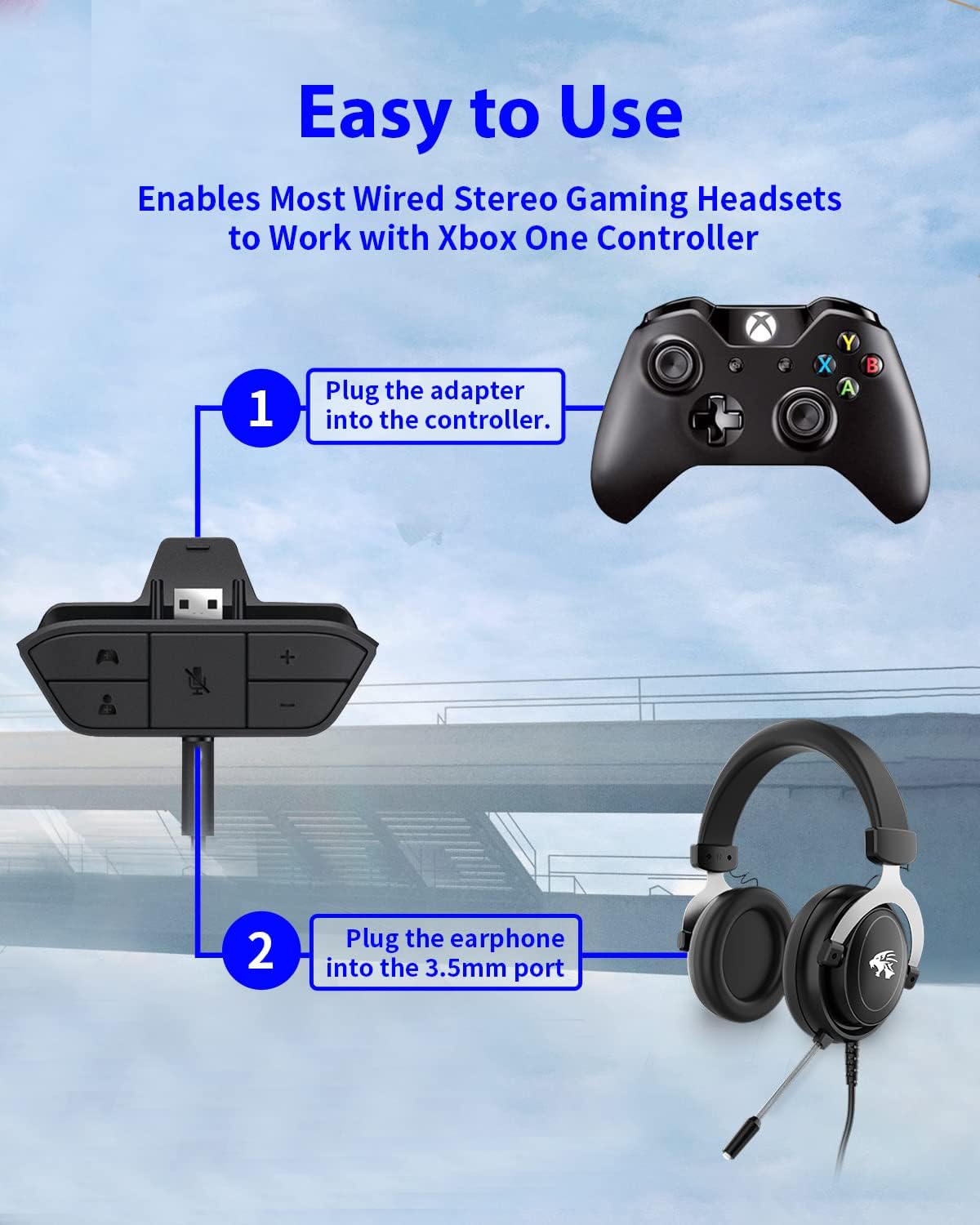
Figure 4: Step-by-step connection guide for the headset adapter.
Video 1: Demonstration of connecting the headset adapter to an Xbox controller.
Belangrike nota: For optimal performance and to resolve potential audio issues, it is recommended to update your Xbox controller's firmware after connecting the adapter. This can typically be done through your Xbox console's settings (Settings > Devices & connections > Accessories > Select your controller > ... > Controller settings > Update firmware).
Bedryfsinstruksies
Once connected, use the buttons on the adapter to control your audio:
- Volume op/af (+/-): Press the '+' button to increase the overall volume of both game and chat audio. Press the '-' button to decrease it.
- Microphone Mute (Microphone Icon): Press this button to mute or unmute your microphone. An indicator light (if present) or on-screen notification may confirm the mute status.
- Game/Chat Balance (Controller Icon / Person Icon):
- Druk die Kontroleerder-ikoon button to increase game audio volume and decrease chat audio volume.
- Druk die Persoon ikoon button to increase chat audio volume and decrease game audio volume.
Figuur 5: Gedetailleerd view of the adapter's control buttons.
Onderhoud
To ensure the longevity and optimal performance of your headset adapter, follow these simple maintenance guidelines:
- Hou die adapter skoon en vry van stof en puin. Gebruik 'n sagte, droë lap vir skoonmaak.
- Vermy die blootstelling van die adapter aan uiterste temperature, humiditeit of direkte sonlig.
- Moenie probeer om die adapter self uitmekaar te haal of te herstel nie, aangesien dit die waarborg ongeldig sal maak.
- Bêre die adapter op 'n veilige plek wanneer dit nie gebruik word nie om fisiese skade te voorkom.
Probleemoplossing
If you encounter issues with your AOLION Stereo Headset Adapter, please refer to the following common solutions:
| Probleem | Moontlike oorsaak/oplossing |
|---|---|
| No audio or poor audio quality (buzzing, peaking) |
|
| Mikrofoon werk nie |
|
| Game/Chat balance not working |
|
Indien die probleem voortduur nadat u hierdie stappe probeer het, kontak asseblief kliëntediens.
Spesifikasies
| Kenmerk | Detail |
|---|---|
| Modelnommer | WGXB004005 |
| Handelsmerk | AOLION |
| Produkafmetings (L x B x H) | 3.15 x 1.57 x 0.79 duim (8 x 4 x 2 cm) |
| Kleur | Swart |
| Connector Tipe | Auxiliary (3.5mm CTIA standard) |
| Versoenbare toestelle | Xbox One, One S, One X, Elite 1, Elite 2, Series S, Series X Controllers; 3.5mm CTIA Stereo Headsets |
Waarborg en Ondersteuning
AOLION stands behind the quality of its products. This Stereo Headset Adapter comes with:
- 60-dae geld-terug-waarborg: If you are not entirely satisfied with your purchase within 60 days, you may be eligible for a full refund.
- 24 maande waarborg: We provide a 24-month warranty against manufacturing defects from the date of purchase.
For any questions, concerns, or warranty claims, please contact us through Amazon. We are committed to responding to your inquiries within 12 hours to ensure your complete satisfaction.