
Inleiding
This manual provides comprehensive instructions for the use and care of your new Remote brand compatible remote control. This remote is specifically designed to function seamlessly with Nordmende ND40S3000J SMART televisions, offering full functionality without the need for complex programming.
Please read this manual carefully to ensure proper setup and operation of your remote control.
Opstelling
1. Battery Installasie
The remote control requires alkaline batteries (not included). Follow these steps to install them:
- Vind die battery kompartement deksel op die agterkant van die afstandbeheer.
- Skuif die deksel afwaarts of druk die grendel om dit oop te maak.
- Insert two new alkaline batteries, ensuring the positive (+) and negative (-) terminals match the diagrams inside the compartment.
- Plaas die batteryklepdeksel terug in plek totdat dit stewig klik.
Belangrik: Always use new alkaline batteries for optimal performance. Do not mix old and new batteries, or different types of batteries.
2. Aanvanklike gebruik (geen programmering benodig nie)
This compatible remote control is pre-programmed for the Nordmende ND40S3000J SMART TV model. No additional programming or setup steps are required. Once batteries are installed, the remote is ready for immediate use with your television.
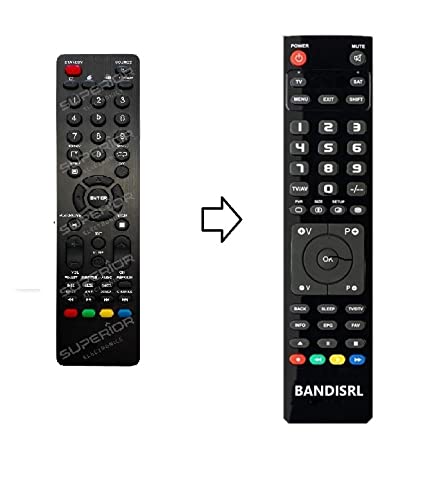
Figuur 1: The Remote compatible remote control. This image displays the layout of the buttons and the overall design of the remote, ready for use with your Nordmende TV.
Bedryfsinstruksies
To operate your Nordmende ND40S3000J SMART TV with this remote control, point the remote directly at the television's infrared receiver. Ensure there are no obstructions between the remote and the TV.
- Kragknoppie: Druk om die TV in of uit te skakel.
- Volume op/af: Pas die klankvolume aan.
- Kanaal op/af: Verander TV-kanale opeenvolgend.
- Getalknoppies (0-9): Kies direk TV-kanale.
- Navigasieknoppies (pyltjietoetse, OK): Navigeer deur spyskaarte en kies opsies.
- Slim-TV-knoppies: Access specific Smart TV functions or applications (e.g., Home, Apps, Netflix, YouTube, etc., depending on the remote's layout and TV's features).
- Demp-knoppie: Maak die TV-klank stil.
- Bron/invoer-knoppie: Blaai deur beskikbare invoerbronne (HDMI, AV, ens.).
Refer to your Nordmende TV's original user manual for specific details on its menu structure and Smart TV functionalities.
Onderhoud
Maak die afstandbeheer skoon
Om jou afstandbeheerder skoon te maak, gebruik 'n sagte, droë lap. Vir hardnekkige vuiligheid, liggiesampen the cloth with water. Do not use abrasive cleaners, alcohol, or solvents, as these can damage the remote's surface and internal components.
Battery vervanging
Replace batteries when the remote control's response becomes sluggish or stops working. Always replace both batteries simultaneously with new alkaline batteries. Dispose of used batteries according to local regulations.
Berging
Bêre die afstandbeheerder op 'n koel, droë plek weg van direkte sonlig en uiterste temperature. Indien die afstandbeheerder nie vir 'n lang tydperk gebruik gaan word nie, is dit raadsaam om die batterye te verwyder om lekkasie te voorkom.
Probleemoplossing
- Afstandbeheer werk nie:
- Kontroleer of die batterye korrek met die korrekte polariteit (+/-) geplaas is.
- Replace the batteries with new alkaline batteries.
- Maak seker dat daar geen obstruksies tussen die afstandbeheerder en die TV se infrarooi-ontvanger is nie.
- Make sure you are pointing the remote directly at the TV.
- Verifieer dat die TV aangeskakel is.
- Some buttons are not responding:
- This remote is designed for the Nordmende ND40S3000J SMART TV. If you are using it with a different model, some advanced functions may not be compatible.
- Ensure the buttons are clean and free from debris.
- TV responds intermittently:
- Batterye mag dalk laag wees; vervang hulle.
- Ensure a clear line of sight to the TV's infrared sensor.
- Avoid strong light sources (like direct sunlight) that might interfere with the infrared signal.
If troubleshooting steps do not resolve the issue, please refer to the Support section.
Spesifikasies
| Handelsmerk: | Remote (Manufacturer: Bandisrl) |
| Versoenbare toestelle: | Nordmende ND40S3000J SMART Television |
| Verbindingstegnologie: | Infrarooi (IR) |
| Spesiale kenmerk: | Geen programmering nodig nie |
| Battery tipe: | Alkalies |
| Batterye ingesluit: | Nee |
| Kleur: | Swart |
| Aantal knoppies: | 25 |
| Kontroleurstipe: | Knoppie beheer |
Waarborg en Ondersteuning
Waarborg inligting
Specific warranty details for this compatible remote control are not provided in this manual. Please refer to the purchase documentation or contact the seller/manufacturer (Bandisrl) for information regarding warranty coverage and terms.
Kliënte ondersteuning
For further assistance, technical support, or inquiries regarding compatibility with other TV models, please contact the manufacturer, Bandisrl. Contact information can typically be found on the product packaging or the seller's webwebwerf.
If you own a different TV model than the Nordmende ND40S3000J SMART, it is recommended to contact Bandisrl to confirm compatibility before purchase or use.