
1. Inleiding
Thank you for choosing the LEICKE DJ Roxxx Portable Bluetooth Speaker. This manual provides essential information for setting up, operating, and maintaining your speaker. Please read it carefully before use to ensure optimal performance and longevity of your device.
2. Veiligheidsinstruksies
- Moenie die luidspreker blootstel aan uiterste temperature, direkte sonlig of hoë humiditeit nie.
- Vermy om die luidspreker te laat val of aan sterk impakte te onderwerp.
- Moenie die luidspreker self uitmekaar haal of probeer herstel nie. Dit sal die waarborg ongeldig maak.
- Keep the speaker away from water and liquids. While splashproof, it is not waterproof and should not be submerged.
- Gebruik slegs die meegeleverde laaikabel of 'n gesertifiseerde ekwivalent.
3. Pakketinhoud
Kontroleer asseblief die pakket vir die volgende items:
- LEICKE DJ Roxxx Portable Bluetooth Speaker
- USB-laaikabel
- Auxiliary Audio Cable (3.5mm Stereo Plug)
- haak
- Instruksie Handleiding
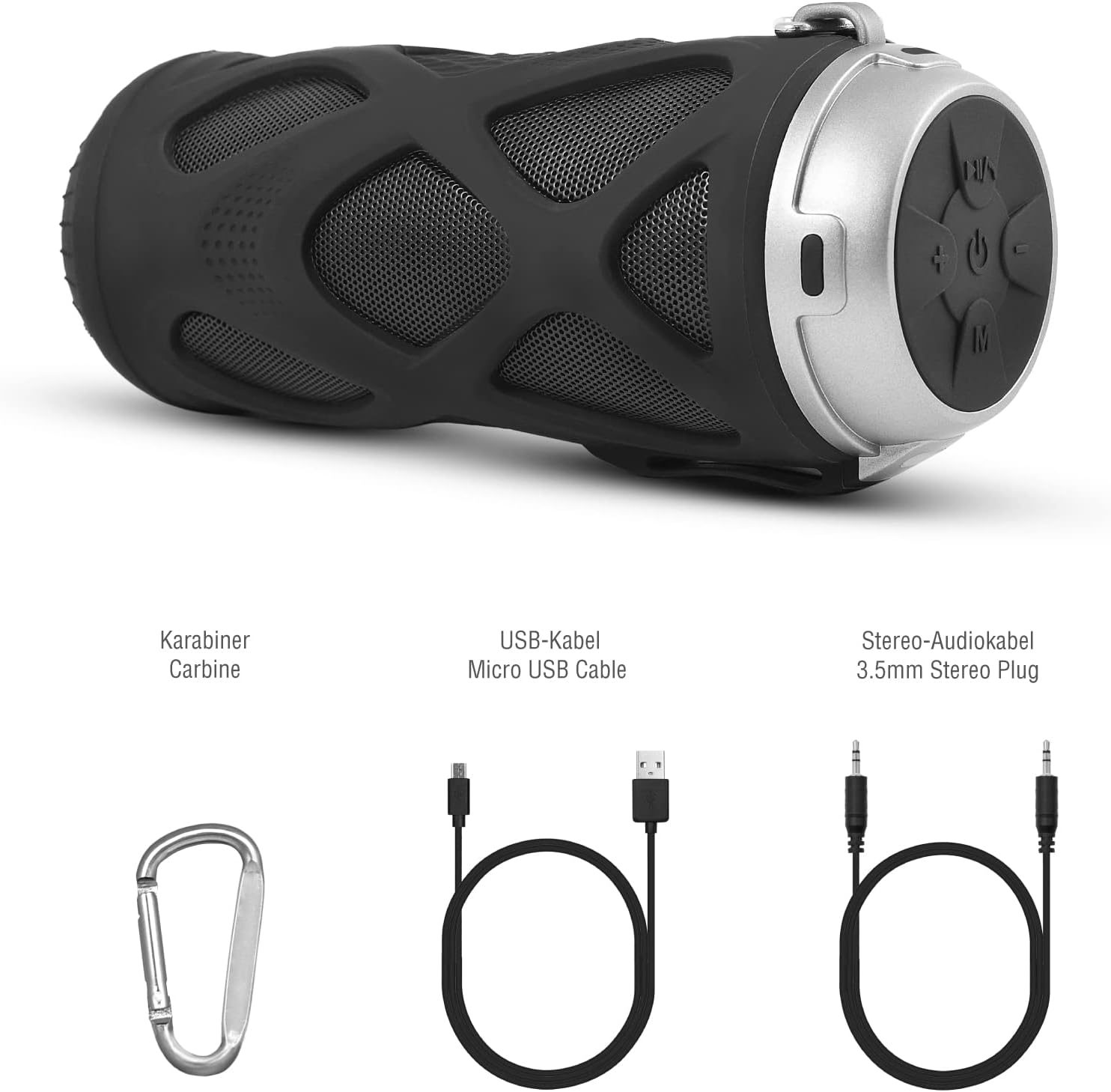
Figuur 3.1: Bykomstighede ingesluit
4. Produk verbyview
4.1 Beheerpaneel

Figuur 4.1: Beheerpaneel-uitleg
- Aan/Af-knoppie: Skakel die luidspreker aan of af.
- Play/Pause/Call/Voice Assistant Button: Controls music playback, answers/ends calls, and activates voice assistant (Siri/Google Assistant).
- Volume Verlaag / Vorige Liedjie Knoppie: Verlaag volume of spring na die vorige snit.
- Volume op / Volgende snit-knoppie: Verhoog die volume of spring na die volgende snit.
- Modusknoppie: Switches between Bluetooth, MicroSD/TF, Aux, and FM Radio modes.
4.2 Poorte en aanwysers
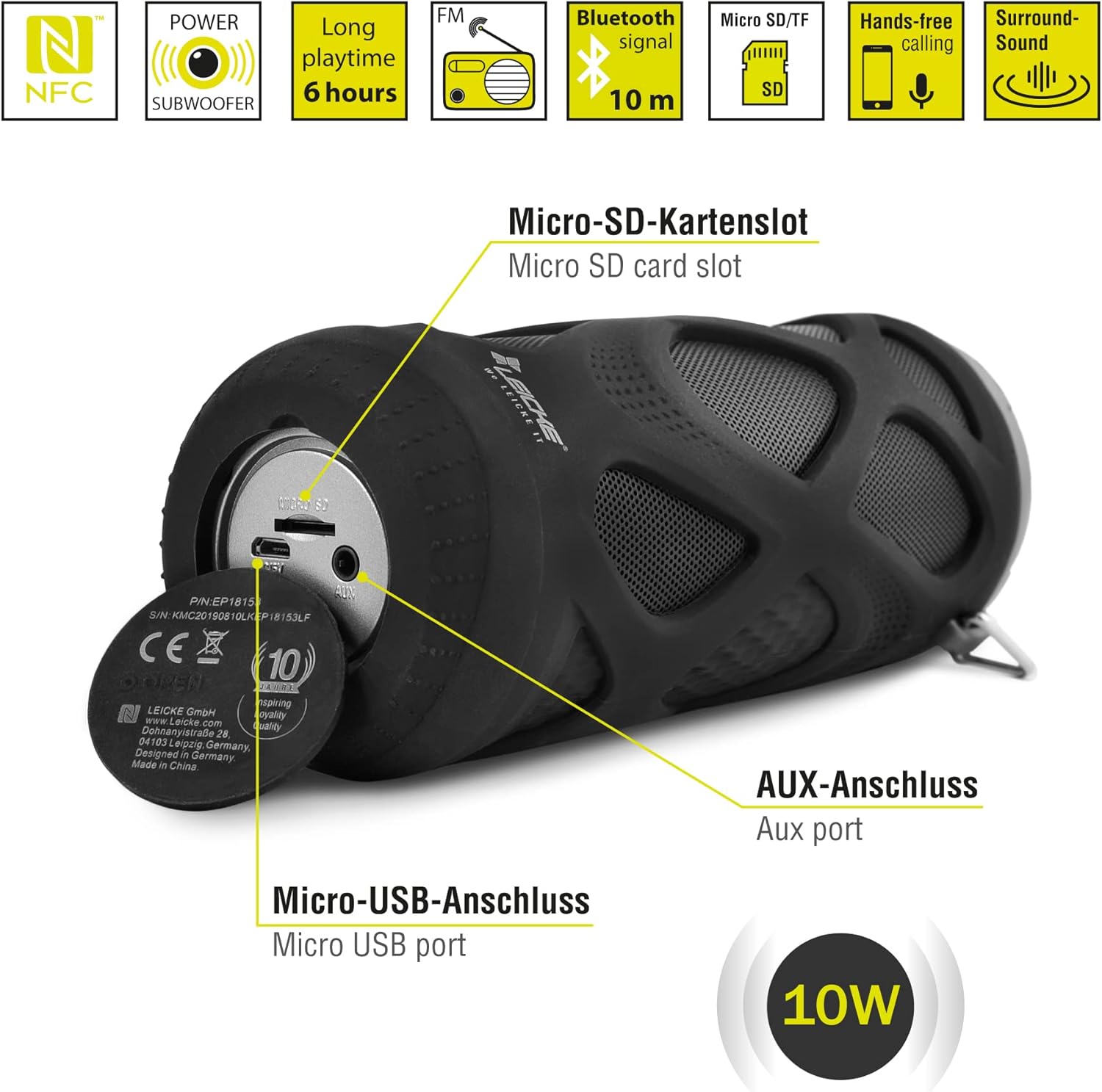
Figuur 4.2: Poorte verbyview
- Mikro SD/TF-kaartgleuf: Insert a Micro SD or TF card for MP3 playback.
- AUX-poort: Connect external audio devices using the 3.5mm auxiliary cable.
- Mikro -USB -poort: Word gebruik om die luidspreker te laai.
- LED-aanwyser: (Typically near the charging port or control panel) Indicates power status, charging status, and Bluetooth pairing status.
5. Opstelling en werking
5.1 Laai die luidspreker
- Koppel die Mikro-USB-punt van die laaikabel aan die luidspreker se Mikro-USB-poort.
- Connect the USB-A end to a USB power adapter (not included) or a computer's USB port.
- Die LED-aanwyser sal tipies rooi wys terwyl dit laai en afskakel of van kleur verander wanneer dit volledig gelaai is.
- A full charge takes approximately 2-3 hours and provides up to 6 hours of playtime.
5.2 Aan-/afskakel
- Om aan te skakel: Druk en hou die Aan/af-knoppie for a few seconds until you hear an audible prompt and the LED indicator lights up.
- Om af te skakel: Druk en hou die Aan/af-knoppie again for a few seconds until you hear an audible prompt and the LED indicator turns off.
5.3 Bluetooth -koppeling
- Ensure the speaker is powered on and in Bluetooth mode (the LED indicator will typically flash blue). If not, press the Modusknoppie om oor te skakel na Bluetooth -modus.
- Gaan na die Bluetooth-instellings op jou slimfoon, tablet of ander Bluetooth-geaktiveerde toestel.
- Soek vir available devices and select "LEICKE DJ Roxxx" from the list.
- Once paired, the LED indicator will stop flashing and remain solid blue, and you will hear a confirmation sound.
- Die luidspreker sal outomaties weer aan die laaste gekoppelde toestel koppel wanneer dit aangeskakel word, indien die toestel binne bereik is en Bluetooth geaktiveer is.
5.4 MicroSD/TF Card Playback
- Insert a Micro SD or TF card (pre-loaded with MP3 audio files) into the Micro SD/TF card slot.
- The speaker will automatically switch to MicroSD/TF mode and begin playing music. If not, press the Modusknoppie to select MicroSD/TF mode.
- Gebruik die Speel / Pouse, Volume op/volgende snit, en Laer volume/vorige snit knoppies om afspeel te beheer.
5.5 AUX-invoer
- Connect one end of the 3.5mm auxiliary cable to the speaker's AUX port.
- Connect the other end to the headphone jack of your audio device (e.g., MP3 player, laptop).
- The speaker will automatically switch to AUX mode. If not, press the Modusknoppie om AUX-modus te kies.
- Volume can be controlled via the speaker or your connected device. Track control must be done from the connected device.
5.6 FM-radiowerking
- Druk die Modusknoppie herhaaldelik totdat jy in FM-radiomodus gaan.
- In FM-modus, druk die Speel/Pause-knoppie once to automatically scan and save available FM stations. The speaker will then play the first saved station.
- Gebruik die Volume op/volgende snit en Laer volume/vorige snit knoppies om tussen gestoorde stasies te wissel.
5.7 Ware Draadlose Stereo (TWS) Funksie
The LEICKE DJ Roxxx speaker supports TWS pairing, allowing you to connect two DJ Roxxx speakers for a stereo sound experience (20W total output).

Figuur 5.1: Ware draadlose stereo (TWS) -paar
- Ensure both DJ Roxxx speakers are powered on and in Bluetooth pairing mode (LED flashing blue).
- Druk en hou op een van die luidsprekers die Modusknoppie for a few seconds until you hear a pairing tone. The speakers will attempt to connect to each other.
- Once successfully paired, you will hear a confirmation sound, and the LED indicator on one speaker will flash blue (master), while the other will be solid blue (slave).
- Now, connect your device to the master speaker via Bluetooth as described in section 5.3. Both speakers will play audio in stereo.
6. Bedryfsinstruksies
6.1 Musiekweergawe
- Speel/pouse: Druk die Speel/Pause-knoppie een keer.
- Volgende snit: Druk en hou die Volume op / Volgende snit-knoppie.
- Vorige snit: Druk en hou die Volume af / Vorige snit-knoppie.
- Volume op: Druk die Volume op / Volgende snit-knoppie kortliks.
- Volume af: Druk die Volume af / Vorige snit-knoppie kortliks.
6.2 Handvrye oproepe
- Beantwoord oproep: Wanneer 'n oproep inkom, druk die Speel / Pouse / Bel-knoppie een keer.
- Beëindig oproep: Druk tydens 'n oproep op die Speel / Pouse / Bel-knoppie een keer.
- Verwerp oproep: When a call comes in, press and hold the Speel / Pouse / Bel-knoppie vir 2 sekondes.
- Herbel laaste nommer: In standby mode, double-press the Speel / Pouse / Bel-knoppie.
6.3 Aktivering van stemassistent
- With one click, you can activate Siri (iOS) or Google Assistant (Android) on your connected smartphone. Press the Play/Pause/Call/Voice Assistant button een keer om te aktiveer.
7. Onderhoud
7.1 Skoonmaak
- Wipe the speaker with a soft, dry, or slightly damp lap.
- Moenie skuurmiddels, alkohol of chemiese oplosmiddels gebruik nie, aangesien dit die oppervlak kan beskadig.
- Ensure all ports are dry before charging or connecting other devices.
7.2 Berging
- Bêre die luidspreker op 'n koel, droë plek weg van direkte sonlig en uiterste temperature.
- As dit vir 'n lang tydperk gestoor word, laai die battery elke paar maande tot ongeveer 50% om die batterygesondheid te handhaaf.
7.3 Waterweerstand
The LEICKE DJ Roxxx speaker is designed to be splashproof, offering protection against light rain or splashes. It is nie waterdig nie and should not be submerged in water or exposed to heavy rain. Ensure the port cover is securely closed to maintain splash resistance.

Figuur 7.1: Splashproof Design for Outdoor Use
8. Probleemoplossing
| Probleem | Moontlike oorsaak | Oplossing |
|---|---|---|
| Luidspreker skakel nie aan nie. | Lae battery. | Laai die luidspreker vir ten minste 30 minute. |
| Kan nie via Bluetooth koppel nie. | Luidspreker nie in paringsmodus nie; toestel Bluetooth af; te ver van toestel. | Ensure speaker is in Bluetooth mode (flashing blue LED). Turn on Bluetooth on your device. Move speaker closer to device (within 10m). Forget previous pairings on your device and try again. |
| Geen klank nie. | Volume te laag; verkeerde modus; toestel speel nie. | Increase speaker and device volume. Ensure correct mode (Bluetooth, AUX, MicroSD). Check if audio is playing on your source device. |
| Swak FM-radio-ontvangs. | Swak sein; interferensie. | Move the speaker to a different location. Re-scan for stations. |
| MicroSD-kaart word nie herken nie. | Card not inserted correctly; unsupported format; corrupted files. | Reinsert the card. Ensure files are in MP3 format. Try a different MicroSD card. |
9. Spesifikasies
| Model Naam | DJ Roxxx |
| Modelnommer | B09P4Z5MN5 |
| Handelsmerk | LEICKE |
| Verbindingstegnologie | Bluetooth |
| Draadlose kommunikasietegnologie | Bluetooth |
| Tipe luidspreker | Draagbare Bluetooth-luidspreker |
| Maksimum luidspreker-uitsetkrag | 10 Watt |
| Beheer metode | Tasbare knoppies |
| Spesiale kenmerke | Integrated Microphone, Portable Wireless, MicroSD/TF Player, Aux Input, FM Radio, Hands-Free Calling, Voice Assistant Support, TWS Function, Splashproof |
| Kragbron | Cable Electric (Rechargeable Battery) |
| Produkafmetings (L x B x H) | 7 x 7 x 18 cm |
| Item gewig | 400 gram |
| Aanbevole gebruike | Vir slimfoon of tablet |
| Versoenbare toestelle | Skootrekenaar, slimfoon |
| Is waterdig | False (Splashproof only) |
10. Waarborg en Ondersteuning
LEICKE products come with a standard manufacturer's warranty. For detailed warranty information, please refer to the warranty card included in your package or visit the official LEICKE webwebwerf.
If you encounter any issues or have questions regarding your LEICKE DJ Roxxx speaker, please contact LEICKE customer support:
- Vervaardiger: LEICKE
- Verkoper: LEICKE - Leipzig (as per Amazon listing)
- Ondersteuning: Refer to the official LEICKE website or contact information provided with your purchase for the most up-to-date support channels.