
Een Vir Almal URC 3661
One For All URC 3661 Universal Remote Control
Gebruikershandleiding
Produk verbyview
The One For All URC 3661 is a universal remote control designed to consolidate multiple remote controls into a single, easy-to-use device. It is compatible with a wide range of electronic devices, including televisions, set-top boxes, audio systems, DVD players, and Blu-ray players. This remote features backlit keys for improved visibility in low-light conditions and includes a learning function to copy commands from original remotes.

Figuur 1: Hoekig view of the URC 3661 Universal Remote Control.
Opstelling
1. Battery Installasie
The URC 3661 remote control requires two (2) AA batteries for operation. Follow these steps to install them:
- Vind die batterykompartement aan die agterkant van die afstandbeheer.
- Skuif die batteryklep afwaarts en lig dit af.
- Insert two AA batteries, ensuring the positive (+) and negative (-) terminals align with the markings inside the compartment.
- Plaas die batteryklep terug deur dit terug te skuif totdat dit stewig klik.
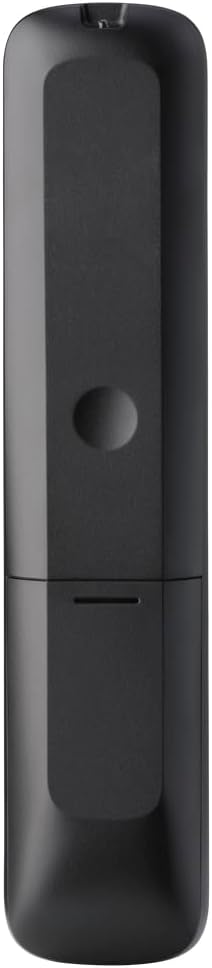
Figuur 2: Terug view of the remote, highlighting the battery compartment.
2. Programmering van die afstandbeheer
The URC 3661 can be programmed using direct code entry, auto code search, or the learning function. It is recommended to try direct code entry first.
Direkte kode-invoer:
- Skakel die toestel aan wat jy wil beheer (bv. TV, DVD-speler).
- Druk en hou die OPSTEL button until the LED light under the device key (e.g., TV, DVD) blinks twice and stays lit.
- Press the device key you want to program (e.g., TV). The LED will remain lit.
- Enter the 4-digit or 5-digit setup code for your brand and device. Refer to the code list provided with your remote or visit the One For All website for the most up-to-date codes.
- After entering the code, the LED will blink twice and turn off if the code is valid. If it blinks once and stays lit, the code is invalid; re-enter the code.
- Toets die afstandbeheerder deur op die KRAG button. If the device turns off, try other functions like volume or channel. If it works, programming is complete. If not, try the next code for your brand or use the Auto Code Search.
Outomatiese kode soektog:
- Skakel die toestel aan wat u wil beheer.
- Druk en hou die OPSTEL knoppie totdat die LED twee keer flikker en aanbly.
- Press the device key you want to program.
- Rig die afstandbeheerder na die toestel en druk die KRAG knoppie herhaaldelik (ongeveer elke 3 sekondes) totdat die toestel afskakel.
- Sodra die toestel afgeskakel is, druk onmiddellik die OPSTEL button to save the code. The LED will blink twice and turn off.
- Test the remote. If it doesn't work correctly, repeat the process.
Leerfunksie:
The learning function allows the URC 3661 to copy functions directly from your original remote control, which is useful for commands not available via direct code entry or auto search.
- Place the URC 3661 and your original remote on a flat surface, facing each other, about 1-2 inches apart.
- Druk en hou die OPSTEL knoppie totdat die LED twee keer flikker en aanbly.
- Press the button on the URC 3661 that you want to teach a function to (e.g., a specific input button). The LED will blink rapidly.
- Press and hold the corresponding button on your original remote control until the LED on the URC 3661 blinks twice, indicating successful learning.
- Repeat for all desired buttons.
- To exit learning mode, press the OPSTEL button. The LED will blink twice and turn off.
Bedien die afstandbeheer
The URC 3661 is designed for intuitive operation. Familiarize yourself with the button layout and their primary functions.

Figuur 3: Voorkant view of the URC 3661 with button layout.
Sleutel funksies:
- Device Keys (TV, STB, AUDIO, BLURAY, DVD, STREAM): Select the device you wish to control. The LED under the selected device key will illuminate.
- KRAG: Skakel die gekose toestel aan of af.
- VOL +/-: Pas die volume aan.
- CH +/-: Verander kanale.
- Navigation Pad (UP, DOWN, LEFT, RIGHT, OK): Gebruik vir kieslysnavigasie en -keuse.
- SPYSKAART: Opens the device's main menu.
- GIDS: Displays the electronic program guide (if supported by the device).
- INLIGTING: Wys inligting oor die huidige program of invoer.
- TUIS: Returns to the device's home screen.
- UITGANG: Exits menus or applications.
- Playback Controls (PLAY, PAUSE, STOP, REWIND, FAST FORWARD, SKIP): Beheer media-afspeel.
- Getalsleutels (0-9): Vir direkte kanaalinvoer of numeriese invoer.
- App Shortcut Keys (Netflix, Prime Video, YouTube): Direkte toegang tot gewilde stromingsdienste.
- Agterlig: The keys are backlit for easy use in dark environments. The backlight activates automatically when a button is pressed.
Onderhoud
Skoonmaak van die afstandbeheer:
To maintain the remote's appearance and functionality, clean it regularly:
- Gebruik 'n sagte, droë lap om die oppervlak van die afstandbeheerder af te vee.
- Vir hardnekkige vuiligheid, effens dampMaak die lap skoon met water of 'n sagte, nie-skurende skoonmaakmiddel. Vermy oormatige vog.
- Do not use harsh chemicals, solvents, or abrasive cleaning agents, as these can damage the remote's finish or internal components.
Battery vervanging:
Replace batteries when the remote's performance degrades or the LED indicator blinks unusually. Refer to the "Battery Installation" section under Setup for detailed instructions.
Probleemoplossing
If you encounter issues with your URC 3661 remote control, try the following troubleshooting steps:
| Probleem | Moontlike oorsaak | Oplossing |
|---|---|---|
| Remote does not operate the device. | Incorrect device selected. Batterye is laag of verkeerd geplaas. Verkeerde kode geprogrammeer. | Ensure the correct device key (TV, DVD, etc.) is pressed. Kontroleer die battery se oriëntasie en vervang dit indien nodig. Re-program the remote using a different code or the Auto Code Search/Learning function. |
| Sommige knoppies werk nie. | Incomplete programming. Device does not support the function. | Use the Learning function to copy specific commands from your original remote. Verify if the original remote has that function. |
| LED blinks once and stays lit during code entry. | Invalid code entered. | Ensure you are entering the correct 4 or 5-digit code. Try another code from the list or use Auto Code Search. |
| Remote LED does not light up. | Dooie batterye. | Replace the batteries with new AA batteries. |
For further assistance, visit the official One For All support website or consult the comprehensive online manual.
Spesifikasies
| Kenmerk | Detail |
|---|---|
| Modelnommer | VGK 3661 |
| Handelsmerk | Een Vir Almal |
| Produk afmetings | 0.39 x 0.39 x 0.39 duim |
| Item gewig | 6.7 onse |
| Batterye benodig | 2 AA batterye |
| Maksimum aantal ondersteunde toestelle | Tot 6 XNUMX toestelle |
| Versoenbare toestelle | Television, Set-top Box, Audio, Blu-ray, DVD, Streaming devices |
| Spesiale kenmerk | Universal, Learning Function, Backlit Keys |

Figure 4: Product packaging indicating compatibility with up to 6 devices.
Waarborg en Ondersteuning
Warranty information for the One For All URC 3661 Universal Remote Control is typically provided with your purchase documentation. Please refer to the warranty card or leaflet included in the product packaging for details regarding coverage, terms, and conditions.
For technical support, frequently asked questions, or to find the latest programming codes, please visit the official One For All website. Contact information for customer service may also be found on the manufacturer's webwebwerf of in jou produkdokumentasie.
One For All Official Webwebwerf: www.oneforall.com
Ask a question about this manual
Ask about setup, troubleshooting, compatibility, parts, safety, or missing instructions. Manuals+ will review the question and use this page’s manual context to help answer it.