
Inleiding
Dankie vir die aankoopasing the Northpoint NP-TL LED Desk Lamp. This modern and versatile desk lamp is designed to provide optimal lighting for your workspace while offering convenient features such as QI wireless charging and an integrated display for time and temperature. Please read this manual carefully before use to ensure proper operation and to maximize the lifespan of your product.
Veiligheidsinstruksies
- Ensure the power adapter is compatible with your local power supply before connecting.
- Moenie die l uitmekaar haal, herstel of wysig nieamp jouself. Kontak gekwalifiseerde dienspersoneel vir hulp.
- Vermy die plasing van die lamp in hoëtemperatuur-, vogtige of stowwerige omgewings.
- Hou die lamp weg van water en ander vloeistowwe.
- Do not look directly into the LED light source for extended periods to prevent eye strain.
- Ontkoppel die lamp from the power outlet before cleaning or when not in use for a long time.
- Hierdie produk is slegs ontwerp vir binnenshuise gebruik.
Pakketinhoud
Kontroleer asseblief die pakket vir die volgende items:
- Northpoint NP-TL LED Desk Lamp
- 12V Kragadapter
- Gebruikershandleiding
Produk verbyview
Familiarize yourself with the components of your Northpoint NP-TL LED Desk Lamp.

Beeld 1: Voorkant view of the Northpoint NP-TL LED Desk Lamp, showing the adjustable light head, flexible arm, integrated display, and QI wireless charging base with mood lighting.

Beeld 2: Sykant view of the Northpoint NP-TL LED Desk Lamp, highlighting the flexible arm design and the integrated display on the lampse liggaam.

Image 3: The Northpoint NP-TL LED Desk Lamp in a typical desk environment, demonstrating its compact size and ambient lighting capabilities.
- Adjustable LED Head: Verskaf rigtingbeligting.
- Buigsame arm: Allows for easy positioning of the light.
- Geïntegreerde skerm: Shows time, date, and ambient temperature.
- Raak die bedieningspaneel aan: For adjusting light settings and display functions.
- QI Wireless Charging Pad: Geleë op die basis vir versoenbare toestelle.
- Mood Light Base: Provides ambient RGB lighting.
Opstelling
- Pak uit: Verwyder alle komponente versigtig uit die verpakking.
- Posisie: Plaas die lamp op 'n stabiele, plat oppervlak.
- Koppel krag: Insert the DC plug of the 12V power adapter into the power input port on the back of the lamp base. Plug the adapter into a standard wall outlet.
- Aanvanklike skermopstelling: Upon first power-on, the display will illuminate. You may need to set the time and date using the touch controls (refer to "Operating Instructions - Display Settings").
Bedryfsinstruksies
Ligte funksies
- Krag aan/af: Tik die Kragknoppie (
 ) on the touch control panel to turn the lamp aan of af.
 - Brightness Adjustment (Dimmable): Terwyl die lamp is on, press and hold the Helderheid knoppie (often represented by a sun icon or +/-) to smoothly adjust the light intensity. Release when the desired brightness is reached.
- Kleur temperatuur aanpassing: Tik die Mode/Color Temperature button (often represented by a 'M' or color spectrum icon) to cycle through different color temperatures: Warm White, Neutral White, and Cool White.
QI draadlose laai
- Place your QI-compatible smartphone or device directly onto the wireless charging pad located on the lampse basis.
- Ensure the device is centered on the charging pad for optimal charging.
- A charging indicator (if available on your device) will confirm that charging has begun.
- Remove any metallic objects or thick cases from your device that may interfere with wireless charging.
Integrated Display Settings (Time, Date, Temperature)
The integrated LCD displays time, date, and ambient temperature. Specific buttons for setting these functions are usually located near the display or on the touch panel.
- Stel tyd/datum in: Look for buttons labeled "SET", "MODE", or similar. Typically, you press "SET" to enter setting mode, then use arrow buttons or +/- to adjust values, and "SET" again to confirm and move to the next setting (e.g., hour, minute, year, month, day).
- Temperatuur vertoon: Die lamp automatically detects and displays the ambient temperature. No manual setting is required for this function.
Gemoedsbeligting
- Die lamp features an integrated mood light base. Look for a dedicated Mood Light-knoppie (often a color wheel or RGB icon).
- Tap the button to cycle through different static colors or activate a color-changing mode.
- Press and hold the button to turn the mood light off.
Onderhoud
- Skoonmaak: Ontkoppel die krag voor skoonmaak. Gebruik 'n sagte, droë lap om die l af te vee.amp. Do not use abrasive cleaners, solvents, or harsh chemicals.
- Berging: As die lamp vir 'n lang tydperk, ontkoppel dit en bêre dit op 'n koel, droë plek.
- LED ligbron: Die LED-ligbron is geïntegreerd en nie deur die gebruiker vervangbaar nie.
Probleemoplossing
| Probleem | Moontlike oorsaak | Oplossing |
|---|---|---|
| Lamp skakel nie aan nie. | Geen kragverbinding nie. Foutiewe kragadapter. | Maak seker dat die kragadapter stewig in beide die l ingeprop isamp en die muuraansluiting. Probeer 'n ander aansluiting. Kontak kliëntediens as die probleem voortduur. |
| Draadlose laai werk nie. | Device not QI-compatible. Toestel nie behoorlik in lyn nie. Obstruction (e.g., thick case, metallic object). | Verify your device supports QI wireless charging. Reposition your device on the charging pad. Remove any cases or metallic objects. |
| Display shows incorrect time/date. | Time/date not set or reset after power interruption. | Refer to "Operating Instructions - Display Settings" to manually set the time and date. |
| Lig flikker of is onstabiel. | Onstabiele kragtoevoer. Probleem met interne komponent. | Probeer die l inpropamp into a different power outlet. If the problem continues, discontinue use and contact customer support. |
Spesifikasies
| Handelsmerk | Noordpunt |
| Modelnommer | NP-TL |
| Produkafmetings (L x B x H) | 16.6 x 6 x 33.5 cm |
| Materiaal | Faux leer |
| Voltooi Tipe | Leather look |
| Ligbrontipe | LED |
| Krag | 18 Watt |
| Ligvloed | 480 lm |
| Kleurweergawe-indeks (CRI) | 80.00 |
| Spesiale kenmerke | Dimmable, QI Wireless Charging, Temperature Display, Mood Lighting |
| Skakel styl | Raak |
| IP-gradering | IP20 |
| Voltage | 12 Volt |
| Ingesluit komponente | QI Charging Station, 12V Power Adapter |

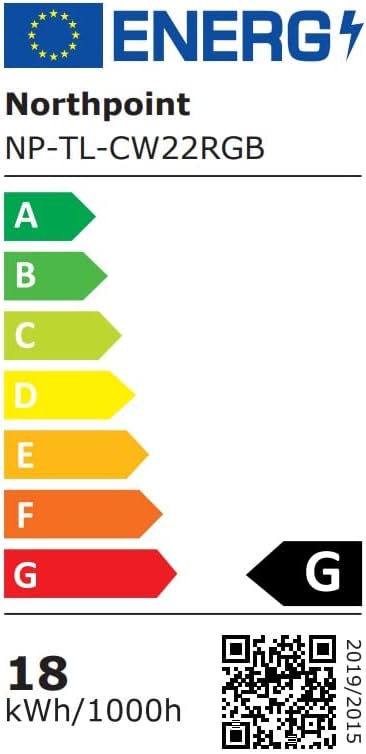
Image 4: Energy efficiency label for the Northpoint NP-TL LED Desk Lamp, indicating energy class G and 18 kWh/1000h consumption.
Waarborg en Ondersteuning
Northpoint products are manufactured to high-quality standards. For warranty information or technical support, please refer to the contact details provided with your purchase documentation or visit the official Northpoint webwebwerf. Bewaar asseblief u bewys van aankoop vir enige waarborgeise.
Note: Information regarding spare parts availability and software updates is not available at the time of printing.