
1. Inleiding
Thank you for choosing the JUQITECH Backlit Keyboard Case. This product is designed to enhance your Samsung Galaxy Tab A8 10.5 (2022) experience by providing a protective case and a versatile detachable Bluetooth wireless keyboard. This manual provides essential information for setup, operation, and maintenance to ensure optimal performance.
2. Verenigbaarheid
This keyboard case is specifically designed for the Samsung Galaxy Tab A8 10.5 inch (2022 Release). It is compatible with the following model numbers:
- SM-X200
- SM-X205
- SM-X207
To verify your tablet's model number, navigate to 'Settings' > 'About tablet' > 'Model' on your device. This case is not compatible with any other tablet models. The Samsung Tablet and S Pen are not included with this product.
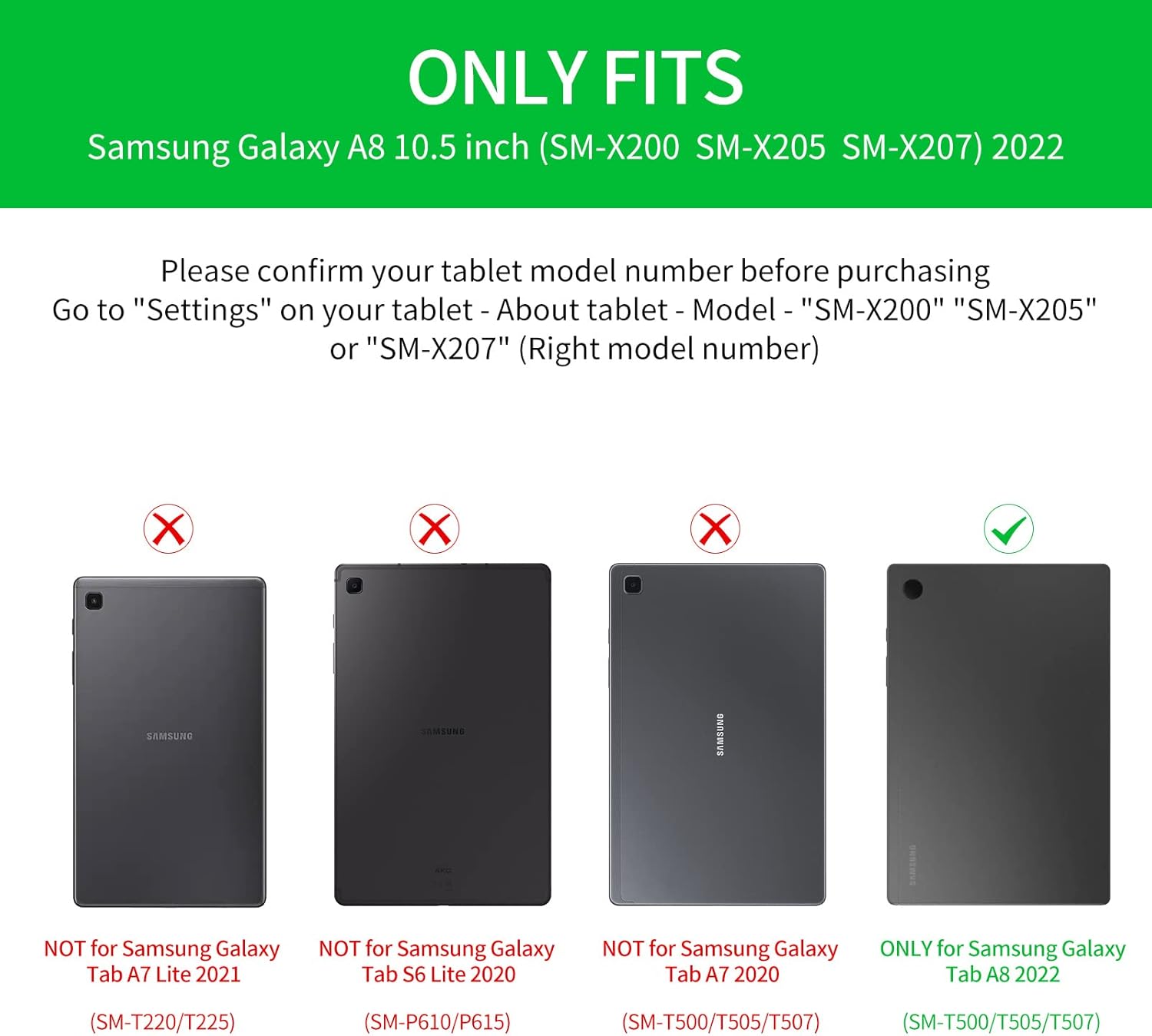
Image: Compatibility chart indicating supported Samsung Galaxy Tab A8 10.5 (2022) models and incompatible models.
3. Pakketinhoud
Kontroleer asseblief die pakket vir die volgende items:
- 1 x Smart Case for Galaxy Tab A8 10.5"
- 1 x Wireless Backlit Keyboard
- 2 x USB-laaikabels
- 1 x Gebruikershandleiding
4. Opstelinstruksies
4.1 Aanvanklike laai
Before first use, fully charge the wireless keyboard for 2-3 uur using one of the provided USB cables. The keyboard has a built-in Lithium-ion battery.
4.2 Bluetooth -koppeling
- Maak seker dat die sleutelbord gelaai is.
- Turn on the keyboard using the power switch (usually located on the side or top edge).
- On your Samsung Galaxy Tab A8, go to 'Settings' > 'Connected devices' > 'Bluetooth'.
- Aktiveer Bluetooth en soek vir beskikbare toestelle.
- Select the keyboard (it may appear as 'Bluetooth Keyboard' or a similar name) from the list to pair.
- Volg enige instruksies op die skerm om die saambindproses te voltooi.
4.3 System Switching
The keyboard is compatible with iOS, Android, and Windows operating systems. To optimize keyboard functions for your tablet, switch to the appropriate system:
- Vir iOS: Druk Fn + Q
- Vir Android: Druk Fn + W.
- Vir Vensters: Druk Fn + E

Image: Keyboard layout illustrating the function keys for switching between different operating systems.
5. Bedryfsinstruksies
5.1 Sleutelbord Agtergrondbeligtingbeheer
The keyboard features 7-color backlighting for typing in low-light conditions.
- Druk die bulb key to cycle through stable backlight mode, breathing backlight mode, or turn off the backlight.
- In stable backlight mode, press the RGB key to change between the 7 available colors: blue, green, red, light blue, purple, yellow, and white.

Image: Close-up of the keyboard demonstrating the backlit keys and color options.
5.2 Detachable Design and Viewing Hoeke
The keyboard is magnetically attached to the case, allowing for easy detachment. This feature enables flexible viewing positions for your tablet.
- Om die aan te pas viewing angle, detach the keyboard and reposition your tablet within the case.
- The case's design supports multiple viewing angles, ideal for watching videos, reading, working, or playing games.

Image: The keyboard case configured to hold the tablet at an optimal viewing angle, simulating a laptop setup.
5.3 Multimedia-kortpaaie
The keyboard includes convenient multimedia shortcut keys for quick access to various functions. Refer to the keyboard layout for specific key assignments such as volume control, playback, and screen lock.

Beeld: Gedetailleerd view of the keyboard's multimedia shortcut keys.
6. Onderhoud
To ensure the longevity and performance of your JUQITECH keyboard case, follow these maintenance guidelines:
- Skoonmaak: Wipe the case and keyboard with a soft, damp lap. Vermy harde chemikalieë of skuurmiddels.
- Beskerming: The case is designed with oil resistance, dustproof properties, impact resistance, anti-fingerprint coating, and scratch-proof material. However, avoid exposing it to extreme temperatures or direct sunlight for extended periods.
- Sleutelbordversorging: The keyboard features a high-quality waterproof conductive film, offering some protection against minor spills. In case of liquid contact, immediately power off the keyboard and allow it to dry completely before reuse.
- Berging: When not in use, store the keyboard case in a clean, dry environment.

Image: Visual representation of the case's protective features and material quality.
7. Probleemoplossing
If you encounter issues with your keyboard case, please refer to the following common solutions:
- Sleutelbord Koppel Nie:
- Maak seker dat die sleutelbord volledig gelaai is.
- Verify Bluetooth is enabled on your tablet and the keyboard is powered on.
- Probeer om die sleutelbord in jou tablet se Bluetooth-instellings te ontkoppel en weer te koppel.
- Restart both your tablet and the keyboard.
- Agterlig werk nie:
- Maak seker dat die sleutelbord gelaai is.
- Press the bulb key to cycle through backlight modes.
- Sleutels reageer nie:
- Kontroleer of die sleutelbord behoorlik via Bluetooth gekoppel is.
- Ensure the correct operating system mode (Fn+Q/W/E) is selected for your tablet.
- If specific keys are unresponsive, try cleaning around the keys.
- Tablet Sleep/Wake Function Issues:
- For optimal sleep/wake functionality, it is recommended to remove the keyboard and use the case separately.
- Unexpected Keyboard Behavior:
- If the keyboard exhibits unusual behavior (e.g., taking screenshots, resetting pages), ensure your tablet's software is up to date.
- Try resetting the keyboard by turning it off and on. If the issue persists, contact customer support.
8. Spesifikasies
| Kenmerk | Detail |
|---|---|
| Handelsmerk | JUQITECH |
| Modelnommer | SGTA8 |
| Versoenbare toestelle | Samsung Galaxy Tab A8 10.5" SM-X200 SM-X205 SM-X207 (2022) |
| Verbindingstegnologie | Bluetooth |
| Sleutelbordbeskrywing | Wireless Bluetooth Rechargeable Detachable 7 Colors Backlit Keyboard |
| Spesiale kenmerke | Backlit, Multi-Angle Adjustable, Rechargeable, Soft Full Protective Case, Transforms Tablet to Laptop |
| Sleutelbord agtergrondbeligting kleur ondersteuning | RGB (7 XNUMX XNUMX kleure) |
| Materiaal | Polyurethane (PU), Thermoplastic Polyurethane (TPU) |
| Item gewig | 1.3 pond |
| Batterye | 1 Litium-ioonbattery (ingesluit) |
| Laai tyd | 2-3 uur |
| Werkstyd | Tot 100 uur (sonder agterlig) |
| Verligte werktyd | 3-5 uur |
9. Waarborg en Ondersteuning
JUQITECH offers a 24-hour after-sales service guarantee for your purchase. If you encounter any problems or have questions regarding your product, please do not hesitate to contact us. Our support team is available to assist you.
For assistance, please refer to the contact information provided with your product packaging or visit the official JUQITECH webwebwerf.