
Swartweb BWA21HO008C
Swartweb 1440p 5 Megapixel USB Webcam gebruikershandleiding
Model: BWA21HO008C
Handelsmerk: Swartweb
1. Inleiding
Die Swartweb BWA21HO008C 1440p 5 Megapixel USB Webcam is designed to provide high-quality video and still image capture for your personal computer. It features an integrated adjustable light ring to ensure optimal illumination in various environments, enhancing your communication and recording experience. This manual provides instructions for setting up, operating, maintaining, and troubleshooting your webkam.
2. Produkkenmerke
- Up to 1440p Resolution @ 30 frames per second (fps) for clear video.
- 5 Megapixel still image resolution for high-quality photos.
- Built-in adjustable 3-level LED ring light to provide optimal lighting.
- Adjustable base designed to fit various sizes of computer monitors, laptop screens, or stand on flat surfaces.
- USB plug and play functionality for easy setup without additional drivers.
3. Pakketinhoud
Kontroleer asseblief die pakket vir die volgende items:
- 1 x Blackweb 1440p 5 Megapixel USB Webcam (Model: BWA21HO008C)
- 1 x Gebruikershandleiding
4. Opstelgids
4.1 Fisiese Opstelling
- Posisionering van die Webkamera: Open the adjustable base of the webcam. Place the webcam on top of your computer monitor or laptop screen, ensuring the front lip of the base rests securely on the front of the screen and the rear clip holds the back. Alternatively, the base can be folded to allow the webcam to stand on a flat surface such as a desk.
- Koppel aan jou rekenaar: Insert the USB cable from the webcam na 'n beskikbare USB-poort op jou rekenaar.

Beeld: Sykant view of the Blackweb webcam demonstrating its adjustable base for mounting on a monitor or laptop screen.
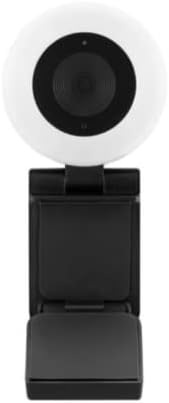
Beeld: Voorkant view of the Blackweb webcam, highlighting the central lens and the surrounding adjustable light ring.
4.2 Sagteware-opstelling
Die Swartweb BWA21HO008C webcam is a plug-and-play device, requiring no additional driver installation for most operating systems (Windows, macOS, Chrome OS). Upon connecting, your computer should automatically detect and configure the webkam.
- Outomatiese opsporing: Once connected, your operating system should recognize the webcam as a new video device.
- Application Selection: Om die webcam, open your preferred video conferencing software (e.g., Zoom, Microsoft Teams, Skype) or recording application. Navigate to the video/camera settings within the application and select "Blackweb BWA21HO008C" (or similar name) as your video input device.
5. Bedryfsinstruksies
5.1 Gebruik die Webnok
Once connected and recognized by your system and chosen in your application, the webcam is ready for use in video calls, live streaming, or recording.
- Ensure your chosen application is open and the webcam is selected as the active camera source.
- Pas die webcam's angle manually to frame your desired view.
5.2 Adjusting the Light Ring
Die webcam features a built-in adjustable 3-level LED light ring to improve illumination in low-light conditions.
- Locate the light control button, typically found on the top or side of the webcam body.
- Press the button repeatedly to cycle through the brightness levels: Low, Medium, High, and Off. Select the level that best suits your lighting needs.

Beeld: Hoekig view of the Blackweb webcam, highlighting the prominent light ring and the camera lens.
6. Onderhoud
- Skoonmaak: Om die skoon te maak webcam lens and body, use a soft, dry, lint-free cloth. Avoid using harsh chemicals, abrasive materials, or excessive moisture, as these can damage the device. Ensure the device is disconnected from your computer before cleaning.
- Berging: Stoor die as dit nie gebruik word nie webcam in a cool, dry place, away from direct sunlight, extreme temperatures, and high humidity.
7. Probleemoplossing
- Geen Beeld/Video:
- Maak seker dat die USB-kabel stewig aan beide die webkamera en jou rekenaar.
- Probeer om die webkamera na 'n ander USB-poort op jou rekenaar.
- Verifieer dat die webcam is selected as the active video input device in your application's settings.
- Herbegin jou rekenaar.
- Swak videogehalte:
- Ensure adequate lighting in your environment; use the built-in light ring if necessary.
- Maak die webcam lens with a soft, dry cloth.
- Confirm your application settings are configured for 1440p resolution if desired and your internet connection is stable if streaming.
- Light Ring Not Working:
- Verseker die webcam is connected to a powered USB port.
- Press the light control button multiple times to cycle through all brightness settings.
- If the issue persists, try connecting the webcam to a different USB port or computer.
8. Spesifikasies
| Modelnommer | BWA21HO008C |
| Video-resolusie | Up to 1440p @ 30 fps |
| Stilbeeld resolusie | 5 Megapixel |
| Konnektiwiteit | USB |
| Spesiale kenmerke | Adjustable 3-level LED light ring, Low Light capability |
| Versoenbare toestelle | Persoonlike rekenaar |
| Kleur | Swart |
| Afmetings (L x B x H) | 16.2 x 10.5 x 5.9 cm (benaderde pakkie-afmetings) |
| Gewig | 170 g (benaderde pakkiegewig) |
9. Veiligheidsinligting
- Moenie die toestel aan water, reën of oormatige vog blootstel nie.
- Moenie probeer om die toestel self uitmekaar te haal, te wysig of te herstel nie. Verwys alle diens aan gekwalifiseerde personeel.
- Hou die toestel buite bereik van kinders en troeteldiere.
- Gebruik slegs met versoenbare toestelle en kragbronne soos gespesifiseer.
- Vermy die plasing van die webcam in direct sunlight or near heat sources.
10. Waarborg en Ondersteuning
For warranty information, technical support, or customer service inquiries regarding your Blackweb BWA21HO008C webcam, please refer to the documentation provided at the point of purchase or contact your retailer. You may also visit the official Blackweb ondersteun website for further assistance, if available.