
Inleiding
Dankie vir die aankoopasing the Bell+Howell BH65TWS Bluetooth True Wireless Stereo Link Cinema Speaker. This portable speaker offers high-quality audio with the convenience of wireless connectivity. Featuring Bluetooth and auxiliary input options, a built-in microphone for hands-free calls, and True Wireless Stereo (TWS) technology for pairing two speakers, it provides a versatile listening experience. This manual will guide you through the setup, operation, and maintenance of your new speaker.
Pakketinhoud
Maak asseblief seker dat alle items in die pakket teenwoordig is:
- BH65TWS Speaker
- USB-laaikabel
- Bykomende oudiokabel
- Instructiehandleiding (hierdie dokument)
- Waarborgkaart
Produk verbyview
Familiarize yourself with the various parts and controls of your BH65TWS speaker.

Prent: Top view of the Bell+Howell BH65TWS speaker, highlighting the control panel with power, volume, and playback buttons.
The top panel features intuitive controls for power, volume adjustment, and media playback. The rear panel includes ports for charging and auxiliary input.
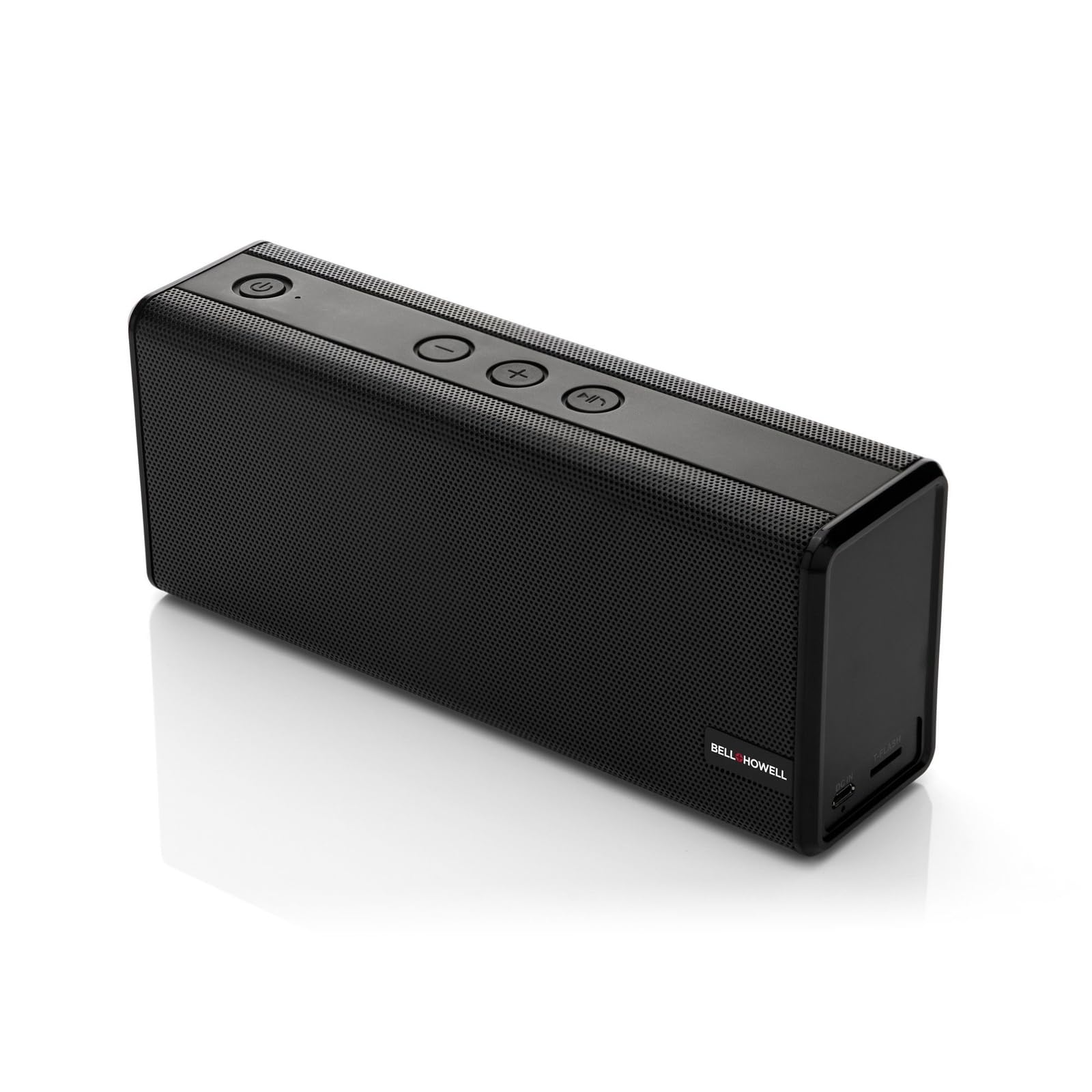
Prent: Voorkant view of the Bell+Howell BH65TWS speaker, showcasing its sleek, rectangular design and speaker grille.
Opstelling
Laai die luidspreker
Before first use, fully charge the speaker. A full charge takes approximately 3-4 hours.
- Connect the small end of the provided USB charging cable to the charging port on the speaker.
- Koppel die groot punt van die USB-kabel aan 'n USB-kragadapter (nie ingesluit nie) of 'n rekenaar se USB-poort.
- Die laai-aanwyserliggie sal tydens laai brand en afskakel wanneer dit volledig gelaai is.

Prent: The Bell+Howell BH65TWS speaker with a visual representation of a charging battery, indicating the charging process.
Skakel aan/af
- Om aan te skakel, hou die Kragknoppie () for approximately 3 seconds until you hear an audible tone and the LED indicator lights up.
- Druk en hou die. In om uit te skakel Kragknoppie for approximately 3 seconds until you hear an audible tone and the LED indicator turns off.
Bedryfsinstruksies
Bluetooth-koppeling
Connect your speaker to a Bluetooth-enabled device for wireless audio streaming.
- Maak seker dat die luidspreker aangeskakel is en binne 33 voet (10 meter) van jou Bluetooth-toestel is.
- Die luidspreker sal outomaties na Bluetooth-paringsmodus gaan, aangedui deur 'n flikkerende LED-liggie.
- Aktiveer Bluetooth op jou Bluetooth-toestel en soek vir beskikbare toestelle.
- Kies "BH65TWS" uit die lys toestelle.
- Sodra dit gekoppel is, sal die LED-aanwyser ophou flikker en konstant bly, en jy sal 'n bevestigingstoon hoor.

Prent: The Bell+Howell BH65TWS speaker positioned beside a smartphone, illustrating a successful Bluetooth connection for audio playback.
Ware draadlose stereo (TWS) -paar
Pair two BH65TWS speakers together for an immersive stereo sound experience.
- Ensure both BH65TWS speakers are powered on and not connected to any Bluetooth device.
- Op een luidspreker (dit sal die primêre luidspreker wees), druk en hou die Speel/Pause-knoppie for approximately 3 seconds until you hear a tone, indicating it's searching for another TWS speaker.
- The two speakers will automatically connect to each other. You will hear a confirmation tone once TWS pairing is successful.
- Now, connect your Bluetooth device to the primary speaker as described in the Bluetooth Pairing section. Audio will play through both speakers in stereo.

Prent: Two Bell+Howell BH65TWS speakers displayed side-by-side with a wireless signal icon between them, illustrating the True Wireless Stereo (TWS) pairing feature.
Hulpinvoermodus
Use the auxiliary input for devices without Bluetooth capability.
- Connect one end of the provided 3.5mm auxiliary audio cable to the AUX port on the speaker.
- Koppel die ander kant van die kabel aan die koptelefoonaansluiting of oudio-uitvoer van jou toestel.
- The speaker will automatically switch to auxiliary mode.
- Beheer terugspeel en volume vanaf jou gekoppelde toestel.
Handvrye oproepe
The built-in microphone allows for hands-free phone calls when connected via Bluetooth.
- When a call comes in, the music will pause. Press the Speel/Pause-knoppie om die oproep te beantwoord.
- Om 'n oproep te beëindig, druk die Speel/Pause-knoppie weer.
- Om die inkomende oproep te weier, hou die Speel/Pause-knoppie vir 2 sekondes.
Onderhoud
Proper care ensures the longevity of your speaker.
- Skoonmaak: Gebruik 'n sagte, droë lap om die luidspreker se oppervlak af te vee. Moenie skuurmiddels of oplosmiddels gebruik nie.
- Berging: Bêre die luidspreker op 'n koel, droë plek weg van direkte sonlig en uiterste temperature.
- Waterblootstelling: Hierdie spreker is NIE waterdig nieVermy blootstelling aan water of oormatige vog.
- Batterysorg: To maintain battery life, charge the speaker at least once every three months if not in regular use.
Probleemoplossing
Indien u probleme ondervind, raadpleeg die volgende algemene oplossings:
| Probleem | Moontlike Oplossing |
|---|---|
| Luidspreker skakel nie aan nie. | Ensure the speaker is fully charged. Connect to a power source and try again. |
| Kan nie via Bluetooth koppel nie. | Make sure the speaker is in pairing mode (flashing LED). Turn off and on Bluetooth on your device. Ensure no other devices are connected to the speaker. Move closer to the speaker. |
| Geen klank in Bluetooth-modus nie. | Check the volume levels on both the speaker and your connected device. Ensure the speaker is successfully paired. |
| TWS-paring misluk. | Ensure both speakers are not connected to any other Bluetooth device. Place speakers close to each other during pairing. Repeat the TWS pairing steps carefully. |
| Klank vervorming. | Reduce the volume on your device or the speaker. Ensure the speaker is not too far from the Bluetooth source. |
Spesifikasies
Detailed technical specifications for the Bell+Howell BH65TWS speaker:
| Kenmerk | Detail |
|---|---|
| Model Naam | BH65TWS-BK |
| Tipe luidspreker | Tweeter |
| Spesiale kenmerke | Built-in Microphone, Stereo Pairing (TWS) |
| Aanbevole gebruik | Musiek |
| Kleur | Swart |
| Item gewig | 1.6 pond (0.73 kg) |
| Waterdig | Nee |
| Draadlose Tegnologie | Bluetooth |
| Luidsprekergrootte | 3.5 millimeter |
| Kragbron | Batteryaangedrewe (1 litiumioonbattery ingesluit) |
| Produk afmetings | 8.7 x 4.7 x 2.8 duim (22.1 x 11.9 x 7.1 cm) |
| Luidspreker Maksimum Uitsetkrag | 6 Watts (Dual 3-watt drivers) |
| Verbindingstegnologie | Hulp, Bluetooth |
| Klankuitvoermodus | Stereo, Surround (met TWS) |
| Batterylewe | Up to 10 hours (2,200mAh battery) |
Veiligheidsinligting
Please read and follow these safety guidelines for safe operation:
- Moenie die luidspreker blootstel aan uiterste temperature, direkte sonlig of hoë humiditeit nie.
- Vermy om die luidspreker te laat val of aan sterk impakte te onderwerp.
- Do not disassemble, repair, or modify the speaker yourself. This will void the warranty.
- Keep the speaker away from sources of heat, such as radiators, heat registers, stoves, or other apparatus (including ampversterkers) wat hitte produseer.
- Do not use the speaker near water or in wet conditions.
- Gebruik slegs die meegeleverde laaikabel of 'n gesertifiseerde ekwivalent.
- Dispose of the battery and speaker responsibly according to local regulations.
Waarborg en Ondersteuning
Your Bell+Howell BH65TWS speaker comes with a limited warranty. Please refer to the included Warranty Card for detailed terms and conditions, including coverage period and how to make a claim.
For technical support, troubleshooting assistance, or warranty inquiries, please contact Bell+Howell customer service. Contact information can typically be found on the warranty card or the official Bell+Howell webwebwerf.