
1. Inleiding
This manual provides essential information for setting up, operating, and maintaining your TECLAST X11 2-in-1 Laptop/Tablet. The TECLAST X11 is a versatile device designed to function as both a portable tablet and a compact laptop, running on Windows 10 Home. It features a 10.1-inch Full HD display, an Intel N4020 processor, 6GB RAM, and 128GB of internal storage.
2. Wat is in die boks
- TECLAST X11 Tablet
- Kragadapter
- USB kabel
- Gebruikershandleiding (hierdie dokument)
Note: The keyboard and stylus pen are sold separately and are not included in the standard package.
3. Produk verbyview
3.1 Sleutelkenmerke
- 2-in-1 ontwerp: Seamlessly switch between tablet and laptop modes.
- Vertoon: 10.1-inch IPS Full HD (1920x1200) touchscreen.
- Verwerker: Intel Gemini Lake Reflash N4020 CPU (up to 2.8GHz).
- Geheue en berging: 6GB RAM, 128GB eMMC ROM (expandable up to 256GB via TF card).
- Bedryfstelsel: Vooraf geïnstalleerde Windows 10 Home.
- Verbinding: Dual-band 2.4G/5G WiFi, Bluetooth 4.2.
- Kameras: 5MP rear camera, 2MP front camera.
- Poorte: USB 3.0, Mini-HDMI, Headphone Jack, DC Port.
- Skopstand: Adjustable U-shaped kickstand (0° to 145°).
3.2 Toesteluitleg
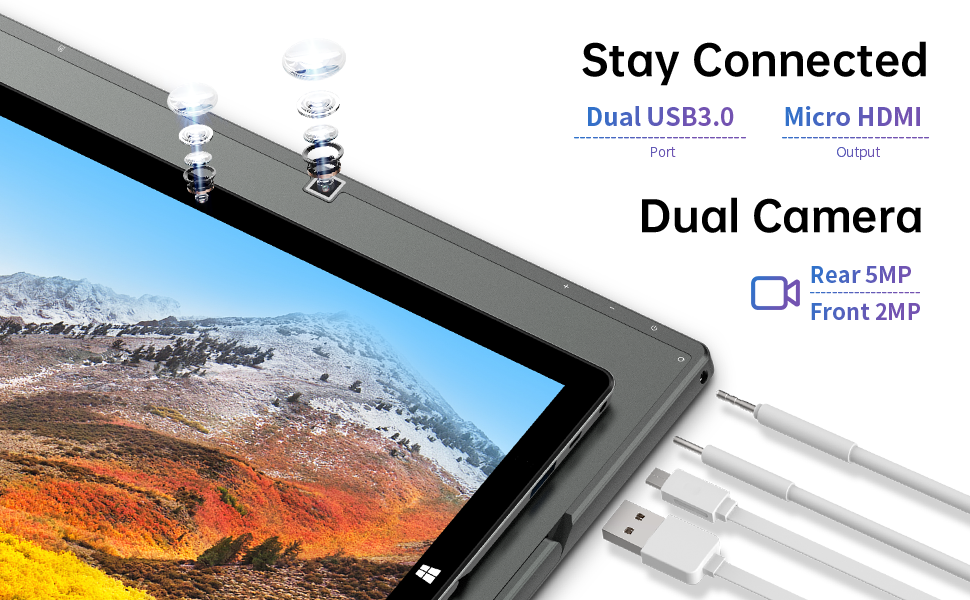
Beeld: Sykant view of the TECLAST X11 tablet highlighting the USB 3.0 port, Micro HDMI output, and front/rear cameras.

Beeld: Gedetailleerd view of the TECLAST X11's side ports, including USB 3.0, Mini-HDMI, DC power input, and headphone jack.
4. Opstelling
4.1 Aanvanklike laai
Before first use, fully charge your TECLAST X11 tablet. Connect the provided power adapter to the DC port on the device and plug it into a power outlet. The charging indicator will illuminate.
4.2 Aan-/afskakel
- Om aan te skakel: Hou die aan / uit -knoppie ingedruk totdat die skerm brand.
- Om af te skakel: Press and hold the Power button, then select "Shut down" from the on-screen options. Alternatively, go to Start Menu > Power > Shut down.
- Slaap stelling: Briefly press the Power button to put the device into sleep mode or wake it up.
4.3 Aanvanklike Windows-opstelling
Upon first power-on, follow the on-screen instructions to complete the Windows 10 setup process. This includes selecting your region, language, connecting to a Wi-Fi network, and creating a user account.
5. Bedryfsinstruksies
5.1 Wissel tussen modusse
The TECLAST X11 is designed for flexibility, allowing you to switch between tablet and laptop modes.
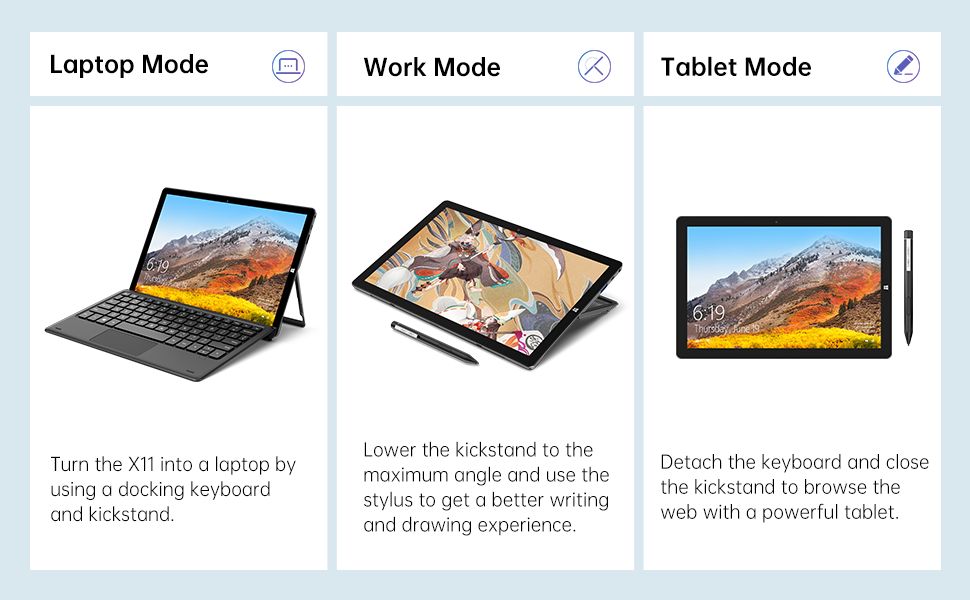
Image: The TECLAST X11 in laptop mode with the keyboard attached and kickstand deployed.
Skootrekenaarmodus: Attach the magnetic docking keyboard and deploy the integrated kickstand. The device will automatically detect the keyboard and switch to laptop interface.

Image: A user holding the TECLAST X11 in tablet mode, interacting with the touchscreen.
Tabletmodus: Detach the keyboard. The device will automatically switch to tablet mode, optimizing the interface for touch input.

Beeld: Agter view of the TECLAST X11 showing the adjustable kickstand extended.
Skopstand gebruik: The integrated U-shaped kickstand can be adjusted from 0° to 145° for comfortable viewing or typing angles.
5.2 Gebruik die raakskerm
The 10.1-inch IPS display supports 10-point multi-touch. Use standard touch gestures for navigation, zooming, and interaction with applications.
5.3 Eksterne Konnektiwiteit
- USB 3.0: Connect external devices such as USB drives, mice, or printers.
- Mini-HDMI: Koppel aan 'n eksterne monitor of TV vir 'n groter skerm.
- Bluetooth 4.2: Pair with Bluetooth-enabled accessories like headphones or speakers.
- Wi-Fi: Connect to wireless networks for internet access. Supports 2.4G and 5G bands.
5.4 Videodemonstrasie
Video: An official TECLAST video demonstrating the features and versatility of the X11 Windows tablet with its detachable keyboard and various usage scenarios.
6. Onderhoud
6.1 Die skoonmaak van die toestel
- Gebruik 'n sagte, pluisvrye lap om die skerm en buite-oppervlaktes skoon te maak.
- Vir hardnekkige merke, effens dampMaak die lap skoon met water of 'n skermveilige skoonmaakoplossing.
- Vermy die gebruik van harde chemikalieë, skuurmiddels of oormatige vog.
6.2 Batterysorg
- Om batterylewe te verleng, vermy uiterste temperature.
- Moenie die toestel vir lang tye volledig gelaai of volledig ontlaai laat nie.
- Gebruik slegs die oorspronklike of gesertifiseerde versoenbare laaier.
6.3 Sagteware-opdaterings
Regularly check for and install Windows updates to ensure optimal performance, security, and access to the latest features. Go to Start Menu > Settings > Update & Security > Windows Update.
7. Probleemoplossing
| Kwessie | Moontlike Oplossing |
|---|---|
| Toestel skakel nie aan nie | Ensure the device is charged. Connect the power adapter and try again. If unresponsive, press and hold the Power button for 10-15 seconds to perform a hard reset. |
| Wi-Fi-verbindingskwessies | Check if Wi-Fi is enabled in Windows settings. Restart your router and the tablet. Ensure you are within range of the Wi-Fi signal. |
| Sleutelbord reageer nie | Ensure the keyboard is securely attached to the magnetic docking port. Restart the tablet. Verify that the keyboard was purchased separately and is compatible. |
| Stadige prestasie | Close unnecessary applications. Check for Windows updates. Ensure sufficient free storage space. Run a disk cleanup. |
| Screen rotation not working | Check if auto-rotate is enabled in Windows Action Center (swipe in from the right edge of the screen or click the icon in the taskbar). |
8. Spesifikasies
| Kenmerk | Detail |
|---|---|
| Model Naam | X11 2-in-1 Tablet |
| Skerm grootte | 10.1 duim |
| Skermresolusie | 1920 x 1200 piksels (FHD IPS) |
| Verwerker | Intel Gemini Lake Reflash N4020 (1.1GHz - 2.8GHz) |
| RAM | 6 GB DDR4 SDRAM |
| Hardeskyf | 128 GB eMMC (expandable up to 256GB via TF card) |
| Grafiese kaart | Geïntegreerde Intel UHD Graphics 600 |
| Bedryfstelsel | Windows 10 Tuis |
| Draadlose tipe | Bluetooth 4.2, Dual-band WiFi (2.4G + 5G) |
| Agter Webcam resolusie | 5 MP |
| Voorkant Webcam resolusie | 2 MP |
| Hawens | USB 3.0, Mini-HDMI, Headphone Jack, DC Port |
| Item gewig | 2.31 pond (ongeveer 1.05 kg) |
| Batterye | 1 Litium Polimeer battery (ingesluit) |
9. Waarborg en Ondersteuning
TECLAST provides a 12-maande waarborgdiens for the X11 2-in-1 Laptop/Tablet. If you encounter any issues or have questions regarding your device, please contact TECLAST customer support. Refer to the contact information provided with your product packaging or visit the official TECLAST webwebwerf vir ondersteuningsbesonderhede.