
Inleiding
Thank you for choosing the Galax Slider-04 Optical Wired Gaming Mouse. This manual provides essential information for setting up, operating, maintaining, and troubleshooting your new gaming mouse. Please read it carefully to ensure optimal performance and longevity of your device.
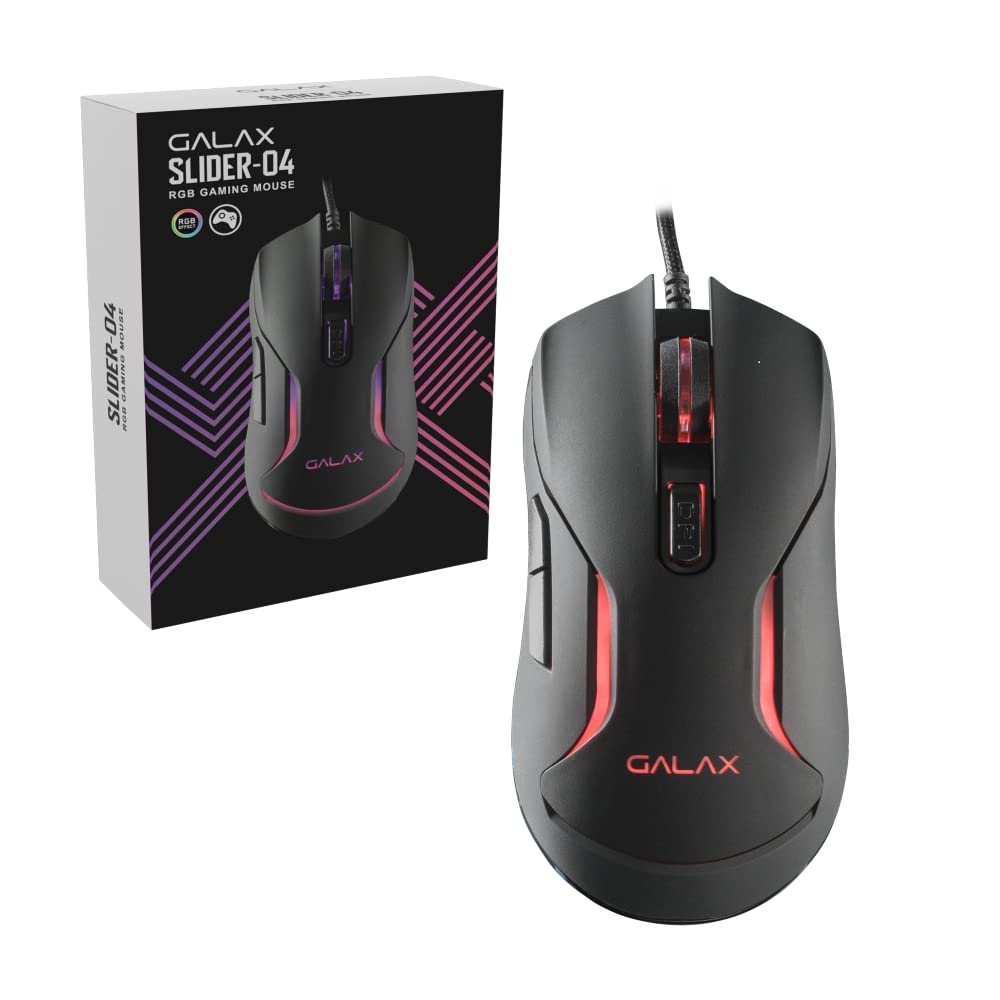
Beeld: Bo view of the Galax Slider-04 Optical Wired Gaming Mouse, showcasing its ergonomic design and central scroll wheel.
Opstelling
The Galax Slider-04 Gaming Mouse is designed for simple plug-and-play functionality, requiring no additional software installation for basic use.
- Pak die muis uit: Verwyder die muis versigtig uit sy verpakking.
- Koppel aan rekenaar: Plug the USB connector of the mouse into an available USB port on your desktop, laptop, or PC.
- Stelselherkenning: Your operating system (Windows, macOS, Unix) will automatically detect and install the necessary drivers. This process usually takes a few seconds.
- Gereed vir gebruik: Sodra die drywers geïnstalleer is, is die muis gereed vir onmiddellike gebruik.

Image: The Galax Slider-04 mouse with its braided USB cable, ready for connection to a computer.
Bedryfsinstruksies
The Galax Slider-04 features multiple buttons and customizable settings to enhance your gaming and productivity experience.
Knoppie Funksies
The mouse is equipped with 6 function keys for versatile control:
- 1. Linkermuisknoppie: Standaard primêre klikfunksie.
- 2. Regtermuisknoppie: Standaard sekondêre klikfunksie (kontekskieslys).
- 3. Scroll Wheel: Blaai op/af en dien as 'n middelste klikknoppie.
- 4. Forward Button: Navigeer vorentoe in web blaaiers of file ontdekkingsreisigers.
- 5. Terug-knoppie: Navigeer agteruit in web blaaiers of file ontdekkingsreisigers.
- 6. DPI Button: Blaai deur DPI-sensitiwiteitsinstellings.

Image: A detailed diagram illustrating the location and numbering of the 6 function keys on the Galax Slider-04 mouse.
DPI aanpassing
Adjust the mouse sensitivity (DPI) to match your preference and task requirements. The Slider-04 offers four preset DPI levels:
- 1000 DPI
- 1600 DPI
- 3200 DPI
- 6400 DPI
Druk die DPI knoppie (Button 6) located behind the scroll wheel to cycle through these settings. Each change will typically be indicated by a change in the mouse's RGB lighting color.

Image: Visual representation of the four selectable DPI settings available on the Galax Slider-04 mouse.
RGB LED-beligting
The Galax Slider-04 features dynamic RGB LED lighting that enhances your gaming setup's aesthetics. The lighting effects cycle automatically, often changing color to indicate the current DPI setting.
Video: A short demonstration of the Galax Slider-04 mouse's RGB LED lighting effects, showcasing the dynamic color changes.

Image: The Galax Slider-04 mouse displayed with various RGB color presets, illustrating the range of lighting options.
Ergonomiese ontwerp
The mouse is designed with ergonomics to provide comfort and reduce hand fatigue during prolonged use. Its shape supports both fingertip and claw grip styles, promoting a natural hand posture.

Image: A diagram demonstrating how the ergonomic design of the Galax Slider-04 mouse accommodates both fingertip and claw grip styles.
Onderhoud
Proper care will extend the life and performance of your Galax Slider-04 Gaming Mouse.
- Skoonmaak: Gebruik 'n sagte, droë lap om die oppervlak van die muis af te vee. Vir hardnekkige vuiligheid, vee dit effens af.ampMaak die lap met water skoon. Vermy harde chemikalieë of skuurmiddels.
- Optiese sensor: Hou die optiese sensor aan die onderkant van die muis skoon en vry van stof of puin om akkurate dophou te verseker.
- Kabelversorging: Avoid sharply bending or twisting the braided USB cable. Store the cable neatly to prevent tangling and damage.
- Berging: Wanneer dit nie gebruik word nie, bêre die muis in 'n skoon, droë omgewing weg van uiterste temperature.
Probleemoplossing
If you encounter issues with your Galax Slider-04 Gaming Mouse, refer to the following common solutions:
- Mouse Not Detected:
- Maak seker dat die USB-kabel stewig in 'n werkende USB-poort ingeprop is.
- Probeer om die muis in 'n ander USB-poort op jou rekenaar te koppel.
- Herbegin jou rekenaar.
- Check your computer's Device Manager (Windows) or System Information (macOS) to see if the mouse is listed.
- DPI verander nie:
- Ensure you are pressing the dedicated DPI button (Button 6).
- Verify that the mouse is properly connected and recognized by your system.
- RGB-ligte werk nie:
- Ensure the mouse is properly connected to your computer.
- The RGB lighting is typically automatic and cycles through colors. If no lights appear, try reconnecting the mouse or restarting your computer.
- Onakkurate dophou:
- Maak die optiese sensor aan die onderkant van die muis skoon.
- Use the mouse on a clean, uniform surface or a quality mouse pad.
- Adjust the DPI setting to a level suitable for your surface and preference.
Spesifikasies
Below are the technical specifications for the Galax Slider-04 Optical Wired Gaming Mouse:
| Kenmerk | Detail |
|---|---|
| Handelsmerk | Galax |
| Model Naam | SKYFIER |
| Modelnommer | MGS04UX26RG2B0 |
| Kleur | Swart |
| Verbindingstegnologie | USB (bedraad) |
| Bewegingsopsporingstegnologie | Opties |
| Mouse Maximum Sensitivity | 6400 DPI |
| DPI-instellings | 1000/1600/3200/6400 |
| Knoppie Hoeveelheid | 6 |
| Knoppie Lewensduur | 3 miljoen kliks |
| Stemmingskoers | 125Hz |
| Spesiale kenmerke | Ergonomic Design, RGB LED Lights, Lightweight |
| Kabellengte | 1.5 meters (Braided) |
| Versoenbare toestelle | Persoonlike rekenaar |
| Ondersteuning van bedryfstelsels | Unix, Windows 7/8/10, macOS 10.12 Sierra and above |
| Item gewig | 250 gram |
| Itemafmetings (L x B) | 12.9L x 4.1W Sentimeter |
| Kragbron | Elektries met koord |
| Omhulselmateriaal | Plastiek |
| Product Finish Type | Mat |

Image: A table summarizing the key specifications of the Galax Slider-04 gaming mouse.
Waarborg & Ondersteuning
The Galax Slider-04 Optical Wired Gaming Mouse comes with a 1 Jaar Vervaardigerswaarborg vanaf die aankoopdatum.
Vir waarborgeise of tegniese ondersteuning, kontak asseblief:
- Vervaardiger: Galax Technology, Galaxy Microsystems Ltd., Hong Kong, Kowloon Bay, Sheung Yuet Rd, 3號企業廣場二期
- Invoerder (Indië): Technology And Gadgets, Gala no.142/143, 1st Floor, Building no.6, Mittal Industrial Estate, Marol, Andheri (East), Mumbai - 400059., Mumbai, India, Maharashtra
Bewaar asseblief u aankoopbewys as bewys van aankoop vir waarborgdoeleindes.