
TECURS MR02
TECURS Condenser USB Microphone User Manual
Model: MR02 | Brand: TECURS
Inleiding
The TECURS Condenser USB Microphone is a versatile audio solution designed for high-quality sound capture in various applications, including recording, podcasting, streaming, gaming, and online meetings. This kit provides professional sound quality with its built-in sound chipset, Cardioid Pickup Pattern, and high sampling rate, ensuring clear and smooth audio reproduction.
Wat is in die boks
- Adjustable Boom Arm for Streaming
- USB-mikrofoon
Opstelgids
1.1 Uitpak en Komponentidentifikasie
Upon opening the package, carefully remove all components. The kit includes the condenser microphone, an adjustable boom arm, a pop filter, a windproof foam cover, a tripod stand, and a USB cable.

Image: All components of the TECURS Condenser USB Microphone kit laid out, including the microphone, boom arm, pop filter, tripod, and cables.
Video: 'n Uitpak en meerview of the TECURS MR02 microphone kit, demonstrating the contents and initial setup steps.
1.2 Assembling the Boom Arm
Heg die lessenaar clamp to a sturdy surface. Insert the base of the boom arm into the clamp and tighten the screw to secure it. Adjust the arm's position and angle using the tension knobs to suit your recording needs.
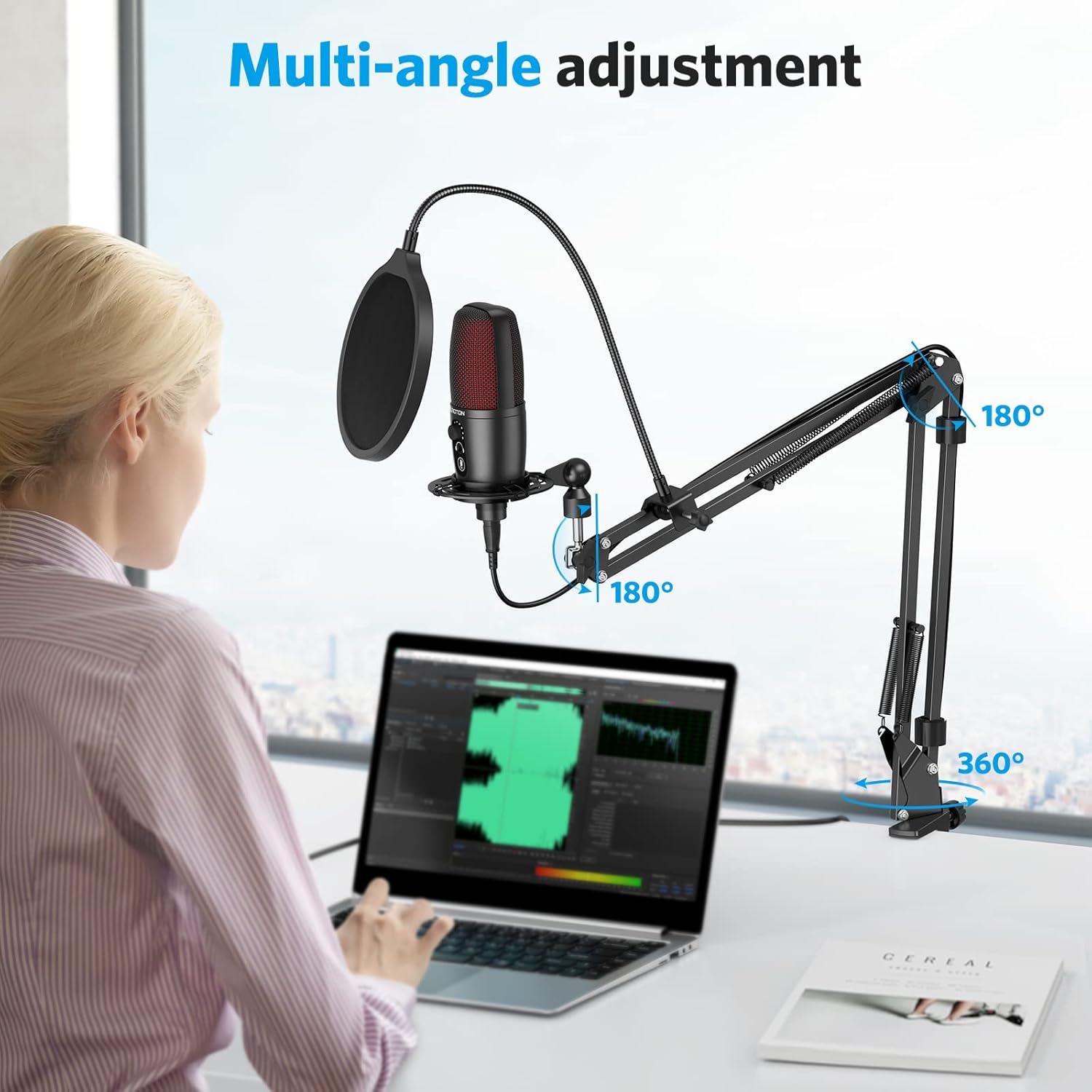
Image: Illustration showing the multi-angle adjustment capabilities of the boom arm, including 180-degree and 360-degree rotation points.
1.3 Die mikrofoon aanheg
Screw the microphone securely onto the shock mount or the tripod stand. Ensure it is firmly attached to prevent accidental dislodgement.

Image: The TECURS microphone mounted on the adjustable boom arm with the pop filter in place, ready for use.
1.4 Aansluiting van bykomstighede
Attach the pop filter to the boom arm and position it approximately 2-3 inches from the microphone. This helps to eliminate plosive sounds. For additional wind noise reduction, place the foam cover over the microphone head.

Image: Diagram illustrating the double-layer acoustic filter and windproof foam cover for pop filter protection.
1.5 Toestelverbinding
Connect the USB cable from the microphone to an available USB 2.0 port on your Mac or Windows computer. The microphone is plug-and-play, requiring no additional drivers or external sound cards. It is compatible with PC, Laptop, Mac, PS4, and PS5. Please note: It is NOT compatible with Xbox.

Image: The microphone connected to a laptop via its 5.9 ft USB cable, highlighting its plug-and-play compatibility with various operating systems and devices.
Bedryfsinstruksies
2.1 Professional Sound Quality
The TECURS microphone features a built-in sound chipset, Cardioid Pickup Pattern, 192KHz/24Bit high Sampling Rate, and 30 Hz-20 KHz wide Frequency Response. This ensures clear and smooth sound capture, perfect for reproducing your voice accurately.

Image: A diagram illustrating the cardioid pickup pattern of the microphone, showing its directional sound capture capabilities.
2.2 One-Touch Mute
Easily mute or unmute the microphone with a single touch. The red LED indicator lights up when the microphone is in use, providing a clear visual cue of its status.
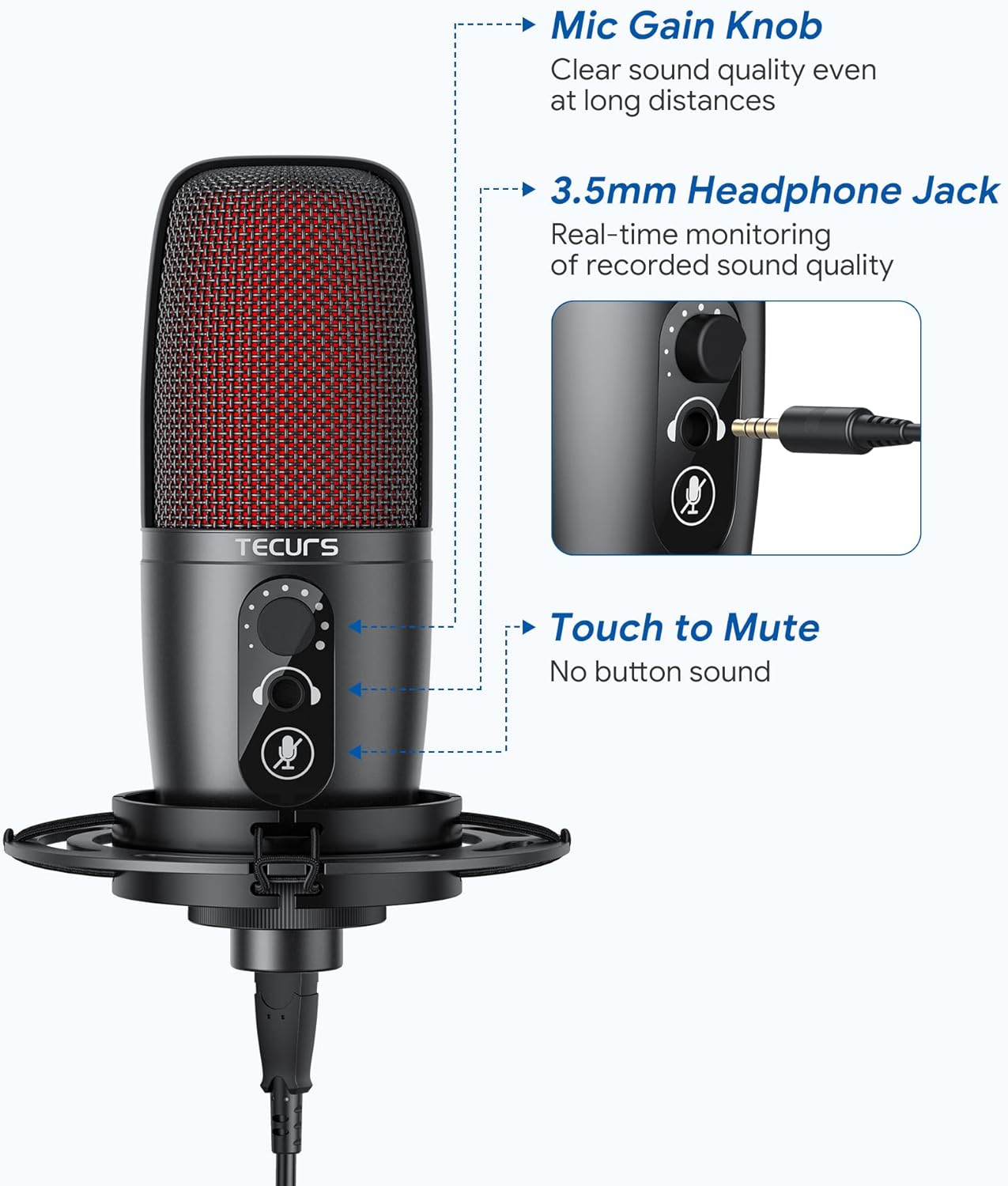
Image: A close-up of the microphone highlighting the one-touch mute button and its LED indicator.
2.3 Gain Knob & Earphone Monitor
Adjust the microphone's volume quickly using the integrated Gain Knob. The 3.5 mm Headphone Jack allows for efficient real-time monitoring of your voice, ensuring optimal audio levels during recording or streaming.
Beeld: 'n Gedetailleerde view of the microphone's controls, including the gain knob and the 3.5mm headphone jack for real-time monitoring.
Onderhoud
To ensure the longevity and optimal performance of your TECURS microphone, keep it clean and free from dust. Use a soft, dry cloth for cleaning. Avoid exposing the microphone to extreme temperatures or humidity. Store it in a safe place when not in use to prevent physical damage.
Probleemoplossing
3.1 Geen klankuitset nie
- Maak seker dat die USB-kabel stewig aan beide die mikrofoon en jou toestel gekoppel is.
- Check your device's sound settings to ensure the TECURS microphone is selected as the input device.
- Verify that the microphone is not muted (red LED indicator should be off when unmuted).
- Adjust the Gain Knob on the microphone to increase volume.
3.2 Swak klankgehalte
- Ensure the pop filter and foam cover are correctly positioned to reduce plosives and wind noise.
- Adjust the microphone's position relative to your mouth (ideally 6-12 inches away for optimal clarity).
- Check for any background noise in your environment and try to minimize it.
Vir meer gedetailleerde probleemoplossing, verwys asseblief na die amptelike Gebruikershandleiding (PDF) or Probleemoplossingsgids (PDF).
Spesifikasies
| Kenmerk | Waarde |
|---|---|
| Handelsmerk | TECURS |
| Model Naam | MR02 |
| Verbindingstegnologie | USB |
| Connector Tipe | USB |
| Spesiale kenmerk | Demp-funksie |
| Versoenbare toestelle | PC, Latop, Mac, PS4, PS5 |
| Kleur | Swart |
| Ingesluit komponente | usb microphone, Boom Arm for Streaming |
| Polêre patroon | Eenrigting |
| Kabellengte | 5.9 Voet |
| Audio Sensitiwiteit | 112 dB |
| Item gewig | 1150 gram |
| Impedansie | 2.2 Kilo-hm |
| Mikrofoonvormfaktor | Gansnek |
| Kragbron | Elektries met koord |
| Materiaal | Legeringstaal, metaal |
| Sein-tot-geraas verhouding | 72 dB |
| Hardeware Platform | Skootrekenaar, rekenaar, PlayStation |
| Aantal kanale | 1 |
| Frekwensiereeks | 30Hz~20KHz |
| Frekwensierespons | 20 KHz |
| Geraasvlak | 6 dB |
| Vervaardiger | Enping Yushi Electronic Technology Co.,Ltd |
| UPC | 789605588341 |
| Item gewig | 2.54 pond |
| Land van oorsprong | China |
| ASIN | B09KLL9QHT |
| Item model nommer | MR02 |
| Datum Eerste Beskikbaar | 1 November 2021 |
| Kleur Naam | Swart |
| Materiaal tipe | Legeringstaal, metaal |
| Aanbevole gebruike vir produk | Streaming, Video Conference, Singing, Gaming |
Waarborg en Ondersteuning
TECURS products come with a standard manufacturer's warranty. For detailed warranty information, technical support, or service inquiries, please visit the official TECURS webwebwerf of kontak hul kliëntediens. Bewaar u aankoopbewys vir waarborgeise.
Ask a question about this manual
Ask about setup, troubleshooting, compatibility, parts, safety, or missing instructions. Manuals+ will review the question and use this page’s manual context to help answer it.