
Parrot Uncle F6305
Parrot Uncle 52-Inch F6305 New York Chrome Crystal Chandelier Ceiling Fan User Manual
Model: F6305
Inleiding
Thank you for choosing the Parrot Uncle 52-Inch F6305 New York Chrome Crystal Chandelier Ceiling Fan. This manual provides essential information for the safe and efficient installation, operation, and maintenance of your new ceiling fan. Please read all instructions carefully before beginning installation and retain this manual for future reference.
Opstelling en installasie
This ceiling fan is designed for indoor use in dry locations, suitable for rooms up to 18 ft. x 18 ft. Professional installation is recommended if you are unfamiliar with electrical wiring.
Pakketinhoud
- Plafonwaaiermotorsamestelling
- 5 Plywood Blades
- Kristal ligarmatuur
- Afstandbeheer
- Afwaartse stange (4-duim en 10-duim)
- Bevestigingsbeugel en hardeware
- Instruksie Handleiding
Installasie verbyview
Installation typically takes 40-60 minutes. Ensure all power is disconnected at the circuit breaker before beginning. The fan supports a 2-position dual mount, including downrod mount and angled mount (up to 15 degrees).

Figuur 1: Dimensions and Mounting Options. The fan measures 52 inches in diameter and 19 inches in height. It can be installed with a downrod or on an angled ceiling up to 15 degrees.
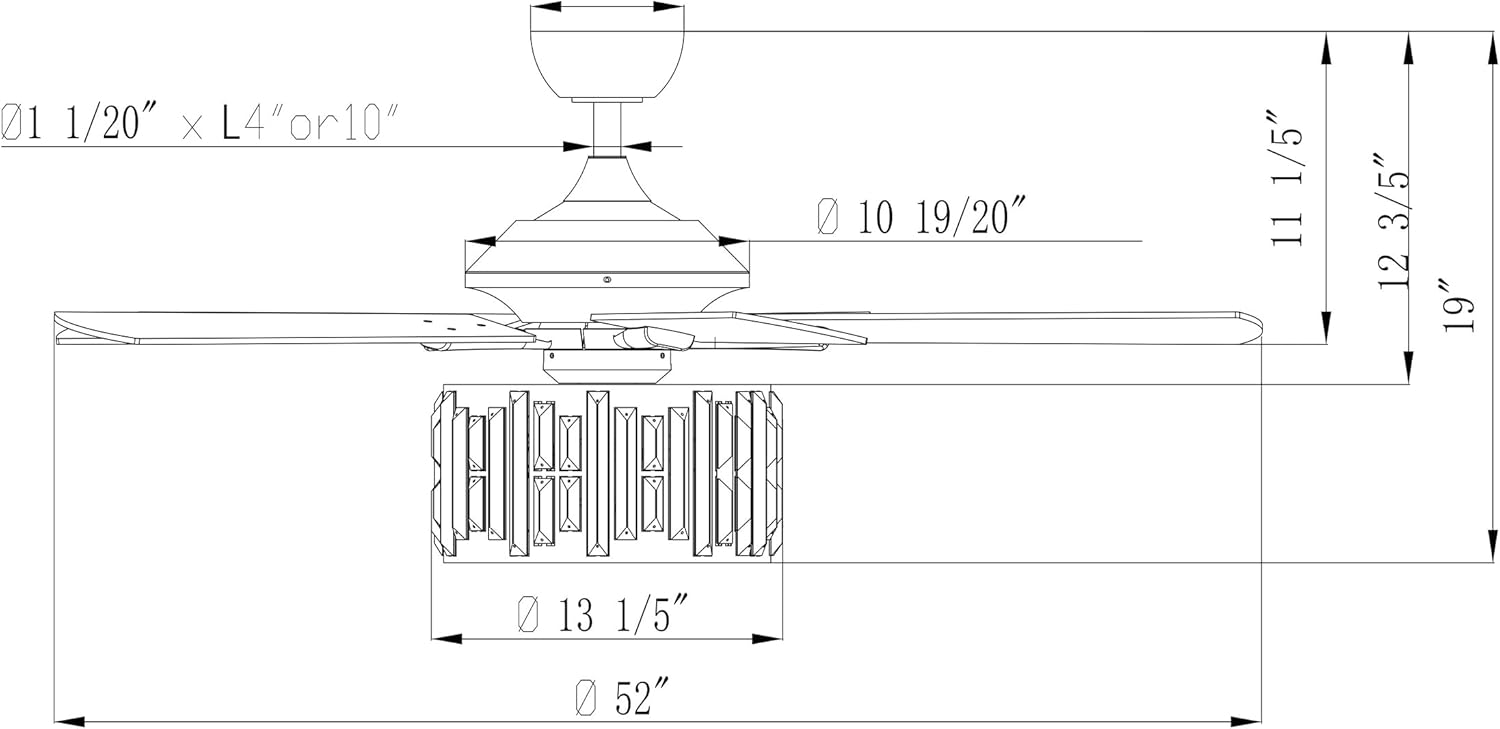
Figuur 2: Detailed technical drawing of the fan, showing specific measurements for installation planning.

Figuur 3: Ontplof view of fan components, highlighting the stable mounting bracket, 4-inch and 10-inch downrods, powerful motor, 5 plywood blades, and sparkling crystal decor.
Installasie video
Knip 1: A 3D animation demonstrating the installation process for the Parrot Uncle F6305 Ceiling Fan. This video provides a visual guide to assembling and mounting the fan components.
Bedryfsinstruksies
Your Parrot Uncle ceiling fan is equipped with a remote control for convenient operation of both the fan and light functions.
Afstandbeheerfunksies
- Fan Spoed: 3-level fan speed adjustment.
- Ligbeheer: Skakel die lig aan/af.
- Afteller: Set the fan to automatically shut off after 2, 4, or 8 hours.
- Omkeerbare motor: Change the direction of the fan blades for seasonal use.

Figuur 4: Remote control for the Parrot Uncle ceiling fan, featuring 3-speed settings, light control, and 2/4/8 hour timer options. The remote operates within a 20ft range.
Omkeerbare Motorfunksie
The reversible motor allows you to optimize air circulation for different seasons:
- Summer Mode (Clockwise Rotation): Skep 'n afwaartse lugvloei, wat 'n verkoelende effek bied.
- Winter Mode (Counter-Clockwise Rotation): Creates an upward airflow, circulating warm air near the ceiling throughout the room.

Figuur 5: Reversible motor function for year-round comfort. Clockwise rotation improves air flow for cooling, while counter-clockwise rotation circulates thermal warmth.
Onderhoud
Gereelde onderhoud verseker die lang lewensduur en optimale werkverrigting van jou plafonwaaier.
- Skoonmaak: To prevent scratching the finish, clean the fan with a soft, damp lap. Moenie skuur skoonmaakmiddels of oplosmiddels gebruik nie.
- Bladversorging: Periodically check the fan blades for dust accumulation and wipe them clean.
- Draai skroewe: Over time, screws may loosen. Check and tighten all screws on the motor housing and blade attachments annually.
- Gloeilamp vervanging: The light fixture requires 2 E26 base bulbs, max 25 watts (bulbs not included). Ensure power is off before replacing bulbs.
Probleemoplossing
As jy probleme met jou waaier ondervind, raadpleeg die volgende algemene stappe vir probleemoplossing:
| Probleem | Moontlike oorsaak | Oplossing |
|---|---|---|
| Waaier begin nie | Loose wiring connection; no power to the fan; remote control battery dead. | Check all wiring connections; ensure power is on at the circuit breaker; replace remote control battery. |
| Fan makes humming or pulsating noise | Loose screws; motor issue. | Check and tighten all screws on the fan assembly. If noise persists, contact customer service. |
| Light flickers or does not turn on | Loose bulb; incorrect bulb type/wattage; wiring issue. | Ensure bulbs are securely tightened; verify bulbs are E26 base, max 25 watts; check light kit wiring. |
| Afstandbeheer werk nie | Dead battery; remote not paired with receiver. | Replace remote battery; refer to remote pairing instructions in the full manual. |
Spesifikasies
| Kenmerk | Detail |
|---|---|
| Handelsmerk | Papegaai-oom |
| Modelnommer | F6305 |
| Styl | 6305 - New York |
| Kleur | Chrome |
| Materiaal | Engineered Wood, Glass, Iron |
| Itemafmetings (L x B x H) | 52 cm L x 52 cm B x 19 cm H |
| Item gewig | 22.3 pond |
| Binne/buiteluggebruik | Binnenshuis (droë ligging) |
| Kragbron | AC |
| Voltage | 120 Volt |
| Ligbron | Incandescent (Bulbs Not Included) |
| Aantal ligbronne | 2 |
| Gloeilamp basis | E26 |
| Max Wattage (per gloeilamp) | 25 watt |
| Helderheid | 1125 lumen |
| Beheer metode | Afstandbeheer |
| Spesiale kenmerke | Remote Controlled, Reversible Motor, Timer |
| Ingesluit komponente | 4" & 10" Downrods, Remote Control |
Waarborg
Parrot Uncle offers the following warranty for your ceiling fan:
- 30-Day Return & Replacement: Worry-free return and replacement service within 30 days of purchase.
- One-Year Free Replacement Parts: Free replacement parts service for one year from the date of purchase.
- Lewenslange professionele kliëntediens: Ongoing customer support for the lifetime of the product.
Ondersteuning
For any questions, concerns, or assistance with your Parrot Uncle ceiling fan, please do not hesitate to contact our professional customer service team. You can also visit the official Parrot Uncle store for more information and products.
Parrot Uncle Store: Besoek Winkel
Ask a question about this manual
Ask about setup, troubleshooting, compatibility, parts, safety, or missing instructions. Manuals+ will review the question and use this page’s manual context to help answer it.