
1. Inleiding
Thank you for choosing the Radwag WTC 15/C1/K Load Cell Scale. This precision balance is designed for accurate weighing, counting, and checkweighing applications in various industrial and scientific environments. This manual provides essential information for the correct installation, operation, and maintenance of your device. Please read it thoroughly before use to ensure optimal performance and safety.
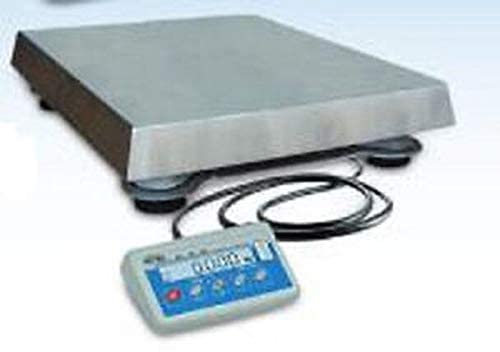
Figure 1: Radwag WTC 15/C1/K Load Cell Scale. This image displays the complete scale unit, including the weighing platform and the integrated display panel.
2. Veiligheidsriglyne
Neem die volgende veiligheidsmaatreëls in ag om beserings en skade aan die toestel te voorkom:
- Operate the scale only in a stable, level environment free from excessive vibrations, drafts, and extreme temperature fluctuations.
- Do not exceed the maximum capacity of 15 kg. Overloading can damage the weighing mechanism.
- Hou die skaal weg van sterk elektromagnetiese velde.
- Gebruik slegs die kragadapter wat by die toestel voorsien is.
- Do not attempt to open or repair the scale yourself. Refer all servicing to qualified personnel.
- Ensure the weighing platform is clean and free of debris before each use.
3. Komponente verbyview
The Radwag WTC 15/C1/K Load Cell Scale typically includes the following components:
- Skaal Eenheid: The main body housing the weighing mechanism and electronics.
- Weegplatform: A removable stainless steel platform (14.1 x 11.4 inches) for placing items to be weighed.
- LCD-skerm: A backlit LCD display for showing weight readings, function modes, and other information.
- Beheerpaneel: Buttons for operating various functions (e.g., ON/OFF, TARE, MODE).
- Kragadapter: For connecting the scale to a power source.
4. Aanvanklike Opstelling
4.1 Uitpak
Verwyder alle komponente versigtig uit die verpakking. Bewaar die verpakking vir toekomstige vervoer of berging.
4.2 Plasing
Place the scale on a firm, level, and stable surface. Avoid locations near air conditioning vents, open windows, or vibrating machinery that could affect measurement accuracy.
4.3 Nivellering
Use the adjustable feet at the bottom of the scale to ensure it is perfectly level. Check the bubble level indicator (if present) to confirm proper leveling.
4.4 Kragverbinding
Connect the power adapter to the scale's power input port and then plug it into a suitable electrical outlet. Allow the scale to warm up for at least 30 minutes after connecting power for optimal stability.
5. Bedryfsinstruksies
5.1 Aan-/afskakel
Druk die AAN/AF button to turn the scale on. Press and hold the AAN/AF knoppie om die skaal af te skakel.
5.2 Basiese Weeg
- Turn on the scale. Wait for the display to show '0.000g' or '0.00g'.
- Place the item to be weighed directly onto the center of the stainless steel weighing platform.
- Read the stable weight value displayed on the LCD.
5.3 Tarrafunksie
To weigh an item in a container, use the Tare function:
- Place the empty container on the weighing platform.
- Druk die tarra button. The display will reset to '0.000g'.
- Add the item to be weighed into the container. The display will show the net weight of the item.
5.4 Counting Function
The scale supports parts counting. Refer to the on-screen menu or specific button for activating and configuring the counting mode. Typically, you will place a known quantity of items (e.g., 10, 20, 50 pieces) to establish a sample weight, then the scale can count larger quantities of identical items.
5.5 Checkweighing Function
The checkweighing function allows you to determine if a weighed item falls within a predefined weight range (e.g., too light, acceptable, too heavy). Consult the scale's menu or dedicated button to set the upper and lower weight limits for checkweighing.
6. Onderhoud en versorging
6.1 Skoonmaak
Maak die skaal gereeld skoon met 'n sagte, damp cloth. For stubborn dirt, use a mild detergent. Do not use abrasive cleaners, solvents, or immerse the scale in water. Ensure no liquids enter the scale's internal components.
6.2 Berging
When not in use for extended periods, store the scale in a dry, dust-free environment at room temperature. If possible, use the original packaging for protection.
6.3 Kalibrasie
Regular calibration ensures the accuracy of your scale. The WTC 15/C1/K may feature internal or external calibration options. Refer to the on-screen menu for calibration procedures. External calibration typically requires certified calibration weights.
7. Probleemoplossing
| Probleem | Moontlike oorsaak | Oplossing |
|---|---|---|
| Onstabiele lesings | Vibrations, drafts, unstable surface, temperature changes. | Relocate the scale to a stable environment. Close windows/doors. Allow scale to acclimatize. |
| Skerm wys 'OORLAAD' | Gewig oorskry maksimum kapasiteit. | Remove excess weight immediately. Do not exceed 15 kg. |
| Skaal skakel nie aan nie | Geen krag, foutiewe adapter, los konneksie. | Check power cable connection. Ensure outlet is functional. Try a different power adapter if available and compatible. |
| Onakkurate lesings | Needs calibration, dirty platform, scale not level. | Perform calibration. Clean the weighing platform. Level the scale. |
8. Tegniese spesifikasies
- Maksimum kapasiteit: 15 kg
- Leesbaarheid: 5 g
- Weegplatform: Stainless Steel (14.1 x 11.4 inches)
- Vertoon: Verligte LCD
- Funksies: Weighing, Counting, Checkweighing
- Materiaal: Stainless Steel (platform)
- Vervaardiger: Radwag
- UPC: 810000396818
9. Waarborg en Ondersteuning
For warranty information, please refer to the documentation provided with your purchase or contact Radwag customer support directly. If you encounter any issues not covered in this manual or require technical assistance, please visit the Radwag Store on Amazon of kontak jou plaaslike verspreider.