
1. Inleiding
This manual provides essential information for the safe and efficient use of your Aligator A675 Senior Double SIM 2G Mobile Phone. Please read it carefully before using the device and keep it for future reference. The Aligator A675 is designed for ease of use, featuring large buttons and a clear display, making it ideal for senior users.
2. Pakketinhoud
Maak seker dat alle items in die pakket teenwoordig is:
- Aligator A675 Mobile Phone
- Battery
- Lader
- Gebruikershandleiding (hierdie dokument)
Indien enige items vermis of beskadig is, kontak asseblief u kleinhandelaar.
3. Toestel oorview
Familiarize yourself with the key components of your Aligator A675 phone.

Prent 3.1: Voor en agter view of the Aligator A675 mobile phone. The front shows the display, keypad, and navigation buttons. The back features the speaker and camera module.
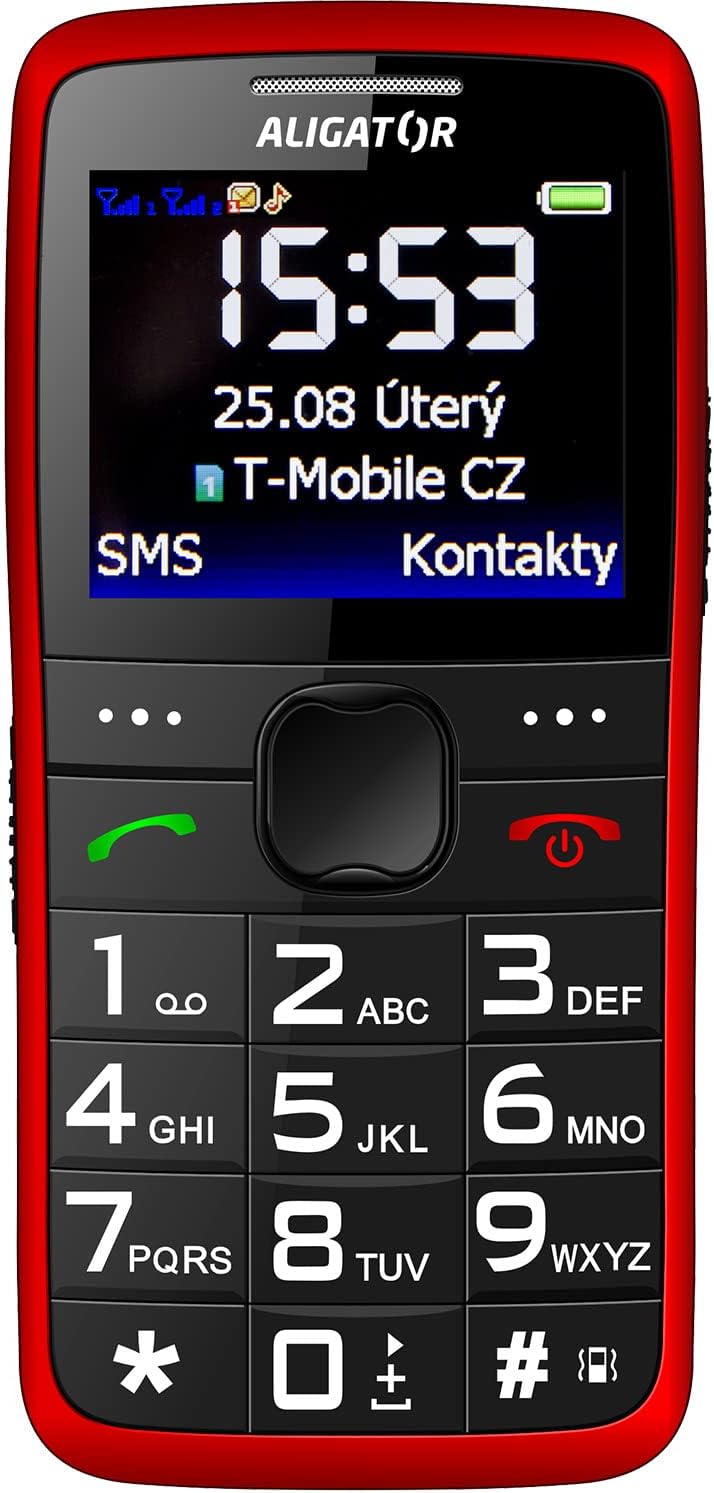
Prent 3.2: Gedetailleerde voorkant view of the Aligator A675 mobile phone, highlighting the large display, clear numeric keypad, and dedicated call/end buttons.
3.1 Voorkant View
- Vertoon: Shows time, date, network status, battery level, and menu options.
- Navigasiesleutel: Word gebruik om deur spyskaarte en opsies te blaai.
- Oproepknoppie (groen): Inisieer oproepe en beantwoord inkomende oproepe.
- End/Power Button (Red): Ends calls, returns to the home screen, and powers the phone on/off.
- klavier: Numeric keys (0-9), asterisk (*), and hash (#) for dialing and text input.
3.2 Terug View
- luidspreker: For ringtones and hands-free calls.
- Kamera: For basic photo capture.
- SOS-knoppie: A dedicated button for emergency calls/SMS (refer to section 5.4 for setup).
4. Opstelling
Follow these steps to prepare your phone for first use.
4.1 SIM-kaarte insit
- Verwyder die agterblad van die foon deur dit versigtig van die kerf oop te wrik.
- If the battery is inserted, remove it.
- Locate the SIM card slots. The Aligator A675 supports two SIM cards (Dual SIM).
- Carefully insert your 2G GSM SIM card(s) into the designated slot(s) with the gold contacts facing down, ensuring they are correctly oriented.
- Ensure the SIM cards are securely in place.
4.2 Plaas die battery in
- Rig die batterykontakte met die kontakte in die foon se batterykompartement.
- Gently press the battery into place until it fits snugly.
- Plaas die agterste deksel terug en maak seker dat dit in posisie klik.
4.3 Laai die foon
- Connect the charger cable to the charging port on the phone (usually located at the bottom).
- Steek die laaier in 'n kragaansluiting.
- The battery icon on the display will indicate charging status.
- Allow the phone to charge completely before first use. This typically takes a few hours.
5. Bediening van die telefoon
Basic functions and features of your Aligator A675.
5.1 Aan-/afskakel
- Om aan te skakel: Druk en hou die End/Power Button (red button) until the screen lights up.
- Om af te skakel: Druk en hou die End/Power Button totdat die afskakelopsies verskyn, en bevestig dan.
5.2 Maak en ontvang oproepe
- Om 'n oproep te maak: Voer die telefoonnommer in met behulp van die sleutelbord en druk die Belknop (green button).
- Om 'n oproep te beantwoord: Druk die Belknop wanneer die telefoon lui.
- Om 'n oproep te beëindig: Druk die End/Power Button.
5.3 Stuur en ontvang van SMS'e
- Navigate to the 'Messages' menu using the navigation key.
- Kies 'Skryf boodskap' om 'n nuwe SMS te skryf.
- Voer die ontvanger se nommer in of kies uit kontakte.
- Type your message using the keypad. Press the appropriate key multiple times for different letters (e.g., '2' for A, B, C).
- Kies 'Stuur'.
- Incoming messages will be displayed on the screen and stored in the 'Inbox'.
5.4 SOS-funksie
The SOS function allows you to quickly contact pre-set emergency numbers.
- Setting Up SOS Numbers: Go to 'Settings' > 'SOS Settings'. Add up to 5 emergency contact numbers.
- Aktivering van SOS: Druk en hou die SOS-knoppie on the back of the phone for a few seconds.
- The phone will automatically send an emergency SMS to the pre-set numbers and then start dialing them one by one until a call is answered.
5.5 Kontakte
- Voeg 'n kontak by: Go to 'Contacts' > 'Add New'. Enter the name and phone number, then save.
- Soek na 'n kontak: Go to 'Contacts' and use the navigation key to scroll or type the first letters of the name.
6. Onderhoud en versorging
Proper care ensures the longevity of your Aligator A675 phone.
- Skoonmaak: Gebruik 'n sagte, droë lap om die foon se oppervlak skoon te maak. Vermy vloeibare skoonmaakmiddels of skuurmiddels.
- Batterysorg: Moenie die battery aan uiterste temperature blootstel nie. Vermy dit om die battery gereeld heeltemal te ontlaai.
- Berging: Bêre die foon op 'n koel, droë plek weg van direkte sonlig en vog.
- Waterweerstand: Hierdie foon is nie waterbestand nie. Vermy kontak met vloeistowwe.
7. Probleemoplossing
Algemene probleme en hul oplossings.
| Probleem | Moontlike oorsaak | Oplossing |
|---|---|---|
| Foon skakel nie aan nie | Lae battery; Battery nie korrek geplaas nie | Charge the battery; Reinsert the battery correctly |
| Kan nie oproepe maak/ontvang nie | No network signal; SIM card not inserted; SIM card not activated | Move to an area with better signal; Reinsert SIM card; Contact your network provider |
| Geen geluid tydens oproepe nie | Volume too low; Speaker blocked | Increase call volume; Check if speaker is obstructed |
| SOS-funksie werk nie | SOS numbers not set; No network signal | Set up SOS numbers in settings; Ensure network coverage |
Indien die probleem voortduur, kontak asseblief kliëntediens.
8. Spesifikasies
Key technical details of the Aligator A675.
- Handelsmerk: ALIGATOR
- Model: A675
- Draadlose diensverskaffer: Ontsluit
- Draadlose netwerktegnologie: GSM (2G)
- Skermgrootte: 3 duim
- Menslike koppelvlak-invoer: Sleutelbord
- SIM-ondersteuning: Dubbele SIM
9. Waarborg en Ondersteuning
Your Aligator A675 phone is covered by a standard manufacturer's warranty. Please refer to the warranty card included in your package for specific terms and conditions, including the warranty period and coverage details.
For technical support, service, or warranty claims, please contact your retailer or the official Aligator customer service. Contact information can typically be found on the manufacturer's webwebwerf of op die verpakking.
Keep your proof of purchase (receipt or invoice) as it will be required for any warranty service.