
Inleiding
The Tunturi Fitcross 50i Rear Driven Crosstrainer is designed for effective fitness training. Its rear-driven mechanism provides a shorter, more active motion compared to front-driven ellipticals, engaging various muscle groups for a comprehensive workout. The device includes a tablet holder, allowing integration with fitness applications like Fit Hi Way, iConsole, Tunturi Routes, and Kinomap for expanded training programs and virtual routes. It offers 20 pre-defined programs and 32 resistance levels for varied workout intensity. Transport wheels facilitate easy relocation and storage after use. The console features a 5.5-inch color LCD with backlight, displaying essential workout data. Heart rate monitoring is available via hand pulse sensors and an integrated telemetric HR receiver.

An individual performing an elliptical workout on the Tunturi Fitcross 50i Crosstrainer, illustrating the natural movement path provided by the rear-driven system.
Opstel instruksies
1. Uitpak en Monteer
Carefully remove all components from the packaging. It is recommended to assemble the crosstrainer in the area where it will be used. Follow the detailed assembly instructions provided in the separate assembly guide. Ensure all bolts, nuts, and washers are securely fastened.
2. plasing
Place the crosstrainer on a flat, stable surface. Ensure there is adequate space around the unit for safe operation and movement. A minimum of 0.6 meters (2 feet) of clear space is recommended around the equipment.
3. Kragverbinding
Connect the provided 9V/1A power adapter to the crosstrainer's power input port and then plug it into a standard electrical outlet.
4. Nivellering
Adjust the leveling feet located on the stabilizer bars to ensure the crosstrainer is stable and does not rock during use.

Sturdy transport wheels integrated into the front stabilizer bar of the crosstrainer, designed for easy relocation and storage.
Bedryfsinstruksies
1. Console Overview
The Tunturi Fitcross 50i features a 5.5-inch color LCD console with backlight. This display shows key workout metrics including Time, Speed, Distance, Watt, and Calories.

The 5.5-inch color LCD console of the crosstrainer, displaying workout metrics and control buttons.
2. Basiese werking
- Krag aan: Plug in the adapter. The console will light up.
- BEGIN / STOP: Press to begin or pause your workout.
- WYSE: Use to navigate through different display modes or confirm selections.
- OP AF: Adjust resistance levels (32 levels available) or navigate menu options.
- HERSTEL: Clear current workout data.
3. Workout Programs
The crosstrainer offers 20 pre-defined programs to suit various fitness levels and goals:
- 1 Manual Program
- 4 Beginner Programs
- 4 Advanced Programs
- 4 Sporty Programs
- 4 Heart Rate Programs (requires heart rate monitoring)
- 1 Watt Program (10-350W, adjustable in 5W increments)
- 1 Herstelprogram
- 1 Body Fat Program
Select your desired program using the MODE and UP/DOWN buttons.
4. Hartslagmonitoring
The Fitcross 50i includes hand pulse sensors on the handlebars and an integrated telemetric HR receiver. To use hand pulse sensors, grip the sensors firmly during your workout. For telemetric monitoring, use a compatible chest strap (not included) which will automatically connect to the integrated receiver.
5. App Connectivity (Bluetooth)
The crosstrainer is equipped with Bluetooth for connecting to various fitness applications on your tablet or smartphone.
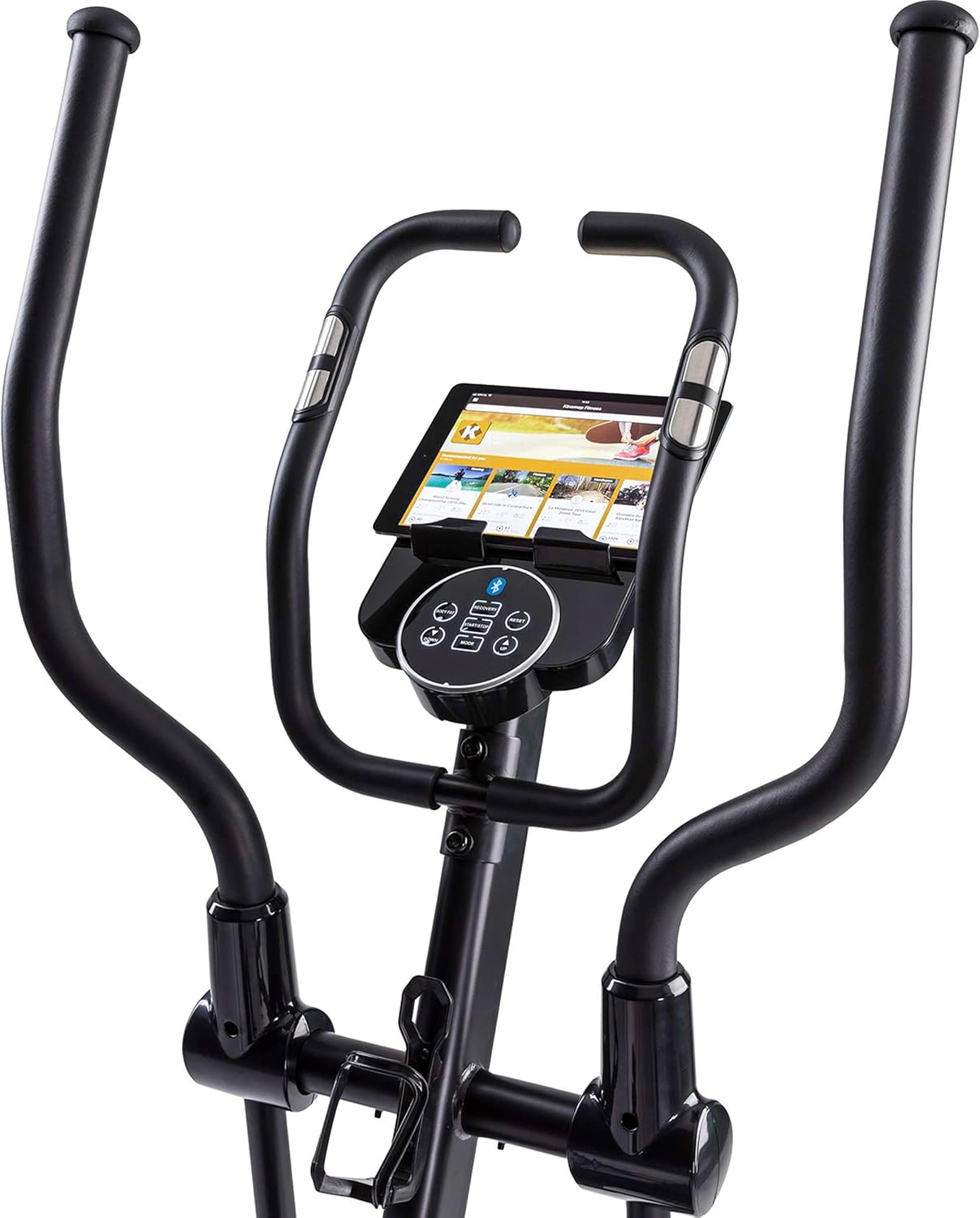
A tablet positioned in the dedicated holder on the crosstrainer, ready for use with fitness applications.
Compatible applications include:
- Tunturi Routes: Offers virtual routes and training programs.
- iConsole+Training: Provides additional workout programs and features.
- Kinomap: Allows you to train on real-world video routes.
- Fit Hi Way: Another application for enhanced training experiences.
To connect, enable Bluetooth on your tablet/smartphone, open the desired app, and follow the app's instructions to pair with the Fitcross 50i.
Onderhoud
1. Skoonmaak
Regularly wipe down the crosstrainer with a damp cloth after each use to remove sweat and dust. Avoid using abrasive cleaners or solvents that could damage the finish or electronic components.
2. Inspeksie
Periodically inspect all moving parts, bolts, and connections to ensure they are secure. Tighten any loose fasteners. Check for any signs of wear or damage on cables, pedals, and handlebars.
3. Smering
Consult the separate assembly guide for specific lubrication requirements. Generally, moving joints may require occasional lubrication with silicone-based lubricant to ensure smooth operation and prevent squeaking.
4. Berging
When not in use, store the crosstrainer in a dry, cool place away from direct sunlight and extreme temperatures. Utilize the transport wheels to move the unit easily.

A detailed shot of the rear section of the crosstrainer, highlighting the drive mechanism and branding. Regular inspection of this area is recommended.
Probleemoplossing
| Probleem | Moontlike oorsaak | Oplossing |
|---|---|---|
| Konsole skakel nie aan nie. | Kragadapter nie gekoppel of foutief. | Ensure the power adapter is securely plugged into both the crosstrainer and a working electrical outlet. Check the adapter for damage. |
| Geen weerstandsverandering nie. | Loose connection to resistance motor or console issue. | Check all cable connections to the console and resistance mechanism. If the issue persists, contact customer support. |
| Onakkurate hartkloplesing. | Improper hand placement or chest strap issue. | Ensure hands are firmly and fully gripping the pulse sensors. If using a chest strap, ensure it is worn correctly and has a fresh battery. |
| Piepend of slypend geluid. | Loose parts or lack of lubrication. | Inspect all bolts and connections and tighten if necessary. Apply lubricant to moving joints as per the assembly guide. |
| Probleme met Bluetooth-verbinding. | Bluetooth not enabled or app issues. | Ensure Bluetooth is enabled on your device. Restart the app and the crosstrainer. Try pairing again. Ensure the app is up to date. |
Spesifikasies
| Model Naam | Fitcross 50i |
| Handelsmerk | Tunturi |
| Weerstandmeganisme | Magneties |
| Aantal weerstandsvlakke | 32 |
| Tipe vertoon | 5.5-inch Color LCD with Backlight |
| Programme | 20 (1 Manual, 4 Beginner, 4 Advanced, 4 Sporty, 4 Heart Rate, 1 Watt, 1 Recovery, 1 Body Fat) |
| Watt Program Range | 10-350 W (adjustable by 5 W) |
| Hartklopmonitering | Hand pulse sensors, Integrated telemetric HR receiver |
| Konnektiwiteit | Bluetooth (Tunturi Routes, iConsole+Training, Kinomap, Fit Hi Way) |
| Materiaal | Allooi staal |
| Maksimum gebruikersgewig | 150 kg (330 lbs) |
| Produkafmetings (L x B x H) | 145 x 60 x 171 cm (57.1 x 23.6 x 67.3 duim) |
| Produk Gewig | 48 kg (105.8 lbs) |
| Kragtoevoer | 9V / 1A adapter |
| Vervoerwiele | Ja |
| Tablethouer | Ja |
Waarborg inligting
Tunturi products are manufactured to high quality standards. For specific warranty details regarding your Fitcross 50i Crosstrainer, please refer to the warranty card included with your product or visit the official Tunturi webwebwerf. Bewaar u bewys van aankoop vir enige waarborgeise.
Kliënte ondersteuning
Should you encounter any issues or have questions not covered in this manual, please contact Tunturi customer support.
- Aanlyn ondersteuning: Besoek die amptelike Tunturi webwebwerf vir algemene vrae, ondersteuningsartikels en kontakvorms.
- Kontakinligting: Refer to your product packaging or the Tunturi webwebwerf vir streekskliëntediens telefoonnommers en e-posadresse.