
Pipishell PIXSF2
Pipishell Full Motion TV Wall Mount Instruction Manual
Model: PIXSF2
Inleiding
This manual provides detailed instructions for the installation, operation, and maintenance of your Pipishell Full Motion TV Wall Mount. Please read this manual thoroughly before installation to ensure safe and correct usage. Keep this manual for future reference.

Image: The Pipishell Full Motion TV Wall Mount, showcasing its articulating arm and VESA plate.
Veiligheidsinligting
Improper installation or use of this product can result in serious injury or damage. Please adhere to the following safety guidelines:
- Maak seker dat die monteeroppervlak die gekombineerde gewig van die montering en die TV veilig kan ondersteun.
- Do not mount on drywall alone. This mount requires installation into a single wood stud, concrete wall, or block wall.
- Gebruik alle voorsiene hardeware en moenie onderdele vervang nie.
- Indien u onseker is oor enige deel van die installasieproses, raadpleeg 'n gekwalifiseerde professionele persoon.
- Hou kinders en troeteldiere weg tydens installasie.

Image: Illustration showing compatible wall types: concrete wall, single wood stud, and block wall. A warning indicates not to mount on drywall alone.
Pakketinhoud
Verify that all components are present and undamaged before beginning installation. If any parts are missing or defective, contact Pipishell customer support.
| Komponent | Hoeveelheid |
|---|---|
| Muurplaat-samestelling | 1 |
| TV bracket | 1 |
| Monteringshardeware (skroewe, ankers, wassers) | Verskeie |
| Instruksie Handleiding | 1 |
Opstelling en installasie
Follow these steps carefully for a secure installation:
- Verifieer verenigbaarheid: Before starting, ensure your TV's VESA pattern (Max: 100x100mm, Min: 75x75mm) and weight (Max: 33 lbs) are compatible with this mount.
- Vind monteringsposisie: Choose a suitable location on a single wood stud, concrete, or block wall. Use a stud finder to accurately locate the center of the wood stud if applicable.
- Monteer muurplaat: Secure the wall plate to the chosen wall type using the appropriate anchor bolts and hardware. Ensure it is level and firmly attached.
- Heg TV-hakie aan: Fasten the TV bracket to the back of your television using the provided screws that match your TV's VESA pattern.
- Hang-vertoning: Carefully lift the television with the attached bracket and hook it onto the wall plate assembly. Ensure it is securely seated.
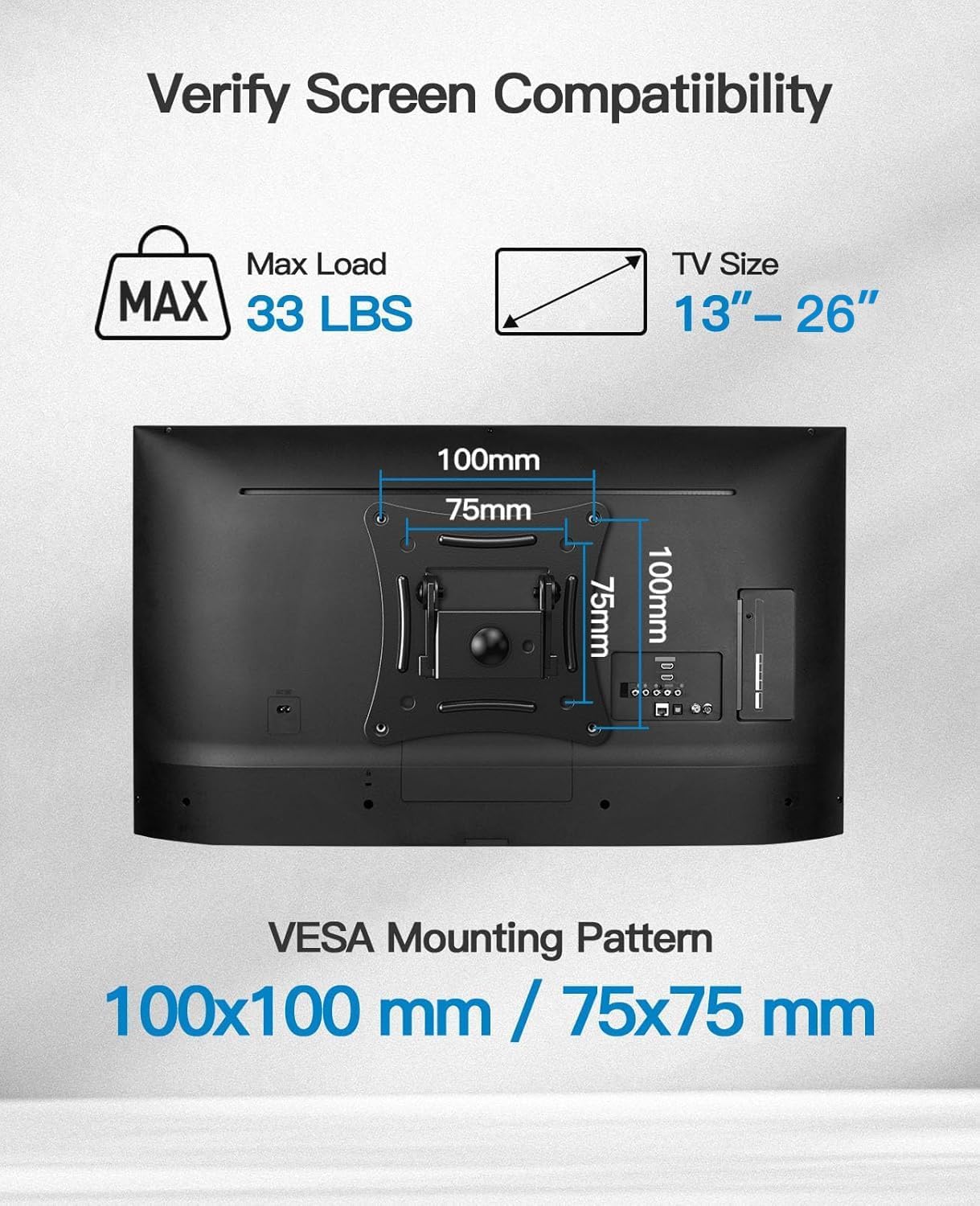
Image: Diagram illustrating VESA mounting patterns (100x100mm, 75x75mm) and maximum load capacity of 33 lbs for TV sizes 13-26 inches.

Image: Visual guide showing three steps: 1) Mount Wall Plate, 2) Attach TV Bracket, 3) Hang Display.
Bedryfsinstruksies
Your Pipishell Full Motion TV Wall Mount offers versatile adjustments for optimal viewing:
- Draai: The mount allows for a swivel range of up to ±90° (depending on TV size and wall distance) to adjust the horizontal viewing hoek.
- Kantel: Adjust the vertical tilt from -15° to +5° to reduce glare and find the perfect viewing hoek.
- Uitbreiding en Terugtrekking: Extend the TV up to 10.6 inches from the wall for flexible positioning or retract it to a mere 2.9 inches for a low-profile kyk.
- Rotasie: The VESA plate can rotate 360° allowing for landscape or portrait orientation of your display.

Image: A TV mounted on the wall, illustrating the swivel motion of ±90° and the extension/retraction range of 2.9 to 10.6 inches, along with tilt angles of -15° to +5°.

Image: A diagram showing the TV mount's full motion flexibility, including 360° rotation of the VESA plate.
Onderhoud
To ensure the longevity and proper function of your TV wall mount:
- Kontroleer gereeld alle skroewe en verbindings om te verseker dat hulle styf en stewig vas bly.
- Maak die monteerstuk skoon met 'n sagte, droë lap. Vermy skuurmiddels of oplosmiddels.
- Moenie enigiets anders as die bedoelde televisie aan die montering hang nie.
Probleemoplossing
| Probleem | Moontlike oorsaak | Oplossing |
|---|---|---|
| Mount feels unstable after installation. | Loose mounting screws or incorrect wall anchors. | Re-check all wall plate screws and ensure they are tightened into a solid stud or appropriate anchors. Refer to installation steps. |
| Moeilikheid om draai/kantel aan te pas. | Joints may be too tight or need lubrication. | Apply a small amount of silicone-based lubricant to the moving joints. Do not over-tighten joint bolts. |
| TV not level. | Wall plate installed unevenly. | Adjust the leveling screws on the VESA plate if available, or re-install the wall plate ensuring it is perfectly level. |
Spesifikasies
- Model: PIXSF2
- Handelsmerk: Pipishell
- Materiaal: Allooi staal
- Kleur: Swart
- Versoenbare TV-groottes: 13-26 duim
- Maksimum laaikapasiteit: 33 lbs (15 kg)
- VESA-versoenbaarheid: 75x75mm, 100x100mm
- Beweging tipe: Swivel, Rotate, Tilt, Full Motion, Articulating
- Kantelhoek: -15° tot +5°
- Draaihoek: ±90° (maks, hang af van TV-grootte)
- Uitbreiding vanaf muur: 2.9 duim (ingetrek) tot 10.6 duim (uitgestrek)
- Produk afmetings: 38.98 x 12.6 x 5.12 inches (mount only)
- Item gewig: 1.39 pond
Waarborg & Ondersteuning
Pipishell products are designed for durability and performance. For specific warranty details, please refer to the warranty card included with your product or visit the official Pipishell webwebwerf.
For technical support, installation assistance, or any questions regarding your product, please contact Pipishell customer service:
- E-pos: support@pipishell.com
- Webwebwerf: www.pipishell.com
You can also find additional resources and FAQs on our webwebwerf.
Ask a question about this manual
Ask about setup, troubleshooting, compatibility, parts, safety, or missing instructions. Manuals+ will review the question and use this page’s manual context to help answer it.