
Inleiding
Thank you for choosing the Audizio SB85 Soundbar with Subwoofer. This manual provides essential information for the safe and correct operation of your new audio system. Please read it thoroughly before use and retain it for future reference. The SB85 is designed to enhance your television's audio, providing a rich, immersive sound experience for movies, games, and music, complete with a dedicated subwoofer for powerful bass.
Veiligheidsinstruksies
- Lees alle instruksies noukeurig deur voordat u die toestel gebruik.
- Keep the unit away from water, moisture, and heat sources.
- Moenie enige ventilasie-openinge blokkeer nie.
- Gebruik slegs aanhegsels/bykomstighede wat deur die vervaardiger gespesifiseer word.
- Ontkoppel die toestel tydens weerligstorms of wanneer dit vir lang tye ongebruik word.
- Verwys alle diens na gekwalifiseerde dienspersoneel.
- Do not expose the battery (if applicable) to excessive heat such as sunshine, fire, or the like.
Pakketinhoud
Maak seker dat alle items in die boks teenwoordig is:
- Audizio SB85 Soundbar
- Bedrade subwoofer
- Afstandbeheer
- Optical Cable (Toslink)
- AUX kabel
- Kragadapter
- Gebruikershandleiding
Produk verbyview
The Audizio SB85 system consists of a soundbar and a separate wired subwoofer, designed to deliver a powerful and clear audio experience.
Klankbalk-kenmerke
- Integrated 150W speaker system with 4 speakers (2x 2cm range, 2x 2cm tweeter).
- Front LED display for status indication.
- Control buttons on the side panel.
- Multiple input options: HDMI (ARC), USB, Line In (AUX), Coaxial, Optical.
- Bluetooth 5.0 vir draadlose klankstroom.

Image: Close-up of the Audizio SB85 Soundbar's control panel and its remote control, highlighting Bluetooth 5.0 and ease of use.

Beeld: Intern view of the Audizio SB85 Soundbar's full-range speaker, emphasizing its 150W speaker system for an immersive audio experience.
Subwoofer-kenmerke
- 5.25-inch wired subwoofer for enhanced bass response.

Image: Close-up of the Audizio SB85 wired subwoofer, designed to amplify bass frequencies.
Opstelling
1. plasing
Place the soundbar centrally below your television. The subwoofer can be placed on the floor near the soundbar, ideally in a corner for optimal bass reflection, but ensure it is not obstructed.

Image: Audizio SB85 Soundbar and Subwoofer setup in a living room, demonstrating room-filling sound and clean design.

Image: Audizio SB85 Soundbar placed below a television, illustrating its universal compatibility with any TV.
2. Koppel aan krag
Connect the power adapter to the DC IN port on the soundbar and then plug it into a wall outlet (230 Vac/50 Hz).
3. Koppel die subwoofer
Connect the wired subwoofer to the dedicated subwoofer output port on the soundbar.
4. Connecting to Audio Sources
The SB85 offers several connection options:
- HDMI (ARC): For the best audio quality and control, connect an HDMI cable from the HDMI (ARC) port on the soundbar to the HDMI ARC port on your TV. This allows the TV to send audio to the soundbar and often enables TV remote control of the soundbar's volume.
- Opties (Toslink): Connect the included optical cable from the OPTICAL port on the soundbar to the Optical Digital Audio Out port on your TV or other audio source.
- Line In (AUX): Use the included AUX cable to connect the LINE IN port on the soundbar to the headphone jack or audio output of your device (e.g., smartphone, MP3 player).
- Koaksiaal: Connect a coaxial cable (not included) from the COAXIAL port on the soundbar to the Coaxial Digital Audio Out port on your TV or other audio source.
- USB: Insert a USB flash drive into the USB port for MP3 playback.
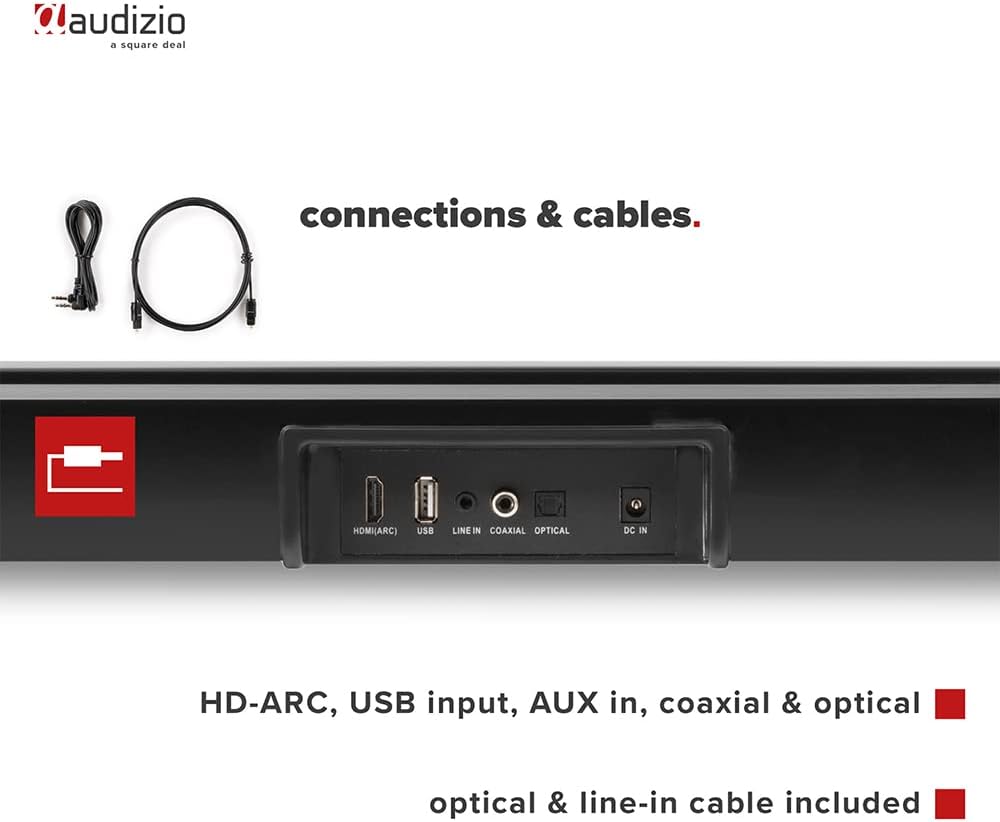
Beeld: Agter view of the Audizio SB85 Soundbar showing various connection ports: HDMI (ARC), USB, Line In, Coaxial, and Optical. Includes optical and line-in cables.
Bedryfsinstruksies
1. Skakel aan/af
Druk die aan/af-knoppie op die klankbalk of die afstandbeheerder om die eenheid aan of af te skakel.
2. Invoerbronkeuse
Press the 'MODE' button on the soundbar or the remote control repeatedly to cycle through the available input sources: HDMI (ARC), Optical, Coaxial, AUX, USB, and Bluetooth. The selected input will be shown on the front LED display.
3. Volumebeheer
Use the 'VOL+' and 'VOL-' buttons on the soundbar or the remote control to adjust the volume. The 'MUTE' button on the remote control will temporarily silence the audio.
4. Bluetooth-koppeling
- Switch the soundbar to Bluetooth mode using the 'MODE' button. The LED display will show 'BT'.
- Aktiveer Bluetooth op jou slimfoon of tablet en soek vir beskikbare toestelle.
- Select 'Audizio SB85' from the list of devices.
- Once paired, the soundbar will indicate a successful connection, and you can stream audio wirelessly.
5. USB-terugspeel
Plaas 'n USB-geheuestokkie wat MP3-klank bevat files into the USB port. The soundbar will automatically switch to USB mode and begin playing the music. Use the remote control to navigate tracks (play/pause, next/previous).
6. Afstandbeheer funksies
The remote control provides full functionality for the soundbar, including power, mode selection, volume, mute, and playback controls for USB and Bluetooth modes.
Onderhoud
Skoonmaak
Wipe the soundbar and subwoofer surfaces with a soft, dry cloth. Do not use abrasive cleaners, waxes, or solvents as they may damage the finish. Ensure the device is unplugged before cleaning.
Berging
If storing the unit for an extended period, unplug it from the power outlet and store it in a cool, dry place, away from direct sunlight and extreme temperatures.
Probleemoplossing
| Probleem | Moontlike oorsaak | Oplossing |
|---|---|---|
| Geen krag nie | Kragkabel nie gekoppel nie; Kragaansluiting foutief | Kontroleer die kragkabelverbinding; Probeer 'n ander aansluiting. |
| Geen klank nie | Incorrect input selected; Volume too low; Mute activated; Cable connection loose | Select correct input source; Increase volume; Deactivate mute; Check all audio cable connections. |
| Bluetooth verbind nie | Soundbar not in Bluetooth mode; Device too far; Device already connected to another unit | Switch soundbar to BT mode; Move device closer; Disconnect from other devices and try again. |
| Afstandbeheer werk nie | Batterye leeg; Obstruksie tussen afstandbeheerder en klankbalk | Vervang batterye; Verwyder enige obstruksies. |
Spesifikasies
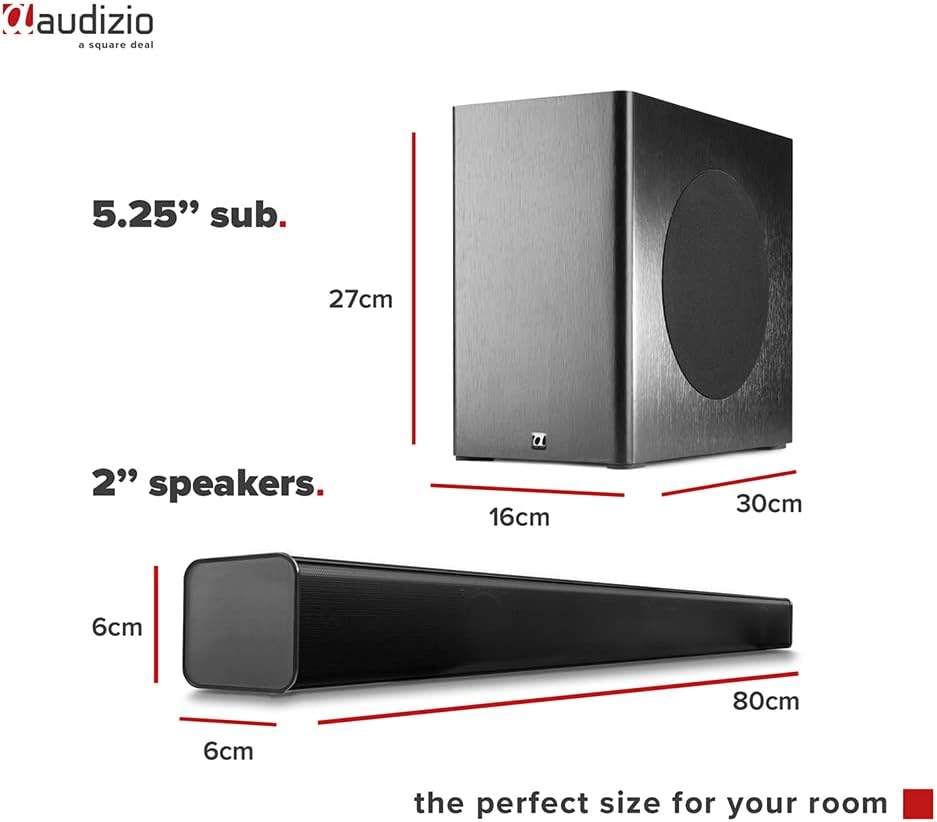
Image: Diagram showing the dimensions of the Audizio SB85 Soundbar and its subwoofer.
- Kraguitset: 150 W (maksimum)
- Luidsprekerkonfigurasie: 4 speakers (2x 2cm range, 2x 2cm tweeter)
- Subwoofer grootte: 5.25 duim
- Frekwensiereeks: 50 Hz - 20 000 Hz
- Maksimum SPL: 125 dB
- Verbinding: Bluetooth 5.0, HDMI (ARC), USB, Line In (AUX), Coaxial, Optical
- Klankuitsetmodus: Stereo
- Versoenbare toestelle: MP3 Player, Smartphone, TV
- Kragbron: 230 Vac/50 Hz (via electric cable)
- Soundbar Dimensions (L x W x H): 80 x 6 x 6 cm
- Subwoofer Dimensions (L x W x H): 16 x 30 x 27 cm
- Totale gewig: 3.9 kg
- Modelnommer: 100.292
Waarborg en Ondersteuning
Vir waarborginligting of tegniese ondersteuning, verwys asseblief na die dokumentasie wat tydens aankoop verskaf is of kontak u kleinhandelaar. Bewaar u bewys van aankoop vir enige waarborgeise.