
1. Veiligheidsinligting
Lees asseblief alle instruksies sorgvuldig deur voor montering en gebruik. Versuim om hierdie instruksies te volg, kan lei tot beserings of produkskade. Bewaar hierdie handleiding vir toekomstige verwysing.
- This desk requires assembly. Ensure all components are correctly installed before use.
- The maximum weight capacity for this desk is 220 pounds (100 kg). Do not exceed this limit.
- When adjusting the desk height, ensure there are no obstructions above or below the desk that could interfere with its movement.
- Hou kinders en troeteldiere weg van die lessenaar tydens werking.
- Do not attempt to manually force the desk up or down. Use only the electric control panel.
- Ensure the power cord is properly connected and routed to prevent tripping hazards or damage.
- Vir optimale stabiliteit, maak seker dat die lessenaar op 'n gelyk oppervlak geplaas word.
Important Note: When using the LED control panel to adjust height, the three height keys must be pressed and held continuously until the desired height is reached.
2. Pakketinhoud
Verifieer dat alle komponente teenwoordig is voordat u met montering begin. Indien enige onderdele ontbreek of beskadig is, kontak asseblief kliëntediens.
- Desktop (71"x32" Black Top)
- Desk Frame (Black Frame)
- 4 Bene
- Beheerpaneel
- Kragadapter en kabel
- Monteringshardeware (skroewe, boute, ens.)
- Instruksie Handleiding
3. Monteer-instruksies
Assembly typically requires two people. Please follow these steps carefully. A power drill may be helpful for some steps, but is not strictly required.
- Pak komponente uit: Verwyder alle dele versigtig uit die verpakking en lê dit op 'n skoon, sagte oppervlak om skrape te voorkom.
- Attach Legs to Frame: Securely attach the four legs to the desk frame using the provided hardware. Ensure all connections are tight.
- Install Desktop: Place the desktop upside down on a soft surface. Carefully align the assembled frame with the pre-drilled holes on the underside of the desktop. Secure the frame to the desktop using the appropriate screws.
- Monteer beheerpaneel: Attach the LED control panel to the underside of the desktop, typically on the front edge, using the provided screws.
- Koppel kabels: Connect the motor cables from the legs to the control box. Connect the control panel cable to the control box. Finally, connect the power adapter to the control box and plug it into a power outlet. Ensure all cables are neatly managed to avoid interference with desk movement.
- Aanvanklike opstelling: Once assembled, carefully flip the desk upright. Perform an initial height calibration by pressing and holding the 'Down' button until the desk reaches its lowest point, then release. The desk is now ready for operation.

Figure 3.1: Fully assembled FLEXISPOT 4 Leg Standing Desk.
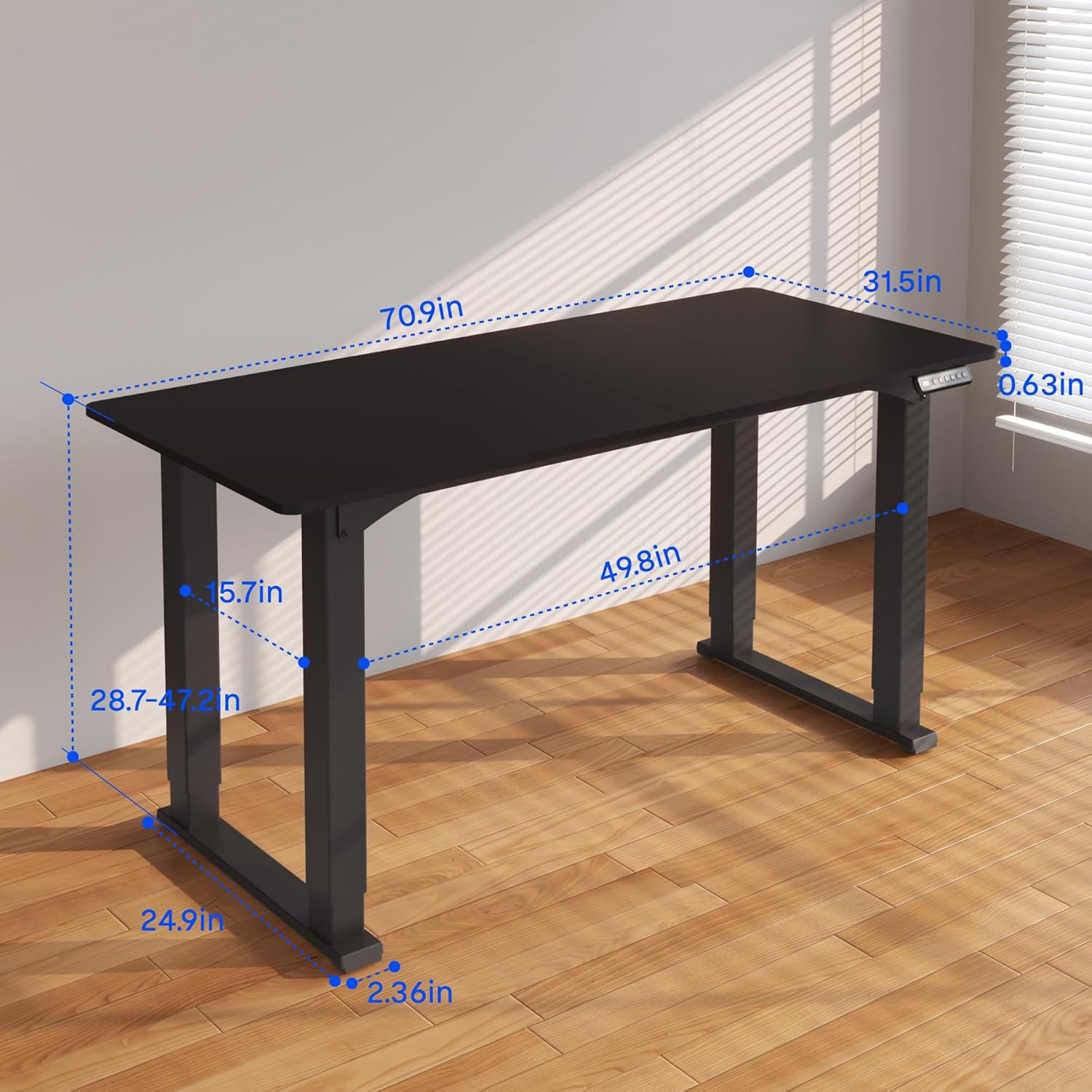
Figure 3.2: Detailed dimensions of the desk, including height range and desktop size.
4. Bedryfsinstruksies
The FLEXISPOT 4 Leg Standing Desk features an intuitive LED control panel for easy height adjustments and memory settings.
4.1. Beheerpaneel verbyview

Figure 4.1: Digital Keypad with memory functions and up/down controls.
- Op/Af Pyle (▲ / ▼): Press and hold to adjust the desk height upwards or downwards. The current height is displayed on the LED screen.
- Memory Buttons (1, 2, 3): These buttons allow you to save and recall preferred height settings.
- Memory Set Button (M): Used to program a height into a memory slot.
4.2. Hoogte verstel
To adjust the desk height, press and hold the ▲ (Up) or ▼ (Down) arrow button until the desk reaches your desired position. The desk will move smoothly between 28.7 inches and 47.2 inches.
4.3. Saving Memory Presets
You can save up to three preferred height settings for quick recall:
- Verstel die lessenaar tot die verlangde hoogte met die pyltjies op/af.
- Druk die 'M'-knoppie. Die LED-skerm sal 'S-' wys.
- Within 3 seconds, press one of the memory buttons (1, 2, or 3). The LED display will show 'S-1', 'S-2', or 'S-3' to confirm the setting has been saved.
4.4. Recalling Memory Presets
To move the desk to a saved height, press and hou the corresponding memory button (1, 2, or 3) until the desk reaches the programmed height.
4.5. Antibotsingstelsel
The desk is equipped with an anti-collision system to prevent damage. If the desk encounters an obstruction during movement, it will stop and reverse slightly. Remove the obstruction before resuming operation.

Figure 4.2: Anti-collision system in action, preventing damage from obstructions.
5. Onderhoud
Regular maintenance ensures the longevity and smooth operation of your standing desk.
- Skoonmaak: Vee die lessenaar en raam af met 'n sagte, damp lap. Vermy harde chemikalieë of skuurmiddels.
- Kabelbestuur: Periodically check and organize cables to prevent tangles and ensure they do not interfere with the desk's movement.
- Bevestigingskontrole: Kontroleer af en toe alle skroewe en boute om seker te maak dat hulle styf bly. Draai weer vas indien nodig.
- Motorversorging: The electric motors are maintenance-free. Do not attempt to lubricate or disassemble them.
6. Probleemoplossing
As jy probleme met jou lessenaar ondervind, raadpleeg die volgende algemene probleme en oplossings:
- Lessenaar beweeg nie:
- Kontroleer of die kragkabel stewig in beide die lessenaar en die muursok ingeprop is.
- Maak seker dat alle motorkabels behoorlik aan die beheerkas gekoppel is.
- Perform a reset: Press and hold the 'Down' button until the desk reaches its lowest point and slightly retracts, then release.
- Ongelyke beweging of wiebeling:
- Ensure the desk is on a level surface. Adjust the leveling feet if necessary.
- Check that all assembly screws and bolts are tightened securely.
- Verify that the weight on the desk does not exceed the maximum capacity of 220 lbs and is evenly distributed.
- Foutkodes op vertoon:
- If an error code appears, try performing a reset as described above.
- If the error persists, disconnect power for 10 minutes, then reconnect and try again.
- Raadpleeg die vervaardiger se website or contact customer support with the specific error code.
- Geheuevoorinstellings werk nie:
- Ensure you are pressing and hou the memory button until the desk reaches the saved height.
- Re-program the memory presets if they are not recalling correctly.
If these steps do not resolve the issue, please contact FLEXISPOT customer support for further assistance.
7. Spesifikasies
| Kenmerk | Spesifikasie |
|---|---|
| Handelsmerk | FLEXISPOT |
| Modelnommer | QS2B-1880-AU |
| Desktop-grootte | 71"D x 32"W (approx. 180.3cm x 81.3cm) |
| Verstelbare hoogtereeks | 28.7" to 47.2" (approx. 72.9cm to 119.9cm) |
| Maksimum gewig kapasiteit | 220 lbs (100 kg) |
| Raammateriaal | Metaal |
| Top materiaal | Hout |
| Kleur | Black Frame & Black Top |
| Tipe beheer | LED Digital Keypad with Memory Presets |
| Spesiale kenmerke | 4-Leg Design, Anti-Collision System, Corded Operation |
| Vergadering benodig | Ja |
8. Waarborg en Ondersteuning
FLEXISPOT provides comprehensive warranty coverage for your peace of mind:
- 5-jaar waarborg: Covers the desk frame and motor components.
- 2-jaar waarborg: Covers the control panel and other electronic parts.
For warranty claims, technical support, or any questions regarding your FLEXISPOT product, please visit the official FLEXISPOT website or contact their customer service department. Please have your model number (QS2B-1880-AU) and proof of purchase available when contacting support.