
1. Produk verbyview
The Zooz Z-Wave Long Range Q Sensor ZSE11 800LR is a versatile smart home device designed to monitor four key environmental factors: motion, temperature, humidity, and light. This sensor utilizes Z-Wave Long Range technology for extended communication capabilities, requiring a compatible Z-Wave hub for operation. It is ideal for triggering automations, enhancing security, and optimizing climate control within your smart home system.
Belangrike nota: This device is supported by open Z-Wave systems ONLY. It will NOT work with Wink or Z-Wave alarm panels. Please verify your hub's compatibility before installation.
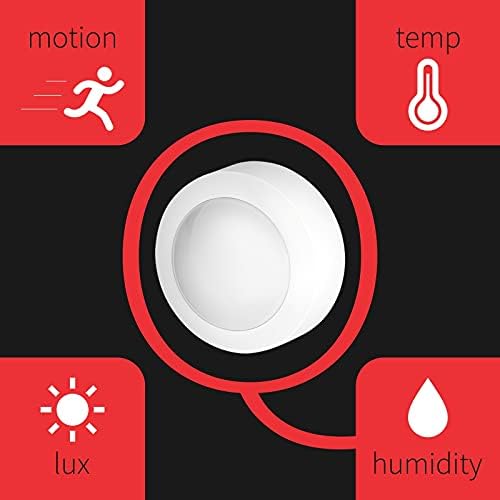
Figure 1: The Zooz Q Sensor ZSE11 800LR monitors motion, temperature, humidity, and light.
2. Pakketinhoud
- Zooz Z-Wave Long Range Q Sensor ZSE11 800LR
- Montagebeugel
- 2 x CR123A-batterye
- Monteringshardeware (skroewe, ankers)
3. Opstelling en installering
3.1 Powering the Sensor
The ZSE11 Q Sensor can be powered by two CR123A batteries (included) or via a micro USB cable (sold separately). Always use only one power source at a time. When powered by USB, the sensor can also function as a Z-Wave repeater, extending your network's range.
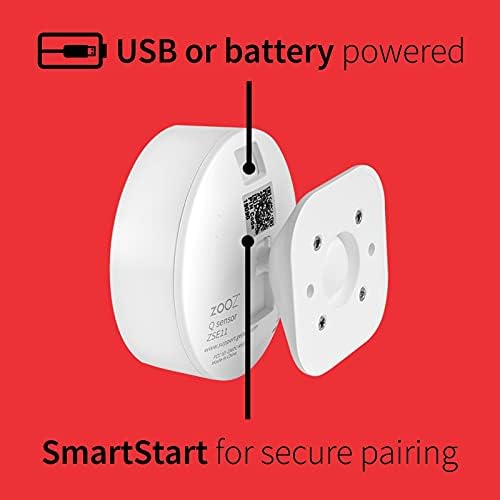
Figure 2: The sensor can be powered by USB or batteries. The SmartStart QR code is visible on the back.
3.2 Bevestiging van die sensor
Use the included flexible mounting bracket to install the sensor. This bracket allows for adjustment of the sensor's field of view, ensuring precise monitoring. Choose a location that provides optimal coverage for motion detection and accurate environmental readings.
- Attach the mounting bracket to a wall or flat surface using the provided screws and anchors.
- Securely attach the sensor to the mounting bracket.
- Adjust the sensor's angle as needed for desired coverage.
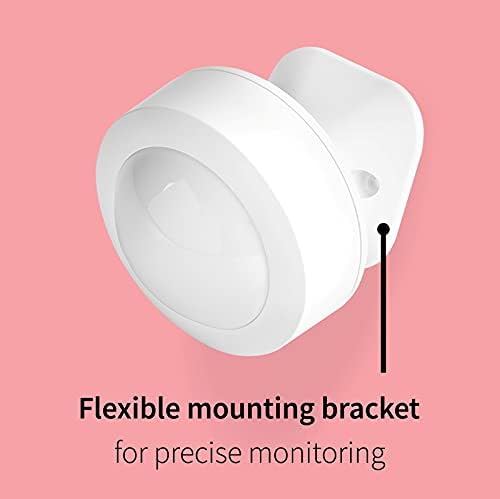
Figure 3: The flexible mounting bracket enables precise positioning of the sensor.
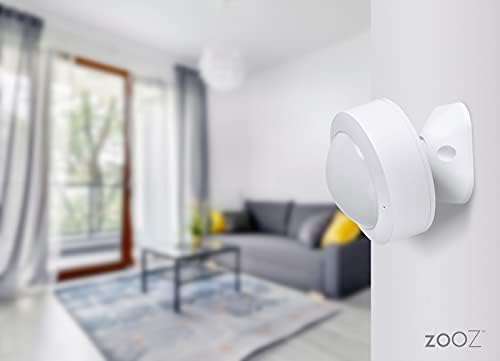
Figure 4: The Zooz Q Sensor discreetly mounted on a wall.
3.3 Z-Wave Insluiting (Paring)
To integrate the sensor into your smart home system, you must include it in your Z-Wave network. The ZSE11 Q Sensor supports S2 Authenticated Z-Wave security and SmartStart for secure and easy pairing.
- Put your Z-Wave hub into inclusion mode. Refer to your hub's manual for specific instructions.
- If using SmartStart, scan the QR code on the back of the sensor or its packaging with your hub's app.
- If not using SmartStart, activate the sensor's inclusion mode (typically by pressing its Z-Wave button once).
- Confirm that your hub recognizes the sensor and displays its multiple functionalities (motion, temperature, humidity, light).
Compatible Z-Wave hubs include: Z-Box Hub (recommended for Zooz devices), SmartThings (requires a custom edge driver), Hubitat, Home Assistant, Indigo, and HomeSeer.
4. Bediening van die sensor
Once successfully included in your Z-Wave network, the ZSE11 Q Sensor will begin reporting data to your hub. You can use this data to create various smart home automations.
- Bewegingsopsporing: The sensor detects motion up to 20 feet away. Use motion alerts to trigger lighting, security alarms, or other routines.
- Temperatuurmonitering: Provides ambient temperature readings within the range of 32-104° F. This can be used for climate control automations.
- Humiditeitsmonitering: Reports relative humidity levels, useful for managing indoor air quality or activating dehumidifiers.
- Light Sensing (Lux): Measures ambient light levels. This can be used to automate lighting based on natural light availability.
- Z-Wave Repeater: When powered by a micro USB cable, the sensor acts as a Z-Wave signal repeater, strengthening your Z-Wave mesh network.
Consult your Z-Wave hub's documentation for instructions on how to view sensor readings and create automations.
5. Onderhoud
5.1 Batteryvervanging
When the battery level is low, your Z-Wave hub should report a low battery status. To replace the batteries, carefully open the sensor casing and insert two new CR123A batteries, ensuring correct polarity. Dispose of old batteries responsibly.
5.2 Skoonmaak
To clean the sensor, gently wipe the exterior with a soft, dry cloth. Avoid using abrasive cleaners or solvents, as these can damage the device.
6. Probleemoplossing
- Sensor Not Appearing on Hub: Ensure your Z-Wave hub is compatible with open Z-Wave systems. Some hubs (e.g., Wink, Z-Wave alarm panels) are not supported. Try excluding the device first, then re-including it. For SmartThings or Hubitat, a custom edge driver may be required for full functionality.
- Onakkurate temperatuur-/humiditeitslesings: Environmental sensors can sometimes require calibration. Check your hub's advanced settings for options to apply offsets to temperature and humidity readings. Ensure the sensor is not placed near heat sources, vents, or in direct sunlight, which can affect accuracy.
- Inconsistent Motion Detection: Verify the sensor's placement and ensure its field of view is unobstructed. Adjust sensitivity settings within your Z-Wave hub's interface if available. Ensure the sensor is powered by USB for optimal responsiveness, especially for light sensing.
- Light Sensor Issues: The light sensor's performance can be significantly improved when the device is USB powered. If experiencing issues with low light detection, ensure the sensor is not solely running on battery power. Some Z-Wave systems may have limitations in displaying very low light levels accurately.
- Short Z-Wave Range: If the sensor is far from your hub or other Z-Wave devices, consider powering it via USB to enable its repeater function. Add other Z-Wave repeaters to strengthen your mesh network.
7. Spesifikasies
| Modelnommer | ZSE11 800LR |
| Handelsmerk | DOOI |
| Z-Wave-streek | VSA / CA / MX |
| Kragbron | 2 x CR123A batteries (included) / micro USB (cable not included) |
| Bewegingsopsporingsreeks | Tot 20 voet |
| Z-golfreeks | Up to 100 feet (open space) / up to 1300 feet (with Z-Wave Long Range hub) |
| Bedryfstemperatuur | 32°F - 104°F (0°C - 40°C) |
| Installasie en gebruik | Slegs binnenshuis |
| Afmetings | 2.3 x 2.3 x 2.2 duim |
| Item gewig | 0.317 onse (9 gram) |
| Versoenbare toestelle | Z-Wave hubs (Z-Box Hub, SmartThings, Hubitat, Home Assistant, Indigo, HomeSeer) |
| UPC | 853478006117 |
8. Waarborg en Ondersteuning
The Zooz Z-Wave Long Range Q Sensor ZSE11 800LR comes with a 1-jaar vervaardigerswaarborg. Additionally, Zooz provides leeftyd tegniese ondersteuning vir hierdie produk.
For technical assistance, compatibility questions, or warranty claims, please contact Zooz customer support directly. Refer to the official Zooz webwebwerf vir die mees onlangse ondersteuningskontakbesonderhede.