
Pigtronix GDR
Pigtronix Gamma Drive Overdrive Pedal
Gebruikershandleiding
Inleiding
The Pigtronix Gamma Drive is a versatile overdrive pedal designed to deliver a wide range of tones, from subtle boosts to aggressive, all-out grind. Its intuitive controls allow musicians to sculpt their sound with precision, making it an essential tool for any guitarist seeking dynamic and expressive overdrive.

Figuur 1: Voorkant view of the Pigtronix Gamma Drive Overdrive Pedal. This image displays the pedal's blue casing, the four control knobs (Volume, Gain, Treble, Bass), the footswitch, and the DC 9V power input label.
Sleutel kenmerke
- Overdrive Pedal with Treble Bass Controls
- Wide range of gain from subtle boost to heavy distortion
- Kompakte en duursame ontwerp
- True bypass switching for signal integrity
Pakketinhoud
Wanneer u die pakkie oopmaak, maak asseblief seker dat al die volgende items teenwoordig is:
- Pigtronix Gamma Drive Overdrive Pedal
- Gebruikershandleiding (hierdie dokument)
- Verbindingskabel
Opstelgids
Follow these steps to properly set up your Pigtronix Gamma Drive pedal:
1. Kragverbinding
Connect a standard 9V DC power supply (not included) to the "DC 9V" input jack on the top of the pedal. Ensure the power supply is center-negative and provides at least 10mA of current.
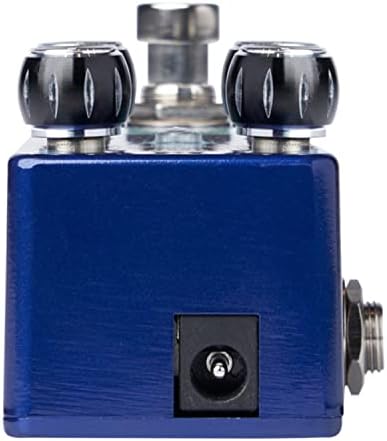
Figure 2: Close-up of the DC 9V power input jack located on the top side of the pedal.
2. Instrument verbinding
Connect your instrument (e.g., guitar) to the INPUT jack on the right side of the pedal using a standard 1/4-inch instrument cable.
3. Amplewendiger verbinding
Koppel die OUTPUT-aansluiting aan die linkerkant van die pedaal aan jou amplifier's input using another standard 1/4-inch instrument cable.
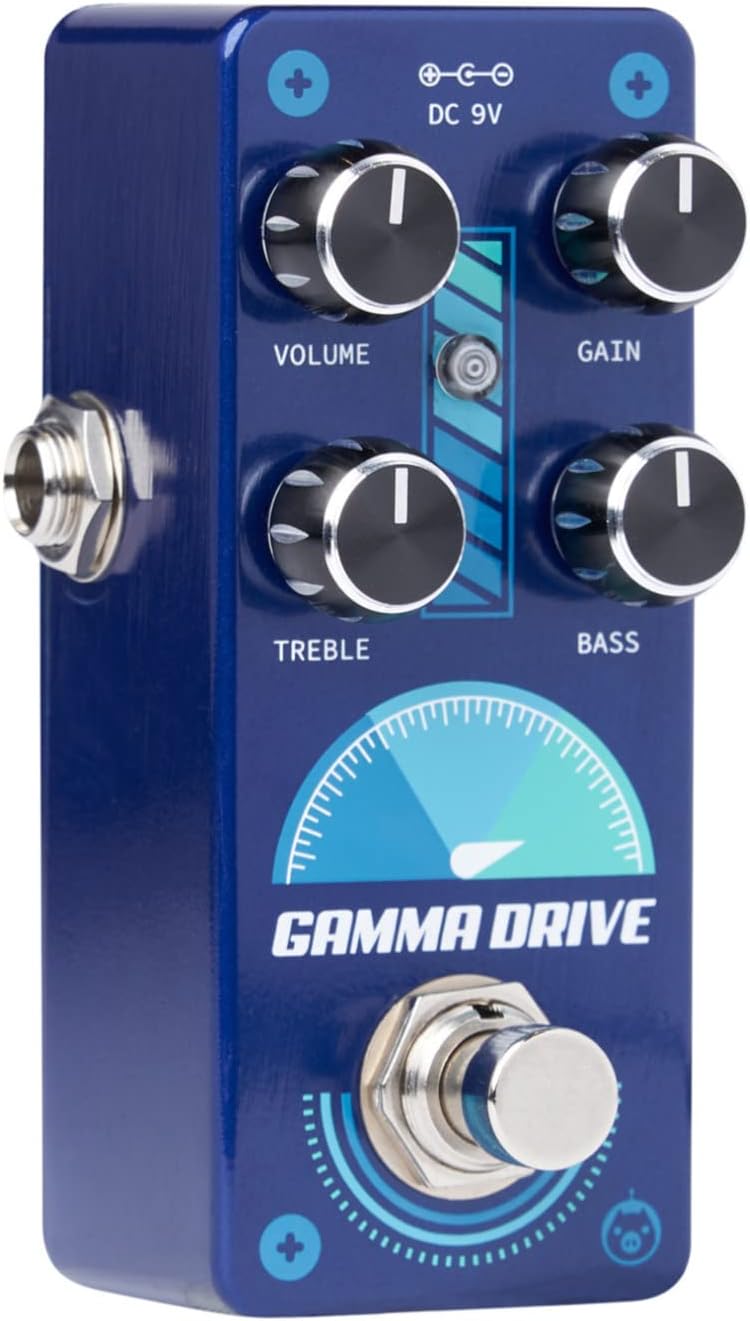
Figuur 3: Hoekig view illustrating the input jack (right side) and output jack (left side) for instrument and ampverligter verbindings.
Operasie
The Pigtronix Gamma Drive features four primary control knobs and a footswitch for intuitive sound shaping.
Kontroles verbyview
Figuur 4: Voorkant view of the pedal showing the layout of the control knobs.
- VOLUME: Controls the overall output level of the pedal. Turn clockwise to increase the volume.
- WINS: Adjusts the amount of overdrive and distortion. Higher settings produce more saturated and aggressive tones.
- TREBEL: Shapes the high-frequency content of your tone. Turn clockwise for brighter sounds, counter-clockwise for warmer tones.
- BAS: Controls the low-frequency content. Turn clockwise to add more bass, counter-clockwise to reduce it.
Gebruik die voetskakelaar
The large footswitch at the bottom of the pedal engages or bypasses the effect. When the effect is active, the LED indicator above the footswitch will illuminate. When bypassed, your signal passes through the pedal unaffected (true bypass).
Onderhoud en versorging
- Skoonmaak: Gebruik 'n sagte, droë lap om die pedaal se oppervlak skoon te maak. Vermy skuurmiddels of oplosmiddels.
- Berging: Bêre die pedaal op 'n koel, droë plek weg van direkte sonlig en uiterste temperature.
- Krag: Always use a regulated 9V DC power supply with the correct polarity (center-negative) to prevent damage.
- Verbindings: Ensure all cables are securely connected before use. Disconnect cables when not in use to prevent accidental damage.
Probleemoplossing
| Probleem | Moontlike oorsaak | Oplossing |
|---|---|---|
| Geen geluid wanneer die pedaal ingetrap word nie. | Incorrect cable connections; Power supply issue; Pedal not engaged. | Check all input/output cables; Ensure 9V DC power supply is connected and functional; Press footswitch to engage pedal (LED should light up). |
| Swak of verwronge klank. | Low power; Incorrect gain/volume settings. | Verifieer kragtoevoer voltage and current; Adjust GAIN and VOLUME knobs to desired levels. |
| Ongewenste geraas of gegons. | Ground loop; Faulty cables; Interference from other electronics. | Use isolated power supply; Try different cables; Move pedal away from power transformers or fluorescent lights. |
Tegniese spesifikasies
| Spesifikasie | Waarde |
|---|---|
| Item gewig | 9 onse |
| Produk afmetings | 8.4 x 6.3 x 4.7 duim |
| Modelnommer | DDR |
| Kleur | Light Blue, Black |
| Hardeware-koppelvlak | HP-HSC |
| Seinformaat | Analoog |
| Kragbron | Battery Powered (Note: Typically refers to ability to use battery, but 9V DC adapter is standard for pedals) |
| Voltage | 9 Volt DC |
| Amperageer | 10 miljoenamps (minimum required) |
Waarborg en Ondersteuning
For detailed warranty information, product registration, and technical support, please visit the official Pigtronix webwebwerf of kontak hul kliëntediensafdeling. Bewaar u bewys van aankoop vir waarborgeise.
Amptelik Webwebwerf: www.pigtronix.com
Ask a question about this manual
Ask about setup, troubleshooting, compatibility, parts, safety, or missing instructions. Manuals+ will review the question and use this page’s manual context to help answer it.