
CAME-TV P-1200R
CAME-TV Boltzen Perseus RGBDT 55W Lighting Screen User Manual
Model: P-1200R
1. Inleiding
Dankie vir die aankoopasing the CAME-TV Boltzen Perseus RGBDT 55W Lighting Screen. This professional-grade LED light is designed for various photography and videography applications, offering versatile color control and powerful illumination. Please read this manual thoroughly before operating the device to ensure proper use and maintenance.
This manual provides essential information on setting up, operating, maintaining, and troubleshooting your lighting screen. Keep this manual for future reference.
2. Veiligheidsmaatreëls
- Do not expose the device to rain or moisture to prevent electric shock or fire.
- Do not disassemble or modify the device. Repairs should only be performed by qualified personnel.
- Ensure the power source matches the device's requirements (Electric, 55W).
- Vermy direkte blootstelling van die oë aan die ligbron, aangesien dit oogskade kan veroorsaak.
- Keep the device away from flammable materials and ensure proper ventilation during operation.
- Hanteer die toestel versigtig om fisiese skade te voorkom.
3. Pakketinhoud
Nadat u die verpakking oopgemaak het, maak asseblief seker dat alle komponente teenwoordig en in 'n goeie toestand is:
- CAME-TV Boltzen Perseus RGBDT 55W Lighting Screen (Model: P-1200R)
- Kragadapter/kabel
- Drasak
- Gebruikershandleiding (hierdie dokument)

Image: The CAME-TV Boltzen Perseus RGBDT 55W Lighting Screen (displaying blue light) shown alongside its dedicated carrying bag, illustrating the main product and its portable storage solution.
4. Opstelgids
4.1 Montering van die Lig
The Boltzen Perseus P-1200R is designed to be mounted on a standard light stand. Locate the mounting bracket on the light and attach it securely to your light stand's spigot.
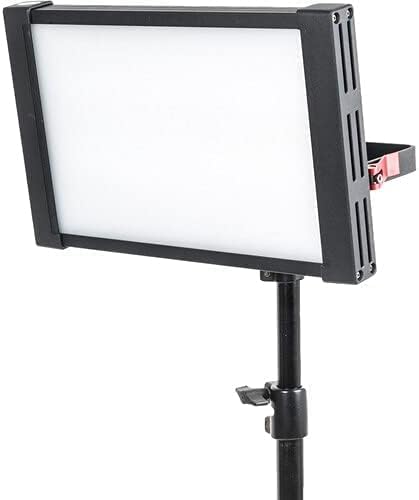
Image: The CAME-TV Boltzen Perseus RGBDT 55W Lighting Screen, emitting a white light, securely mounted on a professional light stand, demonstrating its typical setup for studio or location use.
4.2 Kragverbinding
- Connect the power adapter to the DC input port on the back of the light panel.
- Steek die kragadapter in 'n geskikte elektriese aansluiting.
- Alternatively, if using a compatible battery (not included), attach it to the battery plate on the rear of the unit.

Beeld: 'n Gedetailleerde view of the rear panel of the CAME-TV Boltzen Perseus RGBDT 55W Lighting Screen, highlighting the control knobs, buttons, and the battery mounting plate, essential for operation and power management.
5. Bedryfsinstruksies
5.1 Aan-/afskakel
Locate the power switch on the rear panel of the light. Flip the switch to the 'ON' position to power on the device. Flip it to the 'OFF' position to power off.
5.2 Adjusting Brightness (Dimmer)
Gebruik die DOWWER knob on the control panel to adjust the light's intensity. Rotate clockwise to increase brightness and counter-clockwise to decrease it.
5.3 Color Temperature and Hue Control
The Boltzen Perseus P-1200R features RGBDT color space control, allowing for a wide range of color temperatures and hues.
- CCT-modus: Gebruik die CCT knob to adjust the color temperature from 2000K to 10000K.
- RGB-modus: Druk die KLEUR button to switch to RGB mode. Use the corresponding knobs or buttons to adjust Red, Green, and Blue values to achieve desired colors.
- Spesiale effekte: The light may include pre-programmed special effects. Refer to the on-screen display and control buttons for navigation and selection of these effects.
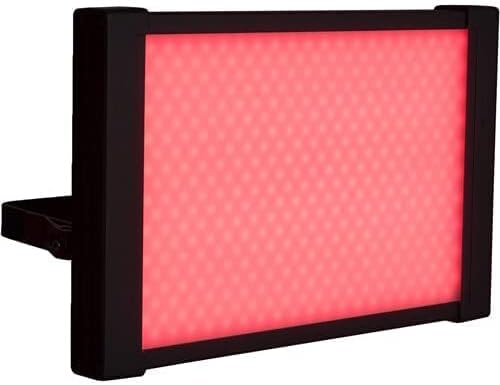
Image: The CAME-TV Boltzen Perseus RGBDT 55W Lighting Screen illuminated with a vibrant red light, showcasing its ability to produce various colors for creative lighting setups.
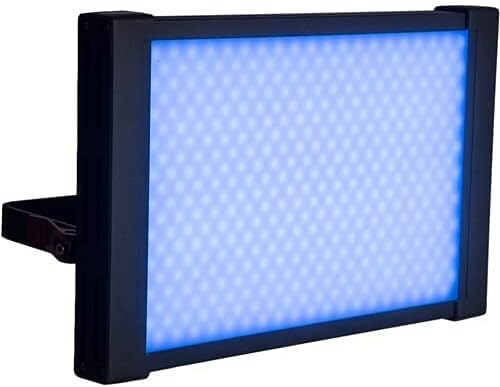
Image: The CAME-TV Boltzen Perseus RGBDT 55W Lighting Screen illuminated with a bright blue light, demonstrating another color option available through its RGBDT color control system.

Image: The CAME-TV Boltzen Perseus RGBDT 55W Lighting Screen illuminated with a rich purple light, further illustrating the extensive color palette achievable with this versatile lighting unit.
6. Onderhoud
- Skoonmaak: Use a soft, dry cloth to clean the light panel and housing. Do not use abrasive cleaners or solvents.
- Berging: Wanneer dit nie gebruik word nie, bêre die lig in sy draagtas op 'n koel, droë plek, weg van direkte sonlig en uiterste temperature.
- Inspeksie: Regularly inspect the power cable and connections for any signs of damage. If damage is found, discontinue use and contact customer support.
7. Probleemoplossing
| Probleem | Moontlike oorsaak | Oplossing |
|---|---|---|
| Lig skakel nie aan nie. | Geen kragtoevoer nie; los verbinding; foutiewe kragadapter. | Check power cable connection; ensure outlet is working; try a different power adapter if available. |
| Lig flikker of dof onverwags. | Unstable power supply; overheating; faulty internal component. | Ensure stable power source; allow light to cool down; contact customer support if problem persists. |
| Color or brightness controls are unresponsive. | Software glitch; control panel issue. | Power cycle the device (turn off, wait 10 seconds, turn on); contact customer support. |
8. Spesifikasies
| Kenmerk | Detail |
|---|---|
| Model | P-1200R |
| Handelsmerk | KOM-TV |
| Kraguitset | 55W (Note: Some specifications may list 9W, but the primary output is 55W) |
| Kleurtemperatuurreeks | 2000K - 10000K (RGBDT) |
| Kragbron | Elektries |
| Afmetings (Versending) | 37.2 x 31.2 x 9.6 cm |
| Gewig (versending) | 1 kg |
| Ingesluit komponente | Lighting Screen, Power Adapter, Carrying Bag |
| Eerste Beskikbare Datum | 14 September 2021 |
9. Waarborg en Ondersteuning
For warranty information and technical support, please refer to the official CAME-TV webwebwerf of kontak u plaaslike verspreider. Bewaar u aankoopbewys as bewys van aankoop vir waarborgeise.
Manufacturer: CAME-TV Boltzen Perseus RGBDT 55W - P-1200R-1
ASIN: B09G3JLCSQ