
Aan die gang
Pakketinhoud
Upon opening the MAXTOP Smart Watch T5 package, you should find the following items:
- MAXTOP Smart Watch T5 device
- Silicone watch strap (black)
- USB-laaikabel
- Gebruikershandleiding

Image: MAXTOP Smart Watch T5 package contents, showing the watch, a black silicone strap, a USB charging cable, and the user manual.
Laai die toestel
Before first use, fully charge your smart watch. Connect the magnetic charging cable to the charging points on the back of the watch and plug the USB end into a standard USB power adapter (not included) or a computer's USB port. The watch display will indicate charging status.
Let wel:
- Maak seker dat die laaikontakte skoon en droog is.
- Use a 5V/1A charger for optimal charging.
Skakel aan/af
- Om aan te skakel: Press and hold the side button for a few seconds until the MAXTOP logo appears.
- Om af te skakel: From the watch face, swipe down to access quick settings, or navigate to the "Settings" menu. Select the power icon and confirm to shut down the device.
App installasie en paring
To unlock the full functionality of your MAXTOP Smart Watch T5, you need to install the companion app on your smartphone.
- Laai die toepassing af: Soek vir the "MAXTOP" app (or specified companion app in the included manual) in the Apple App Store (for iOS) or Google Play Store (for Android).
- Skep rekening: Open the app and follow the on-screen instructions to create an account and set up your profile.
- Koppel die horlosie:
- Maak seker dat Bluetooth op jou slimfoon geaktiveer is.
- Open the app and navigate to the device pairing section.
- Select "Add Device" or similar option. The app will search for nearby devices.
- Select "MAXTOP T5" from the list of found devices.
- Bevestig die paringsversoek op beide jou foon en die horlosie indien gevra.
Belangrik:
- Keep the watch close to your phone during the pairing process.
- Allow all requested permissions for the app to function correctly.
Kenmerke en werking
Navigeer deur die koppelvlak
The MAXTOP Smart Watch T5 features a 1.54-inch full touch screen for easy navigation.
- Swiep op/af: Blaai deur spyskaarte of kennisgewings.
- Swiep links/regs: Access different feature screens or quick views.
- Tik: Kies 'n item of bevestig 'n aksie.
- Syknoppie: Press to return to the main watch face or wake the screen.

Image: The MAXTOP Smart Watch T5 display showcasing multiple functions including heart rate, blood pressure, music control, and various sports modes.
Daily Activity Tracking
Your smart watch automatically tracks your daily activities, including steps, distance, and calories burned. You can view detailed summaries in the companion app.

Image: The MAXTOP Smart Watch T5 tracking daily activities such as steps, calories, and distance, alongside icons representing various sports modes like hiking, cycling, and running.
Sportmodusse
The watch supports 10 different sport modes to accurately track your workouts. To start a sport mode:
- Swipe on the watch face to find the "Sport" icon or menu.
- Tap to select your desired activity (e.g., Outdoor Run, Indoor Walk, Cycling).
- The watch will begin tracking your activity. Tap to pause or end the workout.

Image: The MAXTOP Smart Watch T5 interface showing 10 distinct sport modes, such as hiking, outdoor cycling, indoor running, and elliptical training.
Heart Rate and Blood Pressure Monitoring
The watch can monitor your heart rate (HR) and blood pressure (BP). For accurate readings:
- Wear the watch snugly on your wrist, about one finger's width from your wrist bone.
- Bly stil tydens meting.
- To measure: Navigate to the HR or BP icon on the watch and tap to start.

Image: The MAXTOP Smart Watch T5 displaying heart rate in beats per minute (BPM) and illustrating different sleep stages (awake, light, deep sleep).
Slaapmonitering
The watch automatically tracks your sleep patterns, including awake time, light sleep, and deep sleep. View your sleep quality report in the companion app.

Image: The MAXTOP Smart Watch T5's sleep monitoring feature, displaying sleep duration and a detailed sleep quality analysis within the companion application.
Boodskapkennisgewings
Receive notifications from your smartphone directly on your watch. Ensure the watch is paired and app notifications are enabled in your phone's settings and the companion app.
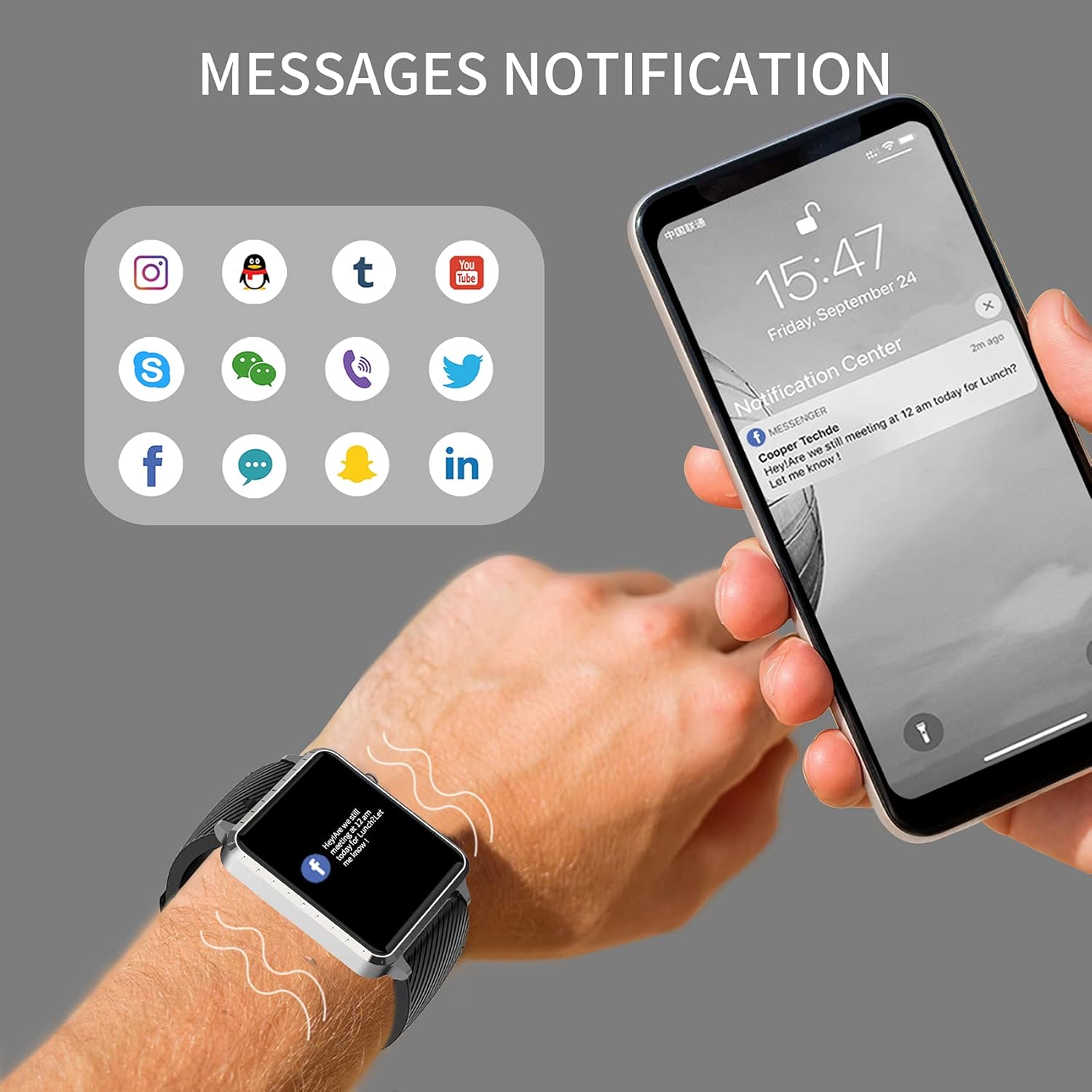
Image: The MAXTOP Smart Watch T5 showing incoming message notifications from popular social media and communication applications on its screen.
Musiekbeheer
Control music playback on your smartphone directly from your watch. This feature allows you to play, pause, skip tracks, and adjust volume without taking out your phone.

Image: The MAXTOP Smart Watch T5 demonstrating various features including music control, message notifications, sedentary reminders, and the 'find phone' function.
Ander funksies
- Sittende herinneringe: Set reminders in the app to encourage movement after periods of inactivity.
- Soek foon: Use this feature on your watch to make your paired phone ring, helping you locate it.
- Stophorlosie en aftelling: Access these tools from the watch's menu for timing activities.
Onderhoud en versorging
Waterweerstand
The MAXTOP Smart Watch T5 is rated IP67 waterproof. This means it is resistant to splashes, rain, and brief immersion in water. It is suitable for daily use and can withstand hand washing or light rain.
Waarskuwing:
- Do not use the watch for swimming, diving, or showering with hot water.
- Vermy die blootstelling van die horlosie aan hoëdrukwater of stoom.
- Water resistance is not a permanent condition and may decrease over time with normal wear.
Skoonmaak
Regularly clean your watch and strap to maintain hygiene and prevent skin irritation.
- Vee die horlosieskerm en -liggaam af met 'n sagte, damp, pluisvrye lap.
- For the silicone strap, you can wash it with mild soap and water, then rinse thoroughly and dry completely before reattaching to your wrist.
- Vermy die gebruik van harde chemikalieë of skuurmateriaal.
Battery sorg
Om die batterylewe te verleng:
- Laai die horlosie volledig voor die eerste gebruik.
- Vermy uiterste temperature.
- If not using the watch for an extended period, charge it to about 50% before storing.
Probleemoplossing
Horlosie skakel nie aan nie
- Maak seker dat die horlosie volledig gelaai is. Koppel dit vir ten minste 30 minute aan die laaier.
- Druk en hou die syknoppie vir 10-15 sekondes in om 'n herbegin te forseer.
Kan nie met foon koppel nie
- Maak seker dat Bluetooth op jou foon geaktiveer is en dat die horlosie binne bereik is.
- Herbegin beide jou foon en die horlosie.
- Ensure the companion app is installed and updated to the latest version.
- Forget the device from your phone's Bluetooth settings and try pairing again through the app.
- Kontroleer of die horlosie reeds met 'n ander toestel gekoppel is.
Inaccurate Readings (HR/BP/Sleep)
- Ensure the watch is worn correctly: snug on the wrist, not too tight or too loose.
- Bly stil tydens metings.
- Note that smart watch readings are for reference only and should not be used for medical diagnosis.
Kennisgewings verskyn nie
- Verifieer dat die horlosie suksesvol met jou foon gekoppel is.
- Check app notification settings on your phone and within the companion app.
- Maak seker dat die toepassing in die agtergrond loop en nie deur jou foon se kragbesparingsfunksies gesluit word nie.
Spesifikasies
| Kenmerk | Detail |
|---|---|
| Handelsmerk | MAKSTOP |
| Model | T5 |
| Skerm grootte | 1.54 duim |
| Produk afmetings | 1.46 x 1.57 x 0.28 duim |
| Item gewig | 1.87 onse (53 gram) |
| Bedryfstelsel | Android, iOS-versoenbaar |
| Draadlose kommunikasie | Bluetooth |
| Battery Tipe | Litiumpolimeer (1 ingesluit) |
| Batterylewe | Tot 10 dae |
| Waterweerstandvlak | Waterdig (IP67) |
| Eerste Beskikbare Datum | 6 Julie 2022 |

Image: Detailed physical dimensions of the MAXTOP Smart Watch T5, including the watch face width, height, and the adjustable strap length.
Waarborg en Ondersteuning
For warranty information and customer support, please refer to the official MAXTOP website or contact their customer service directly. Details are typically provided in the packaging or on the manufacturer's webwebwerf.
Bewaar u aankoopbewys as bewys van aankoop vir enige waarborgeise.