
Sinotimer Tm630S-2
Sinotimer TM630S-2 Digital Programmable Timer Switch User Manual
Model: TM630S-2
1. Inleiding
The Sinotimer TM630S-2 is a versatile 7-day weekly programmable digital timer switch designed for automatic control of various electrical equipment. It features a built-in battery for memory retention during power failures, high accuracy, and strong anti-jamming capabilities. This manual provides detailed instructions for the setup, operation, and maintenance of your TM630S-2 timer switch.
This device is ideal for controlling streetlights, neon signs, water heaters, air conditioners, electric cookers, agricultural facilities, and broadcasting equipment, offering precise scheduling with up to 16 ON/OFF settings per day or week.

Figuur 1: Hoekig view of the Sinotimer TM630S-2 Digital Timer Switch, showing the LCD display and control buttons.
2. Produk verbyview
The TM630S-2 features an LCD display for time and program settings, along with several buttons for configuration. It is designed for DIN-rail mounting, making it suitable for integration into electrical panels.

Figuur 2: Voorkant view of the Sinotimer TM630S-2, highlighting its 220V compatibility and button layout.
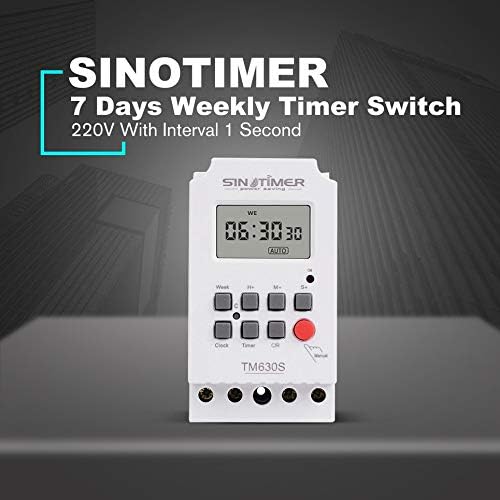
Figure 3: The Sinotimer TM630S-2, marketed as a 7-day weekly timer switch with 1-second interval capability.

Figure 4: The TM630S-2 showcasing its key features, including automatic switching, low consumption, high-accuracy CMOS chip, and compliance with IEC 60367 and CE standards.
3. Installasie en Opstelling
3.1 Montering
The TM630S-2 is designed for DIN-rail mounting. Ensure the mounting location is secure, dry, and within the specified operating temperature range.

Figure 5: Technical drawing illustrating the dimensions and DIN-rail mounting mechanism of the TM630S-2.
3.2 Bedrading
WAARSKUWING: All wiring should be performed by a qualified electrician and in accordance with local electrical codes. Ensure power is disconnected before wiring to prevent electric shock.
The TM630S-2 supports 220V AC power supply. Connect the input power and the load according to the wiring diagram provided on the device and below.
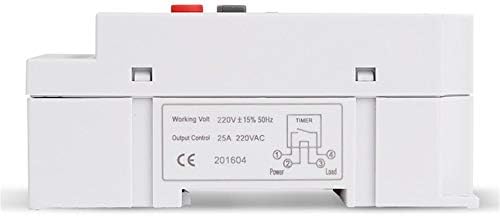
Figuur 6: Onder view of the TM630S-2, displaying the wiring diagram for input power and household appliances, along with product specifications.
- Connect the Live (L) and Neutral (N) wires of the 220V AC power supply to the input terminals.
- Connect the Live (L) and Neutral (N) wires of the appliance (load) to be controlled to the output terminals.
- Maak seker dat alle verbindings veilig en behoorlik geïsoleer is.
4. Bedryfsinstruksies
4.1 Knoppie Funksies
- Horlosie: Used to set the current time and day.
- Week: Selects the day of the week during time or program setting.
- H+: Adjusts hours (for time or program setting).
- M+: Adjusts minutes (for time or program setting).
- S+: Adjusts seconds (for time or program setting).
- Afteller: Enters program setting mode.
- C/R (Cancel/Recall): Clears current program settings or recalls them.
- handleiding: Manually switches the output ON/OFF or sets to AUTO mode.
4.2 Instelling van Huidige Tyd en Dag
- Druk en hou die Horlosie knoppie.
- Terwyl jy vashou Horlosie, druk Week om die huidige dag van die week te stel.
- Terwyl jy vashou Horlosie, druk H+ om die huidige uur te stel.
- Terwyl jy vashou Horlosie, druk M+ om die huidige minuut te stel.
- Terwyl jy vashou Horlosie, druk S+ to set the current second.
- Los die Horlosie knoppie om die instellings te stoor.
4.3 Programmering van AAN/AF-siklusse
The TM630S-2 supports up to 16 ON/OFF programs. Each program can be set for specific days of the week or for all days.
- Druk die Afteller button once to enter the first ON program setting (display shows "1 ON").
- Druk Week to select the desired day(s) for this program (e.g., Mon-Sun, Mon-Fri, Sat-Sun, etc.).
- Druk H+ en M+ to set the desired ON time.
- Druk die Afteller button again to enter the first OFF program setting (display shows "1 OFF").
- Druk Week to select the desired day(s) for this OFF program (usually matches the ON program).
- Druk H+ en M+ to set the desired OFF time.
- Repeat steps 1-6 for additional ON/OFF programs (up to 16 pairs).
- Nadat al die verlangde programme ingestel is, druk die Horlosie button to exit program mode and return to the current time display.
To clear a specific program, navigate to that program using the Afteller knoppie en druk dan die C/R knoppie.
4.4 Handmatige beheer
Druk die Handleiding button to cycle through the output modes:
- OP: Output is continuously ON.
- AF: Output is continuously OFF.
- VOERTUIG: The timer operates according to the programmed ON/OFF settings. Ensure the timer is in AUTO mode for scheduled operations.
5. Onderhoud
The Sinotimer TM630S-2 is designed for low maintenance. The built-in battery ensures memory retention for up to 60 days during power outages, eliminating the need for frequent time resetting.
- Skoonmaak: Gebruik 'n sagte, droë lap om die buitekant van die toestel skoon te maak. Moenie skuurmiddels of oplosmiddels gebruik nie.
- Battery: The internal battery is rechargeable and designed for long-term use. If the display becomes dim or settings are lost frequently during power outages, the battery may be nearing the end of its life. Battery replacement should only be performed by qualified personnel.
- Inspeksie: Inspekteer die bedradingverbindings gereeld om te verseker dat hulle veilig bly.
6. Probleemoplossing
- Toestel word nie aangeskakel nie:
- Check the main power supply to the device.
- Verify that the wiring connections are correct and secure as per the wiring diagram.
- Programs not executing:
- Ensure the timer is set to AUTO modus met behulp van die Handleiding knoppie.
- Double-check the ON/OFF program settings for correct times and days.
- Verify that the current time and day are set correctly on the timer.
- Time drift/inaccuracy:
- The device has an auto time error correction of +/- 30 seconds weekly. Significant deviations may indicate an issue.
- Ensure the device is operating within its specified temperature range (-20℃ to +50℃).
- Display is blank or dim during power outage:
- The internal battery may be depleted or nearing end-of-life. The battery provides backup for up to 60 days. Allow the device to be powered for several hours to recharge the internal battery.
7. Spesifikasies
| Kenmerk | Spesifikasie |
|---|---|
| Handelsmerk | Sinotimer |
| Model | TM630S-2 |
| Kleur | Wit |
| Temperatuurreeks | -20℃ tot +50℃ |
| Kragtoevoer | 220VAC (also available in 12VDC option) |
| Kragverbruik | 4.5 VA (maksimum) |
| Vertoon | LCD |
| Switching Contact | 1 omskakelaar |
| Programme | 16 ON/OFF settings (daily or weekly) |
| Histerese | 2 sec/day (at 25℃) |
| Minimum interval | 1 sekondes |
| Kapasiteit | 30A 250V AC |
| Black-out Memory | 60 days (via built-in rechargeable 3V battery) |
| Timer reeks | 1 sekonde tot 168 uur |
| Average Error | 1s/24h (at 25℃) |
| Afmetings (ongeveer) | 95 mm (H) x 98 mm (B) x 40 mm (D) |

Figuur 7: Examples of typical applications for the TM630S-2 timer switch, including industrial settings, home automation, and agricultural use.
8. Waarborg en Ondersteuning
Specific warranty information for the Sinotimer TM630S-2 is not provided within this manual. Please refer to the product packaging, the seller's website (Kiminors), or your purchase receipt for details regarding warranty coverage and terms.
For technical support or further assistance, please contact the vendor or manufacturer through the contact information provided at the point of purchase.