
1. Inleiding
Welcome to the user manual for your Ulefone Armor X9 Rugged Phone. This guide provides essential information on setting up, operating, maintaining, and troubleshooting your device. The Ulefone Armor X9 is designed for durability and performance, featuring robust protection and advanced functionalities.
Key features of your Ulefone Armor X9 include:
- IP68/IP69K Grade 360 All Round Protection: Gebou om strawwe omgewings te weerstaan.
- Android 11-bedryfstelsel: Enjoy the latest Android experience.
- 4GB RAM + 128GB ROM: Ample memory and storage for your applications and data.
- 16MP Triple Rear Camera: Capture high-quality photos and videos.
- Massive 5580mAh Battery Capacity: Extended usage time.
- Triple Navigation System: Enhanced positioning accuracy.
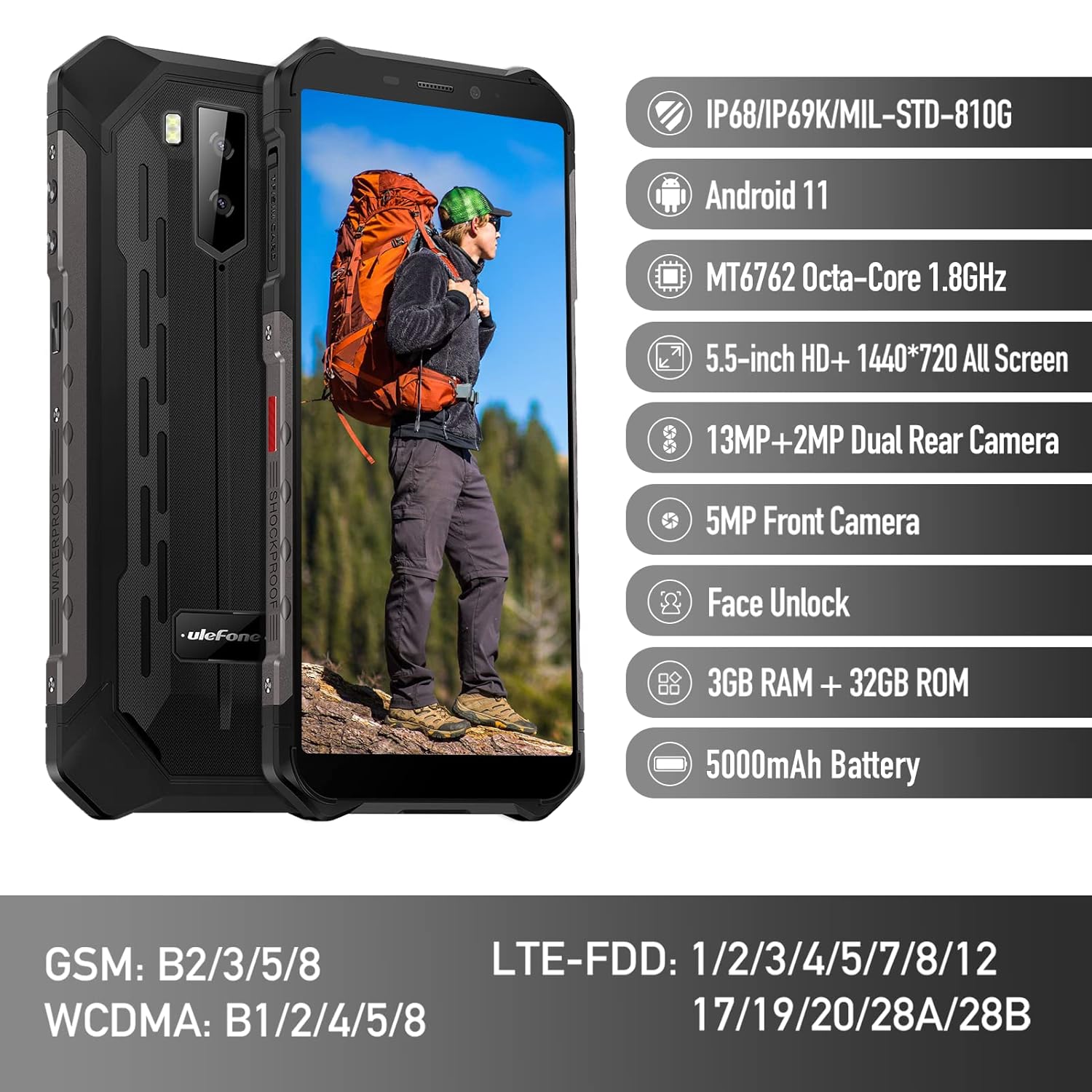
Figure 1: Ulefone Armor X9 Rugged Phone overview, highlighting its robust design and core specifications like IP68/IP69K rating, Android 11, Octa-Core processor, 5.5-inch HD+ screen, 13MP+2MP dual rear camera, 5MP front camera, Face Unlock, 3GB RAM + 32GB ROM, and 5000mAh battery.
2. Opstelling
2.1. SIM-kaart en TF-kaartinstallasie
The Ulefone Armor X9 supports dual SIM cards and a TF (microSD) card for expandable storage. Follow these steps to install them:
- Vind die SIM-kaartlaai aan die kant van die foon.
- Gebruik die meegeleverde SIM-uitwerpgereedskap om die skinkbord oop te maak.
- Plaas jou Nano-SIM-kaarte versigtig in die aangewese gleuwe (SIM1 en SIM2).
- If using a TF card, place it into the dedicated TF card slot. Note that some configurations may share a slot between SIM2 and the TF card.
- Gently push the tray back into the phone until it is flush with the device body. Ensure the tray is properly sealed to maintain water and dust resistance.

Figure 2: Illustration of the dual SIM and TF card tray, showing how to insert SIM1, SIM2, and a TF card into the Ulefone Armor X9.
2.2. Aanvanklike laai
Before first use, it is recommended to fully charge your Ulefone Armor X9. Use the provided USB cable and power adapter.
- Koppel die USB-kabel aan die laaipoort op jou foon.
- Koppel die ander kant van die USB-kabel aan die kragadapter.
- Steek die kragadapter in 'n muuraansluiting.
- Die laai-aanwyser sal op die skerm verskyn. Laat die foon laai totdat die battery-ikoon vol wys.
2.3. Skakel aan/af
- Om aan te skakel: Press and hold the Power button (usually on the right side) until the Ulefone logo appears.
- Om af te skakel: Press and hold the Power button until the power options menu appears on the screen. Select "Power off" and confirm.
- Om weer te begin: Kies "Herbegin" in die kragopsies-kieslys en bevestig.
3. Bedryfsinstruksies
3.1. Basiese Navigasie (Android 11)
Your Ulefone Armor X9 runs on Android 11, offering an intuitive user interface. Common gestures and navigation include:
- Swiep op: Kry toegang tot die toepassingslaai.
- Swiep af: Open the notification panel and quick settings.
- Tik: Kies 'n item of maak 'n toepassing oop.
- Lang pers: Kry toegang tot kontekstuele spyskaarte of skuif ikone.
- Knyp-om-te-Zoem: Zoem in of uit op beelde en web bladsye.

Figure 3: Screenshots of the Android 11 interface on the Ulefone Armor X9, showing settings menus, quick toggles, and the sound recorder application.

Figure 4: The 5.5-inch 18:9 All Screen display of the Ulefone Armor X9, showcasing its immersive viewing experience with an image of a skier.
3.2. Kameragebruik
Your phone is equipped with a 16MP Triple Rear Camera and a Front Camera. To use the camera:
- Maak die "Kamera"-toepassing oop vanaf jou tuisskerm of toepassinglaai.
- Tik die sluiterknoppie om 'n foto te neem.
- Wissel tussen foto- en videomodusse soos nodig.
- Tap the icon to switch between the front and rear cameras.
- Verken verskeie kameramodusse en -instellings vir optimale resultate.
3.3. Konnektiwiteit
The Ulefone Armor X9 supports various connectivity options:
- Wi-Fi: Gaan na Instellings > Netwerk en internet > Wi-Fi om aan beskikbare netwerke te koppel.
- Bluetooth: Go to Settings > Connected devices > Bluetooth to pair with Bluetooth devices.
- GPS: The phone features AGPS for accurate location services. Ensure location services are enabled in Settings > Location.
- USB: Connect your phone to a computer using a USB cable for data transfer or charging.
3.4. Gesigontsluiting
For convenient and secure unlocking, your Ulefone Armor X9 supports Face Unlock:
- Gaan na Instellings > Sekuriteit > Gesigontsluiting.
- Volg die instruksies op die skerm om jou gesig te registreer.
- Ensure good lighting and hold the phone at eye level during registration.
- Once registered, you can unlock your phone by simply looking at the front camera.
4. Onderhoud
4.1. Skoonmaak en versorging
To maintain the performance and appearance of your rugged phone:
- Vee die skerm en liggaam af met 'n sagte, pluisvrye lap.
- Vir hardnekkige vuiligheid, gebruik 'n effense damp lap. Vermy harde chemikalieë of skuurmiddels.
- Ensure all port covers are securely closed to maintain water and dust resistance, especially after charging or using headphones.

Figure 5: The Ulefone Armor X9's 360° All Protection Design, showcasing its superior materials and superb durability against impacts and harsh conditions.
4.2. Water and Dust Resistance (IP68/IP69K)
The Ulefone Armor X9 is rated IP68/IP69K, meaning it is resistant to dust and water immersion. However, this resistance is not permanent and may decrease over time with normal wear. To ensure optimal protection:
- Do not intentionally submerge the phone in water for extended periods or beyond specified depths.
- Avoid exposing the phone to high-pressure water or extreme temperatures.
- Ensure all port covers are tightly sealed before exposure to water or dust.
- If the phone gets wet, dry it thoroughly before charging or opening any ports.
4.3. Batteryversorging
To prolong the life of your 5580mAh Lithium Polymer battery:
- Vermy uiterste temperature (warm of koud) aangesien dit die battery se werkverrigting kan benadeel.
- Gebruik slegs die oorspronklike laaier en kabel of gesertifiseerde versoenbare bykomstighede.
- Moenie die battery gereeld heeltemal laat leegloop nie. Laai dit voordat dit baie lae vlakke bereik.
5. Probleemoplossing
If you encounter issues with your Ulefone Armor X9, try the following troubleshooting steps:
5.1. Foon skakel nie aan nie
- Maak seker dat die battery gelaai is. Koppel die foon vir ten minste 30 minute aan 'n laaier.
- Druk en hou die aan/af-knoppie vir 10-15 sekondes in om 'n herbegin te forseer.
5.2. Laaiprobleme
- Verify that the charging cable and adapter are working correctly. Try a different charger if available.
- Maak seker dat die laaipoort skoon en vry van puin is.
- Make sure the charging cable is fully inserted into the port. Some rugged phone ports may require a firm connection due to protective covers.
5.3. SIM/TF Card Not Detected
- Ensure the SIM/TF card is correctly inserted into the tray and the tray is fully seated.
- Herbegin die foon.
- Check if the SIM card is active with your network provider.
5.4. App Crashes or Freezing
- Maak die problematiese toepassing toe en heropen dit.
- Maak die program se kasgeheue en data skoon (Instellings > Programme > [Programnaam] > Berging en kasgeheue).
- Maak seker dat die toepassing opgedateer is na die nuutste weergawe.
- Herbegin die foon.
5.5. Fabrieksterugstelling
Indien probleme voortduur, kan 'n fabrieksherstel dit oplos. Waarskuwing: Dit sal alle data op jou foon uitvee. Rugsteun belangrike data voordat jy voortgaan.
- Gaan na Instellings > Stelsel > Herstelopsies.
- Kies "Vee alle data uit (fabrieksherstel)".
- Bevestig jou besluit en voer jou PIN/wagwoord in indien gevra.
6. Spesifikasies
Below are the detailed specifications for the Ulefone Armor X9:

Figure 6: Details of the Ulefone Armor X9's Octa-Core Processor, highlighting its power-efficient yet powerful performance, along with 3GB RAM and 32GB ROM, and support for up to 256GB TF card extendable storage.
| Kenmerk | Spesifikasie |
|---|---|
| Bedryfstelsel | Android 11.0 |
| RAM | 3 GB (Note: Feature bullets mention 4GB RAM, please verify actual model) |
| Geheue berging kapasiteit | 32 GB (Expandable with TF card up to 256GB. Feature bullets mention 128GB ROM, please verify actual model) |
| SVE Model | MT6762 Octa-Core 1.8GHz (Note: Specifications list 'Snapdragon', but image indicates MT6762. Please verify actual model) |
| Produk afmetings | 15.8 x 7.75 x 1.38 cm |
| Item gewig | 472 g |
| Batterye | 1 Litiumpolimeerbattery (5580mAh, ingesluit) |
| Draadlose kommunikasie | Sellulêr, Bluetooth, USB, Wi-Fi |
| GPS | AGPS |
| Spesiale kenmerke | Rear Camera, Face Unlock, IP68/IP69K, MIL-STD-810G |
| Vertoon | 5.5-inch HD+ 1440*720 All Screen |
| Agterste kamera | 13MP+2MP Dual Rear Camera (Note: Feature bullets mention 16MP Triple Rear Camera, please verify actual model) |
| Voorste kamera | 5MP voorkamera |
| Kleur | Swart |
| Vervaardiger | Ulefone |
Note: Specifications are based on available product data and may vary slightly. Please refer to your product packaging for the most accurate information. There are discrepancies between feature bullets, specifications, and image text regarding RAM, ROM, CPU, and camera megapixels. This manual uses the most frequently cited or detailed information, with notes for clarification.
7. Waarborg en Ondersteuning
7.1. Waarborginligting
Your Ulefone Armor X9 is covered by a manufacturer's warranty. The specific terms and duration of the warranty may vary by region and retailer. Please refer to the warranty card included in your product packaging or contact your point of purchase for detailed information regarding warranty coverage and claims.
7.2. Kliëntediens
For technical assistance, troubleshooting beyond this manual, or warranty inquiries, please contact Ulefone customer support or your authorized dealer. You can typically find contact information on the official Ulefone webwebwerf of in jou produkdokumentasie.
- Visit the official Ulefone website for FAQs, software updates, and support contact details.
- Hou jou aankoopbewys en produkreeksnommer byderhand wanneer jy ondersteuning kontak.