
Inleiding
This manual provides detailed instructions for the setup, operation, and maintenance of your Moultrie W800 All-Purpose Series A Trail Camera. Please read this guide thoroughly to ensure proper use and optimal performance of your device.
Produk verbyview
The Moultrie W800 is a high-performance trail camera designed for capturing images and videos of wildlife. It features an Illumi-Night Sensor for clear nighttime captures and a robust design for outdoor use.
Sleutel kenmerke:
- Captures 26 Megapixel images for high clarity.
- 70-foot flash and detection range.
- Fast 0.5 second trigger speed.
- Moultrie Smokescreen Camo Pattern for discreet placement.
Wat is in die boks:
- Moultrie W800 Trail Camera
- 8 AA-batterye
- Monteer band

Image: Moultrie W800 Trail Camera in its retail packaging, showing the camera, batteries, and key features on the box.
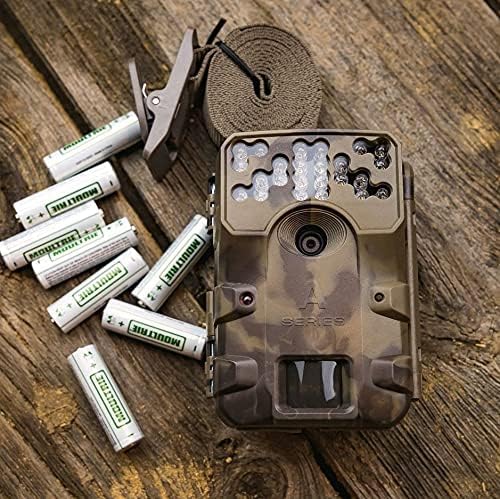
Image: The Moultrie W800 trail camera displayed with the included 8 AA batteries and a mounting strap, ready for setup.
Opstelling
1. Battery Installasie
- Open the camera housing latch.
- Insert 8 AA batteries into the battery compartment, ensuring correct polarity (+/-).
- Close the camera housing latch securely.
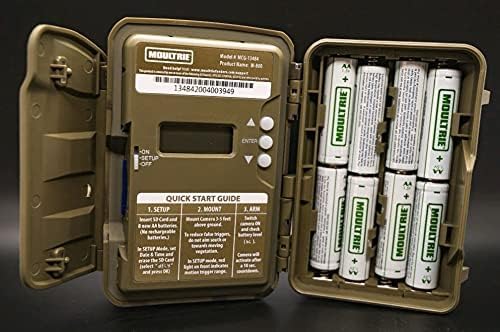
Image: An open Moultrie W800 camera, revealing the battery compartment on the right, the control panel with a small screen, and buttons on the left. This view is essential for battery and SD card installation.
2. Installasie van SD-kaart
- Met die kamerabehuising oop, vind die SD-kaartgleuf.
- Insert a standard SD card (up to 32GB) into the slot until it clicks into place. Ensure the card is inserted in the correct orientation.
- It is recommended to format the SD card using the camera's menu settings before first use.
3. Monteer die kamera
- Select a suitable location, typically a tree or post, where the camera can capture the desired area.
- Mount the camera approximately 3-5 feet above the ground.
- Use the provided mounting strap to secure the camera firmly. Thread the strap through the camera's mounting slots and tighten it around the object.
- Angle the camera to avoid direct sunlight and to minimize false triggers from swaying branches.

Image: A Moultrie W800 trail camera, in its camouflage casing, securely mounted to a tree trunk using a strap, demonstrating a typical field setup.
Bedryfsinstruksies
Basiese werking
- Krag aan/af: Locate the power switch inside the camera housing. Slide it to the 'ON' position to power on the camera. Slide to 'OFF' to power off.
- Opstelmodus: After powering on, the camera will typically enter 'SETUP' mode. In this mode, you can adjust settings such as date, time, photo/video mode, resolution, and trigger delay using the control buttons and display.
- Arming the Camera: Once settings are configured, slide the power switch to the 'ARM' position. The camera will initiate a countdown (e.g., 10 seconds) to allow you to leave the area without triggering a capture. After the countdown, the camera will be active and ready to detect motion.
- Kontroleer status: The small display inside the camera housing provides status information, including battery level, SD card status, and current mode.
Onderhoud
- Skoonmaak: Periodically clean the camera lens and sensor window with a soft, lint-free cloth. Avoid abrasive materials or harsh chemicals.
- Batterykontrole: Regularly check battery levels, especially before extended deployment. Replace all batteries simultaneously to ensure consistent power.
- SD-kaartbestuur: Format the SD card regularly to prevent data corruption and ensure optimal performance. Back up important images/videos before formatting.
- Behuisingsintegriteit: Ensure the camera housing latch is always securely closed to protect against moisture and dust.
Probleemoplossing
- Kamera neem nie foto's nie:
- Check if the camera is in 'ARM' mode.
- Ensure the SD card is properly inserted and has sufficient free space.
- Verify that batteries have adequate charge.
- Check camera settings for trigger delay or sensitivity.
- Formateer die SD-kaart.
- Swak beeldkwaliteit:
- Clean the camera lens and sensor window.
- Ensure the camera is mounted at the recommended height and angle.
- Kontroleer vir obstruksies voor die kamera.
- Kort batterylewe:
- Use fresh, high-quality alkaline or lithium AA batteries.
- Ekstreme temperature kan batteryprestasie beïnvloed.
- Frequent video recording or high trigger frequency can consume more power.
Spesifikasies
Detailed technical specifications for the Moultrie W800 Trail Camera:
| Kenmerk | Spesifikasie |
|---|---|
| Effektiewe stilresolusie | 26 MP |
| Snellersnelheid | 0.5 sekondes |
| Flitsreeks | 70 voet |
| Opsporingsreeks | 70 voet |
| Lae lig tegnologie | Illumi-Night Sensor (Night Color) |
| Video-opname-resolusie | 720p |
| Video-opname-formaat | MPEG-4 |
| Tipe flitsgeheue | SD (tot 32 GB) |
| Kragbron | 8 AA-batterye |
| Verbindingstegnologie | Draadloos (Wi-Fi) |
| Beheer metode | Toep |
| Spesiale kenmerke | Bewegingsensor, Nagvisie |
| Internasionale Beskermingsgraad | IP54 |
| Item gewig | 1.12 pond |
| Pakket afmetings | 8.62 x 5.39 x 3.43 duim |
| UPC | 053695134840 |

Image: The back of the Moultrie W800 retail box, detailing performance specifications such as trigger speed, detection range, flash range, battery life, and SD card compatibility.
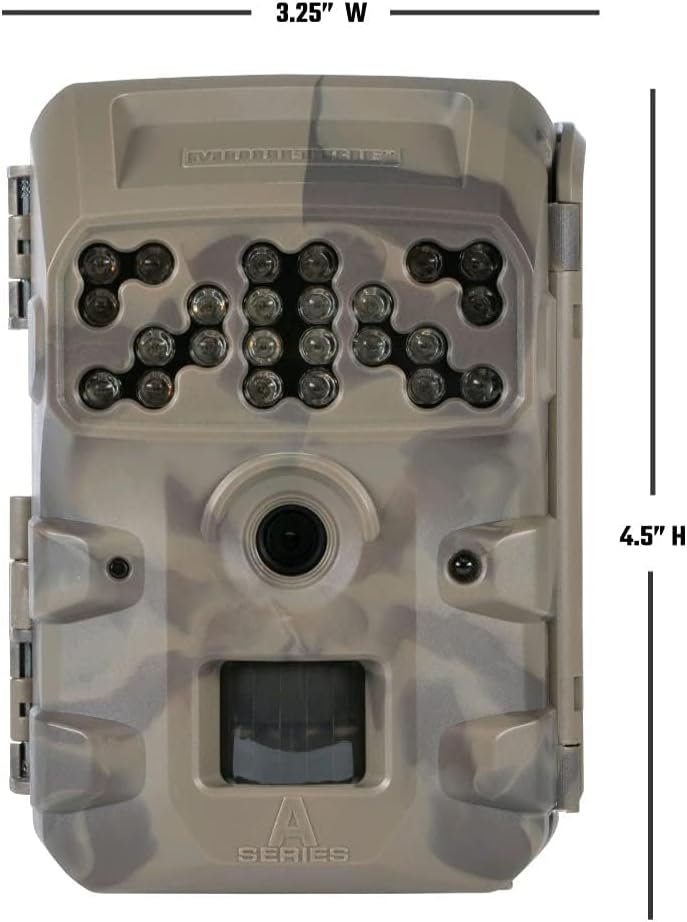
Beeld: Voorkant view of the Moultrie W800 trail camera with its dimensions clearly labeled: 3.25 inches wide and 4.5 inches high.
Waarborg en Ondersteuning
Waarborginligting:
The Moultrie W800 Trail Camera comes with a 2 jaar waarborg vanaf die aankoopdatum, wat vervaardigingsfoute dek. Bewaar asseblief u bewys van aankoop vir waarborgeise.
Kliëntediens:
For technical assistance, troubleshooting, or warranty inquiries, please visit the official Moultrie support webwebwerf: