
1. Inleiding
This manual provides essential instructions for the safe and efficient use of your Xiaomi Mi Portable Bluetooth Speaker. Please read this manual thoroughly before using the product and retain it for future reference. The speaker features high-quality sound, True Wireless Stereo (TWS) capability, Bluetooth 5.0 connectivity, and IPX7 waterproofing, making it suitable for various environments.

Beeld: Hoekig view of the Xiaomi Mi Portable Bluetooth Speaker, highlighting its compact design and control panel.
2. Pakketinhoud
Maak seker dat alle items in die pakket teenwoordig is:
- Xiaomi Mi Portable Bluetooth Speaker x1
- Charging Cable x1 (USB-C)
- Gebruikershandleiding x1
3. Produkkenmerke
- Hoë kwaliteit klank: Delivers clear and balanced audio.
- Ware draadlose stereo (TWS): Connect two speakers for an immersive stereo experience.
- Bluetooth 5.0: Stabiele en doeltreffende draadlose konnektiwiteit.
- IPX7 waterdig: Protected against immersion in water up to 1 meter for 30 minutes.
- Lang speeltyd: Approximately 13 hours of playback at 50% volume.
- Ingeboude mikrofoon: Vir handvrye oproepe.
- AUX-invoer: Vir bedrade klankverbinding.
4. Kontroles en aanwysers
Familiarize yourself with the speaker's control buttons and indicators:
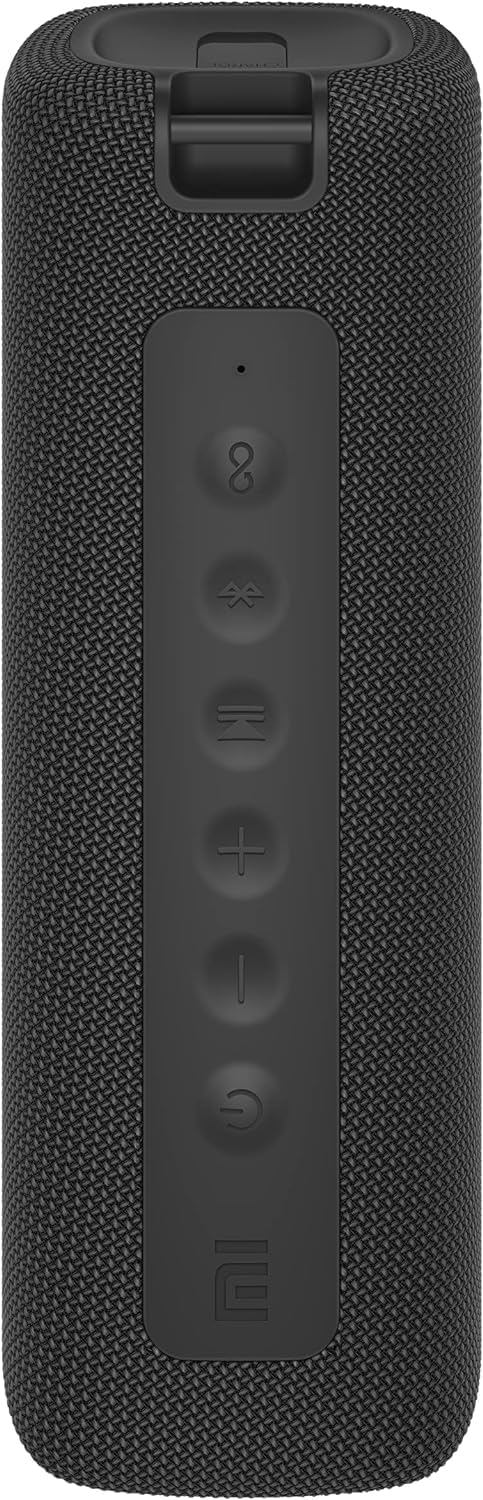
Beeld: Voorkant view of the speaker with clearly visible control buttons.
| Knoppie/aanwyser | Funksie |
|---|---|
| Kragknoppie (⏻) | Press and hold for 2 seconds to power on/off. Short press to play/pause music or answer/end calls. |
| Volume af (−) | Short press to decrease volume. Press and hold for previous track. |
| Volume op (+) | Short press to increase volume. Press and hold for next track. |
| Bluetooth-knoppie (Ⓑ) | Druk kort om Bluetooth-paringsmodus te betree. |
| TWS-knoppie (∞) | Press to initiate True Wireless Stereo pairing with another Mi Portable Bluetooth Speaker. |
| LED aanwyser | Dui kragstatus, laaistatus en Bluetooth-paringstatus aan. |
5. Opstelling
5.1 Laai die luidspreker
- Koppel die meegeleverde USB-C-laaikabel aan die luidspreker se laaipoort.
- Connect the other end of the cable to a 5V 1A USB power adapter (not included) or a computer's USB port.
- Die LED-aanwyser sal die laaistatus wys (bv. rooi tydens laai, af wanneer dit volledig gelaai is).
- 'n Volle laai neem ongeveer 4 uur.
5.2 Krag aan/af
- Om aan te skakel: Press and hold the Power button for 2 seconds. You will hear an audible prompt, and the LED indicator will light up.
- Om af te skakel: Press and hold the Power button for 2 seconds. You will hear an audible prompt, and the LED indicator will turn off.
5.3 Bluetooth -koppeling
- Ensure the speaker is powered on. The LED indicator will flash blue, indicating it's in pairing mode.
- Aktiveer Bluetooth op jou toestel (slimfoon, tablet, rekenaar) en soek vir beskikbare toestelle.
- Kies "Mi Portable Bluetooth Speaker" uit die lys toestelle.
- Sodra dit gekoppel is, sal die LED-aanwyser blou word en jy sal 'n bevestigingsgeluid hoor.
- Die luidspreker sal outomaties aan die laaste gekoppelde toestel koppel wanneer dit aangeskakel is, indien binne bereik.
5.4 Ware Draadlose Stereo (TWS) Paring
To pair two Xiaomi Mi Portable Bluetooth Speakers for stereo sound:
- Maak seker dat beide luidsprekers aangeskakel is en nie aan enige ander Bluetooth-toestel gekoppel is nie.
- On one speaker (this will be the primary speaker), short press the TWS button (∞). The LED indicator will flash.
- On the second speaker, short press the TWS button (∞).
- The two speakers will automatically connect to each other. You will hear a confirmation sound, and the LED indicators on both speakers will turn solid blue.
- Now, connect your device to the primary speaker via Bluetooth as described in section 5.3. The sound will play in stereo through both speakers.
5.5 AUX-aansluiting
Vir bedrade klankweergawe:
- Connect a 3.5mm audio cable (not included) from your audio source to the AUX IN port on the speaker.
- Die luidspreker sal outomaties na AUX-modus oorskakel.
- Control playback and volume from your audio source device.
6. Bedryfsinstruksies
6.1 Musiekweergawe
- Speel/pouse: Druk kort op die Power-knoppie.
- Volume op: Druk kort op die Volume Op (+) knoppie.
- Volume af: Short press the Volume Down (−) knoppie.
- Volgende snit: Press and hold the Volume Up (+) knoppie.
- Vorige snit: Press and hold the Volume Down (−) knoppie.
6.2 Oproepbestuur
- Beantwoord/beëindig oproep: Short press the Power button when a call comes in or during a call.
- Verwerp oproep: Druk en hou die aan/af-knoppie vir 2 sekondes in wanneer 'n oproep inkom.
7. Onderhoud
- Skoonmaak: Vee die luidspreker af met 'n sagte, damp lap. Moenie skuur skoonmaakmiddels of oplosmiddels gebruik nie.
- Berging: Bêre die luidspreker op 'n koel, droë plek weg van direkte sonlig en uiterste temperature.
- Waterweerstand: The speaker is IPX7 waterproof. Ensure the charging port cover is securely closed before exposure to water. Do not submerge the speaker for extended periods or beyond specified depths.
- Batterysorg: Om die batterylewe te verleng, vermy om die luidspreker gereeld heeltemal te ontlaai. Laai dit gereeld, selfs al word dit nie vir lang tye gebruik nie.
8. Probleemoplossing
| Probleem | Moontlike Oplossing |
|---|---|
| Luidspreker skakel nie aan nie. | Maak seker dat die battery gelaai is. Koppel aan 'n kragbron en probeer weer. |
| Kan nie via Bluetooth koppel nie. |
|
| Geen geluid of lae volume nie. |
|
| TWS-paring misluk. |
|
| Swak klankgehalte. |
|
9. Spesifikasies

Beeld: Onderkant view of the speaker, displaying model number and certifications.
| Parameter | Waarde |
|---|---|
| Model | MDZ-36-DB |
| Produk afmetings | W 213 x D 74 x H 74 mm (approx. 8 x 3 x 3 inches) |
| Konnektiwiteit | Bluetooth 5.0, 3.5mm AUX IN |
| Gegradeerde uitset | 2 x 8W (16W total) |
| Sein-tot-geraas verhouding | ≥ 70dB |
| TWS Connection Range | ≤ 5m |
| Waterdigte gradering | IPX7 |
| Battery Tipe | Litium-ioon, 3.7V |
| Battery kapasiteit | 2600mAh |
| Battery Laai Tyd | Ongeveer. 4 uur |
| Speeltyd | Ongeveer. 13 uur (teen 50% volume) |
| Frekwensiereeks | 80Hz tot 20KHz |
| Gegradeerde impedansie | 4 Ω |
| Transmissie afstand | 15m |
| Gegradeerde invoer | 5V 1A |
| Item gewig | 500 gram (1.1 pond) |
10. Waarborg en Ondersteuning
Vir gedetailleerde waarborginligting, verwys asseblief na die waarborgkaart wat by u produk ingesluit is of besoek die amptelike Xiaomi-webwerf. webwebwerf.
If you encounter any issues not covered in this manual, please contact Xiaomi customer support or visit their official support channels for assistance.