
Inleiding
This manual provides detailed instructions for the safe and efficient use of your pack all 110 Lbs Digital Handheld Luggage Scale. Please read this manual thoroughly before operating the device and retain it for future reference.
The pack all digital luggage scale is designed for accurate weight measurement of luggage and other items, with a maximum capacity of 110 lbs (50 kg) and a precision of 0.1 lb (50 g). It features switchable units (lb/kg/oz), a backlit LCD display for clear visibility, and a tare function for convenient net weight readings. Its compact and lightweight design makes it an ideal travel companion.
Opstelling
Battery installasie
The scale requires a CR2032 button cell battery (included). Follow these steps to install or replace the battery:
- Vind die battery kompartement op die agterkant van die skaal.
- Using a small screwdriver, unscrew the safety screw on the battery cover.
- Verwyder die batterydeksel.
- Plaas die CR2032-battery in met die positiewe (+) kant na bo.
- Replace the battery cover and tighten the safety screw.

After battery installation, the scale is ready for use.
Bedryfsinstruksies
Basiese werking
- Krag aan/af: Press the power button once to turn the scale on. The display will show '0.00'. To turn off, press and hold the power button for 3 seconds, or the scale will auto power off after 60 seconds of inactivity.
- Eenheidwisseling: When the scale is on, quickly press the power button twice to cycle through the available units: kilograms (kg), ounces (oz), and pounds (lb).
- Tarra funksie: To weigh an item in a container, first attach the empty container to the scale. Press the power button once to activate the tare function, which will reset the display to '0.00'. Then, add the item to the container and lift to measure its net weight.
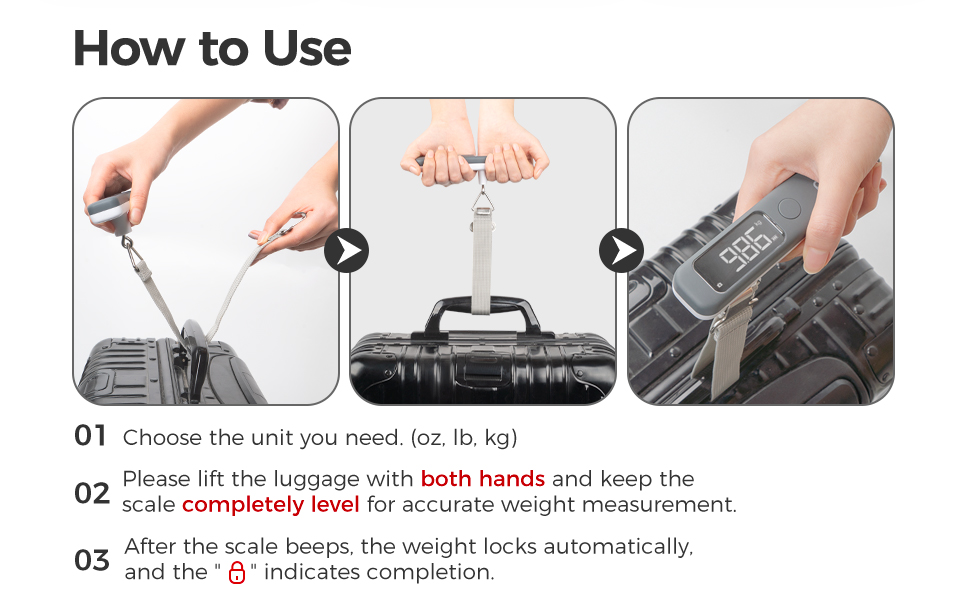
Weeg van bagasie
- Ensure the scale is powered on and the desired unit of measurement (oz, lb, or kg) is selected.
- Attach the scale's strap securely to the handle of your luggage.
- Lift the luggage using both hands, holding the scale steady and level. This ensures an accurate weight measurement.
- Wait for the scale to beep. The weight will lock automatically, and a lock icon will appear on the display, indicating completion.
- Read the displayed weight.

Instruksionele video
Kenmerke
- High Capacity & Precision: Measures up to 110 lbs (50 kg) with 0.1 lb (50 g) accuracy.
- Veelvuldige eenhede: Easily switch between pounds (lb), kilograms (kg), and ounces (oz).
- Agtergrond LCD -skerm: Large, clear display for easy reading in various lighting conditions.
- Tarra funksie: Allows for accurate measurement of net weight.
- Outomatiese slot: Weight locks automatically after a stable reading.
- Kompak en draagbaar: Lightweight design for easy carrying during travel.
- Duursame konstruksie: Features a tough hook and strong load-bearing strap.

Spesifikasies
| Kenmerk | Detail |
|---|---|
| Handelsnaam | pack all |
| Model | PA-25216-4 |
| Gewig Kapasiteit Maksimum | 110 pond (50 kg) |
| Uitlees akkuraatheid | 0.1 pond (50 g) |
| Tipe meting | pounds, kilograms, ounces |
| Tipe vertoon | LCD |
| Spesiale kenmerke | Backlit Display, Tare Function, Auto-Off |
| Vormfaktor | Handheld |
| Kragbron | CR2032 Battery (included) |
| UPC | 850018572477 |
Onderhoud
- Skoonmaak: Vee die skaal af met 'n sagte, damp lap. Moenie skuurmiddels gebruik of die skaal in water dompel nie.
- Berging: Bêre die skaal op 'n koel, droë plek weg van direkte sonlig en uiterste temperature.
- Batterysorg: If the scale will not be used for an extended period, remove the battery to prevent leakage and damage. Replace the battery when the low battery indicator appears on the display.
- Hanteer versigtig: Avoid dropping the scale or subjecting it to strong impacts, as this may affect its accuracy and functionality.
Probleemoplossing
- Onakkurate lesings: Ensure the scale is held steady and level when weighing. Avoid touching the luggage or the scale during measurement. Check if the battery is low and replace if necessary.
- Vertoning werk nie: Check if the battery is correctly installed and has sufficient charge. Replace the battery if the display remains blank.
- Skaal skakel nie aan nie: Verify battery installation and charge. If the issue persists, contact customer support.
- Weight Exceeds Capacity: If 'OVER' or 'ERR' appears on the display, the item being weighed exceeds the scale's maximum capacity of 110 lbs (50 kg). Remove the item to prevent damage.
Waarborg en Ondersteuning
Your pack all luggage scale is covered by a manufacturer's warranty against defects in materials and workmanship. For specific warranty details, duration, and terms, please refer to the product packaging or contact pack all customer support directly.
If you encounter any issues or have questions regarding your product, please visit the official pack all store on Amazon or contact their customer service for assistance. Keep your purchase receipt as proof of purchase for warranty claims.
pack all Store: Visit the pack all Store