
Inleiding
This manual provides detailed instructions for the assembly, operation, and maintenance of your FLEXISPOT EC5 Pro Electric Standing Desk Frame. Please read this manual thoroughly before use to ensure proper function and safety. The EC5 Pro is designed to offer a robust and stable height-adjustable solution for your workspace, promoting a healthier work-life balance.
Veiligheidswaarskuwings
- This product features safety mechanisms such as collision protection and overload protection.
- Moenie die maksimum vragvermoë van 160 kg oorskry nie.
- Ensure the desk is correctly installed and used in an appropriate environment.
- Hou kinders en troeteldiere weg van die lessenaar tydens werking.
- Maak seker dat daar geen hindernisse in die pad van die lessenaar se beweging is (op of af) om botsings te voorkom nie.
- Do not open or attempt to repair the motor or control box. Contact qualified service personnel for assistance.
- Ontkoppel krag voor skoonmaak of instandhouding.
Produk verbyview
The FLEXISPOT EC5 Pro is an electric height-adjustable desk frame designed for durability and smooth operation. It features a dual-motor system for powerful and stable lifting.

Image: The FLEXISPOT EC5 Pro Electric Standing Desk Frame in white, showcasing its robust structure without a tabletop.
Sleutel kenmerke:
- Powerful Dual Motor System: Equipped with two motors for enhanced stability and a maximum load capacity of 160 kg.
- Fast and Smooth Adjustment: Lifting speed up to 3.5 cm/s.
- Wide Height Range: Adjustable from 62 cm to 127 cm, suitable for various user heights.
- Advanced Control Panel: Features 3 memory height presets, a time reminder function, and an anti-collision system.
- Energiedoeltreffend: Consumes less than 0.5 watts in standby mode.
- Robuuste en Stabiele Konstruksie: Designed for long-term reliability with over 20,000 fatigue tests.

Image: The FLEXISPOT EC5 desk frame, available in white, black, and grey, highlighting its robust and stable construction. Certifications like CE, TUV, GS, and UKCA are visible.

Image: An illustration detailing the benefits of the dual motor system, including a maximum load capacity of 160 kg, energy consumption below 0.5 W, a speed of 35 mm/s, and low noise operation under 50 dB.

Image: This diagram highlights the stability and durability of the desk frame, featuring 3 lifting columns, a height adjustment range of 62-127 cm, validation through over 20,000 fatigue tests, and removable foot caps for optional casters.
Opstel- en monteringsinstruksies
The FLEXISPOT EC5 Pro desk frame is designed for easy assembly, typically taking 20-25 minutes. All necessary assembly tools are included in the package. Follow the detailed instructions provided in the separate assembly guide for step-by-step installation.
Stappe vir die Algemene Vergadering:
- Pak al die komponente uit en verifieer dit teen die onderdelelys.
- Attach the lifting columns to the foot bases.
- Connect the crossbars between the lifting columns.
- Install the control box and connect the motor cables.
- Mount the control panel to a convenient location.
- Secure your chosen tabletop to the assembled frame using the provided screws.
- Plug in the power cord and test the desk's functionality.
Ensure all connections are secure before operating the desk. The frame is suitable for tabletops with a length of 120-180 cm and a width of 60-80 cm.

Image: An exploded diagram illustrating the various components of the EC5 Pro desk frame, including the legs, crossbars, control box, control panel, and assembly tools, emphasizing ease of assembly.
Bedryfsinstruksies
The EC5 Pro features an advanced control panel for easy height adjustment and personalized settings.

Beeld: 'n Gedetailleerde view of the advanced control panel, showing the digital height display, up/down adjustment buttons, three memory preset buttons (1, 2, 3), and a reminder function button (A).
Beheerpaneel funksies:
- Op/Af Pyle (▲ / ▼): Press and hold to manually adjust the desk height. Release to stop at the desired height.
- Geheue-voorinstellings (1, 2, 3): Store and recall preferred desk heights.
- Reminder Function (A): Set a timer to remind you to switch between sitting and standing positions.
Geheuevoorinstellings instel:
- Verstel die lessenaar tot die verlangde hoogte met die op/af pyle.
- Press the "M" button (or similar 'Set' button if present). The display will show "S-".
- Immediately press one of the number buttons (1, 2, or 3) to save the current height to that preset. The display will confirm with "S-1", "S-2", or "S-3".
Gebruik van geheuevoorinstellings:
Simply press the corresponding number button (1, 2, or 3) to automatically move the desk to the saved height.
Herinnering funksie:
Press the "A" button to activate or deactivate the reminder function. This feature helps you maintain a healthy work routine by prompting you to change positions at regular intervals.
Antibotsingstelsel:
The desk is equipped with an anti-collision system. If the desk encounters an obstacle during movement, it will automatically stop and reverse slightly to prevent damage. Ensure the area around the desk is clear to allow this feature to function effectively.
Onderhoud
- Skoonmaak: Disconnect the power supply before cleaning. Use a soft, damp cloth to wipe down the desk frame. Avoid abrasive cleaners or solvents.
- Inspeksie: Kontroleer gereeld alle skroewe en verbindings om te verseker dat hulle styf vas is. Draai weer vas indien nodig.
- Kabelbestuur: Ensure all cables are neatly managed and not pinched or tangled, especially during height adjustments.
- Smering: The lifting columns are designed for maintenance-free operation and do not require lubrication.
Probleemoplossing
| Probleem | Moontlike oorsaak | Oplossing |
|---|---|---|
| Die lessenaar beweeg nie. | Power cord disconnected; control box or motor cable loose; overload. | Check power connection; ensure all cables are securely plugged in; reduce weight on the desk. |
| Die lessenaar beweeg oneweredig of maak ongewone geraas. | Uneven load; loose connections; damaged component. | Distribute weight evenly; check and tighten all screws; contact support if problem persists. |
| Anti-collision system triggers too often. | Obstacles in the path; sensitivity setting too high (if adjustable). | Clear the area around the desk; refer to the full manual for anti-collision sensitivity adjustment if available. |
| Geheue-voorinstellings werk nie. | Voorinstellings nie behoorlik gestoor nie. | Re-save the desired heights following the "Setting Memory Presets" instructions. |
Spesifikasies
| Modelnommer | E5-1 |
| Handelsmerk | FLEXISPOT |
| Kleur | Wit |
| Materiaal | Staal |
| Hoogteaanpassingsreeks | 62 cm - 127 cm |
| Opheffing van kolomme | 3-stage |
| Motor tipe | Dubbelmotor |
| Maksimum vragkapasiteit | 160 kg |
| Hefspoed | 3.5 cm/s |
| Geraasvlak | < 50 dB |
| Standby-kragverbruik | < 0.5 W |
| Aanbevole tafelbladafmetings | Length: 120-180 cm, Width: 60-80 cm |
| Spesiale kenmerke | Advanced control panel with memory and reminder function, anti-collision system. |

Image: An illustration demonstrating the adjustable frame width (110-170 cm) and the recommended tabletop dimensions (120-200 cm length x 60-80 cm depth) for compatibility.
Waarborg en Ondersteuning
FLEXISPOT products are designed with a focus on ergonomics and durability, backed by extensive testing and certifications.
- The EC5 Pro desk frame has passed over 20,000 fatigue tests, ensuring long-term reliability.
- It holds various European certifications, including IGR, CE, and TÜV, confirming its quality and safety standards.
- The constant current power system prevents motor overheating and spontaneous combustion, enhancing safety and lifespan.
For specific warranty details, claims, or technical support, please refer to the official FLEXISPOT webwebwerf of kontak hul kliëntediens direk. Bewaar u aankoopbewys vir waarborgvalidering.
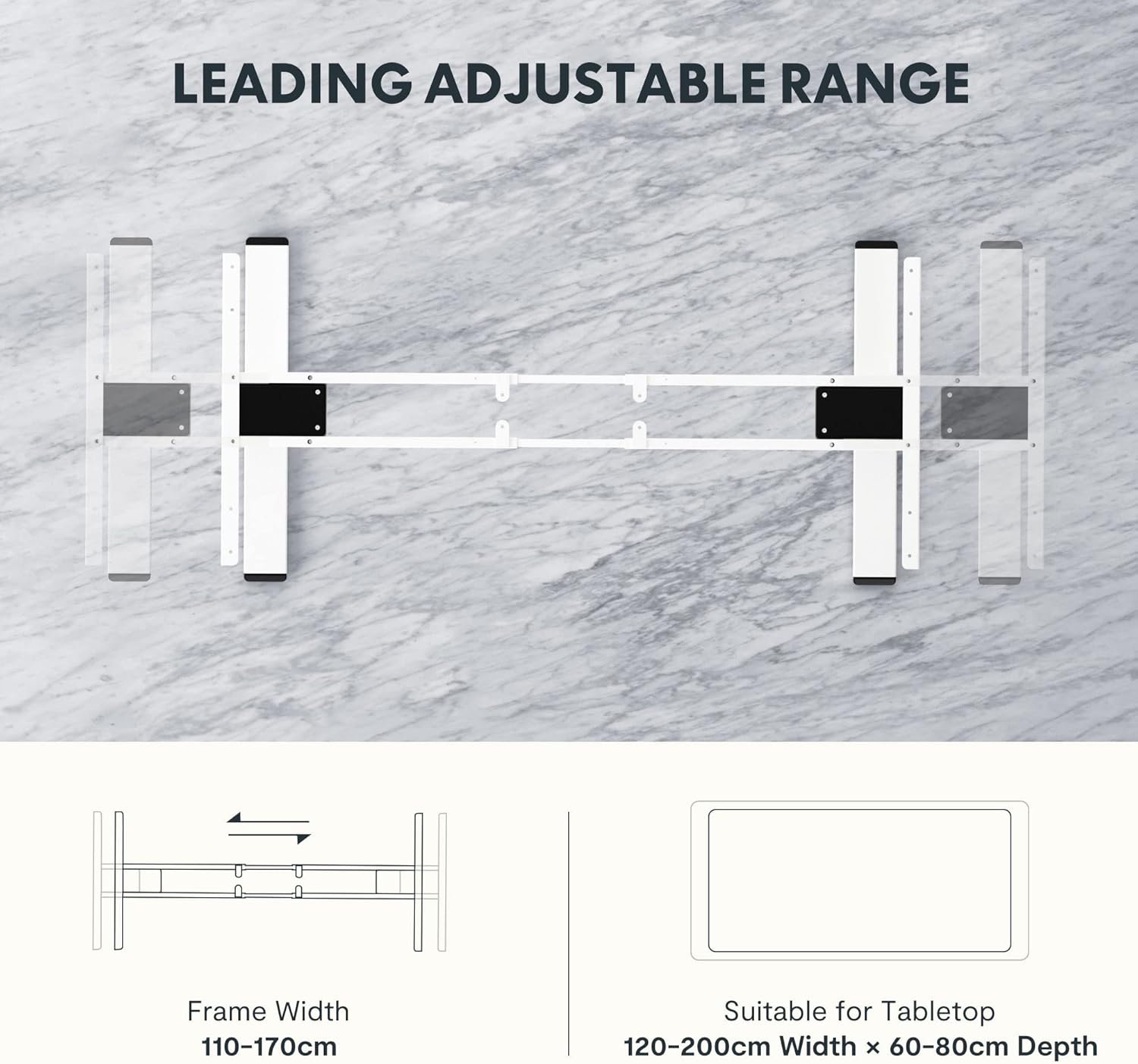
Image: Certificates from the IGR Institute and the Deutscher Gesundheitspreis (German Health Award), demonstrating FLEXISPOT's commitment to ergonomic design and product quality.