
1. Inleiding
Thank you for choosing the A4tech FG1112 Fstyler Wireless Keyboard and Mouse Set. This compact and efficient combo provides a reliable 2.4GHz wireless connection, offering convenience and comfort for your daily computing needs. The keyboard features a Q Turkish layout with FN multimedia keys, while the mouse offers precise 1200 DPI optical tracking. This manual will guide you through the setup, operation, and maintenance of your new device.
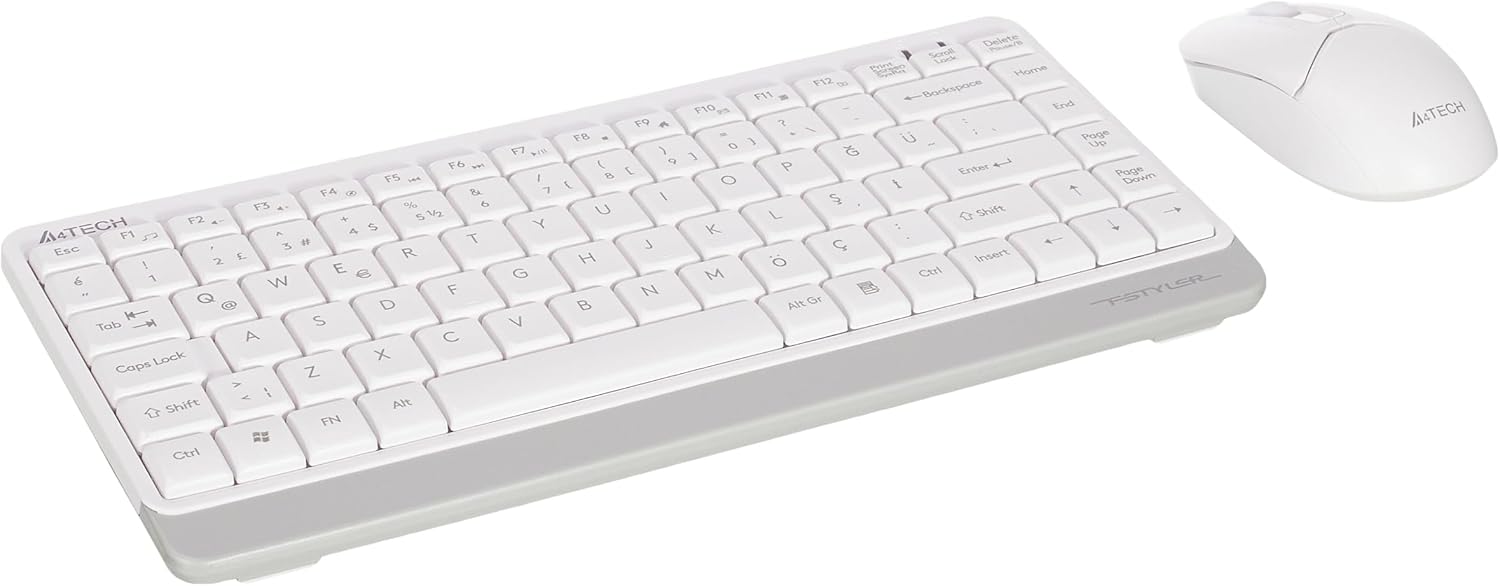
Image 1.1: A4tech FG1112 Fstyler Wireless Keyboard and Mouse Set (White)
2. Pakketinhoud
Kontroleer asseblief die inhoud van die pakket om seker te maak dat alle items teenwoordig is:
- 1 x A4tech FG1112 Wireless Keyboard
- 1 x A4tech Fstyler Wireless Mouse
- 1 x USB Nano-ontvanger
- 2 x AAA-batterye (vir sleutelbord)
- 1 x AA Battery (for mouse, typically included)
- 1 x Gebruikershandleiding (hierdie dokument)
3. Opstelinstruksies
- Plaas batterye in:
- For the keyboard: Open the battery compartment cover on the underside of the keyboard. Insert two AAA batteries, ensuring correct polarity (+/-). Close the cover.
- For the mouse: Open the battery compartment cover on the underside of the mouse. Insert one AA battery, ensuring correct polarity (+/-). Close the cover.

Image 3.1: Mouse bottom view showing battery compartment and power switch.
- Koppel USB Nano-ontvanger: Locate the USB Nano Receiver, typically stored inside the mouse's battery compartment or packaged separately. Plug the receiver into an available USB port on your computer.
- Krag aan:
- For the keyboard: Ensure the keyboard is powered on. There might be a power switch on the top right or underside.
- For the mouse: Slide the power switch on the underside of the mouse to the "ON" position.
- Outomatiese verbinding: Your computer should automatically detect and install the necessary drivers for the keyboard and mouse. This process may take a few moments. Once complete, your devices are ready for use.
Video 3.1: A short demonstration of the A4tech Fstyler Wireless Keyboard and Mouse Set, showing its compact design and wireless connectivity. This video illustrates the product's features and ease of use.
4. Bedryfsinstruksies
4.1 Sleutelbordgebruik
The A4tech FG1112 keyboard features a compact design with a Q Turkish layout. It is designed for comfortable and quiet typing.

Beeld 4.1: Bo view of the A4tech FG1112 Wireless Keyboard, highlighting its Q Turkish layout.
Multimedia- en funksietoetse:
The keyboard includes 12 multimedia and internet function keys integrated into the F1-F12 keys. To activate these functions, press the FN sleutel gelyktydig met die verlangde F-sleutel indruk.
- FN + F1: Media-speler
- FN + F2: Volume verlaag
- FN + F3: Volume op
- FN + F4: Stom
- FN + F5: Vorige Snit
- FN + F6: Volgende Snit
- FN + F7: Speel / Pouse
- FN + F8: Stop
- FN + F9: Home Page
- FN + F10: E-pos
- FN + F11: My rekenaar
- FN + F12: Sakrekenaar

Image 4.2: Illustration of FN key functionality for multimedia controls.
4.2 Muisgebruik
The A4tech Fstyler mouse provides precise 1200 DPI optical tracking for smooth and accurate cursor movement.

Beeld 4.3: Bo view of the A4tech Fstyler Wireless Mouse.
Basiese funksies:
- Links klik: Primary function, used for selecting items, opening files, ens.
- Regs klik: Secondary function, typically opens context menus.
- Rolwiel: Used for scrolling documents and web pages vertically. Can also function as a middle click button.
5. Onderhoud
- Skoonmaak: Gebruik 'n sagte, droë lap om die sleutelbord en muis skoon te maak. Vir hardnekkige vuiligheid, gebruik 'n effens droë lap.amp cloth can be used, but ensure no liquid enters the devices.
- Battery vervanging: When the keyboard or mouse becomes unresponsive or exhibits delayed input, it's time to replace the batteries. Follow the "Insert Batteries" steps in the Setup section.
- Berging: When not in use for extended periods, turn off the mouse to conserve battery life. Store the devices in a cool, dry place.
6. Probleemoplossing
| Probleem | Moontlike Oplossing |
|---|---|
| Sleutelbord/muis reageer nie |
|
| Delayed or intermittent response |
|
| Multimediasleutels werk nie |
|
7. Spesifikasies
| Kenmerk | Detail |
|---|---|
| Handelsmerk | A4tech |
| Model | FG1112 |
| Verbindingstegnologie | 2.4 GHz draadloos |
| Sleutelborduitleg | Q Turkish |
| Tipe sleutelbord | Multimedia Membrane |
| Muis DPI | 1200 DPI Optical |
| Sleutelbord Kragbron | 2 x AAA-batterye |
| Muis Kragbron | 1 x AA Battery (typical) |
| Spesiale kenmerke | Wireless, Mini, Multimedia Keys, Optical Mouse, Laser Printed Keys, Water-resistant design (with drainage channels) |
| Produk Gewig | 0.62 Kilograms (Set) |
| Afmetings (Sleutelbord) | Approx. 315mm (Width) x 146mm (Depth) x 25mm (Height) |
| Afmetings (Muis) | Approx. 64mm (Width) x 108mm (Depth) x 35mm (Height) |

Image 7.1: Dimensions of the A4tech FG1112 Keyboard and Mouse.
8. Waarborg en Ondersteuning
This A4tech FG1112 Fstyler Wireless Keyboard and Mouse Set comes with a 2 jaar waarborg vanaf die aankoopdatum. Bewaar asseblief u bewys van aankoop vir waarborgeise.
For technical support, troubleshooting assistance, or warranty inquiries, please contact A4tech customer service through their official webwebwerf of jou plaaslike verspreider.
Jy kan meer inligting en ondersteuningsbronne vind op die A4tech Store on Amazon.